


 Video Converter Ultimate
 Perakam Skrin
 Pembaikan Video
Ketahui Cara Menukar AMV kepada MOV Tanpa Merendahkan Kualiti
AMV ialah format video proprietari yang digunakan untuk menyimpan main balik video pada pemain media S1 MP3 dan MP4. Sambungan fail .amv ini beresolusi rendah dan dimampatkan supaya fail boleh disimpan pada pemain media mudah alih ini. Walaupun format ini masih wujud, keserasian pemain media ini dengan telefon sukar ditemui kerana format ini sudah lama. Daripada mencari pemain media yang serasi, lebih baik anda menukar fail AMV kepada format baharu yang banyak disokong seperti MOV. Oleh itu, jika anda mahu tahu cara terbaik untuk menukar AMV kepada MOV, mari kita mulakan penerokaan ini.

Bahagian 1. Pengenalan Ringkas tentang AMV dan MOV
Idea Action Media Video atau AMV adalah untuk menggantikan MP4 sebagai format universal kerana format ini lebih baik dan lebih termampat. Juga, format ini adalah versi format AVI yang lebih baik. Tetapi format itu telah diabaikan melalui era baharu ini kerana ia tidak menerima sebarang kemas kini untuk meningkatkan kualiti resolusi. Dan sekarang, jika anda menyimpan format ini pada peranti mudah alih kami dan memainkannya menjangkakan anda tidak boleh memainkannya kerana formatnya tidak disokong. Jadi jika anda ingin memainkan video di bawah format ini, anda mesti memuat turun pemain media pihak ketiga untuk AMV. Walaupun MOV, format ini mendapat banyak sokongan kerana ia adalah format fail asli yang dibangunkan oleh QuickTime.
Bahagian 2. Tukar AMV kepada MOV dengan Perisian Desktop Ultimate
FVC Video Converter Ultimate
Tukar AMV kepada MOV dengan bantuan penukar video profesional yang menghasilkan output hebat yang sukar ditandingi, FVC Video Converter Ultimate. Penukar ini tersedia pada PC dan Mac, dan kedua-duanya mempunyai ciri lanjutan yang sama seperti yang disediakan oleh alat ini. Selain itu, penukaran pantas dan pemecutan perkakasan yang ada pada PC juga tersedia pada Mac. Ramai pengguna telah memilih perisian ini sebagai penukar pilihan pertama untuk menyelesaikan masalah mereka. Tambahan pula, sebelum anda boleh menggunakan alat ini, anda perlu membelinya daripada FVC. Walaupun ia berbayar, anda tidak perlu membelanjakan sehingga ratusan dolar, dan harganya berbaloi. Tanpa melengahkan masa, mari kita uji alat ini untuk melihat sama ada kita boleh mencapai penukaran terbaik seperti yang dijanjikan namanya.
Langkah-langkah Cara Menukar AMV kepada MOV dengan FVC Video Converter Ultimate:
Langkah 1. Muat turun FVC Video Converter Ultimate pada desktop anda dengan mengklik butang di bawah; pasang perisian selepas proses muat turun selesai.
Muat Turun PercumaUntuk Windows 7 atau lebih baharuMuat Turun Selamat
Muat Turun PercumaUntuk MacOS 10.7 atau lebih baharuMuat Turun Selamat
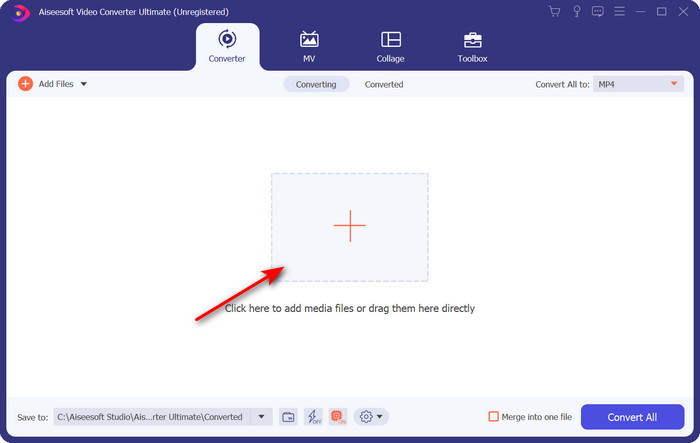
Langkah 2. Buka perisian untuk menggunakannya, dan untuk memuat naik .amv, klik tanda +. Cari fail dalam folder dan tekan Open untuk memasukkannya.
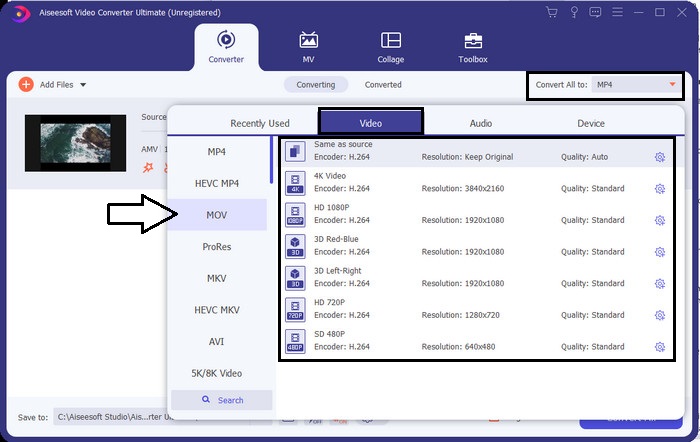
Langkah 3. Untuk menukar format kepada MOV, klik Convert All to: dan pilih MOV atau format lain yang anda inginkan.
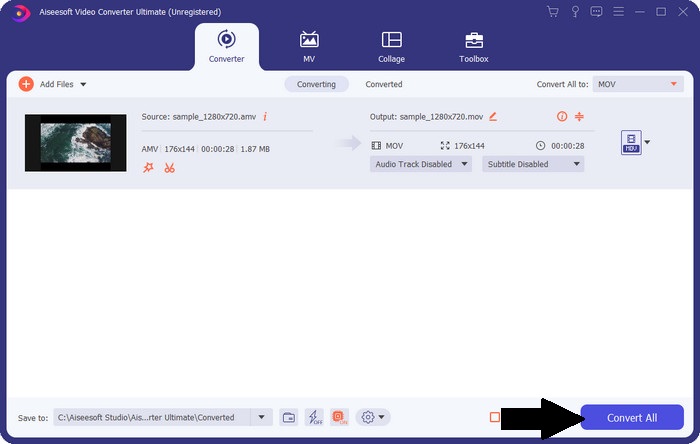
Langkah 4. Untuk menukar fail AMV kepada MOV, klik Convert All untuk memulakan proses penukaran.
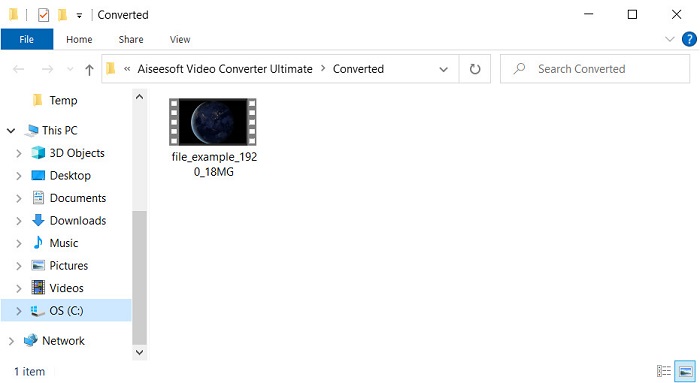
Langkah 5. Proses menukar fail hanya mengambil masa beberapa saat. Kemudian tunggu folder muncul bersama fail .mov yang anda hasilkan tadi; klik fail tersebut untuk menontonnya pada pemain media asal (native) anda.
Bahagian 3. Tukar AMV kepada MOV dengan 2 Penukar Perkhidmatan Dalam Talian Tersedia
1. ConvertFiles
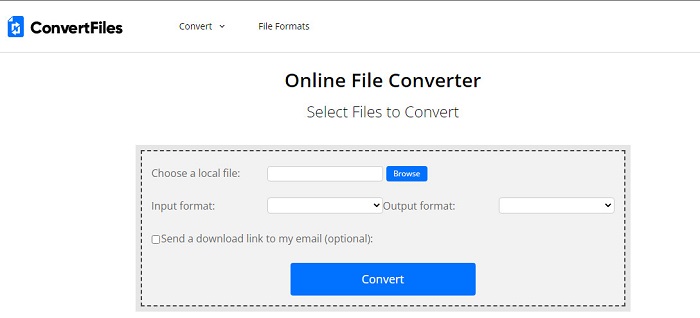
Salah satu penukar dalam talian terbaik yang boleh anda akses pada pelayar kegemaran anda ialah ConvertFiles. Alat dalam talian ini boleh menukar format anda kepada format baharu tanpa sebarang masalah. Selain itu, alat ini menyokong set format yang kecil untuk anda pilih. Namun, memuat turun fail yang telah ditukar di sini mengambil masa yang lama kerana ia tidak menyediakan penukaran pantas. Satu lagi kelemahan di sini ialah iklan; terdapat banyak iklan pada antara mukanya. Walaupun ada masalah dengan proses muat turun dan iklan, alat ini tetap berfungsi dengan baik sebagai alat dalam talian percuma.
Langkah-langkah Cara Menukar AMV kepada MOV dengan ConvertFiles:
Langkah 1. Buka pelayar kegemaran anda dan cari ConvertFiles.
Langkah 2. Setelah laman web dibuka, klik Browse untuk mencari fail dalam folder; pada Output Format, cari MOV, dan klik Convert.
Langkah 3. Jika proses penukaran sudah selesai, klik pautan berwarna biru untuk memuat turun fail ke komputer anda.
2. MConverter
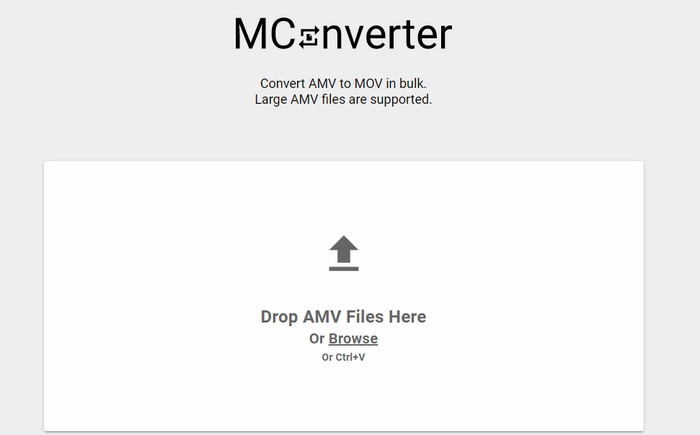
Tidak mahu sebarang iklan pada antara muka supaya anda boleh menukar AMV kepada MOV dengan tenang? Maka cubalah gunakan MConverter yang tersedia pada pelayar anda. Selain itu, alat ini menyokong penukaran kelompok (batch conversion) untuk menjadikan proses penukaran anda lebih cekap, seperti FVC Video Converter Ultimate. Namun, kelemahan alat dalam talian ini ialah anda tidak boleh melebihi saiz fail 200MB. Jadi, jika anda mahu menukar video panjang dan saiz fail melepasi had yang disokong, maka ini bukan pilihan yang patut anda gunakan. Tetapi jika anda mahu pengalaman menukar yang lebih baik daripada ConvertFile, ikuti langkah di bawah.
Langkah-langkah Cara Menukar AMV kepada MOV dengan MConverter:
Langkah 1. Cari MConverter pada enjin carian anda dan buka laman tersebut.
Langkah 2. Klik butang Upload untuk memasukkan fail, tunggu seketika untuk alatan web dimuatkan, cari MOV dan klik padanya. Proses penukaran fail akan bermula selepas anda mengklik format MOV.
Langkah 3. Tekan Download All untuk menyimpan fail.
Bahagian 4. Soalan Lazim tentang AMV dan MOV
Bolehkah saya menukar MP4 saya kepada AMV?
Anda boleh menukar MP4 anda kepada AMV untuk memindahkan fail dengan lebih pantas secara dalam talian. Terutamanya jika video berdurasi satu jam, kami mencadangkan anda menukar fail .mp4 kepada .amv kerana saiznya jauh lebih kecil jika dibandingkan kedua-dua format ini.
Adakah VLC menyokong AMV?
Mujurlah, anda boleh menggunakan VLC Media Player untuk memainkan fail .amv pada pemain media ini walaupun ia sudah ketinggalan zaman. Tetapi tahukah anda bahawa ada pemain media lain yang mengatasi pemain media ini? Jadi jika anda mahu tahu apakah pemain media tersebut, anda perlu klik pautan ini untuk mengetahui 5 pemain media alternatif kepada VLC.
Bagaimanakah cara menukar AMV saya kepada AVI?
AMV ialah versi lebih baik bagi AVI; namun, jika bercakap tentang kualiti, AVI memberikan prestasi hebat berbanding format lama ini. Selain itu, AVI sangat serasi dengan semua platform. Jadi sekarang, jika anda mahu menonton AMV anda dalam versi yang lebih baik dan pada semua platform, anda mesti belajar cara menukar AMV kepada AVI.
Kesimpulannya
Perbincangan mesti berakhir di sini; walaupun kami ingin menyimpan fail AMV pada cakera kami, isu keserasian adalah salah satu sebab kami perlu menukarnya. Lagipun, AMV dikatakan popular sebelum ini kerana cara bekas ini memampatkan fail. Walau bagaimanapun, hari ini anda mesti mempertimbangkan untuk menukarnya kepada format baharu untuk menggunakannya. Selain itu, penyelesaian yang disediakan di sini menukar dengan berkesan. Namun, FVC Video Converter Ultimate menunjukkan prestasi yang luar biasa berbanding dengan dua alat lain. Oleh itu, jika anda ingin mengalami alat terbaik, maka anda mesti memuat turun ini pada komputer anda dan menyalin langkah-langkah yang disediakan di atas.
-
 4 Kaedah Terbaik untuk Menukar MOV ke MP3 pada Windows dan Mac dengan Mudah
 Apabila anda ingin mengekstrak fail audio MP3 dari fail MOV, anda dapat mengetahui lebih lanjut mengenai 4 penukar MOV ke MP3 yang paling berkesan untuk mendapatkan fail yang diinginkan dari artikel tersebut.
-
 MKV ke MOV - Cara Menukar MKV ke MOV
 Bagaimana cara menukar MKV ke MOV di Mac? Bolehkah iMovie membaca MKV? Apakah maksud format MOV? Catatan ini memberitahu 2 cara mudah untuk membantu anda menukar MKV ke MOV dengan penukar video dalam talian dan profesional percuma.
-
 FLV ke MOV - Cara Menukar FLV ke MOV pada Mac / PC / Secara Percuma
 Bagaimana cara menukar FLV ke MOV? Bagaimana cara menukar FLV ke MOV pada Mac? Adakah cara percuma untuk menukar YouTube FLV ke MOV dalam talian? Catatan ini berkongsi 3 penukar FLV ke MOV untuk menukar fail FLV ke MOV.
