


 Video Converter Ultimate
 Perakam Skrin
 Pembaikan Video
Pelbagai Variasi Penukar Berbeza untuk MOV ke AVI Dalam Talian dan Luar Talian
MOV ialah format yang dibangunkan oleh Apple Inc. untuk dimainkan pada pemain media lalai mereka iaitu QuickTime Player. Dalam keadaan ini, jika anda memindahkan fail MOV anda ke program desktop lain seperti Windows dan sebagainya, terdapat kemungkinan besar ia akan menjadi tidak disokong kerana format ini eksklusif untuk pengguna Mac sahaja. Jadi, jika anda salah seorang pengguna yang menghadapi kesukaran memainkan fail MOV pada desktop anda, anda harus terus membaca artikel ini untuk menentukan yang mana satu patut anda pilih. Sebagai penukar peribadi anda yang akan mengajar cara untuk menukar MOV kepada AVI tanpa kehilangan kualiti dan juga keselamatan.

Bahagian 1. Tukar MOV kepada AVI Dalam Talian tanpa Had
Penukar Video Dalam Talian Percuma FVC
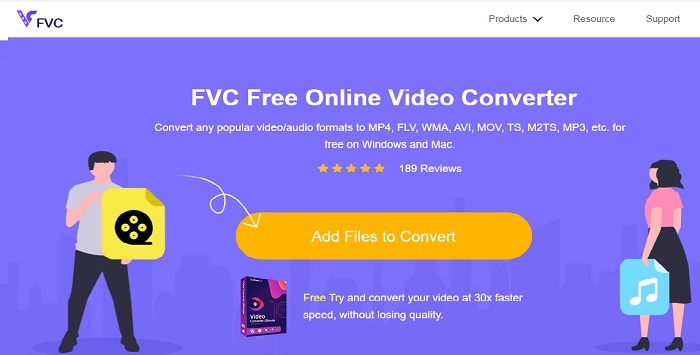
Antara penukar dalam talian terbaik ialah FVC Free Video Converter. Jika anda mahu merasai pengalaman penukaran video atau audio dalam talian pada tahap yang lebih tinggi, ini ialah pilihan yang sesuai. Ia merupakan salah satu penukar MOV ke AVI percuma yang terbaik. Namun begitu, kelemahannya ialah ia tidak menyediakan ciri premium seperti dalam versi berbayar dan pilihan formatnya terhad. Walaupun anda boleh menukar tanpa had, ia tidak boleh melakukan penukaran berbilang fail serentak. Walau bagaimanapun, memandangkan alat ini percuma dan lebih baik daripada VLC sebagai penukar, ia tetap berbaloi. Mahu tahu cara menggunakan alat dalam talian ini? Ikuti langkah di bawah untuk mengetahui cara menukar dengan mudah.
Langkah 1. Klik pautan ini untuk pergi ke laman utama. Tidak perlu risau, laman ini selamat dan terjamin untuk anda akses.
Langkah 2. Tekan Add Files to Convert untuk memulakan program.
Muat turun Versi Desktop untuk menukar fail secara kelompok.
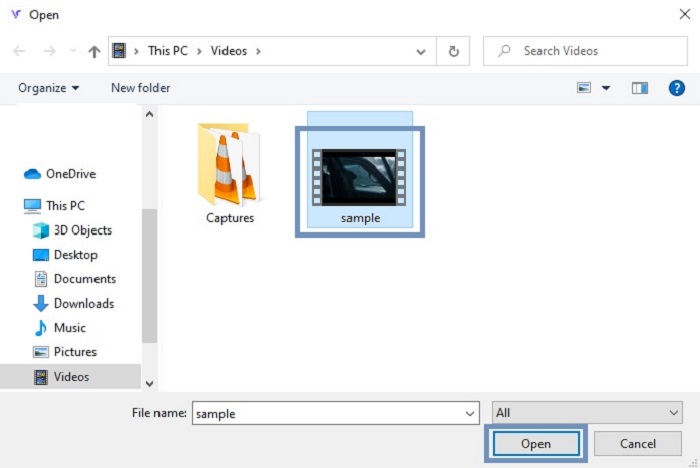
Langkah 3. Pilih fail MOV yang ingin anda tukar dan tekan OK untuk meneruskan.
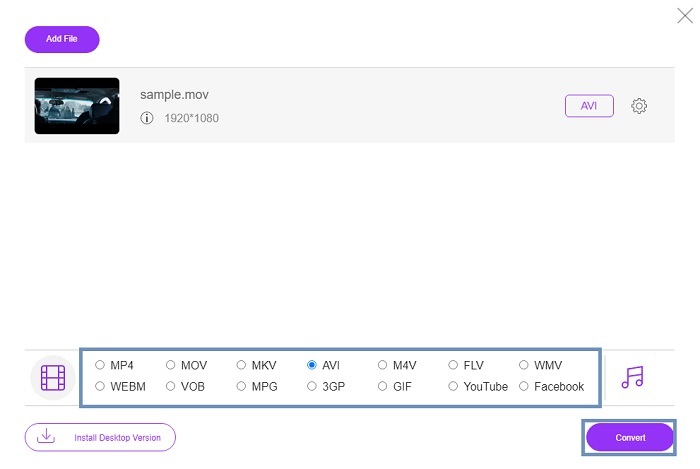
Langkah 4. Selepas memilih format AVI atau format lain yang anda mahu, klik Convert untuk memulakan proses.
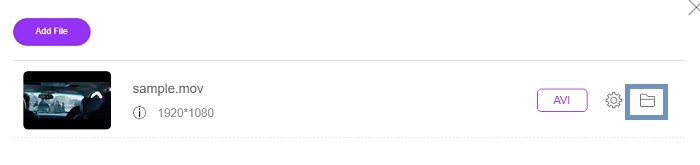
Langkah 5. Tunggu beberapa minit sehingga selesai. Kemudian klik folder ini untuk menyemak hasil akhir di situ.
Bahagian 2. Tukar MOV kepada Apl Desktop AVI Luar Talian
Jika menukar dalam talian bukan kemahiran anda, maka anda mesti mempertimbangkan untuk menggunakan alat berasaskan desktop yang hebat ini. Pilih penukar terbaik untuk melakukan kerja.
1. FVC Video Converter Ultimate
Jika anda mahu merasai pengalaman menukar, menyunting dan menambah baik video serta audio dengan hebat, maka FVC Video Converter Ultimate ini mesti menjadi alat pilihan anda. Tukar format MOV ke AVI tanpa bersusah payah. Disebabkan antara muka yang mesra pengguna dan perisian yang ringan, ia telah menjadi penukar pilihan pertama ramai pengguna di internet. Setakat ini, bilangan pengguna yang memuat turun alat ini telah meningkat dengan begitu ketara dari segi jumlah dan juga kemahiran. Tidak seperti alat lain yang dipersembahkan di sini dan di web, dengan hanya memiliki alat ini ibarat anda mempunyai pisau tentera Swiss sendiri. Walaupun ia menyediakan fungsi yang serba lengkap, perisian ini mengamalkan dasar bayaran dahulu. Ini bermakna jika anda mahu menggunakannya, anda perlu membelinya. Namun tidak perlu risau kerana harganya berpatutan dan kaedah pembayarannya selamat serta disokong oleh PayPal, pindahan wang, Visa dan lain-lain. Jika anda masih ragu-ragu sama ada ini pilihan terbaik, cuba baca langkah di bawah untuk mengetahui sama ada ini penukar paling sesuai untuk anda.
Langkah 1. Muat turun perisian ke pemacu desktop anda dan pilih versi yang paling sesuai dengan sistem anda. Kemudian laraskan keutamaan jika perlu dan klik Finish untuk memasang perisian pada pemacu anda.
Muat Turun PercumaUntuk Windows 7 atau lebih baharuMuat Turun Selamat
Muat Turun PercumaUntuk MacOS 10.7 atau lebih baharuMuat Turun Selamat
Langkah 2. Selepas proses pemasangan, program akan terbuka secara automatik. Ini ialah contoh antara mukanya.
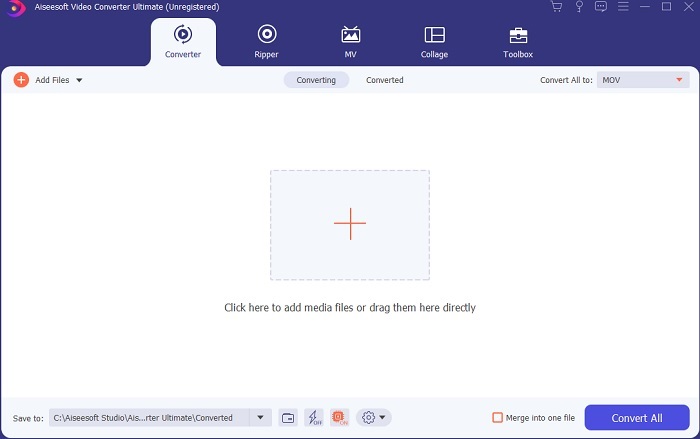
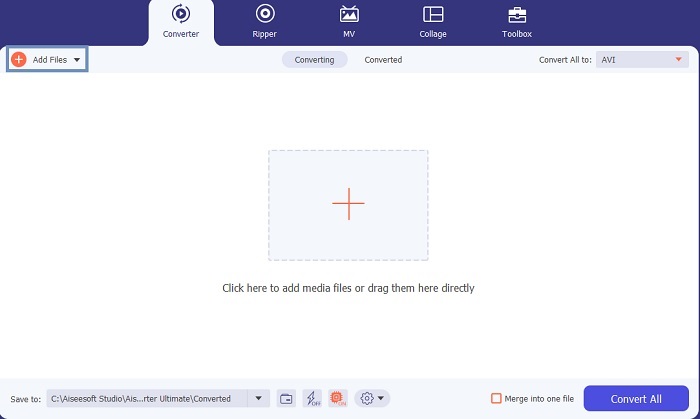
Langkah 3. Klik butang Add Files dan pilih fail MOV yang mahu anda tukar. Jika anda ingin menukar banyak fail MOV, anda boleh seret dan lepas (drag-and-drop) fail tersebut ke antara muka alat ini.
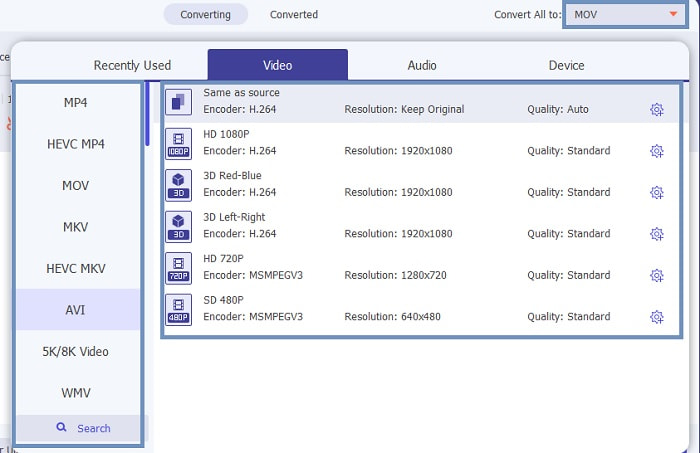
Langkah 4. Pilih format yang anda mahu dalam senarai di submenu Convert All to. Terdapat pelbagai variasi yang boleh anda pilih. Dan untuk memulakan proses, klik Convert All.
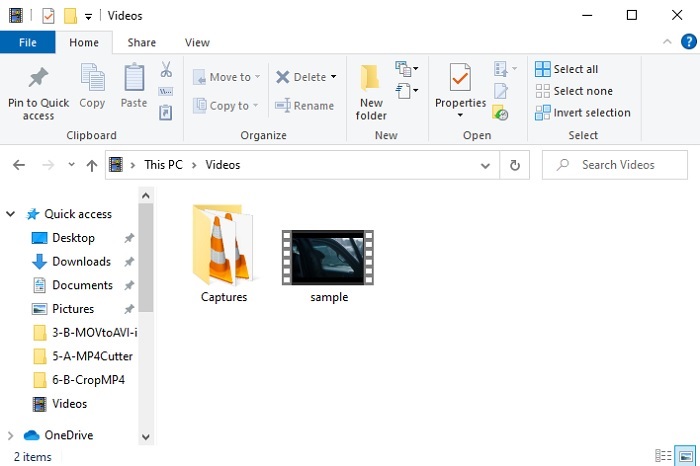
Langkah 5. Proses ini hanya mengambil beberapa saat dan apabila selesai, tetingkap penjelajah fail akan muncul pada skrin anda; klik fail yang telah anda tukar untuk menontonnya terus pada komputer anda. Jika anda mahu menambah, menambah baik atau melakukan sesuatu yang istimewa pada video, anda boleh pergi ke bahagian Toolbar dan semak fungsi yang tersedia untuk menaik taraf video atau audio anda.
2. Pemain Media VLC
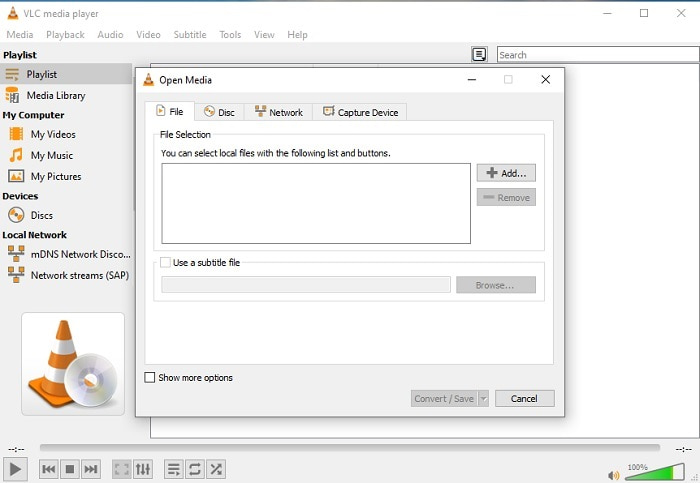
Tahukah anda bahawa anda boleh menukar MOV ke AVI menggunakan VLC? Ya, anda boleh menggunakan pemain media ini sebagai penukar anda. Walaupun ia boleh menukar format, ia bukan pilihan terbaik untuk dijadikan penukar. Ini kerana ia tidak mesra pengguna, kurang panduan pada antara muka tentang cara menggunakannya, dan pilihan formatnya juga agak terhad. Walaupun ia mungkin pemain media yang hebat, menjadi penukar terbaik bukanlah kepakarannya. Namun jika anda mahu mencubanya, anda boleh menilai sendiri dan menggunakannya untuk menukar format.
3. Pazera
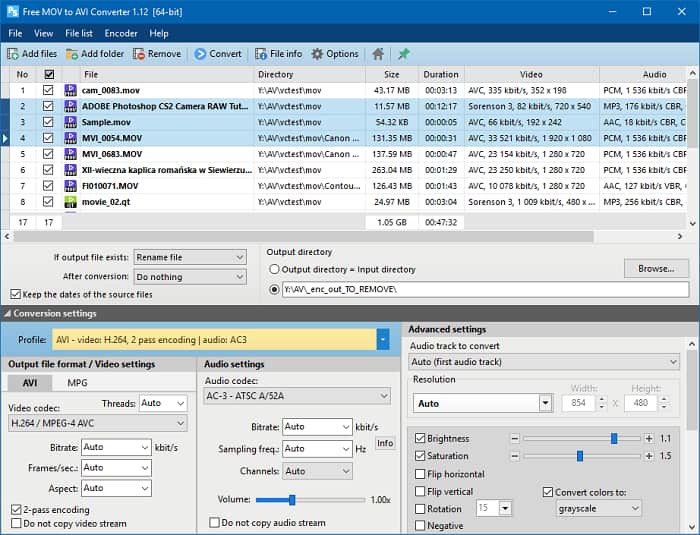
Anda boleh memuat turun Pazera MOV to AVI Converter secara percuma. Alat ini mudah digunakan dan walaupun ringkas, ia memberikan pengalaman penukaran yang agak baik. Tetapi bahagian yang sedikit menggerunkan ialah ia bukan penukar pelbagai format. Tidak seperti alat yang disebut di bahagian atas tadi, penukar ini hanya memberi anda pengalaman satu corak penukaran sahaja. Untuk memperjelas, jika anda memuat turun MP4 to AVI Converter, maka itulah sahaja penukaran yang anda akan dapat. Jadi, jika anda sedang mencari penukar serba boleh, alat ini sepatutnya menjadi pilihan terakhir anda. Selain itu, jika anda cuba mengakses laman web alat ini untuk memuat turunnya, terdapat banyak iklan timbul (pop-up) yang menjengkelkan. Anda harus berhati-hati jika mahu mengakses alat ini.
Bacaan Lanjut
MOV lwn. AVI
Format MOV boleh digunakan untuk menyimpan filem, rancangan TV, klip video pendek atau filem rumah. Ia sebenarnya disimpan dalam Format Fail QuickTime (QTFF), yang telah diperkenalkan oleh Apple pada tahun 1991. Fail MOV sering digunakan apabila orang ingin menyimpan video dengan kualiti yang tinggi.
Berdasarkan Format Fail Pertukaran Sumber (RIFF), format AVI telah diperkenalkan oleh Microsoft pada tahun 1992. Ia boleh menyimpan video/audio berkualiti tinggi kerana ia menggunakan kurang pemampatan. Tetapi itu juga menyebabkan saiz fail besar fail AVI, yang mungkin menjadi masalah apabila terdapat ruang yang terhad.
Bahagian 3. Soalan Lazim tentang MOV ke AVI
Bolehkah QuickTime menukar MOV kepada AVI?
Walaupun QuickTime terkenal sebagai pemain media lalai Mac. Menukar melalui QuickTime adalah mungkin. Anda boleh menyemak pautan ini jika anda ingin mengetahui cara menukar MOV kepada AVI dengan QuickTime.
Apakah perbezaan antara MOV dan AVI?
Perbezaan utama pertama antara keduanya adalah pemiliknya. Seperti yang dikatakan di tempat pertama, MOV telah dikeluarkan oleh Apple Inc. sebagai format unik mereka untuk pemain QuickTime. MOV menjadi popular kerana menjadi salah satu format terbaik yang boleh anda gunakan kerana ia juga menyimpan fail audio, video dan teks yang berbeza. AVI dibangunkan oleh Microsoft untuk bersaing dengan MOV. Walaupun format ini tidak dimampatkan. Jadi, jika anda merakam atau memuat turun fail ke dalam format ini mengharapkan saiz fail yang besar. Jadi, jika anda ingin mengecilkan saiz fail, anda perlu memampatkannya. Tetapi perkara yang baik mengenainya ialah ia menghasilkan output video dan audio yang sangat berkualiti tinggi.
Di manakah saya boleh memainkan MOV saya yang ditukar kepada AVI?
Jika anda mahu menonton fail AVI atau MOV yang baru sahaja anda tukar, anda boleh menggunakan FVC Free Video Player untuk menontonnya. Jadi walaupun anda tidak menukar fail MOV kepada AVI pada Mac atau PC, anda masih boleh menontonnya kemudian.
Kesimpulannya
Sebagai penutup perjalanan yang kita lalui, kini jelas bahawa proses menukar format adalah antara tugas paling mudah yang boleh dilakukan sesiapa sahaja. Pembelajaran daripada artikel ini memberikan perubahan besar kepada kita semua kerana ia menyediakan butiran, langkah-langkah dan juga alternatif. Jadi, jika anda masih keliru tentang alat mana yang harus dijadikan penukar utama, perkara ini sepatutnya menjelaskan. FVC Video Converter Ultimate ialah penukar serba lengkap yang anda idamkan. Idea untuk menukar, menyunting, menambah baik dan menghasilkan semuanya ada dalam alat ini. Jadi, apa yang anda tunggu lagi? Tidak perlu risau kerana FVC Video Converter Ultimate ialah penukar yang tiada tandingan.
-
 4 Kaedah Terbaik untuk Menukar MOV ke MP3 pada Windows dan Mac dengan Mudah
 Apabila anda ingin mengekstrak fail audio MP3 dari fail MOV, anda dapat mengetahui lebih lanjut mengenai 4 penukar MOV ke MP3 yang paling berkesan untuk mendapatkan fail yang diinginkan dari artikel tersebut.
-
 8 Pemain MOV Terbaik untuk Memainkan Fail MOV QuickTime dengan Kualiti Asal
 Ketahui lebih lanjut mengenai 8 pemain MOV terbaik yang tersedia untuk Windows dan Mac. Anda boleh memilih yang dikehendaki dan sesuai untuk memainkan fail MOV dengan kualiti yang asli.
-
 MKV ke MOV - Cara Menukar MKV ke MOV
 Bagaimana cara menukar MKV ke MOV di Mac? Bolehkah iMovie membaca MKV? Apakah maksud format MOV? Catatan ini memberitahu 2 cara mudah untuk membantu anda menukar MKV ke MOV dengan penukar video dalam talian dan profesional percuma.

