


 Video Converter Ultimate
 Perakam Skrin
 Pembaikan Video
 Muat Turun Selamat
Penukaran M4B dan MP3 yang lancar: Nikmati Buku Audio Di Mana-mana, Pada Bila-bila Masa
Discover the gateway to audiobook versatility with remarkable MP3 to M4B converters. If you're seeking a hassle-free way to expand your audiobook library, the converters reviewed here empower you to effortlessly convert MP3 files to the M4B format or vice versa. Seamlessly compatible with popular audiobook platforms and devices for enjoying your favorite stories on-the-go. Unleash the true potential of your audiobook collection with user-friendly M4B to MP3 converters, designed to streamline your listening journey. Start exploring the limitless possibilities today and embark on a seamless transition into an audiobook universe without boundaries.

Bahagian 1. M4B lwn MP3
Sebelum kita menyelami proses penukaran, berikut ialah jadual perbandingan yang menyerlahkan perbezaan utama antara format M4B dan MP3:
| M4B | MP3 | |
| DRM | Boleh dilindungi DRM, mengehadkan penggunaan pada peranti tertentu | Boleh bebas DRM atau dilindungi DRM bergantung pada fail |
| Metadata | Menyokong metadata yang luas untuk mengatur buku audio | Sokongan metadata terhad untuk maklumat trek asas |
| Saiz fail | Saiz fail biasanya lebih besar kerana ciri yang dipertingkatkan | Saiz fail yang lebih kecil kerana pemampatan yang lebih tinggi |
| Keserasian | Biasa digunakan pada peranti iTunes dan Apple | Serasi secara universal dengan pelbagai jenis peranti |
| Kualiti | Menawarkan audio berkualiti tinggi dengan pemampatan yang cekap | Kualiti boleh ubah bergantung pada kadar bit |
| Pemampatan | Menggunakan pemampatan AAC (Pengekodan Audio Lanjutan) lanjutan | Menggunakan algoritma mampatan lossy |
Bahagian 2. Tukar MP3 kepada M4B atau MP3 kepada M4B pada Windows dan Mac
1. Video Converter Ultimate
When it comes to converting video and music, Video Converter Ultimate is the gold standard. It comes with support for a wide variety of video and audio file formats for conversion, including M4B, MP3, AIFF, OGG, AAC, and so on. You can also change the format according to the gadget you're using. The software will automatically select the best possible settings and format for your gadgets. Within a few seconds, your file can be converted from MP3 to M4B or vice versa. This converter also allows for batch conversion, which is quite helpful when dealing with a huge number of files or when you want to convert M4B to MP3 with chapters. Nonetheless, here is a simple guide to help you use this program.
Step 1. Acquire the software
Initially, obtain the program's installer by selecting the Free Download option. Afterward, install the app on your computer and launch it afterward.
Muat Turun PercumaUntuk Windows 7 atau lebih baharuMuat Turun Selamat
Muat Turun PercumaUntuk MacOS 10.7 atau lebih baharuMuat Turun Selamat
Step 2. Proceed to upload the MP3 or M4B file
To add audio files, click the Plus sign button on the main interface or select the Add Files button. After that, the audio’s thumbnail should be presented.
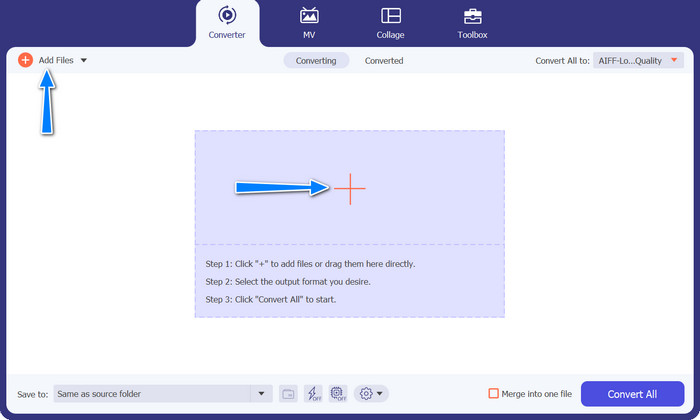
Step 3. Select an output format
Next, go to the Profile tab and navigate to the Audio tab. Navigate to the M4B or MP3 format in the left-hand menu.
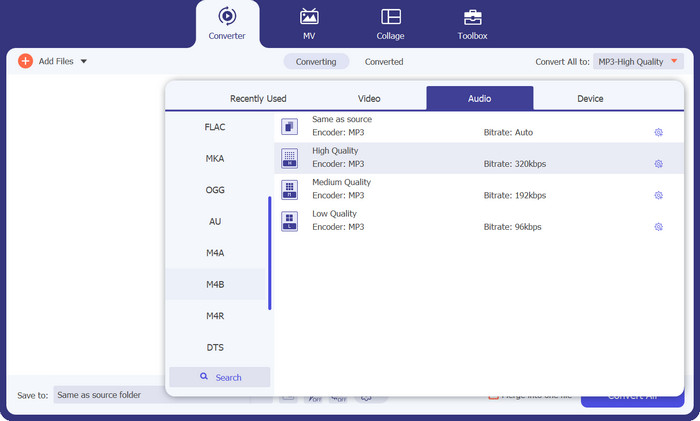
Step 4. Commence the conversion procedure
Now that everything is set, you can change M4B to MP3 and vice versa. Smash the Convert All button at the bottom of the right corner to initialize the conversion process. Then, the process should start immediately.
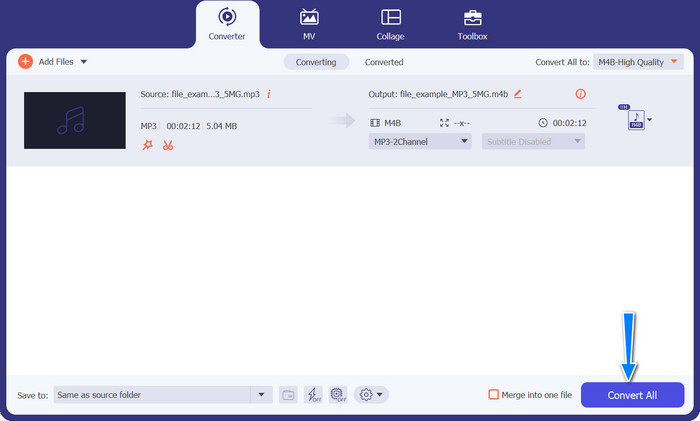
Kelebihan
- Akses luar talian.
- Keupayaan penukaran kelompok.
- Penyesuaian dan kawalan.
Keburukan
- Alat yang kaya dengan ciri mungkin datang dengan harga.
2. Penukar MP3 Percuma Dalam Talian
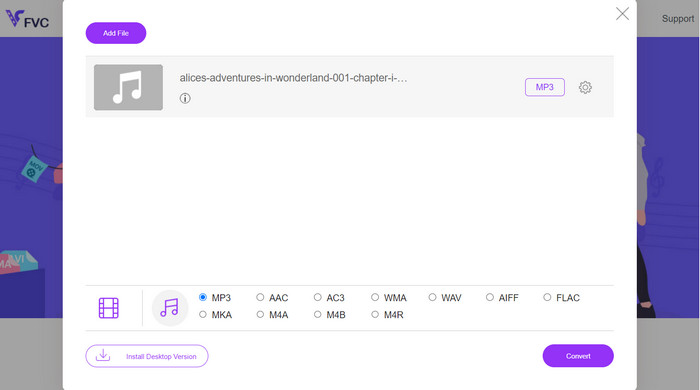
Kami mengesyorkan menggunakan Free MP3 Converter Online sebagai alat penukaran M4B kepada MP3 yang berkesan. Laman web ini tidak mengenakan caj atau memaparkan iklan pada halaman webnya. Penukaran fail audio dan video tanpa had adalah mungkin. Pendaftaran tidak diperlukan. Ini adalah penukar dalam talian yang paling berkesan. Arahan berikut memberikan panduan untuk menggunakan alat untuk menukar M4B kepada MP3 secara percuma.
Step 1. Initially, all you need to do is go to the program's main website. You can access the site with whatever browser you like.
Step 2. Click the Add Files to Convert button at the top of the page to begin uploading your audio files. The launcher must be installed first if it hasn't already been.
Step 3. Third, decide on a file type to send out. Under Audio Format, select the AIFF radio button. The last step is to click the Convert button to start the transformation.
Kelebihan
- Ia menyokong pelbagai format fail.
- Platform bebas.
Keburukan
- Program bergantung kepada Internet.
- Risiko keselamatan dan privasi.
3. iTunes
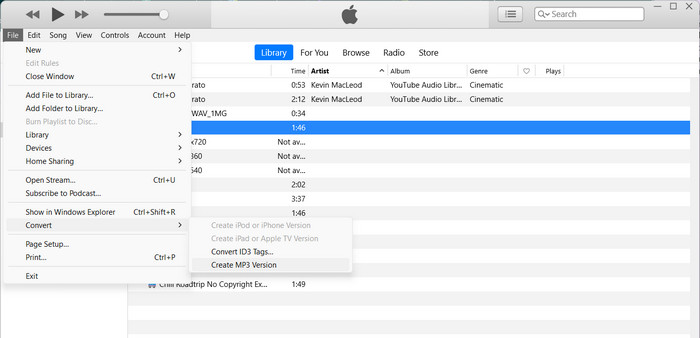
iTunes oleh Apple ialah pemain dan pengatur fail audio yang popular yang menyokong pelbagai format digital yang berbeza. Jika anda memiliki Mac, anda boleh menggunakan iTunes untuk menukar M4B anda kepada MP3. Di bawah ialah beberapa langkah untuk mengetahui cara menukar M4B kepada MP3 dalam iTunes.
Step 1. Launch iTunes on your computer. Then, go to the Edit menu (Windows) or iTunes menu (Mac) and select Preferences.
Step 2. In the Preferences window, hit the General tab, and then tick on the Import Settings button.
Step 3. A new window will appear. In the Import Using dropdown menu, select MP3 Encoder. You can also adjust the MP3 settings by clicking on the Settings button if desired. Once done, click OK to close the settings window.
Step 4. Now, go to your iTunes library and locate the M4B audiobook you want to convert to MP3. If it's not already in iTunes, you can add it by going to File (Windows) or iTunes (Mac) and selecting Add File to Library or Add Folder to Library.
Step 5. Right-click (or Control-click) on it and choose Create MP3 Version. iTunes will start converting the M4B file to MP3 format. The converted MP3 version will appear alongside the original M4B file in your iTunes library.
Bahagian 3. Tukar MP3 kepada M4B atau MP3 kepada M4B pada iOS dan Android
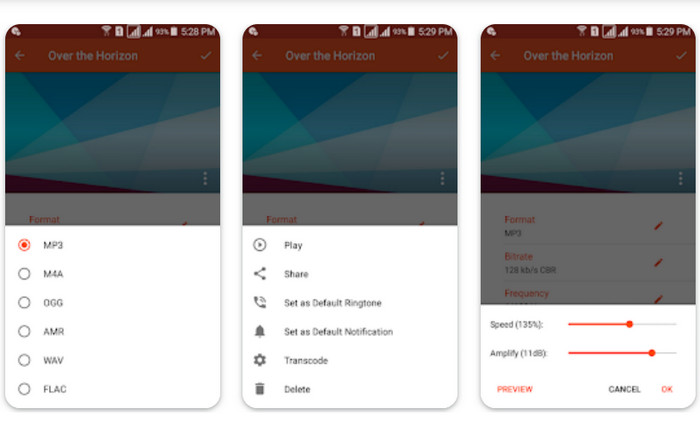
Audio Converter ialah apl mudah alih popular yang tersedia untuk kedua-dua peranti iOS dan Android. Ia menyokong penukaran M4B ke MP3 bersama-sama dengan format audio lain. Aplikasi ini membolehkan anda mengimport fail M4B anda, memilih format MP3 sebagai output dan melaraskan tetapan audio seperti kadar bit dan kadar sampel. Ia juga menawarkan pilihan untuk memangkas dan menggabungkan fail audio. Ikuti prosedur di bawah untuk menguasai cara menggunakan aplikasi penukar M4B ke MP3 ini pada peranti mudah alih anda.
Step 1. Launch Audio Converter. The program usually has a simple interface for selecting and converting audio files.
Step 2. Choose the M4B file to convert to MP3. The program may import files from your device, cloud storage, or other apps.
Step 3. After selecting the M4B file, you'll see output format options. Select MP3 for output. The app may include more customization options. These options may include audio quality/bitrate, sample rate, channel settings, and even trimming or merging audio files. If necessary, customize the settings.
Step 4. Start the conversion after selecting the output format and modifying any options. The program converts M4B to MP3.
Kelebihan
- Ciri tambahan seperti pemangkasan, penggabungan atau keupayaan pengeditan asas.
- Ia menyediakan kemudahan mudah alih.
Keburukan
- Proses penukaran boleh mengambil sedikit masa.
Bacaan Lanjut:
Top 5 Best M4B Recorder Software for PC and Mac [Free & Paid]
M4A vs MP3: Which Audio File Format is Right for You?
Bahagian 4. Soalan Lazim tentang Penukaran M4B dan MP3
Bolehkah saya menukar fail M4B kepada MP3 tanpa kehilangan kualiti audio?
Menukar daripada format lossy seperti M4B kepada MP3 akan melibatkan sedikit kehilangan kualiti audio akibat pemampatan. Walau bagaimanapun, anda boleh mengawal kualiti output dengan melaraskan tetapan semasa proses penukaran.
Adakah fail MP3 yang ditukar akan mengekalkan maklumat bab daripada buku audio M4B yang asal?
Menukar kepada MP3 boleh mengakibatkan kehilangan penanda bab dan ciri lanjutan lain yang terdapat dalam fail M4B. MP3 direka terutamanya untuk audio trek tunggal.
Bolehkah saya menukar fail M4B yang dilindungi DRM kepada MP3?
Menukar fail M4B yang dilindungi DRM kepada MP3 mungkin dihadkan disebabkan oleh langkah perlindungan hak cipta. Pastikan anda mempunyai hak dan kebenaran yang diperlukan untuk sebarang proses penukaran.
Kesimpulannya
Converting M4B to MP3 opens a world of possibilities for audiobook enthusiasts and casual listeners alike. Whether you choose to use desktop software or mobile apps for conversion, there are numerous options available to simplify the process.
-
 Alat Terbaik yang Boleh Anda Gunakan untuk Batch Menukar MP3 kepada M4R
 Mencari penukar yang boleh mengubah fail MP3 anda kepada nada dering M4R untuk iPhone atau iPad anda mengikut kelompok? Baca artikel tersebut untuk mengetahui beberapa artikel terbaik yang ada.
-
 Penukaran MP3 kepada AAC: Cara Meningkatkan Kualiti Audio Anda
 Tukar AAC kepada MP3 dan MP3 kepada AAC dengan mudah! Panduan artikel ini merangkumi segala-galanya tentang format audio popular ini, termasuk saiz fail, kualiti dan keserasian.
-
 FLAC lwn. MP3: Format Fail Audio Mana Yang Berkuasa
 Siaran ini akan membandingkan perbezaan utama antara FLAC berbanding MP3. Itu termasuk kualiti bunyi, saiz fail, keserasian dan banyak lagi.
