


 Video Converter Ultimate
 Perakam Skrin
 Pembaikan Video
Ketahui Video Terbaik kepada Penukar MP3 di Web, Desktop dan Telefon Mudah Alih
Muzik ialah salah satu bentuk hiburan terbaik yang dunia dapat berikan kepada kita. Untuk menyokong rasa cinta kita terhadap muzik, khususnya artis kegemaran yang kita dengar setiap hari. Dalam sesetengah keadaan, akan tiba masanya anda benar‑benar mahu mendengar muzik kegemaran tetapi tiada internet. Jangan risau, anda kini boleh menyelamatkan keadaan dengan memuat turun video muzik tersebut. Namun, saiz fail video muzik yang dimuat turun jauh lebih besar berbanding fail audio sahaja. Untuk menyelesaikan masalah ini, mari kita teliti pelbagai alat yang boleh anda gunakan untuk menukar video kepada format MP3 bagi menjimatkan ruang. Anda juga boleh bergantung pada artikel ini kerana ia memberikan bukti kukuh untuk menyelesaikan masalah ini, jadi teruskan membaca dan mari kita mulakan.

Bahagian 1. Penukar Video ke MP3 Terbaik untuk Windows & Mac dengan Carta Perbandingan
Penukar MP3 Percuma FVC
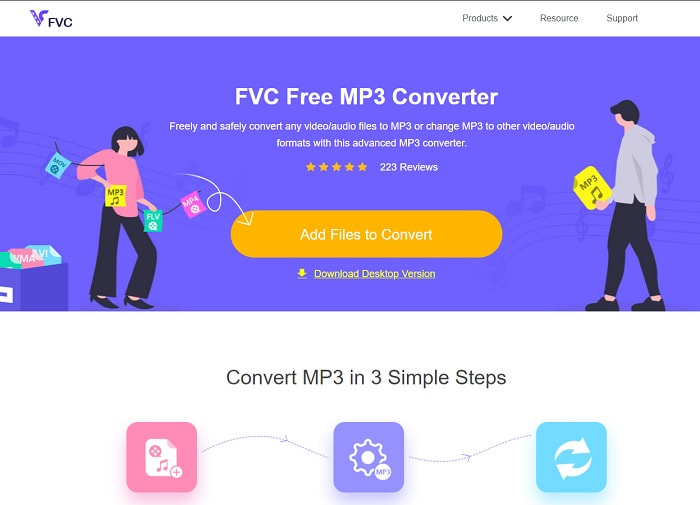
Jika anda sedang mencari penukar video ke MP3 percuma maka FVC Free MP3 Converter menyediakannya. Walaupun alat ini menawarkan banyak ciri yang hampir sama dengan penukar mudah alih dan penukar berasaskan web yang lain, ia masih dianggap sebagai raja penukar di web kerana proses penukaran yang pantas dan tepat. Namun, alat ini hanya menyokong julat format yang agak terhad dan mungkin menghadkan kebolehan anda untuk menukar sesuka hati. Walau bagaimanapun, ia tetap sebuah penukar yang baik. Untuk mengetahui lebih lanjut tentang alat ini, teruskan dengan membaca langkah di bawah tentang cara menggunakannya.
Langkah 1. Klik hiperpautan di atas yang membawa anda ke laman utama alat ini.
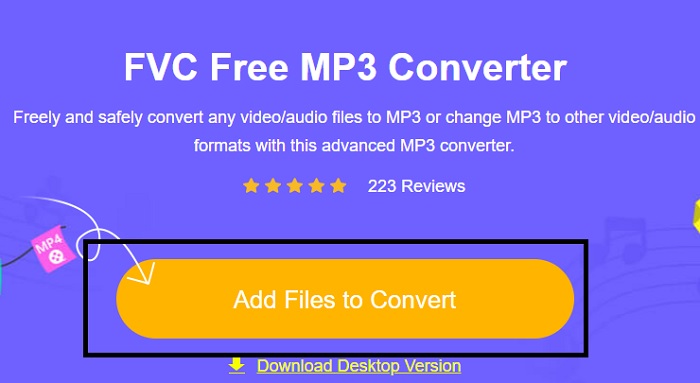
Langkah 2. Selepas itu, klik Add Files to Convert untuk membuka dan melancarkan alat tersebut.
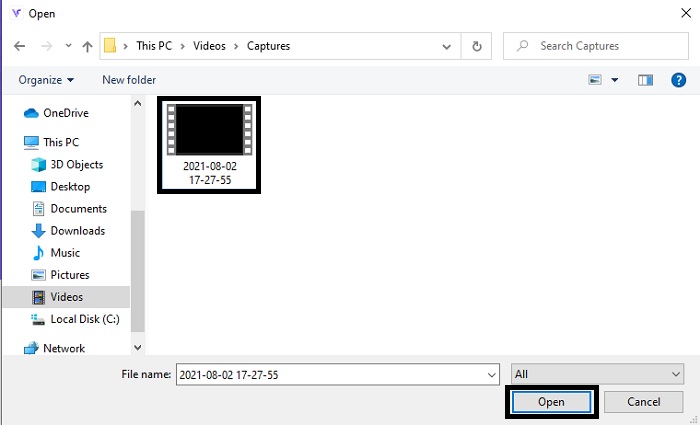
Langkah 3. Cari fail video yang ingin anda tukar dan klik Open untuk memasukkan fail.
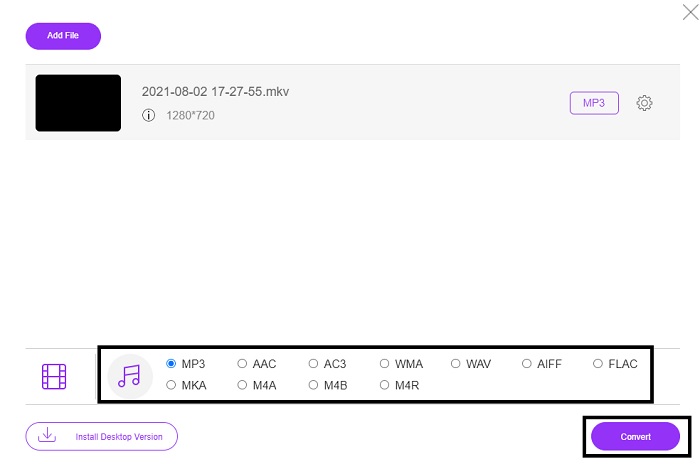
Langkah 4. Pilih di sini format audio yang anda mahukan. Jika anda sudah bersedia untuk memulakan penukaran, klik Convert.
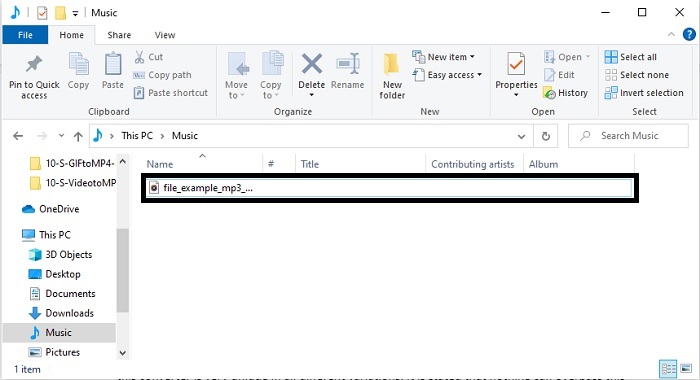
Langkah 5. Jika anda mahu mendengar fail yang telah ditukar, anda boleh klik folder ini untuk memaparkan fail tersebut.
FVC Video Converter Ultimate
Jika alat pertama tidak memberikan hasil penukaran yang anda mahukan, anda boleh menggunakan FVC Video Converter Ultimate, penukar kegemaran sepanjang masa. Tidak seperti mana‑mana penukar yang pernah atau belum anda gunakan, penukar ini sangat unik dalam pelbagai aspek. Dinyatakan bahawa tiada alat lain yang dapat menandingi alat ini dalam proses penukaran, penyuntingan, penciptaan, penambahbaikan dan sebagainya. Namun, mungkin anda fikir alat ini sukar digunakan dan tekaan anda itu salah. Ia sememangnya mudah digunakan dan walaupun anda bukan pakar dalam penukaran, anda masih mampu menghasilkan output yang hebat. Jadi, seperti yang disebut, mari kita selidik cara menukar video kepada MP3 dengan bantuan penukar terbaik yang anda inginkan ini.
Langkah 1. Pertama sekali, muat turun alat berasaskan desktop ini ke dalam pemacu anda. Ubah tetapan pemasangan jika mahu dan klik Finish untuk menyimpan perubahan.
Muat Turun PercumaUntuk Windows 7 atau lebih baharuMuat Turun Selamat
Muat Turun PercumaUntuk MacOS 10.7 atau lebih baharuMuat Turun Selamat
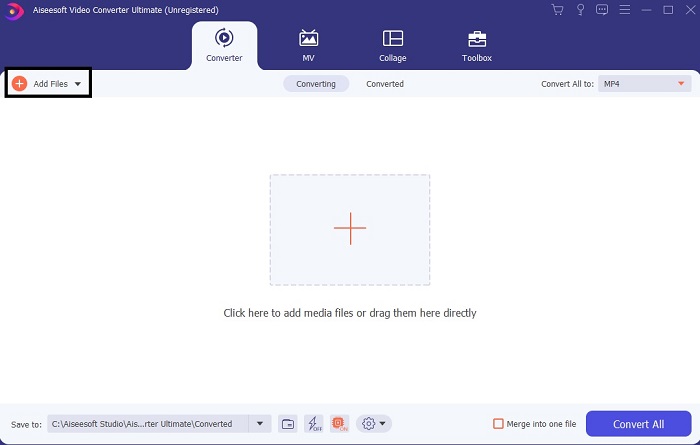
Langkah 2. Antara muka seperti ini akan muncul pada skrin anda. Tekan Add Files atau tanda tambah untuk memasukkan fail ke dalam antara muka.
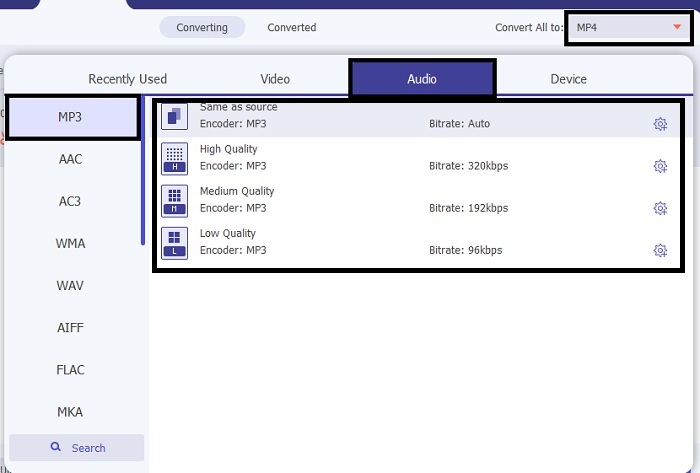
Langkah 3. Selepas memilih fail yang ingin ditukar, klik menu drop-down di sebelah Convert All to dan pilih daripada lebih 500 format.
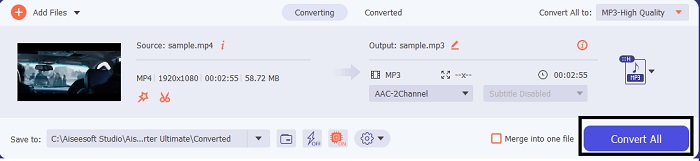
Langkah 4. Kemudian klik Convert All untuk memulakan penukaran video kepada MP3.
Langkah 5. Jika semuanya sudah selesai, pengurus fail akan dipaparkan pada skrin anda. Klik fail yang telah ditukar untuk mendengar dan menikmatinya.
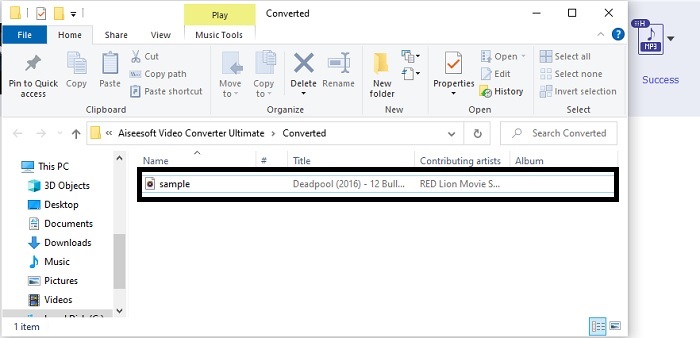
Langkah Tambahan untuk Meningkatkan Audio anda Sebelum Menukar dengan Bantuan FVC Video Converter Ultimate
Edit audio melalui salah satu fungsi dalam FVC Video Converter Ultimate. Sebelum anda menukar fail video, adalah lebih baik jika anda menambah baik audio supaya kemudian anda dapat mendengarnya dengan lebih jelas. Untuk mengetahui caranya, anda perlu mengikut langkah demi langkah tentang cara menguatkan bunyi dengan Volume Booster.
Langkah 1. Jika anda sudah memasang alat ini, pergi ke Toolbar dan klik Volume Booster.
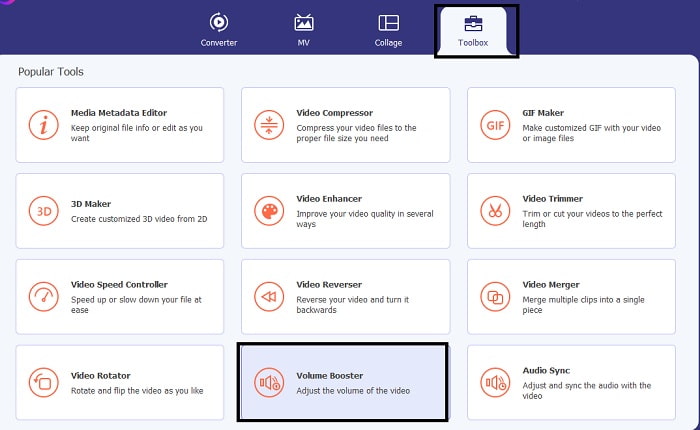
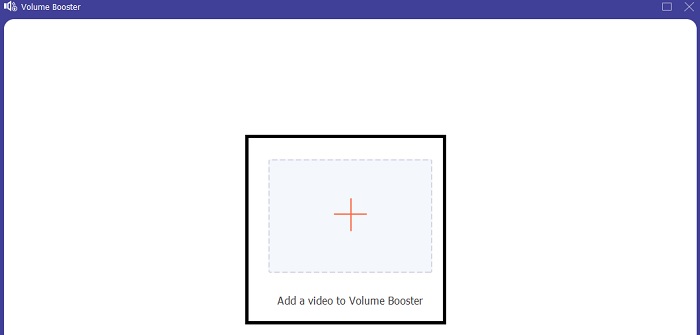
Langkah 2. Pilih fail video yang anda mahu tingkatkan kualiti audionya dan klik Open untuk memasukkannya.
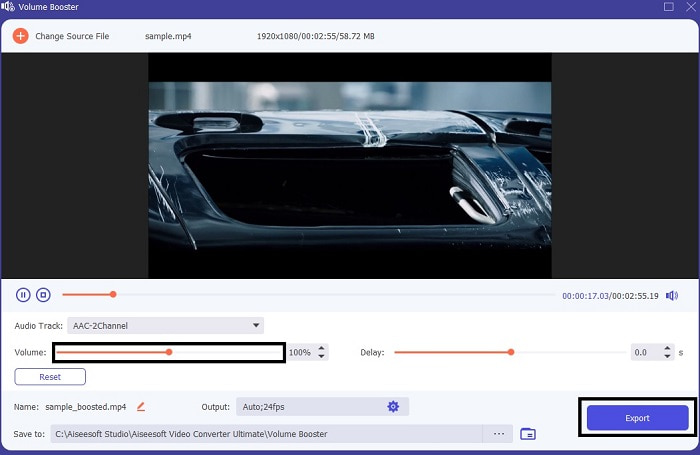
Langkah 3. Laraskan volume slides mengikut kehendak anda. Kemudian klik ikon cog dan ubah tetapan output, jika sudah selesai klik OK untuk menyimpan perubahan. Klik Export untuk menyimpan output akhir dan nikmatinya.
Perbandingan FVC Free Video Converter dan Video Converter Ultimate
Walaupun kedua-dua alat memberikan apa yang anda perlukan kerana ia adalah yang terbaik dalam kepakaran mereka sendiri. Memutuskan perkara yang hendak digunakan mungkin menyukarkan anda. Tetapi untuk menyelesaikan kes ini, berikut adalah carta perbandingan antara kedua-dua alat tersebut. Mari kita siasat kelemahan mereka dan kekuatan mereka sebagai alat individu.
| ciri-ciri | Penukar MP3 Percuma FVC | Video Converter Ultimate |
| Penukaran Audio |  | |
| Ciri Penyuntingan |  | |
| Mudah untuk Muat Turun atau Akses | | |
| Mesra pengguna | | |
| Program Disokong | Alat berasaskan web | Alat berasaskan desktop |
| Perisian yang ada | Dalam semua perisian | Dalam semua perisian |
| Julat harga | Alat dalam talian percumanya | Selama 1 bulan: $25.00 Selama setahun: $31.20 Untuk Lesen Sepanjang Hayat: $55.20 |
Bahagian 2. Video ke Apl MP3 untuk iPhone dan Peranti Android
1. Penukar Video ke MP3
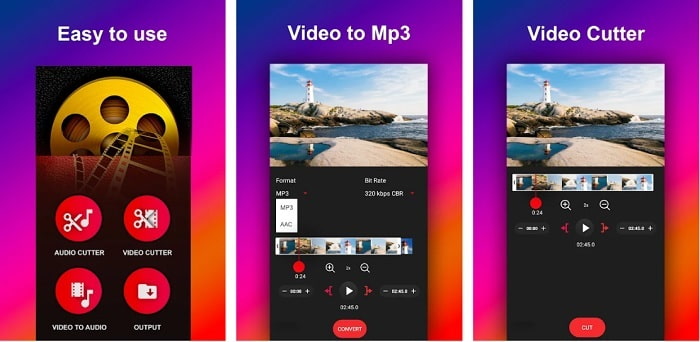
Jika anda sedang mencari penukar video ke MP3 pada Android, anda mungkin ingin mencuba Video to MP3 Converter ini. Alat ini direka khusus untuk menukar sebarang fail media kepada format fail MP3 atau AAC. Selain itu, anda juga boleh menukar bitrate dan memotong audio menggunakan alat ini. Walaupun menghasilkan output berkualiti tinggi, fail yang ditukar tidak akan disimpan terus ke direktori muzik, yang agak menyusahkan kerana bukannya boleh terus didengar, anda perlu mencarinya dahulu selepas proses penukaran.
2. MP4 kepada MP3 - Tukar Video kepada Audio, Potong Nada Dering
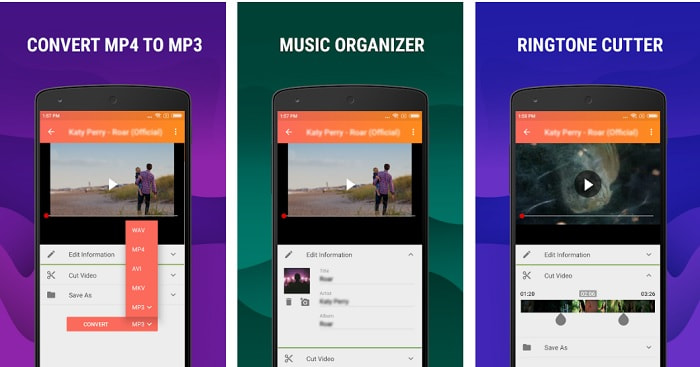
Walaupun alat pertama dalam senarai ini menyediakan penukaran MP3 yang anda inginkan, MP4 to MP3 - Convert Video to Audio, Cut Ringtones masih boleh mengatasinya dalam beberapa aspek. Namun, alat ini hanya untuk pengguna Android, jadi jika anda pengguna iOS anda tidak boleh menggunakannya. Penarafan alat ini ialah 4.0 bintang di Play Store tetapi jumlah pengguna yang menggunakannya agak rendah. Kebanyakan mereka mempunyai aduan yang sama, iaitu selepas menukar fail dalam aplikasi ini, fail tersebut sukar ditemui, sama seperti aplikasi pertama tadi. Walau bagaimanapun, masih ada pengguna yang menjadikannya penukar MP3 peribadi kerana anda boleh menukar berbilang fail serentak.
Berkaitan:
3. Penukar Audio
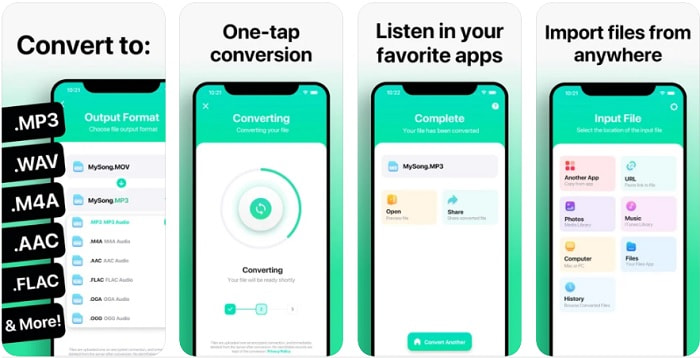
Jika anda pengguna iOS mungkin beranggapan anda tidak boleh melakukan penukaran audio pada telefon anda dengan kualiti penukaran yang baik. Anggapan itu salah, kerana The Audio Converter menyediakan proses penukaran terbaik dan banyak lagi. Menukar video kepada MP3 pada iPhone menjadi mudah dengan bantuan alat ini. Namun kelemahan alat ini ialah untuk versi percuma terdapat had saiz fail. Jadi, jika anda mahu menukar fail yang lebih besar anda perlu membayar dan melanggan. Dalam sesetengah kes, jika anda mahu membatalkan langganan, tiada butang batal disediakan. Berhati‑hatilah menggunakan alat ini kerana mungkin akan ada caj yang tidak diingini ke atas kad anda jika anda menggunakan kaedah pembayaran ini.
Bahagian 3. Carta Perbandingan
| ciri-ciri | Penukar MP3 Percuma FVC | FVC Video Converter Ultimate | Penukar Video ke MP3 | MP4 kepada MP3 – Tukar Video kepada Audio, Potong Nada Dering | Penukar Audio |
| Penukar Audio | | | | | |
| Format Menyokong | MP3, AAC, AC3, WMA, WAV, AIFF, FLAC, MKA, M4A, M4B, M4R | 500+ Format Media Tersedia | MP3 & AAC | MP3 | MP3 & AAC |
| Kebolehcapaian alat | Alat berasaskan web | Alat berasaskan desktop | Apl berasaskan Telefon Android | Apl berasaskan Telefon Android | Apl berasaskan telefon iOS |
| Julat harga | Alat dalam talian percumanya | Selama 1 bulan: $25.00 Selama setahun: $31.20 Untuk Lesen Sepanjang Hayat: $55.20 | Apl Android Boleh Muat Turun Percuma | $6.49 – $19.99 setiap item | Pas Premium$3.99 Pas Seumur Hidup$6.99 |
Bahagian 4. Soalan Lazim tentang Video ke MP3
Mengapa video saya tidak boleh dimainkan pada komputer saya?
Ada kemungkinan format video tidak disokong oleh pemain media lalai anda. Jadi, dalam keadaan ini anda mungkin mahu menggunakan FVC Free Video Player untuk memainkan video anda. Ia menyokong lebih daripada 200 format yang diketahui, jadi tonton apa‑apa fail video di sini tanpa perlu risau ia tidak dapat dimainkan.
Adakah MP3 format audio terbaik?
Walaupun MP3 dikenali sebagai format audio sejagat kerana digunakan di pelbagai tempat untuk memainkan, merakam dan menyimpan fail audio, ada format yang lebih baik daripada MP3 iaitu AAC. Walaupun begitu, saiz fail AAC lebih besar berbanding MP3, tetapi tidak perlu risau kerana ia tidak sebesar AVI. Untuk menukar fail MP3, anda boleh menggunakan penukar web MP3 ke AAC ini dan bukannya alat lain yang tidak selamat dan lemah dari segi pemampatan.
Apakah kelemahan audio?
Fail audio jauh lebih kecil berbanding fail video tetapi ia kurang interaktif kerana tidak memberikan visual kepada pendengar. Jadi, jika anda membuat podcast, sebaiknya pilih perakam audio yang terbaik iaitu FVC Screen Recorder. Alat ini menawarkan fungsi penyuntingan rakaman yang sangat baik dan juga menyokong lebih banyak format audio berbanding alat lain yang boleh anda muat turun atau guna dalam talian. Jika rakaman menjadi masalah anda, hanya ada satu penyelesaian dan penyelesaiannya ialah FVC Screen Recorder. Klik di sini untuk mendapatkan lebih banyak perakam MP3 profesional.
Kesimpulannya
Kini setelah kita sampai ke penghujung artikel ini, masalah yang dihadapi pada awalnya telah pun diselesaikan. Walaupun kita akan berpisah dan meninggalkan kes ini kepada anda, pencarian anda akan berakhir sebaik sahaja anda memilih alat yang paling sesuai untuk dijadikan sandaran, seperti FVC Video Converter Ultimate. Setiap kali anda menggunakan alat ini, anda boleh menjangkakan proses penukaran yang pantas, boleh dipercayai dan selamat. Jika anda menghadapi masalah pada audio dan mahu menambah baiknya, anda juga boleh melakukannya dengan alat ini. Selain itu, kami berharap anda akan terus meneroka FVC Video Converter Ultimate kerana alat ini menawarkan kualiti penukaran yang terbaik. Dengan bantuan bukti tepat yang kami sediakan khusus untuk anda. Jika anda kini berpuas hati, bolehlah kita menganggap kes ini telah ditutup.
-
 [2021] 6 Cara Percuma & Dalam Talian Terbaik untuk Menukar M2TS kepada MP3
 Bolehkah fail M2TS ditukar menjadi MP3? Dalam catatan ini, kami telah menyenaraikan 6 cara teratas dan percuma dalam talian untuk membantu anda menukar M2TS ke MP3, AAC, AIFF, dan lebih banyak format audio.
-
 4 100% Kaedah Kerja untuk Menukar Fail Video FLV ke Format MP3
 Bagaimana cara menukar FLV ke fail MP3? Yang perlu anda lakukan ialah membaca artikel ini dengan teliti, cari kaedah kegemaran anda dan ikuti panduan langkah demi langkah kami untuk mendapatkan apa yang anda mahukan.
-
 4 Kaedah Teratas untuk Menukar OGG ke MP3 tanpa Kehilangan Kualiti
 Bagaimana cara menukar fail OGG anda ke dalam format MP3 untuk didengarkan di komputer atau peranti mudah alih? Di sini kami kongsikan 5 cara termudah untuk melakukannya di desktop atau dalam talian.
