


 Video Converter Ultimate
 Perakam Skrin
 Pembaikan Video
 Muat Turun Selamat
Tukar 3GP kepada MP4 dengan Penukar Cekap dan Mesra Pengguna
Keperluan untuk menukar format fail telah berkembang dengan ketara. Satu penukaran tertentu yang mempunyai kepentingan yang besar ialah menukar fail 3GP kepada format MP4. Walaupun fail 3GP popular pada masa lalu, ia sering menimbulkan isu keserasian pada peranti dan platform moden. Sebaliknya, format MP4 menawarkan keserasian universal, main balik berkualiti tinggi dan sokongan yang lebih luas merentas pelbagai peranti dan platform.
Untuk memenuhi keperluan menukar fail 3GP ke MP4 dengan lancar, kami telah meneliti dan menyusun senarai alat penukaran yang berkuasa dengan teliti. Alat‑alat ini menyediakan penyelesaian yang cekap dan boleh dipercayai untuk menukar video 3GP anda kepada format MP4 yang sangat serasi. Sertai kami untuk meneroka alat penukaran bertaraf tinggi ini dan ketahui bagaimana ia boleh meningkatkan pengalaman video anda dengan memastikan kualiti main balik yang optimum serta keserasian merentasi pelbagai platform dan peranti.

Bahagian 1. Penukar 3GP ke MP4 Terbaik
1. Video Converter Ultimate
Video Converter Ultimate ialah program yang sangat baik untuk menukar video kepada 3GP dan MP4, serta format audio lain. Perisian ini mempunyai fungsi penukaran kelompok yang membolehkan anda menukar berbilang fail audio serentak. Selain itu, aplikasi ini membenarkan pengguna mengoptimumkan kualiti keluaran dengan mengubah parameter seperti kadar bingkai, bitrate dan resolusi. Baca tutorial ringkas yang kami sediakan di bawah jika anda ingin belajar cara menukar 3GP ke MP4.
Ciri Utama
◆ Perisian FVC Video Converter Ultimate direka untuk menjana video keluaran unggul dan fail audio, memfokuskan pada mengekalkan kualiti asal fail yang ditukar setakat yang mungkin.
◆ Antara muka aplikasi direka bentuk untuk mesra pengguna dan intuitif, memudahkan navigasi untuk pengguna baru dan lanjutan.
◆ FVC Video Converter Ultimate ialah alat perisian yang mempamerkan kelajuan dan keberkesanan tinggi, memudahkan penukaran segera pelbagai format fail.
Langkah 1. Dapatkan Apl Penukar 3GP ke MP4
Mula‑mula, klik pilihan Muat Turun Percuma yang berkaitan di bawah untuk mula memuat turun program ke peranti anda. Seterusnya, anda perlu ikut arahan pada skrin untuk mengaktifkan perisian. Setelah pemasangan selesai, anda boleh mendapatkan bantuan tentang antara muka pengguna.
Muat Turun PercumaUntuk Windows 7 atau lebih baharuMuat Turun Selamat
Muat Turun PercumaUntuk MacOS 10.7 atau lebih baharuMuat Turun Selamat
Langkah 2. Muat naik fail filem 3GP
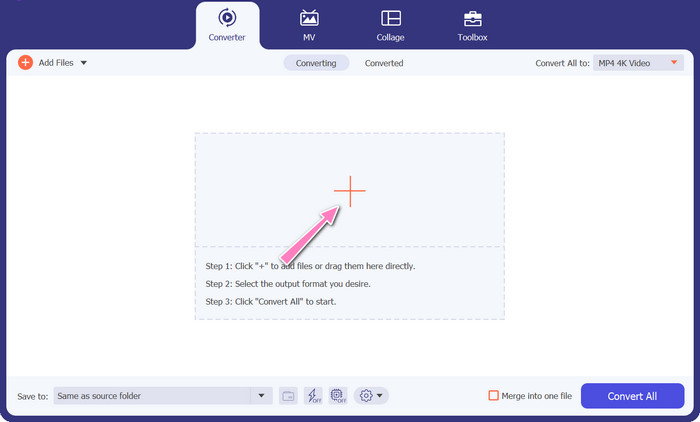
Langkah kedua ialah mengimport fail filem yang ingin anda sunting dengan menekan ikon Tambah pada skrin utama. Selepas itu, pratonton fail yang diimport akan dimuatkan. Jika anda ingin menukar banyak fail sekali gus, hanya muat naik folder tersebut. Pilih direktori yang mengandungi semua fail audio anda.
Langkah 3. Pilih format keluaran
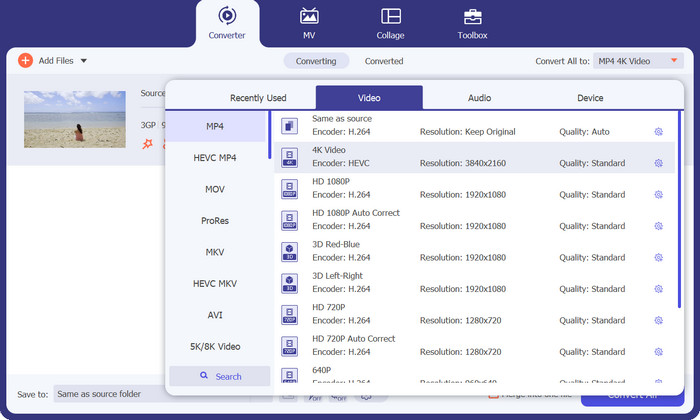
Ketiga, tekan butang Converter All to di bahagian atas antara muka program untuk memilih format baharu bagi hasil akhir. Pilih MP4 daripada menu tarik turun Video Output. Anda mempunyai kawalan ke atas kualiti fail keluaran dengan mengubah kadar sampel dan bitrate.
Langkah 4. Mulakan proses penukaran
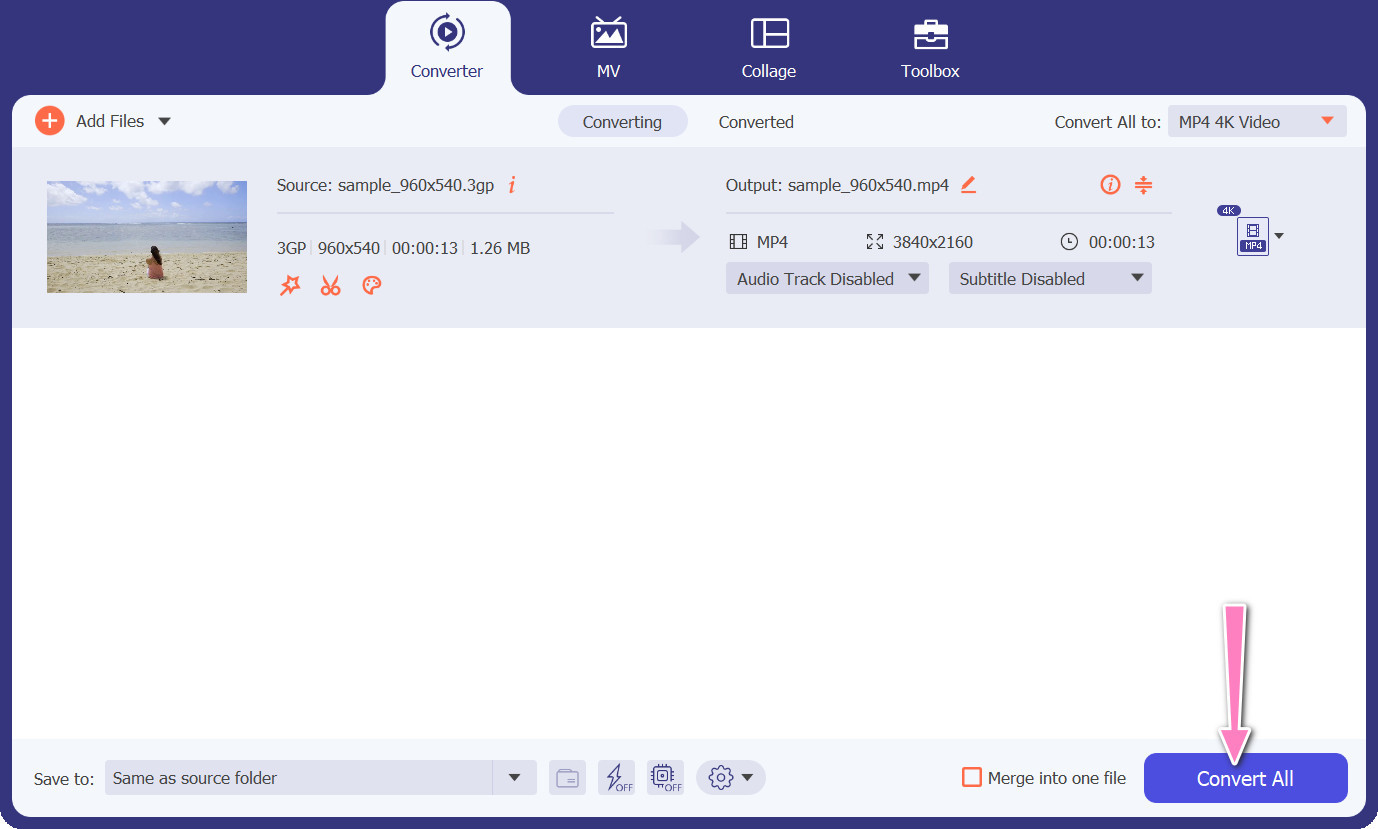
Keempat, mulakan proses penukaran dengan menekan butang Convert All di bahagian bawah. Folder keluaran kemudian akan dibuka supaya anda boleh menyemak semula fail yang telah ditukar.
2. Penukar MP4 Percuma Dalam Talian
Penggunaan Free MP4 Converter Online merupakan alternatif yang berdaya maju kepada pemasangan program desktop, sekali gus menawarkan penyelesaian yang mudah. Penukar 3GP ke MP4 dalam talian ini beroperasi dengan cekap dan lancar, sambil memastikan perlindungan dan kerahsiaan data peribadi sepanjang proses penukaran. Selain itu, fungsi penukaran kelompok perisian ini boleh digunakan dengan cara yang sama seperti program desktop.
Ciri Utama
◆ Free MP4 Converter Online membolehkan anda menyesuaikan tetapan output mengikut pilihan anda. Anda boleh melaraskan parameter seperti codec video, resolusi, kadar bit dan kadar bingkai untuk mencapai kualiti dan saiz fail yang diingini.
◆ Free MP4 Converter Online menyokong penukaran kelompok, membolehkan anda memuat naik dan menukar berbilang fail 3GP kepada MP4 secara serentak. Ini menjimatkan masa dan usaha apabila berurusan dengan berbilang fail.
◆ Free MP4 Converter Online menghargai privasi pengguna dan menggunakan langkah-langkah untuk melindungi fail anda yang dimuat naik. Mereka sering memberikan pilihan untuk memadam fail selepas penukaran atau menyimpannya dengan selamat untuk tempoh terhad.
Langkah 1. Langkah pertama ialah pergi ke laman utama Free MP4 Converter Online dengan mengklik pautan yang disediakan. Cari pilihan Add Files to Convert pada antara muka utama dan teruskan untuk memuat naik fail audio anda.

Langkah 2. Setelah dijalankan, paparan dokumen asal akan muncul pada antara muka. Pilih format keluaran pilihan anda dengan memilihnya daripada panel yang sama.
Langkah 3. Seterusnya, pilih butang Convert untuk menukar 3GP ke MP4. Untuk menukar fail tambahan, anda perlu mengulangi arahan yang dinyatakan di atas dari awal.

3. Sebarang Penukar Video
Program desktop Any Video Converter yang digunakan secara meluas mempunyai rakan sejawat berasaskan web percuma. Ia mungkin untuk menukar 3GP kepada MP4, dan ia mempunyai satu tan tetapan yang canggih dan pemprosesan kelompok. Penyuntingan video dan pembakaran DVD hanyalah dua daripada tambahan yang tersedia dalam edisi perisian.
Ciri Utama
◆ Sebarang Penukar Video membolehkan anda menyesuaikan peleraian video, kadar bit, kadar bingkai dan kualiti audio. Ia mengoptimumkan output video mengikut spesifikasi anda.
◆ Sebarang Penukar Video membolehkan anda memotong, memangkas, menggabungkan dan menambah kesan pada video. Sari kata dan tera air memperibadikan video.
◆ Mana-mana Penukar Video menyokong mengimport dan membenamkan sari kata ke dalam video anda. Anda boleh menambah fail sari kata luaran atau memasukkan sari kata secara manual untuk menjadikan video anda lebih mudah diakses atau berbilang bahasa.
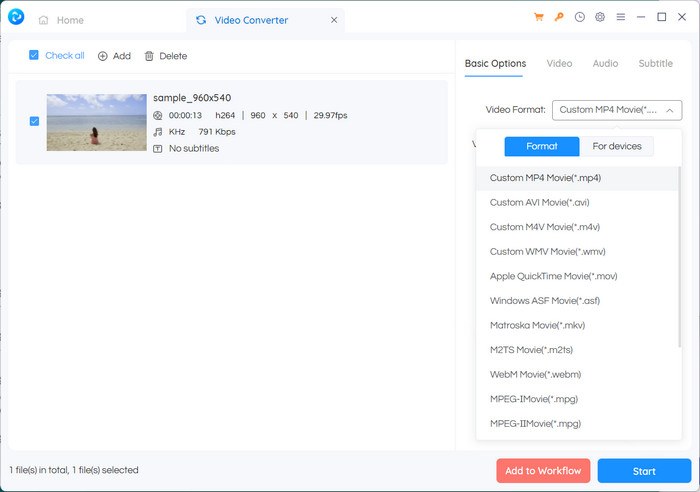
Langkah 1. Mula‑mula, pasang Any Video Converter. Muat turun Any Video Converter daripada laman web rasminya dan pasang pada komputer anda mengikut arahan pada skrin. Lancarkan Any Video Converter.
Langkah 2. Klik butang Add Video(s) dalam perisian. Semak lalu dan pilih fail 3GP yang anda mahu tukar kepada MP4. Seterusnya, klik Open untuk menambah fail yang dipilih ke dalam baris gilir penukaran.
Langkah 3. Dalam bahagian Profile, pilih MP4 sebagai format keluaran yang dikehendaki. Anda mungkin mempunyai beberapa pilihan MP4 untuk dipilih berdasarkan keutamaan dan keperluan anda. Pilih yang paling sesuai dengan kehendak anda.
Langkah 4. Tanda pada butang Start untuk memulakan proses penukaran.
Bacaan Lanjut:
Gabung 3GP – Cara Menggabungkan Klip Video Berbeza daripada Telefon Pintar Anda
Cara Menukar 3GP ke MOV Menggunakan Pendekatan Berbeza [2023]
Bahagian 2. Soalan Lazim tentang Penukar 3GP ke MP4
Apakah perbezaan antara 3GP dan MP4?
MP4 menyokong lebih banyak peranti dan platform daripada 3GP. Codec: MP4 menyokong lebih banyak codec audio dan video untuk fleksibiliti dan kualiti pengekodan yang lebih besar. Ciri: 3GP tidak menyokong sari kata, bab atau berbilang trek audio, manakala MP4 menyokongnya. Disebabkan oleh algoritma pemampatan yang lebih cekap, fail MP4 adalah lebih kecil daripada fail 3GP tetapi mempunyai kualiti yang setara atau unggul.
Adakah terdapat kelebihan khusus menggunakan MP4 berbanding 3GP untuk penstriman dalam talian?
Kualiti video MP4 yang lebih baik, teknik mampatan lanjutan dan keserasian yang lebih luas menjadikannya pilihan pilihan untuk platform penstriman dalam talian, memberikan pengalaman tontonan yang lebih baik untuk pengguna.
Bolehkah saya menukar video MP4 kepada format 3GP jika perlu?
Ya, terdapat penukar video yang tersedia yang membolehkan anda menukar video MP4 kepada format 3GP jika diperlukan, walaupun ia boleh mengakibatkan penurunan taraf dalam kualiti dan keupayaan multimedia terhad.
Kesimpulannya
Walaupun 3GP pernah popular pada masa lalu, terutamanya untuk peranti mudah alih, ia mempunyai sokongan yang lebih terhad untuk ciri lanjutan dan mungkin tidak begitu serasi dengan platform moden. MP4 pula menyokong rangkaian codec video, codec audio, sari kata dan ciri lanjutan yang lebih luas seperti bab, menu dan berbilang trek audio. Nasib baik, anda mempunyai banyak pilihan untuk memilih penukar 3GP ke MP4 terbaik mengikut keperluan anda. Secara keseluruhan, jika anda mempunyai pilihan antara 3GP dan MP4 untuk fail video, adalah disyorkan untuk memilih MP4 kerana kualiti, keserasian dan rangkaian cirinya yang lebih baik serta lebih menyeluruh.
-
 Cara Memampatkan Video 3GP ke Ukuran Lebih Kecil dengan Proses Batch
 Untuk membuat sandaran video 3GP pada telefon pintar anda, berikut adalah 2 cara yang paling sering digunakan untuk memampatkan fail 3GP ke ukuran yang sangat kecil dengan proses kumpulan dari artikel.
-
 Penyelesaian Penting untuk Menukar 3GP kepada MKV Tanpa Kehilangan
 Lihat tutorial langkah demi langkah tentang cara menukar 3GP kepada MKV tanpa kehilangan kualiti. Jika anda ingin menukar fail, bersedia untuk memenuhi kaedah yang menakjubkan ini.
-
 3 Pemain 3GP Percuma Terbaik untuk Komputer dan Mudah Alih yang Anda Perlu Tahu
 Apabila anda ingin memainkan filem 3GP anda dengan mudah tanpa pemasangan atau penukaran codec video, anda boleh mengetahui lebih lanjut mengenai 3 pemain 3GP terbaik di Windows, Mac, Android dan iPhone dalam artikel ini.
