


 Video Converter Ultimate
 Perakam Skrin
 Pembaikan Video
 Muat Turun Selamat
Cara Menukar MP4 ke M4A pada Windows / Mac (Percuma & Dalam Talian)
MP4 adalah format fail yang meluas yang digunakan dengan pelbagai stesen dan pemain video. Fail MP4 dapat menyimpan video, audio, dan kandungan lain. Sekarang, banyak orang lebih suka mendengar trek audio video MP4. Untuk menjaga kualiti, menukar MP4 ke M4A adalah idea yang bagus. M4A bermaksud MPEG 4 Audio. Sebilangan besar program boleh memainkan fail M4A, termasuk iTunes, QuickTime, Windows Media Player, dan banyak lagi.

You might wonder how to extract the audio from MP4 file. There are many ways to turn a MP4 file into a M4A file. Check out this post to figure out how to convert MP4 to M4A for future listening on your mobile devices.
Bahagian 1. Cara Dalam Talian Percuma Terbaik untuk Menukar MP4 ke M4A tanpa Kehilangan Kualiti
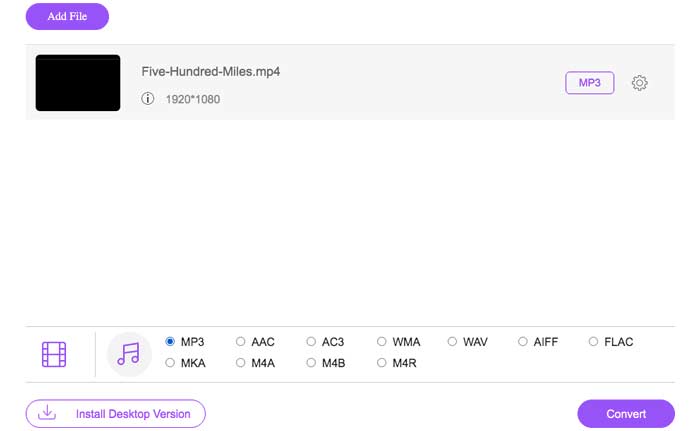
FVC Free Online Video Converter is a free MP4 to M4A file converter that can convert the MP4 format to not only M4A but others like MP3, WAV, M4R, WMA, AIFF, AC3, etc. It allows you to make a batch conversion so that you can convert multiple MP4 videos to M4A instantly. Also, this free online tool also allows you to convert the MP4 video to MOV, AVI, FLV, and other video formats.
Step 1. Open https://www.free-videoconverter.net/free-online-video-converter/ on your browser. Click the Add Files to Convert button and then you need to download and install its launcher.

Step 2. Upload the MP4 video you want to convert, and then click Open to move on.
Step 3. After uploading your video files to this application, click the Audio icon and choose the M4A format as the output format.
Step 4. In the end, click the Convert button in the bottom right corner. Wait for a while, and you’ll get your M4A audio from the MP4 file.
Bahagian 2. Cara Menukar MP4 ke M4A dengan Penukar Audio Percuma
FVC Free Audio Converter ialah perisian percuma yang membolehkan anda menukar fail MP4 kepada M4A dengan mudah. Ia mampu menukar mana-mana fail video atau audio kepada M4A, MP3, WAV, dll. Anda boleh memuat turun dan memasangnya pada PC Windows anda untuk memulakan penukaran.
Free DownloadFor Windows 7 or laterSecure Download
Free DownloadFor MacOS 10.7 or laterSecure Download
Step 1. Launch this audio converter on your computer. Click the Add File(s) button to upload the MP4 files to this program.

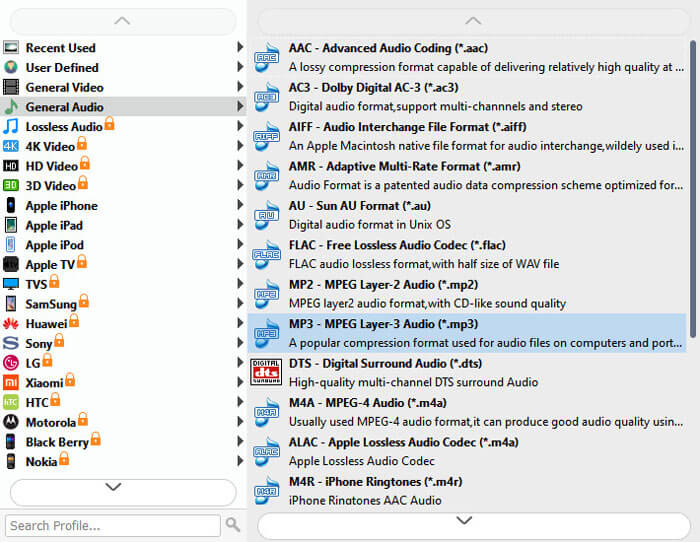
Step 2. Find the Output formats option and choose the M4A as the output format from its drop-down list.
Step 3. Click the Convert button to start turning MP4 files into M4A.
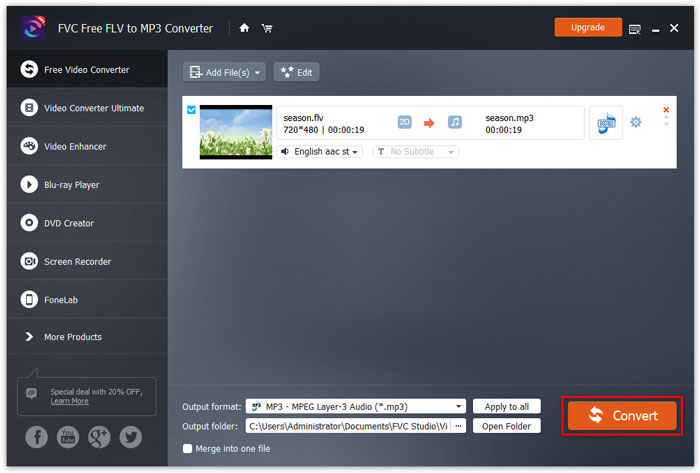
Apart from M4A, you can use it to convert MP4 to MP3, AAC, or other audio formats.
Bahagian 3. Cara Menukar MP4 ke M4A Menggunakan iTunes
Untuk menukar MP4 ke M4A dengan iTunes untuk Windows atau Mac, anda perlu mengubah tetapan import iTunes dan kemudian menggunakan pilihan menu Tukar untuk membuat salinan M4A.
Step 1. Open iTunes on your Windows PC or Mac.
Step 2. Choose Edit, then click on Preferences in the menu bar. Then, go to the General tab, and click Import Settings.
Step 3. Find and click the menu next to Import Using, and then choose the encoding format that you want to convert the video to. Then, click OK.
Step 4. Select the songs in your library that you want to convert. After that, choose File, then click on Create New Version, then create M4A version.
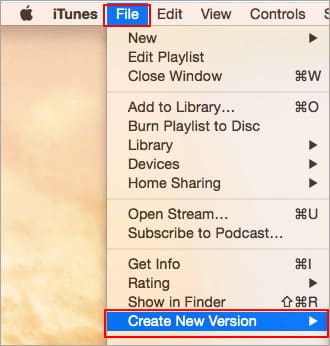
Fail audio yang ditukar akan muncul di perpustakaan anda di sebelah fail asal.
Bahagian 4. Soalan Lazim Penukaran MP4 ke M4A
1. Apakah fail M4A?
Fail dengan sambungan fail M4A adalah fail Audio MPEG-4. M4A sering dijumpai di iTunes Store Apple sebagai format muat turun lagu.
2. Bagaimana cara membuka fail M4A?
Program yang membuka fail M4A termasuk iTunes, QuickTime, Windows Media Player, dll. Tablet dan telefon Android, iPhone, iPad, dan iPod touch juga menyokong memainkan fail M4A.
3. Bagaimana menggabungkan fail MP4 dalam talian?
FVC Free Online Video Merger can help you merge or join various MP4 or other video formats like MOV, AVI, FLV, and more online.
4. Bolehkah Windows Media Player menukar MP4 ke M4A?
Tidak. Windows Media Player hanya menyokong menukar fail video ke MP3 atau WAV.
Kesimpulannya
Tiga cara di atas dapat membantu anda mengubah MP4 menjadi M4A secara percuma tanpa banyak usaha. Sekiranya anda lebih suka melakukan penukaran secara dalam talian, FVC Free Video Video Converter semestinya menjadi pilihan yang tepat. Sekiranya fail MP4 anda berukuran besar, FVC Free Audio Converter atau iTunes akan lebih dipercayai untuk menukar fail MP4 ke M4A.
-
 Cara Menukar MP4 ke WMV untuk Mac / Windows
 Catatan ini berkongsi cara menukar video MP4 ke format WMV pada Mac atau Windows. Kami juga akan menawarkan beberapa pilihan, termasuk perisian desktop dan penukar dalam talian berasaskan web. Bersedia untuk mengetahui alat penukaran MP4 ke WMV terbaik?
-
 Cara Menukar WMV ke MP3 di Desktop dan Dalam Talian
 Anda boleh mendapatkan perisian penukar video percuma dari studio FVC. Sebarang format video / audio disokong, termasuk MP4, MOV, TS, AVI, WMV, FLAC, MP3, dll.
-
 Cara Menukar Video AVCHD ke MP4 secara percuma di Windows / Mac / Online
 Terdapat 5 cara mudah untuk menukar video AVCHD ke MP4 di komputer anda. Anda boleh menukar video AVCHD secara berkala menjadi MP4 tanpa kehilangan kualiti dengan mana-mana penukar di sini.
