


 Video Converter Ultimate
 Perakam Skrin
 Pembaikan Video
 Muat Turun Selamat
MP4 ke MXF untuk Tiada Masalah Memainkan Fail MXF pada Peranti Berbeza
Kadangkala, perisian penyuntingan video atau sistem penyiaran tertentu memilih fail MXF. Jika anda berurusan dengan itu, menukar video MP4 anda kepada MXF menjadi penting untuk main balik dan penyuntingan yang lancar. Terdapat beberapa alat berguna di luar sana yang boleh menjadikan penukaran ini sekeping kek. Jadi, jika anda ingin tahu tentang menangani tugas ini tanpa mengeluarkan peluh, teruskan membaca!
Mari kita kenali penukar MP4 ke MXF yang hebat ini dan langkah mudah yang mereka sediakan untuk menukar fail MP4 anda kepada MXF seperti seorang profesional.

Bahagian 1. 5 Cara Terbaik untuk Menukar MP4 kepada MXF
1. Video Converter Ultimate
Video Converter Ultimate ialah alat bertaraf tinggi yang menawarkan penyelesaian hebat untuk menukar fail MP4 kepada pelbagai format video dan peranti seperti iPhone, iPad, Galaxy S6 dan banyak lagi. Antara mukanya yang mesra pengguna memudahkan sesiapa sahaja, termasuk yang kurang mahir teknologi, untuk menavigasi dan menggunakannya dengan berkesan. Kelajuan penukaran videonya sangat pantas, meninggalkan perisian lain jauh ke belakang. Tambahan pula, mod kelompok untuk menukar berbilang fail memang mengagumkan. Lihat panduan di bawah untuk belajar cara menukar MP4 kepada MXF menggunakan alat berkuasa ini.
Langkah 1. Muat turun dan pasang penukar daripada butang Muat Turun Percuma di bawah. Setelah dipasang, lancarkan aplikasi pada komputer anda.
Muat Turun PercumaUntuk Windows 7 atau lebih baharuMuat Turun Selamat
Muat Turun PercumaUntuk MacOS 10.7 atau lebih baharuMuat Turun Selamat
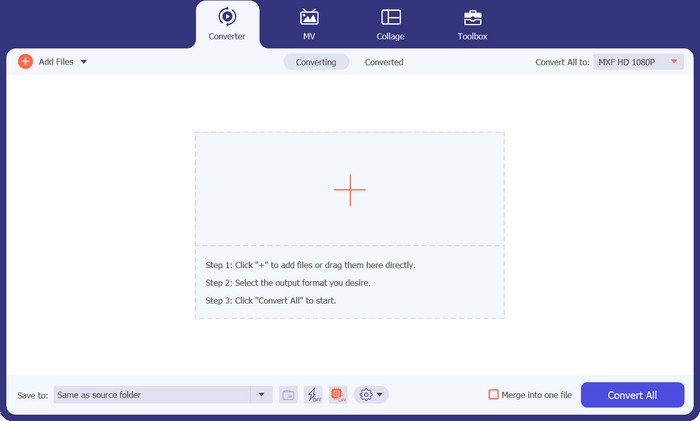
Langkah 2. Muat naik video MP4 yang anda mahu tukar dengan mengklik butang tanda Tambah atau gunakan Spacebar untuk membuka folder komputer anda. Semak lalu dan pilih video sasaran.
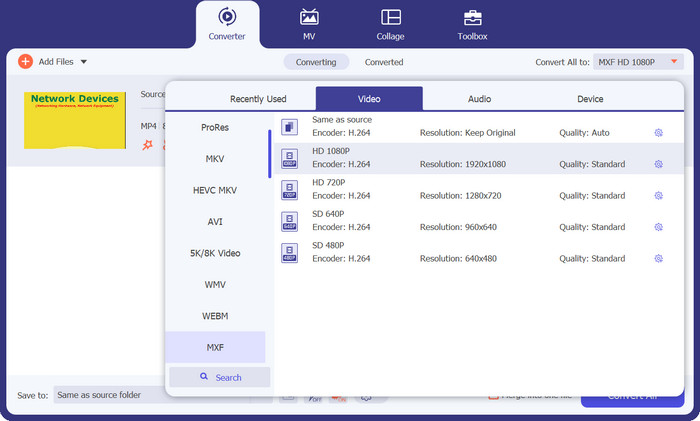
Langkah 3. Pilih MXF sebagai format keluaran. Hanya bentangkan senarai Profil di penjuru kanan atas, pergi ke tab Video, dan cari MXF. Anda juga boleh menggunakan bar carian untuk menemuinya dengan cepat. Pilih kualiti yang anda inginkan untuk keluaran anda.
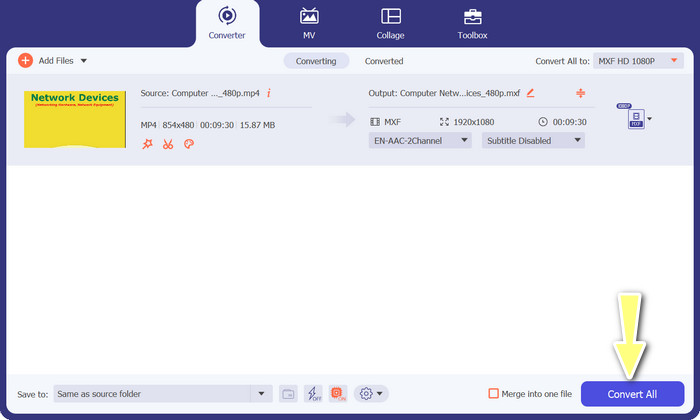
Langkah 4. Sedia untuk menukar! Tanda butang Tukar Semua di penjuru kanan bawah, dan siap! Fail yang telah ditukar akan disimpan secara automatik ke folder komputer anda.
2. Penukar MP4 Percuma Dalam Talian
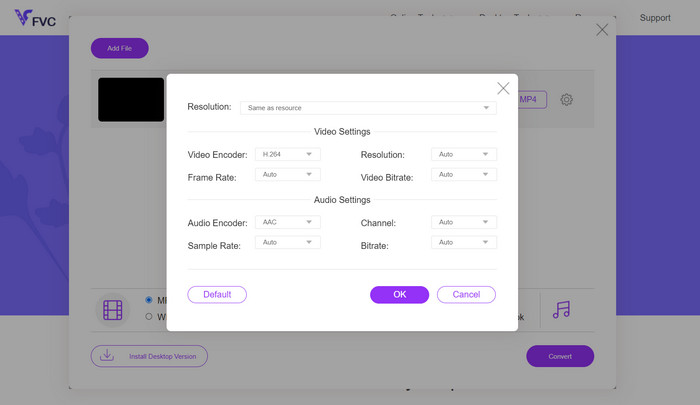
Jika anda sedang mencari penukar MP4 dalam talian yang boleh dipercayai untuk menukar MP4 kepada MXF secara dalam talian, cuba Free MP4 Converter Online. Laman web ini menyediakan platform yang selamat dan boleh diharap untuk memuat naik fail MP4 anda dan menukarnya kepada MXF atau pelbagai format lain. Yakinlah, setiap penukaran mengekalkan kualiti tinggi yang konsisten. Bukan itu sahaja, anda juga mempunyai pilihan untuk mengubah suai penukaran dengan menyunting codec video dan pratetap. Cubalah, dan anda akan dapat menyesuaikan penukaran mengikut kehendak anda.
Langkah 1. Pergi ke laman web mereka menggunakan pelayar web anda. Anda tidak perlu memuat turun apa-apa; hanya buka seperti laman web biasa yang lain.
Langkah 2. Klik butang Tambah Fail untuk Tukar atau seret dan lepaskan video MP4 anda ke laman web tersebut. Ia akan mula memproses fail anda, dan anda akan melihat bar kemajuan.
Langkah 3. Setelah muat naik selesai, cari pilihan dan pilih MXF daripada senarai. Jika ada tetapan kualiti, pilih yang anda suka. Tekan butang Tukar, dan proses penukaran pun bermula!
3. FreeFileConvert
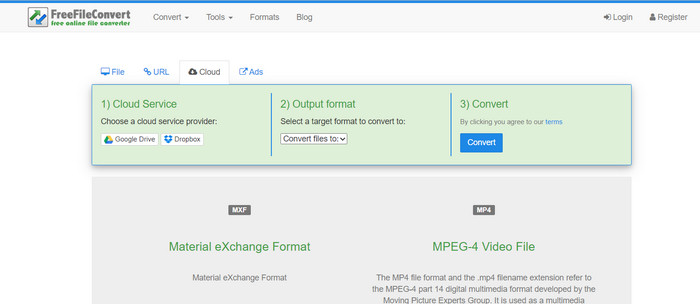
Mencari satu lagi penukar MXF-ke-MP4 percuma? Beri peluang FreeFileConvert! Platform mesra pengguna ini mengikuti proses tiga langkah yang mudah dan menawarkan antara muka yang mudah dinavigasi untuk membantu anda menukar video anda tanpa kerumitan. Hanya lawati tapak web mereka, muat naik fail anda dari komputer anda, pilih format output yang diingini, dan tekan tukar. Anda bukan sahaja boleh memuat naik fail dari komputer anda, tetapi anda juga mempunyai pilihan untuk memuat naik daripada akaun Dropbox atau Google Drive anda.
Langkah 1. Buka pelayar web anda dan pergi ke laman web FreeFileConvert. Tiada pemasangan diperlukan, sama seperti melayari laman web biasa yang lain.
Langkah 2. Klik butang Pilih Fail. Anda juga boleh memuat naik dari Dropbox atau Google Drive jika itu lebih mudah untuk anda.
Langkah 3. Dalam menu tarik turun Format Keluaran, cari MXF dan pilihnya sebagai format yang dikehendaki. Kemudian tekan butang Tukar, dan biarkan FreeFileConvert menjalankan tugasnya!
4. AnyConv
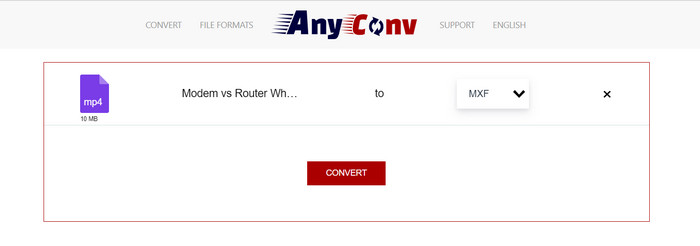
Mencari alat dalam talian untuk menukar MP4 kepada MXF? Jangan lihat lebih jauh daripada AnyConv! Seperti yang lain, ia tidak memerlukan sebarang pemasangan. Selain itu, ia tidak terhad kepada hanya MP4 hingga MXF; ia boleh mengendalikan pelbagai penukaran format lain juga! Bahagian yang terbaik? Anda tidak perlu mendaftar untuk perkhidmatan penuh – ia tidak perlu bersusah payah. Cuma ikut langkah di bawah dan anda akan menyelesaikan penukaran MP4 kepada MXF anda dalam masa yang singkat. Senang kacang.
Langkah 1. Buka laman web AnyConv menggunakan mana-mana pelayar web.
Langkah 2. Tekan butang CHOOSE FILES untuk memuat naik video MP4 anda. Kemudian, kembangkan menu Profil dan cari format MXF.
Langkah 3. Sedia untuk menukar? Tekan butang biru Tukar, dan proses penukaran akan bermula.
5. Convertio
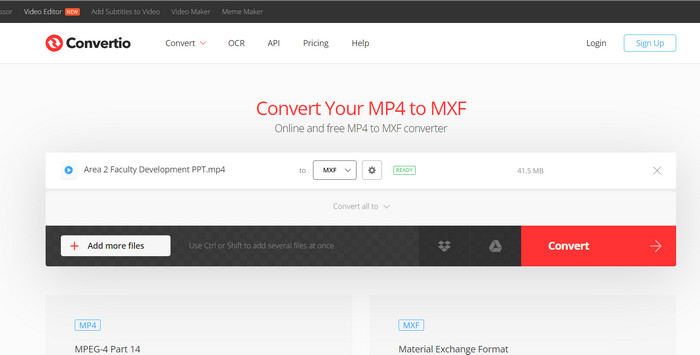
Memanggil semua pengguna yang mahukan penukar fail tanpa perlu memuat turun apl tambahan! Convertio telah melindungi anda. Dengan alat ini, menukar MP4 kepada MXF dalam talian adalah mudah tanpa perlu bersusah payah mengubah tetapan yang rumit. Bahagian yang terbaik? Ia menyokong pelbagai format fail media, termasuk dokumen, arkib, hamparan, pembentangan dan banyak lagi.
Langkah 1. Pilih pelayar pada komputer anda dan pergi ke halaman rasmi alat tersebut.
Langkah 2. Pada antara muka utama program, tekan butang Pilih Fail untuk memuat naik fail MP4 anda. Sebagai alternatif, untuk kemudahan anda, anda boleh terus seret dan lepaskan fail video.
Langkah 3. Cari menu Profil dan pilih format MXF daripada bahagian Video. Kemudian, klik butang Convert untuk memulakan proses penukaran.
Bacaan Lanjut:
4 Cara Percuma untuk Menukar MXF Kamera Video ke MP4 untuk Main Balik Sejagat
[Panduan] 2 Kaedah Terbaik untuk Menggabungkan Video MXF daripada Sony X70
Bahagian 2. Soalan Lazim tentang MP4 hingga MXF
Apakah fail MXF?
Fail MXF ialah sambungan fail yang mewakili Format Pertukaran Bahan, yang berfungsi sebagai bekas untuk kandungan audio dan video profesional standard. Ia biasanya digunakan dalam penyiaran TV dan teater kerana keupayaannya untuk mengekalkan video berkualiti tinggi. Pada dasarnya, MXF bertindak sebagai alternatif untuk menyimpan video sebenar dalam format digital, menjadikannya pilihan pilihan untuk mengendalikan kandungan video profesional.
Bolehkah saya menukar MXF kepada MP4?
Sudah tentu! Dengan alatan seperti Video Converter Ultimate, menukar MP4 kepada MXF atau sebaliknya adalah mudah. Anda mempunyai fleksibiliti untuk mencuba kedua-dua pilihan dan melihat mana yang paling sesuai untuk anda.
Bagaimanakah cara membuka fail MXF?
Apabila ia datang untuk membuka fail MXF, VLC Media Player ialah pilihan yang terbaik. Utiliti media ringan dan merentas platform ini cemerlang dalam melihat fail media dari semua jenis.
Apakah potensi kelemahan untuk menukar MP4 kepada MXF?
Menukar MP4 kepada MXF boleh menghasilkan saiz fail yang lebih besar kerana kaedah pemampatan berbeza yang digunakan dalam MXF. Selain itu, sesetengah alatan mungkin memerlukan sambungan internet yang stabil untuk penukaran dalam talian.
Bolehkah saya mengedit fail MXF selepas penukaran?
Ya, selepas menukar MP4 kepada MXF, anda boleh mengedit fail MXF menggunakan perisian penyuntingan video yang serasi. Fail MXF disokong dengan baik oleh alat penyuntingan video profesional dan sistem penyuntingan bukan linear.
Kesimpulannya
Sama ada anda perlu menukar MP4 kepada MXF, membuka fail MXF, atau mengendalikan sebarang format video, terdapat alat mesra pengguna yang boleh menjadikan proses ini lancar. Melalui alat yang berkuasa dan serba boleh ini, anda boleh mengendalikan dunia penukaran video dengan mudah dan menikmati main balik media tanpa masalah.
-
 Cara Memampatkan MXF dengan Premiere Pro dan Online Percuma
 Bagaimana memampatkan MXF dengan saiz fail yang lebih kecil? Bagaimana cara memampatkan fail MXF dalam Adobe Premiere Pro? Catatan ini berkongsi 2 cara untuk memampatkan fail MXF.
-
 4 Penyelesaian Teratas Terbaik untuk Menukar MXF kepada MKV [Selesai]
 Kenali empat kaedah hebat ini untuk menukar MXF kepada MKV dalam talian dan luar talian dengan mudah. Apl yang disertakan dalam siaran ini boleh membantu anda menukar fail tanpa perlu bersusah payah.
-
 Cara Menukar MP4 kepada MPG pada Desktop dan Dalam Talian Dengan Mudah
 Ketahui cara menukar MP4 kegemaran anda kepada MPG dengan langkah mudah. Tiada masalah teknologi, hanya peralihan yang lancar untuk fail media anda.
