


 Video Converter Ultimate
 Perakam Skrin
 Pembaikan Video
 Muat Turun Selamat
Tukar MP4 kepada WebP Dalam Talian dengan Alat Percuma Terbaik
Video dengan panjang kedua sahaja terdiri daripada berbilang imej berasingan. Imej atau bingkai ini biasanya dipaparkan apabila anda berusaha untuk mengedit video. Dan jika anda seorang blogger yang pakar dalam makanan, satu cara yang baik untuk menjadikan kandungan video anda menarik adalah dengan membuat lakaran kecil untuknya. Bukan itu sahaja, tetapi anda akan mahu memilih bingkai yang sesuai untuk digunakan sebagai lakaran kecil untuk video anda. Untuk menangani perkara ini, anda boleh memilih imej terbaik daripada kandungan video anda untuk menjadi imej pratonton sempurna anda melalui penukaran video ke foto. Dan jika anda ingin bertanya kepada kami, WebP akan menjadi format imej yang baik untuk dicuba.
Mujurlah, artikel ini akan menunjukkan kepada anda tiga cara berbeza untuk menukar MP4 kepada WebP dalam talian. Lihat kandungan di bawah dan ketahui kaedah yang paling sesuai untuk anda bagi mendapatkan foto daripada video anda.

Bahagian 1. Ketahui Lebih Lanjut tentang WebP
Apakah WebP?
WebP ialah sejenis format imej yang direka oleh Google. Ia dibuat untuk menjadikan imej web lebih kecil dan memuatkan lebih cepat. Tambahan pula, jenis format ini menggunakan kaedah pemampatan lanjutan yang membantu mengurangkan saiz fail imej tanpa mengubah terlalu banyak kualiti.
Ini berfaedah untuk tapak web dimuatkan dengan lebih cepat, dan ini juga penting untuk pengguna pada sambungan internet atau peranti mudah alih yang perlahan. Memandangkan fail WebP menyokong pemampatan lossy dan lossless, ia juga memberi anda fleksibiliti untuk memilih keseimbangan yang betul antara saiz dan kualiti fail. Adakah anda tahu bahawa anda boleh menukar MP4 anda kepada WebP dalam talian? Ini hanya dinasihatkan jika anda berhasrat untuk meningkatkan pengalaman menyemak imbas web anda dengan menjadikan imej lebih cekap dan boleh dimuatkan sambil mengekalkan kualiti yang baik daripada fail video yang anda miliki sekarang. Yang berkata, mari kita teruskan ke penukar video-ke-imej yang baik, yang proses penukarannya dibentangkan di bawah.
Bahagian 2. 3 Cara Terbaik untuk Menukar MP4 kepada WebP Dalam Talian
1. MP4.kepada
Jika anda ingin membuka kunci potensi video MP4 anda untuk menjadi imej web, maka penukar pertama yang anda mesti cuba ialah MP4.to ini. Ia adalah alat penukaran fail dalam talian yang direka khusus untuk menukar pelbagai jenis fail multimedia ke dalam format MP4. Dengan alat yang luar biasa ini, anda boleh menukar MP4 kepada WebP dalam talian dan kepada format lain yang berbeza seperti GIF, MOV, WAV, AVI, MP3, MPEG dan banyak lagi. Sebaliknya, anda boleh memuat naik pelbagai jenis fail, seperti video, klip audio, dan juga imej, dan menukarnya kepada format MP4. Ini boleh berguna untuk menyediakan video untuk penstriman dalam talian dan memastikan keserasian merentas peranti dan platform berbeza yang menyokong format MP4. Sementara itu, di bawah ialah langkah mudah yang boleh anda ikuti menggunakan MP4.to untuk menukar video anda kepada WebP.
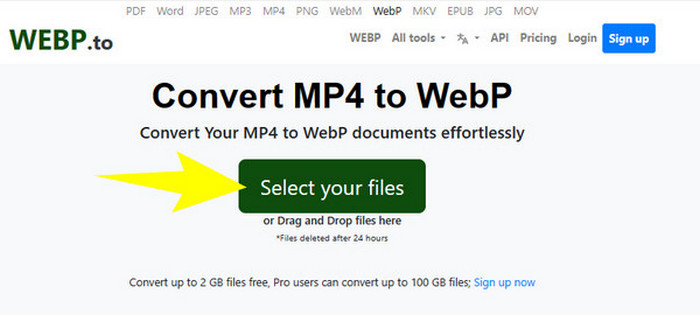
Langkah 1. Pada laman web alat tersebut, klik butang Select your files untuk memuat naik fail MP4 anda.
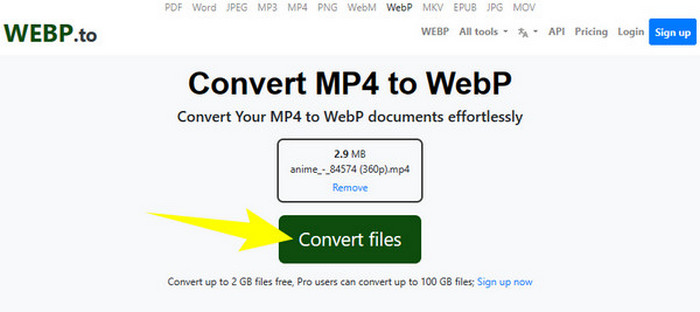
Langkah 2. Setelah fail MP4 dimuat naik, alat ini akan memberikan anda butang Convert Files, yang perlu anda klik untuk memproses penukaran.
Langkah 3. Tunggu sementara proses berjalan. Selepas itu, muat turun fail yang telah ditukar dan eksport ke komputer anda.
2. MConverter
Penukar seterusnya daripada fail MP4 ke WebP atau WebP ke penukar MP4 percuma dalam talian yang mesti anda cuba ialah MConvert. Penukar dalam talian ini menyediakan penyelesaian yang mudah untuk anda yang perlu menukar fail kepada format berbeza, kerana ia juga menyokong pelbagai jenis format untuk video, audio, dan imej. Selain itu, penukar dalam talian ini menawarkan antara muka yang mesra pengguna dan selalunya tidak memerlukan pemasangan perisian, menjadikannya boleh diakses oleh sesiapa sahaja yang mempunyai sambungan internet. Namun begitu, sama seperti masalah pada banyak alat dalam talian, MConverter juga hadir dengan iklan pada antara mukanya. Oleh itu, jika perkara ini langsung bukan masalah bagi anda, teruskan dengan langkah mudah yang kami sediakan di bawah.
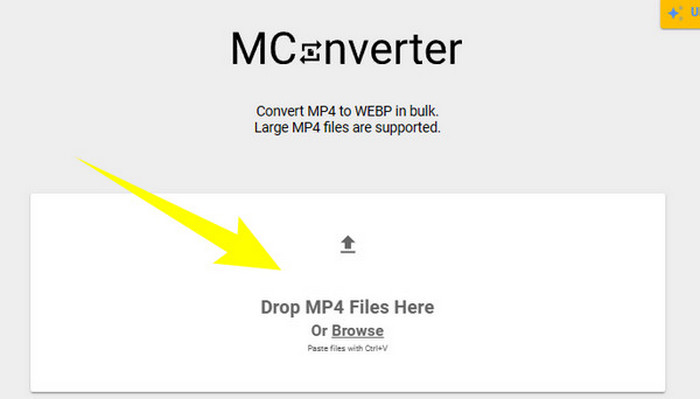
Langkah 1. Sebaik sahaja anda sampai ke laman web penukar tersebut, anda boleh lepaskan (drop) fail MP4 yang perlu anda tukar di situ.
Langkah 2. Selepas melepaskan fail, klik WebP daripada pilihan di bahagian kuning sebagai format output anda.
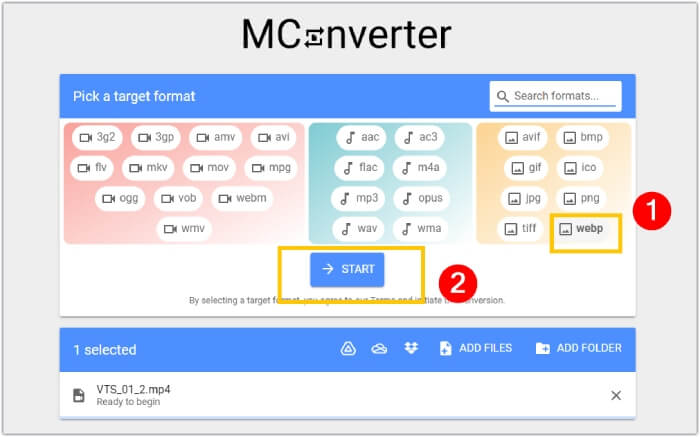
Langkah 3. Kemudian, klik butang START untuk memulakan proses penukaran.
3. Ezgif.com
Dengan alat Video to WebP daripada Ezgif, anda boleh menukar fail MP4 anda dengan mudah dan percuma kepada format WebP. Selain itu, dengan alat dalam talian ini, anda boleh melakukan tugas seperti menukar saiz, mengoptimumkan, memotong, dan menambah kesan pada fail multimedia anda. Tambahan pula, perisian penukar MP4 ke WebP ini popular kerana kesederhanaan dan kemudahannya untuk digunakan. Ia merupakan pilihan yang mudah bagi individu yang mahu menyunting atau menukar fail multimedia tanpa perlu menggunakan perisian yang rumit atau kepakaran teknikal. Oleh itu, ia juga boleh menjadi penukar media, penyunting, dan pembuat GIF anda dalam satu alat! Sementara itu, dengan menumpukan pada tujuan kita, berikut ialah langkah-langkah untuk menukarkan fail video kepada imej dengan Ezgif.
Langkah 1. Pada laman utama alat tersebut, pilih tab Video to WebP antara alat yang ditawarkannya. Muat naik fail MP4 menggunakan butang Upload File.
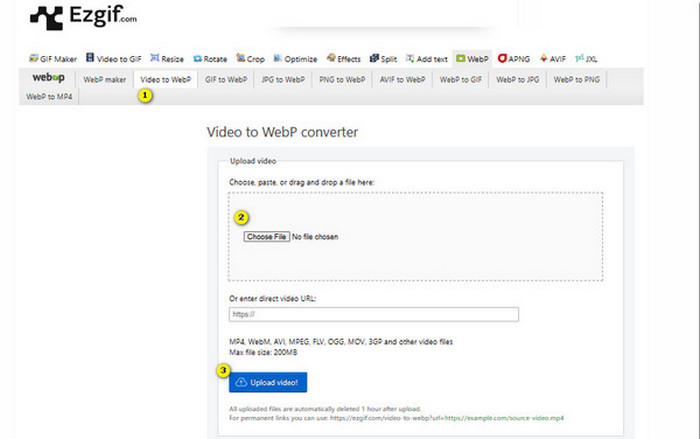
Langkah 2. Selepas itu, klik butang Upload Video untuk meneruskan.
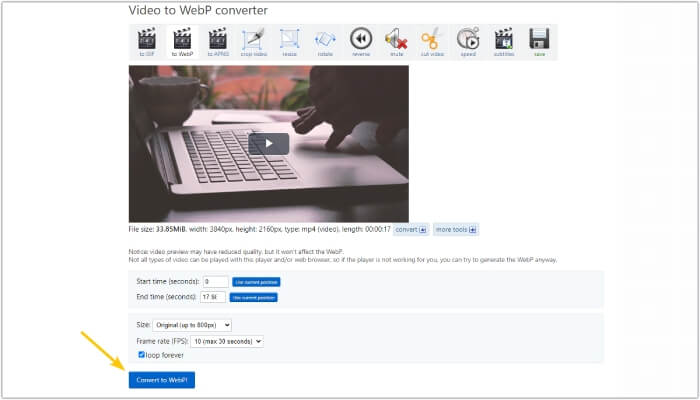
Langkah 3. Apabila fail dimuatkan, klik butang Convert to WebP dan tunggu sehingga proses selesai.
Bahagian 3. Petua Bonus: Cara Terbaik untuk Menukar MP4 kepada Pelbagai Format Video dan Audio
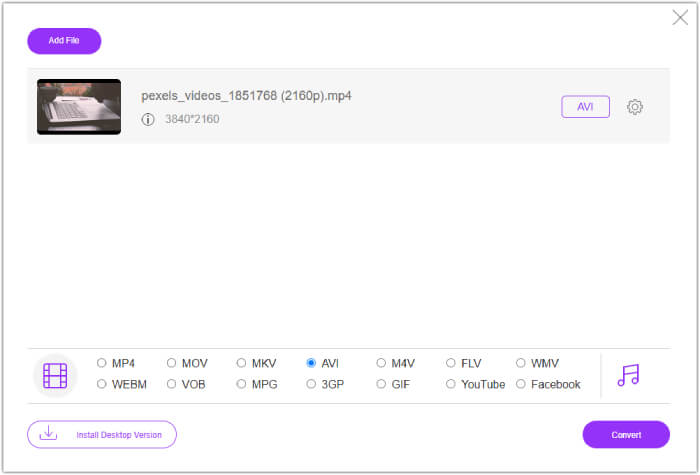
Kini setelah anda mengenali tiga penukar MP4 ke WebP di atas, kami berbesar hati untuk memberikan bahagian bonus di mana anda akan menemui cara terbaik untuk menukar MP4 anda kepada format video atau audio. FVC Free Video Converter Online juga merupakan alat berasaskan web yang menyediakan cara terbaik untuk menukar fail secara pukal dengan pantas. Ya, tidak seperti penukar dalam talian di atas, penukar video ini hadir dengan penukaran yang sangat pantas, yang membawa anda kepada proses penukaran yang lebih cepat. Selain itu, anda tidak perlu memuat turun fail yang telah ditukar, kerana ia berfungsi mengekspor fail secara automatik sejurus selepas penukaran. Apa yang lebih menarik lagi ialah ketiadaan iklan mahupun tera air, menjadikannya lebih lancar dan mudah digunakan.
Bahagian 4. Soalan Lazim tentang Penukaran MP4 dan WebP
Bolehkah saya benar-benar menukar MP4 kepada imej seperti WebP?
Penukaran video kepada imej tidak boleh dilakukan secara langsung. Sebaliknya, ia dilakukan melalui pengekstrakan bingkai.
Apakah faedah yang saya dapat daripada menukar video kepada WebP?
Berbanding format tradisional seperti JPEG dan PNG, menukar video kepada format WebP menawarkan beberapa kelebihan. Antaranya ialah saiz fail yang lebih kecil, yang dapat membantu meningkatkan masa pemuatan laman web.
Bolehkah saya menggunakan semua WebP dalam semua pelayar web?
Format WebP tidak disokong sepenuhnya dalam beberapa penyemak imbas lama. Walau bagaimanapun, kebanyakan penyemak imbas web moden menyokong imej WebP, termasuk Google Chrome, Opera, Firefox dan Edge.
Kesimpulannya
Catatan ini merupakan pengenalan kepada tiga penukar MP4 ke WebP yang berkesan yang boleh anda gunakan secara dalam talian. Selain itu, kami juga menyertakan penukar video-ke-video/audio dalam talian yang pasti akan meningkatkan proses penukaran media anda. Jadi, kongsikan ini dengan rakan-rakan anda dan peroleh pengalaman penukaran bertaraf profesional bersama-sama!
-
 Ketahui Pendekatan Paling Mudah untuk Menukar WebP kepada JPG dengan Pantas
 Ketahui Pendekatan Paling Mudah untuk Menukar WebP kepada JPG dengan Pantas
-
 Kaedah Sempurna untuk Menukar WebP kepada PNG Dengan Mudah
 Berpengetahuan tentang kaedah luar biasa untuk menukar WebP kepada PNG. Tiang panduan ini akan memberikan anda penukar imej yang paling berguna yang boleh anda cuba.
-
 Semakan Penukar MP4 Terbaik Dalam Talian dan Luar Talian
 Maksimumkan jangkauan dan kesan kandungan video anda dengan MP4 terbaik
