


 Video Converter Ultimate
 Perakam Skrin
 Pembaikan Video
3 Penukar MPG ke MP4 Dalam Talian & Luar Talian Anda Mesti Cuba untuk Menukar Fail MPG
MP4 ialah salah satu format fail yang paling biasa anda lihat di internet pada masa kini. Walaupun MPG dan MP4 mempunyai banyak persamaan, kedua-duanya juga mempunyai perbezaan. Dan jika anda ingin menukar fail MPG anda kepada format fail MP4, kami telah menguji penukar video yang popular pada masa kini. Selain itu, kami telah memilih penukar MPG ke MP4 terbaik untuk anda cuba!

Bahagian 1. Mengapa Anda Perlu Menukar MPG kepada MP4
Apakah kepentingan menukar MPG kepada MP4? Format MPG dan MP4 sering digunakan untuk video di internet. Tetapi apakah perbezaan di antara keduanya? MPG atau MPEG ialah format asal yang menggunakan codec MPEG. Ia merupakan pengekod yang menyediakan output video berkualiti tinggi.
Sebaliknya, MP4 ialah salah satu format fail video yang paling biasa dan menggunakan pemampatan video moden. Jadi yang mana lebih baik? Keupayaan pemampatan tinggi MP4 membolehkan fail dimampatkan dalam saiz yang lebih kecil daripada mana-mana format fail video lain seperti MPG.
Bahagian 2. 3 Cara Menukar MPG kepada MP4
Berikut ialah penukar video terbaik yang boleh anda gunakan dalam talian dan luar talian dan pelajari cara menukar MPG kepada MP4.
1. Gunakan Video Converter Ultimate
Video Converter Ultimate ialah penukar fail media yang membolehkan anda menukar fail MPG anda kepada format fail MP4 dengan mudah. Penukar ini mempunyai antara muka yang mudah digunakan tetapi menghasilkan output yang mengagumkan. Ia mempunyai ciri yang membolehkan anda mengedit, menambah baik, dan memampatkan fail MPG anda. Selain itu, anda boleh menukar berkelompok fail MPG kepada MP4 dengan penukar ini.
Video Converter Ultimate juga mempunyai pilihan di mana anda boleh kolaj imej dan video. Selain itu, jika anda ingin mencipta GIF, penukar ini mempunyai ciri itu. Di samping itu, apabila menggunakan penukar ini, anda boleh menukar fail besar tanpa merosakkan kualitinya. Walaupun cirinya kelihatan seperti profesional, anda boleh menggunakannya dengan cepat kerana ia hanya mudah digunakan.
Langkah 1. Untuk memuat turun penukar ini, klik butang muat turun di bawah. Ikuti proses pemasangan, kemudian buka aplikasi.
Muat Turun PercumaUntuk Windows 7 atau lebih baharuMuat Turun Selamat
Muat Turun PercumaUntuk MacOS 10.7 atau lebih baharuMuat Turun Selamat
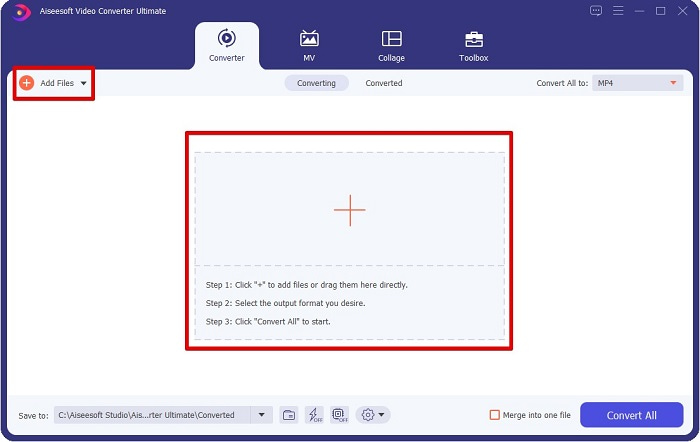
Langkah 2. Selepas melancarkan penukar, klik butang Add Files atau butang + untuk memuat naik fail MPG anda. Fail komputer anda akan dipaparkan, di mana anda akan mencari fail anda dalam folder. Kemudian klik Open untuk menambah fail anda ke dalam baris giliran.
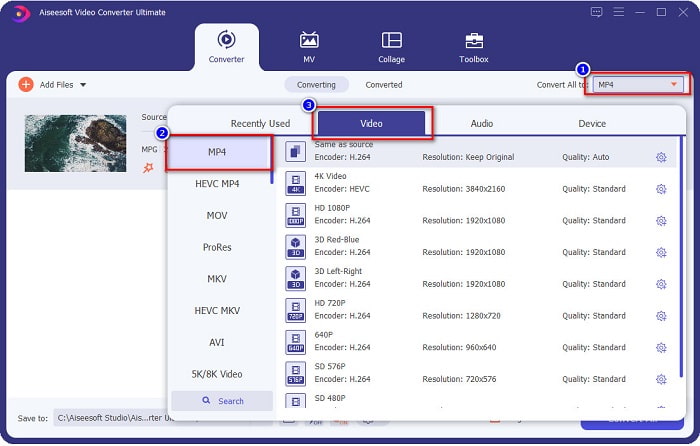
Langkah 3. Untuk menukar format fail MPG anda, klik Convert All to di sudut kanan atas skrin anda. Selepas anda melihat senarai format fail, pilih format fail MP4.
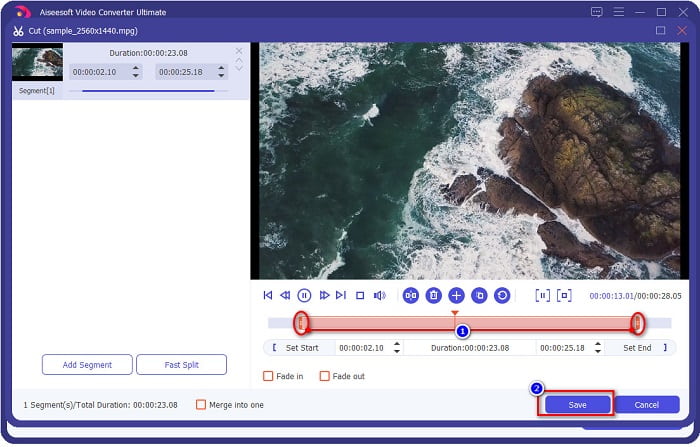
Jika anda mahu memendekkan durasi video anda, klik butang scissor untuk memangkas video anda. Dengan menyeret butang play head, anda boleh melaraskan panjang video anda. Untuk selesai, klik Save.
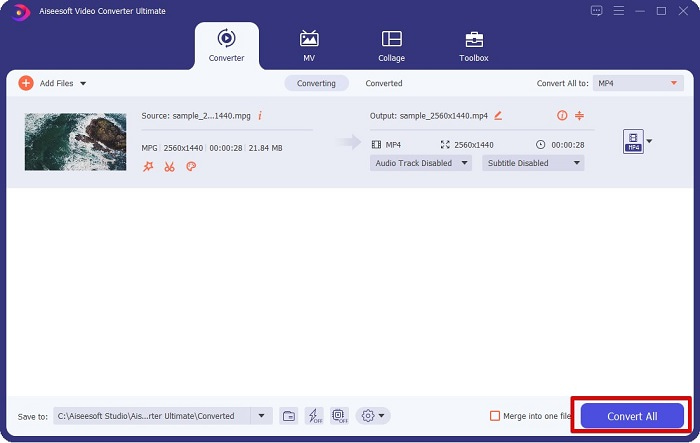
Langkah 4. Apabila anda telah memilih format fail yang anda mahu, klik Convert All untuk menukar fail MPG anda kepada fail MP4. Tunggu seketika, kemudian fail MPG anda akan ditukar kepada fail MP4. Dengan langkah mudah tersebut, anda telah menukar fail MPG anda kepada MP4 dengan mudah.
2. Gunakan Penukar Dalam Talian Percuma
FVC Free Online Video Converter membolehkan anda menukar fail MPG anda kepada format fail MP4 secara percuma tanpa pendaftaran. Ia ialah penukar video dalam talian percuma yang membolehkan anda menukar tanpa had. Selain itu, anda boleh menukar fail bersaiz besar dalam talian dengan penukar ini. Anda juga tidak perlu memuat turun apa-apa kerana anda boleh mengaksesnya secara dalam talian. Namun, kelemahannya ialah ia bergantung kepada internet, bermakna kelajuan penukaran anda bergantung pada sambungan internet. Walau bagaimanapun, ramai pengguna telah menggunakan penukar ini, dan ia terbukti sebagai penukar video yang hebat.
Berikut ialah senarai langkah untuk menukar dalam FVC Free Online Video Converter:
Langkah 1. Pergi ke pelayar anda dan cari FVC Free Online Video Converter.
Langkah 2. Apabila anda sudah berada di laman web, klik Add Files to Convert. Satu kotak teks akan muncul, di mana anda perlu memuat turun pelancar terlebih dahulu. Apabila pelancar telah dimuat turun, anda akan diarahkan ke fail anda, pilih fail MPG yang ingin anda tukar.
Muat turun Versi Desktop untuk menukar fail secara kelompok.
Langkah 3. Selepas memilih fail MPG anda, anda akan melihat antara muka pertama untuk melihat senarai set format video. Pilih MP4 sebelum anda menukar fail MPG anda kepada MP4 dalam talian.
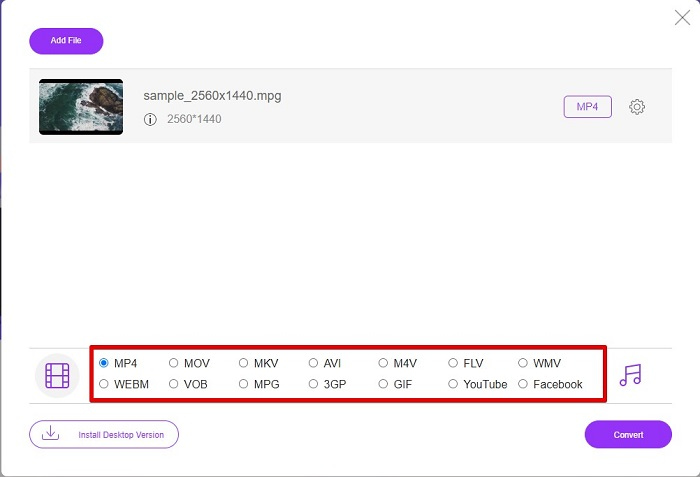
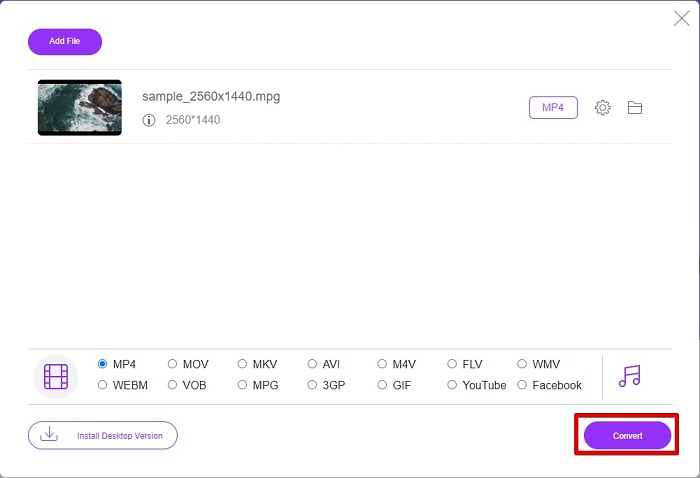
Langkah 4. Klik butang Convert untuk memulakan penukaran. Satu tab baharu akan muncul di mana anda akan memilih lokasi untuk menyimpan fail yang telah ditukar dalam fail komputer anda, kemudian klik select folder.
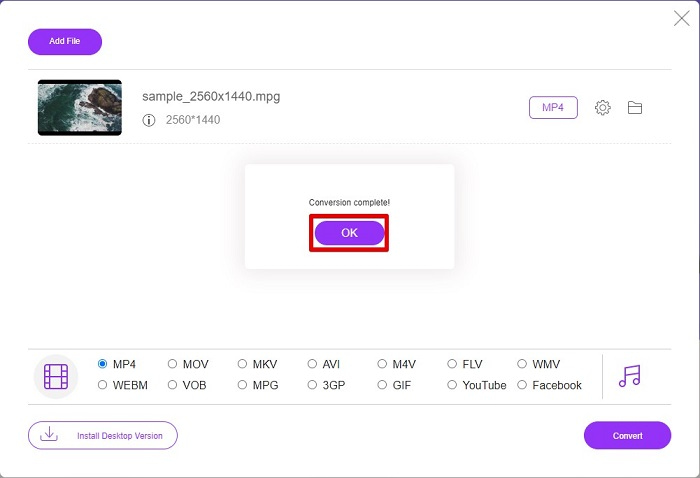
Langkah 5. Akhir sekali, fail anda akan mula ditukar; apabila selesai ditukar, klik OK untuk menghabiskan proses. Itu sahaja! Anda selesai menukar dengan mudah seperti 1-2-3!
3. Gunakan ConvertFiles.com
ConvertFiles.com ialah apl penukar dalam talian percuma untuk menukar fail MPG anda kepada MP4. Ia membolehkan anda menukar format fail, sehingga 300 jenis format fail. Dan jika anda sedang mencari penukar MPG ke MP4 dalam talian yang membolehkan anda menukar dokumen, lukisan, video, pembentangan dan banyak lagi. Walau bagaimanapun, dalam menggunakan penukar dalam talian ini, anda akan menghadapi banyak iklan yang mengganggu. Namun begitu, penukar dalam talian ini masih berbaloi untuk dicuba dan telah terbukti menjanjikan.
Berikut ialah cara anda menukar fail MPG anda kepada format fail MP4:
Langkah 1. Dalam pelayar anda, cari ConvertFiles.com untuk terus melawat laman web.
Langkah 2. Pilih fail MPG anda dengan mengklik butang segi empat tepat atau butang Browse di sebelah Choose a local file. Cari fail MPG anda, kemudian pilihnya.
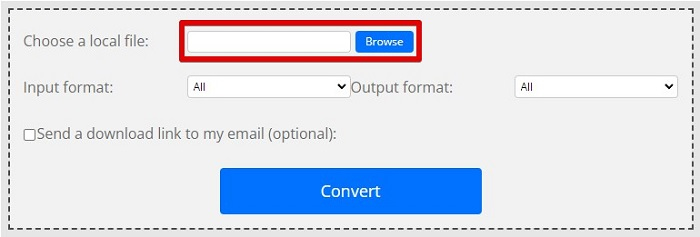
Langkah 3. Selepas memilih fail MPG yang anda mahu tukar, pada bahagian output format, pilih format .mp4 dengan mengklik butang drop-down.
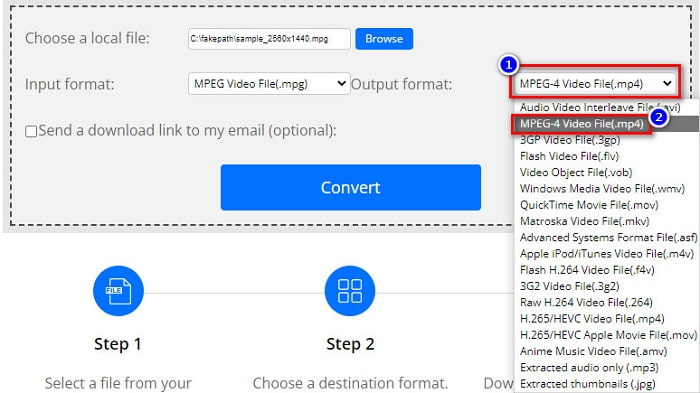
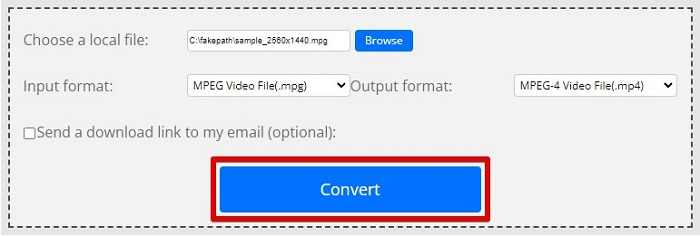
Langkah 4. Setelah anda memilih format fail yang dikehendaki, anda boleh menukar fail anda dengan mengklik Convert.
MPG lwn MP4
Dibuat oleh Moving Picture Experts Group (MPEG), MPG ialah format video digital biasa untuk menyimpan maklumat video, audio dan metadata. Ia agak berguna apabila mencipta filem untuk dikongsi di Internet. Fail tersebut dalam MPG biasanya mengandungi pemampatan video/audio MPEG-1 atau MPEG-2.
Dikeluarkan oleh Moving Picture Experts Group (MPEG) pada tahun 2001, format MP4 boleh membantu anda menyimpan data video, audio, sari kata dan imej dalam trek yang berasingan. Ia adalah singkatan untuk MPEG-4 Bahagian 14. Selain itu, ia adalah salah satu format paling popular yang digunakan untuk penstriman dan perkongsian video.
Bahagian 3. Soalan Lazim tentang MPG dan Format MP4
Bolehkah saya menukar fail MPG kepada MP4 tanpa kehilangan kualitinya?
ya. Video Converter Ultimate membolehkan anda menukar MPG anda kepada format MP4, tanpa kehilangan kualitinya, walaupun saiz failnya.
Di manakah saya boleh memainkan fail MPG?
Fail MPG disokong secara meluas. Oleh itu, banyak pemain media boleh membuka format fail ini, termasuk Microsoft Windows Media Player dan VideoLAN VLC Media Player. Anda boleh menyemak artikel ini untuk maklumat lanjut. 4 Pemain MPG/MPEG Terbaik untuk Windows/Mac/Android/iPhone [2021]
Bolehkah saya menukar MP4 kepada MPG?
ya. Anda boleh menukar format fail MPG kepada MP4 menggunakan penukar fail yang telah kami senaraikan di atas.
Kesimpulannya
Penukar yang kami senaraikan di atas terbukti sebagai penukar yang boleh dipercayai. Ia mudah digunakan dan percuma! Tetapi jika anda mahu penukar fail yang boleh menukar fail MPG anda kepada format fail MP4, dan mempunyai ciri hebat yang boleh menambah baik fail anda, maka Video Converter Ultimate ialah pilihan terbaik. Selain itu, jika anda mahu penukar dalam talian yang bebas iklan dan juga boleh menukar fail besar dengan mudah, cubalah FVC Free Online Converter.
-
 3 Cara Mudah tentang Cara Menukar MPG kepada MOV pada Mac/Windows/Online Anda
 Ingin menukar fail MPG anda dan kemudian mengangkutnya pada iOS, iPod, iPad atau Mac anda? Artikel ini akan membantu untuk memikirkan cara untuk menukar MPG kepada MOV dengan langkah-langkah.
-
 Bagaimana untuk Menukar MPG kepada FLV Tanpa Kehilangan Kualiti [Terbukti]
 Anda mesti menonton filem kegemaran anda pada pemain media ini, tetapi ia tidak menyokong MPG. Cuba tukar fail MPG anda kepada FLV menggunakan penukar ini yang diperkenalkan oleh artikel ini.
-
 2 Ultimate MPG Converters untuk Menukar MPG kepada WMV secara Percuma
 Adakah anda ingin menukar MPG kepada WMV percuma? Dalam kes itu, anda bertuah kerana kami mendapati terdapat dua alat yang boleh anda gunakan untuk menukar fail MPG anda.

