


 Video Converter Ultimate
 Perakam Skrin
 Pembaikan Video
 Muat Turun Selamat
Kaedah Percuma & Dalam Talian untuk Menukar RMVB ke MP4
RMVB (RealMedia Variable Bitrate) ialah fail video RealMedia yang tidak disokong oleh semua aplikasi. Ramai orang ingin menukar format fail tersebut daripada RMVB ke MP4 supaya mudah dimainkan pada telefon bimbit. Panduan ini akan menunjukkan tiga cara dalam talian dan percuma untuk menukar fail RMVB kepada MP4 dengan pantas supaya anda boleh terus menikmati video anda tanpa sebarang kesulitan.

Bahagian 1. Cara Menukar RMVB ke MP4 dengan RMVB ke MP4 Converter
Untuk menukar RMVB ke MP4 pada Windows 10 atau Mac anda, penukar RMVB ke MP4 adalah cukup pantas dan boleh dipercayai. Free RMVB to MP4 Video Converter ialah penukar video percuma yang berfungsi untuk membuat penukaran pantas daripada RMVB ke MP4. Ia juga menyokong penukaran RMVB ke AVI, FLV, MOV atau format lain. Di bawah ialah langkah-langkah untuk menukar RMVB ke MP4.
Muat Turun PercumaUntuk Windows 7 atau versi lebih baharuMuat Turun Selamat
Muat Turun PercumaUntuk MacOS 10.7 atau versi lebih baharuMuat Turun Selamat
Langkah 1. Sebelum bermula, anda perlu memuat turun dan memasang perisian percuma ini pada komputer anda. Kemudian, lancarkan Free RMVB to MP4 Converter, dan import fail RMVB ke dalam program dengan mengklik butang Add File(s). Selain itu, ia membenarkan anda membuat penukaran kelompok sekali gus supaya anda boleh menukar berbilang fail RMVB serentak.
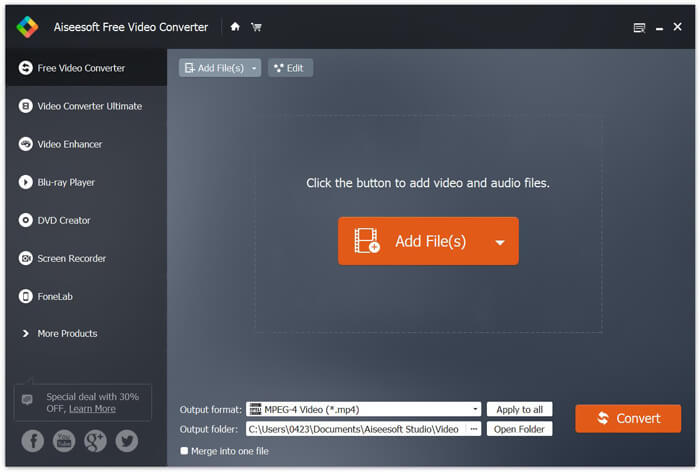
Langkah 2. Selepas menambah fail anda ke dalam program, pergi ke Output format dan kemudian pilih format MP4.

Langkah 3. Klik butang Convert. Tunggu beberapa minit, dan anda akan memperoleh fail MP4 yang dikehendaki.
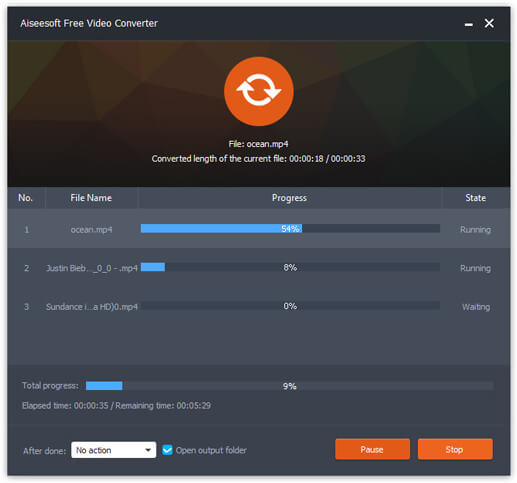
Apabila anda mendapat fail MP4, anda boleh memainkannya pada komputer atau peranti mudah alih anda. Selain itu, anda juga boleh menggunakan Free RMVB to MP4 Converter ini untuk menukar RM ke MP4, atau menukar WMV ke MP4.
Bahagian 2. Cara Menukar RMVB ke MP4 dengan VLC
VLC juga berfungsi sebagai alat penukaran video praktikal, dan anda boleh menukar fail RMVB anda menjadi MP4 dengan kualiti tinggi. Mari lihat bagaimana menggunakan VLC untuk melakukan pekerjaan ini.
Langkah 1. Mula-mula, anda perlu memuat turun dan memasang program VLC Media Player pada komputer anda, kemudian jalankannya.
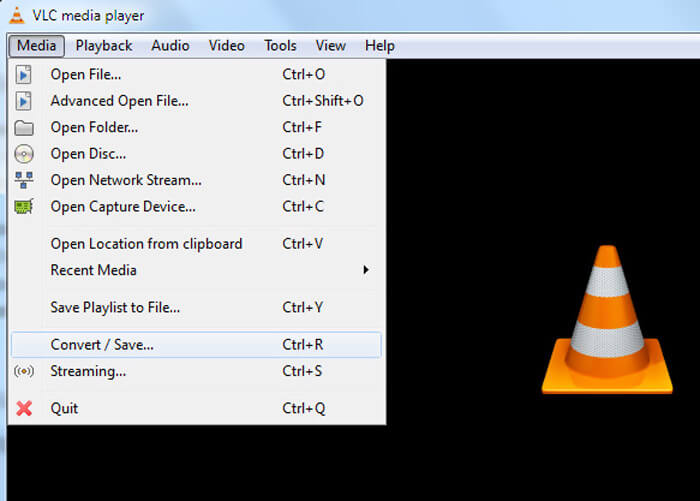
Langkah 2. Pergi ke Media tab, kemudian pilih Convert/Save untuk meneruskan.
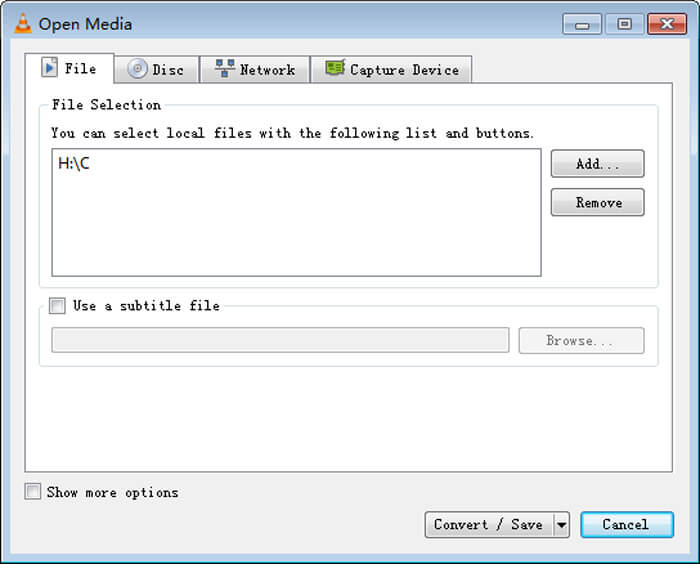
Langkah 3. Apabila anda melihat tetingkap Open Media, anda perlu menambah fail RMVB anda ke VLC dengan mengklik butang Add… daripada pilihan File. Kemudian, klik butang Convert/Save di bahagian bawah tetingkap.
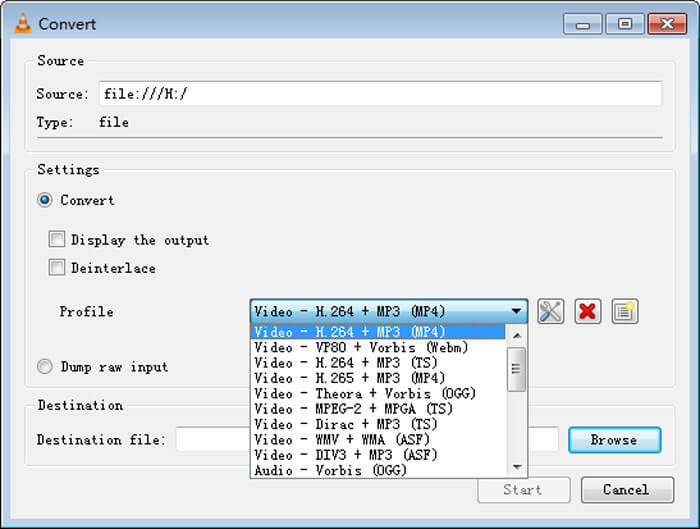
Langkah 4. Seterusnya, anda akan dibawa ke tetingkap Convert. Di sini anda perlu mencari Settings, pergi ke Profile, dan kemudian pilih MP4 sebagai format keluaran daripada menu juntai bawah. Akhir sekali, klik Start untuk menukar RMVB anda ke MP4 supaya mudah dimainkan.
Bahagian 3. Cara Menukar RMVB ke MP4 Dalam Talian
Penukar video dalam talian ini juga menyokong penukaran video RMVB ke MP4 dengan kelajuan yang pantas. Free Online Video Converter ialah penukar video berasaskan web yang boleh menukar mana-mana fail video atau audio popular kepada MP4, MOV, FLV, AVI, MP3, AAC dan banyak lagi secara percuma. Ia membolehkan pengguna menukar fail daripada RMVB ke MP4 melalui pelayar dengan mudah.
Langkah 1. Layari https://www.free-videoconverter.net/free-online-video-converter/ dan klik butang Add Files to Convert untuk mengaktifkan pelancar.
Muat turun Versi Desktop untuk menukar fail secara kelompok.

Langkah 2. Selepas itu, import fail RMVB anda ke alat dalam talian ini. Kemudian, pilih format MP4 di bawah tab Video. Apabila anda bersedia untuk membuat penukaran, klik butang Convert untuk memulakan penukaran. Setelah penukaran selesai, fail yang telah ditukar akan disimpan ke komputer anda secara automatik.

RMVB lwn MP4
RMVB, variasi baharu format Real Media (.RM) standard, ialah format fail video Real Media yang dimampatkan menggunakan kadar bit berubah-ubah. Ia adalah format popular untuk filem dan anime Asia. Fail RMVB bersaiz lebih kecil dan mempunyai kadar bit yang lebih rendah tetapi kualiti yang lebih baik.
Dikeluarkan oleh Moving Picture Experts Group (MPEG) pada tahun 2001, format MP4 boleh membantu anda menyimpan data video, audio, sari kata dan imej dalam trek yang berasingan. Ia adalah singkatan untuk MPEG-4 Bahagian 14. Selain itu, ia adalah salah satu format paling popular yang digunakan untuk penstriman dan perkongsian video.
Bahagian 4. Soalan Lazim RMVB hingga MP4
Apakah fail RMVB?
RMVB (RealMedia Variable Bitrate) adalah format fail video Real Media menggunakan kadar bit pemboleh ubah. Dulu popular untuk menyebarkan anime Asia, filem, episod, torrent, dll di web kerana ukuran failnya lebih kecil dan kualitinya jauh lebih baik.
Bagaimana cara membuka fail RMVB?
RealPlayer menyokong pemutaran fail RMVB di Windows, Mac OS X, dan Linux. Atau anda boleh menggunakan VLC untuk memainkan fail RMVB.
Bolehkah HandBrake menukar RMVB ke MP4?
HandBrake adalah alat yang bagus untuk menukar video untuk berfungsi pada sejumlah peranti yang disokong. Ini adalah pilihan terbaik bagi sesiapa sahaja untuk mengubah RMVB menjadi MP4.
Jadi, begitulah cara anda menukar fail RMVB ke MP4. Adakah anda menghadapi masalah mengikuti langkah-langkah yang dinyatakan di atas? Jangan ragu untuk memberitahu kami pendapat anda.
-
 3 Langkah Mudah Membakar Video _TS Files / Folder ke DVD pada Mac / Windows
 Bagaimana cara menukar dan membakar fail TS ke cakera DVD? Panduan langkah demi langkah ini akan menunjukkan kepada anda cara menyalin fail TS dan folder ke DVD pada Windows / Mac sehingga anda dapat menonton fail TS pada pemain DVD atau TV.
-
 6 Cara Mudah untuk Menukar TS ke AVI / MKV / MOV / WMV pada Windows / Mac
 Ingin menukar fail TS ke AVI / MKV / MOV / WMV dengan cepat? Artikel ini menunjukkan penukar video dalam talian dan luar talian dengan panduan lengkap. Mungkin anda boleh mendapatkan penukar TS percuma terbaik di sini.
-
 Cara Menukar MP4 ke M4A pada Windows / Mac (Percuma & Dalam Talian)
 Bagaimana cara menukar MP4 ke M4A dalam talian? Bolehkah saya mengekstrak audio dari fail MP4? Baca catatan ini, dan anda akan mendapat semua jawapan mengenai penukaran dari MP4 ke M4A.

