


 Video Converter Ultimate
 Perakam Skrin
 Pembaikan Video
 Muat Turun Selamat
Cara Percuma Menukar SWF ke MP4 dalam 3 Cara
Untuk menukar salah satu format video yang paling sukar, SWF, kepada MP4, anda boleh menggunakan 3 teratas percuma penukar SWF ke MP4 di sini.

SWF ialah format fail Adobe Flash yang digunakan untuk multimedia, grafik vektor dan pelayar yang menggunakan ActionScript. Adalah mudah untuk membuka fail SWF melalui Adobe Flash Player. Namun begitu, hanya pemalam terhad seperti Adobe Flash Player dan Adobe Integrated Runtime yang boleh memainkan fail SWF yang dijana oleh Adobe dan program pihak ketiga yang lain. Untuk memainkan fail SWF pada lebih banyak pemain, anda perlu menukar SWF ke MP4, format video paling popular yang disokong oleh hampir semua pemain.
Setelah mencuba beberapa kaedah dan aplikasi yang berbeza, dan tampil dengan senarai 3 teratas percuma ini.
Bahagian 1. Penukar Video Percuma - Tukarkan SWF ke MP4 pada PC / Mac
SWF, sebagai format web, dihasilkan dengan kualiti animasi dan codec audio yang hebat yang dapat dimuat di mana saja. Akibatnya, sukar untuk mencari perisian yang dapat membuka atau mengedit fail SWF tanpa produk Adobe. Masih terdapat penukar SWF ke MP4 percuma.
Penukar Video Percuma ialah penukar fail SWF percuma, yang boleh menukar fail SWF kepada MP4, MOV, AVI, WMV, MKV dan lain-lain, pada komputer Windows dan Mac.

Penukar FLV ke MP4 percuma
30000+ Muat turun- Batch menukar SWF dan FLV menjadi MP4 secara percuma pada PC dan Mac.
- Tukarkan SWF menjadi MP4 di H.264, MPEG4 dan banyak lagi.
- Tukar SWF ke format lain seperti MOV, AVI, MP3, MKV, dll.
- Edit fail SWF sebelum mengeksport fail MP4.
Muat Turun PercumaUntuk Windows 7 atau lebih baharuMuat Turun Selamat
Muat Turun PercumaUntuk MacOS 10.7 atau lebih baharuMuat Turun Selamat
Kelebihan
- Batch menukar SWF ke MP4.
- Menyokong pelbagai format.
- Tukar SWF ke peranti.
Keburukan
- Ciri penyuntingan lemah.
Langkah menukar SWF ke MP4 cukup mudah.
Langkah 1. Tambah fail SWF
Muat turun perisian penukaran SWF ke MP4 percuma di komputer dengan mengklik pautan muat turun di atas. Lancarkan dengan segera.
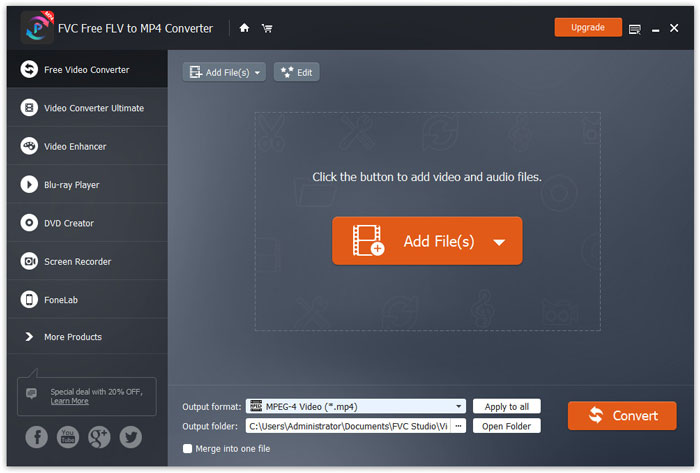
Klik butang Add Files(s) untuk memuatkan satu atau lebih fail SWF ke dalam program ini.
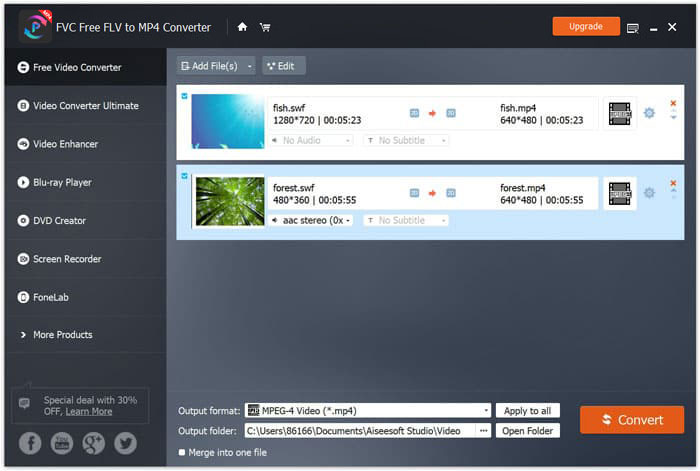
Langkah 2. Suai MP4
Pilih MP4 daripada pilihan lungsur Output format di bahagian bawah. Di sini, ia juga memberikan anda pilihan untuk memilih peranti yang boleh membuka fail SWF seperti PSP, Avid Media Composer, Adobe Premiere, Apple iPhone, Samsung, PS3/4, Xbox dan lain-lain.

Selain itu, ia membolehkan anda menyesuaikan codec video, resolusi, bitrate, dan lain-lain, dengan mengklik ikon gear di sebelah output MP4.
Langkah 3. Eksport SWF ke MP4
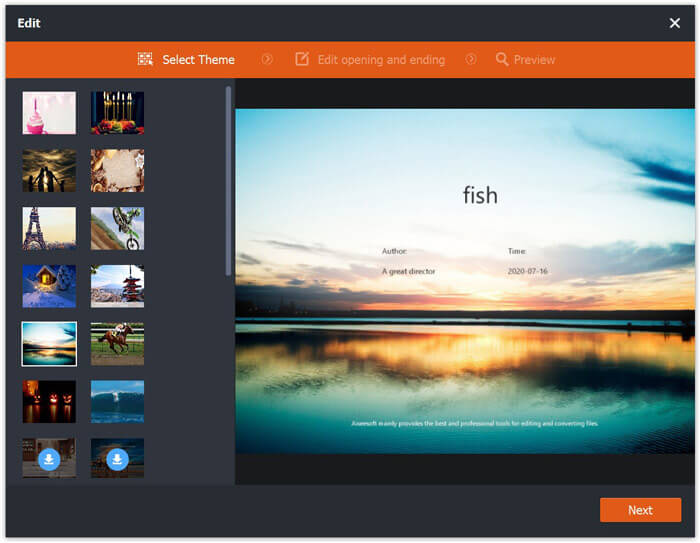
Sebagai pilihan, butang Edit pada antara muka utama membolehkan anda menyunting fail SWF untuk menambah tema pembukaan dan penutup.
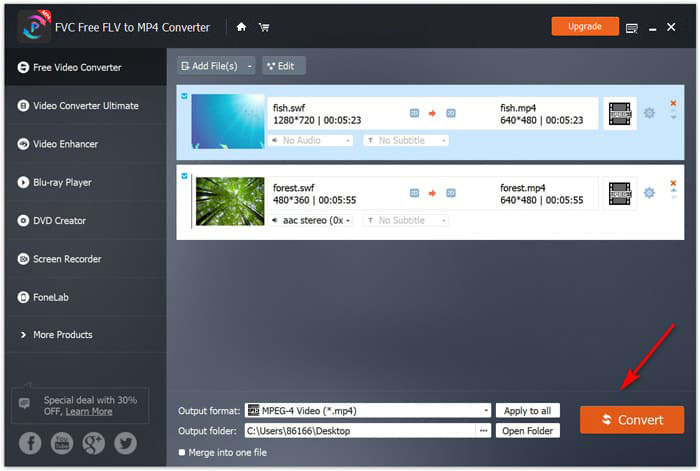
Selepas semuanya disediakan dengan baik, pilih destinasi di bahagian bawah untuk menyimpan fail MP4 yang telah ditukar, dan klik sahaja butang Convert di penjuru kanan bawah untuk menukar fail SWF kepada video MP4 serta-merta.
Bahagian 2. Penukar Video Dalam Talian Percuma - Tukar SWF ke MP4 Dalam Talian
Tidak mahu memasang perisian untuk menukar SWF ke MP4? Cubalah penukar video dalam talian percuma.
Penukar Video Dalam Talian Percuma ialah alat penukaran dalam talian untuk menukar SWF kepada MP4 melalui pelayar. Ia menukar SWF dan FLV kepada MP4 dan format popular lain seperti MP4, AVI, MOV dan sebagainya. Selain itu, ia boleh mengekstrak audio daripada fail SWF untuk mengekalkan muzik latar.
Kelebihan
- Tukarkan SWF ke Facebook dan YouTube.
- Buat GIF dari fail SWF.
- Sesuaikan resolusi video, codec, dll.
Keburukan
- Kekurangan ciri penyuntingan.
Berikut adalah panduan untuk menggunakan penukar video dalam talian percuma untuk menukar SWF ke MP4.
Langkah 1. Muat naik fail SWF dalam talian
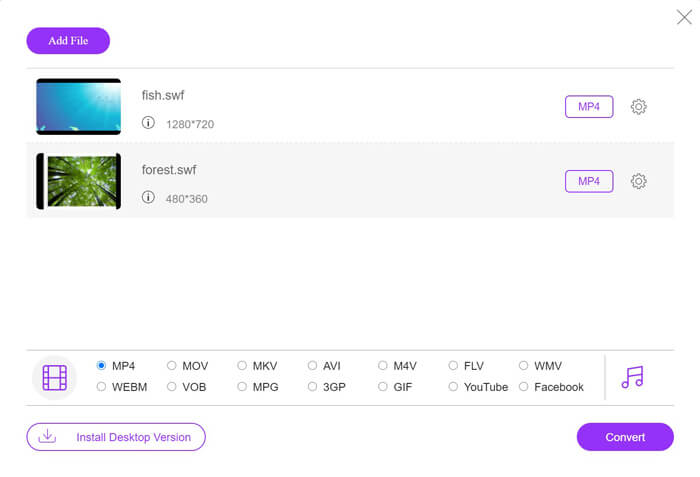
Buka penukar SWF ke MP4 dalam talian percuma ini melalui pelayar anda. Klik butang Add Files to Convert, dan satu tetingkap gesaan akan meminta anda memuat turun dan memasang pelancar. Ikut seperti yang diminta, dan satu tetingkap sumber terbuka akan dipaparkan selepas pemasangan berjaya. Pilih fail SWF yang anda ingin tukar kepada MP4 dari komputer tempatan ke laman dalam talian ini.
Langkah 2. Pilih MP4
Tandakan kotak pilihan MP4 di bahagian bawah. Selain itu, ia juga menyediakan format output lain seperti AVI, VOB, FLV, M4V, MKV, GIF, YouTube, MP3, WMA dan lain-lain. Ikon Settings di sebelah MP4 membolehkan anda melaraskan pengekod, kadar bingkai, resolusi, bit kadar dan parameter lain.

Langkah 3. Tukar SWF ke MP4
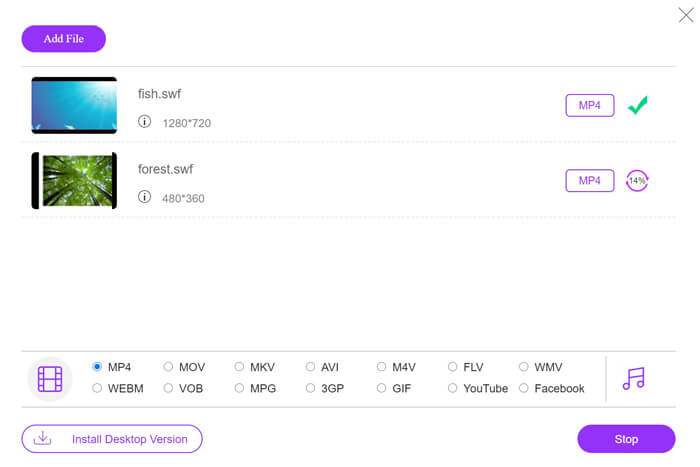
Selepas semua tetapan selesai, klik butang Convert untuk memilih lokasi bagi menyimpan fail MP4 yang telah ditukar. Kemudian klik butang Convert sekali lagi untuk menukarkan SWF kepada MP4 dengan serta-merta.
Bahagian 3. VLC - Tukar SWF menjadi MP4 pada Windows / Mac
VLC terkenal dengan pemain media sumber terbuka untuk memainkan SWF, FLV, MP4, dan format lain. Walau bagaimanapun, terdapat fungsi tersembunyi yang mungkin anda terlepas, dan menukar SWF ke MP4 adalah salah satunya. Memandangkan ia tidak dirancang untuk video converter, VLC berfungsi sedikit berbeza untuk menukar SWF ke MP4.
Kelebihan
- Tukarkan SWF ke MP4 secara pukal.
- Tukar SWF ke MP4 secara percuma.
Keburukan
- Tidak mesra untuk digunakan sebagai penukar SWF.
- Kelajuan menukar perlahan.
Tutorial ringkas ini menunjukkan kepada anda cara melakukan transkod SWF ke MP4 di VLC.
Langkah 1. Tambah fail SWF ke dalam VLC
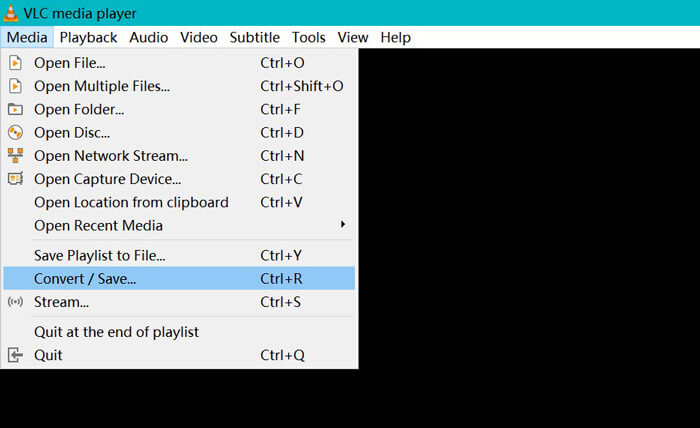
Jalankan VLC pada komputer anda (Windows, Mac, Linux atau Chrome). Cari menu Media di bahagian atas dan pilih Convert / Save daripada pilihan lungsur turun.
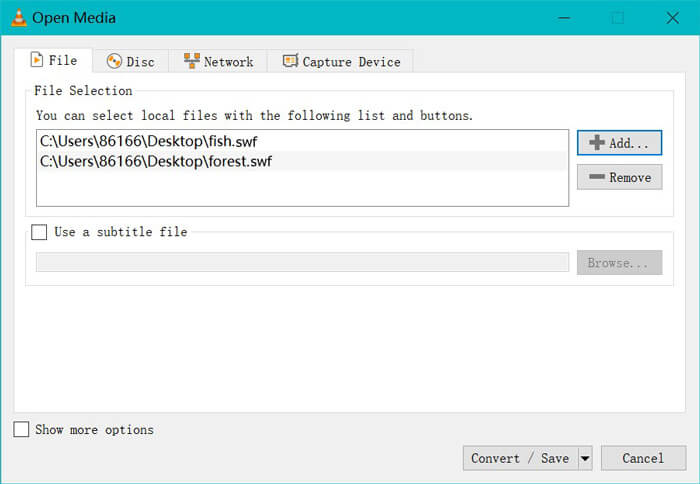
Klik butang Add di bahagian kanan untuk memuatkan fail SWF pada komputer anda.
Langkah 2. Pilih MP4
Pilih Convert daripada senarai lungsur Convert / Save di bahagian bawah.
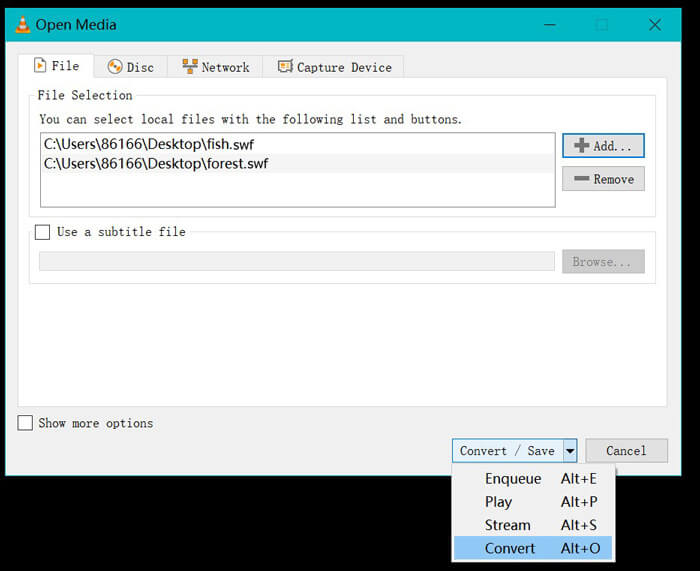
Kemudian anda akan dibawa ke tetingkap Convert, di mana anda mencari MP4 daripada pilihan lungsur Profile.
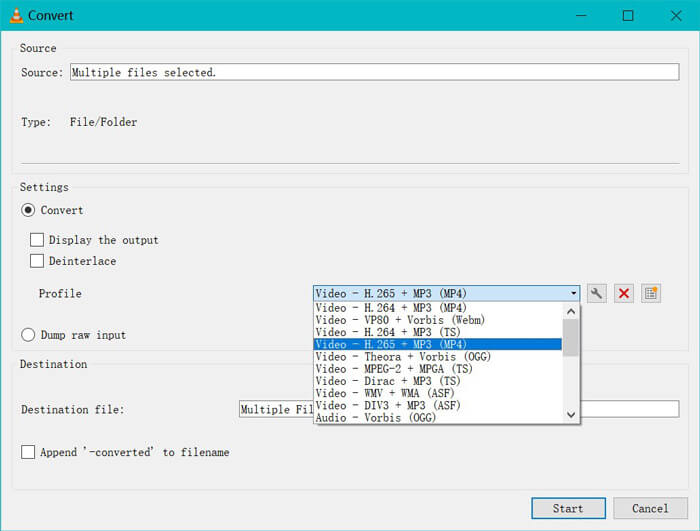
Ikon tetapan di sebelah output MP4 memungkinkan anda menyesuaikan enkapsulasi, codec video, codec audio, dan sari kata.
Langkah 3. Tukar SWF ke MP4 dalam VLC
Kemudian pilih destinasi untuk menyimpan fail MP4 yang ditukar klik butang Mula untuk mula menukar SWF menjadi MP4 melalui VLC.
Anda dapat mengetahui kemajuan dalam pemain VLC. Penukaran VLC menggunakan ciri rakaman untuk menyelesaikan tugas penukaran, sehingga kecepatan menukar perlahan.
Bahagian 4. Soalan Lazim SWF hingga MP4
Adakah fail SWF masih digunakan?
Adobe secara rasmi menghentikan SWF, yang menunjukkan ia tidak akan disokong atau dikembangkan lagi. Sokongan video HTML5 dan animasi CSS3 telah menggantikan SWF.
Adakah PS3 akan menyokong fail SWF?
Ya. Konsol Sony PlayStation Portable boleh memainkan fail SWF terhad dalam penyemak imbas web Sony, bermula dengan versi firmware 2.71. Kedua PS3 dapat menjalankan fail SWF melalui penyemak imbas Internet mereka.
Mengapa video MP4 saya tidak berfungsi dalam VLC pada telefon Android saya?
Ciri penukaran dalam VLC hanya tersedia untuk komputer. Sekiranya anda menggunakan VLC pada peranti Android atau iOS, ia tidak membolehkan anda menukar SWF menjadi MP4.
Kesimpulannya
Catatan ini mengumpulkan 3 sumber terbuka terbuka SWF ke MP4 penukar, sehingga anda dapat mengubah SWF menjadi MP4 untuk dimainkan di lebih banyak peranti. Kami juga menyenaraikan kebaikan dan keburukan penukar percuma tersebut untuk rujukan anda.
Penukar SWF ke MP4 percuma mana yang menjadi kegemaran anda?
Atau adakah anda mempunyai cadangan yang lebih baik?
Bagaimanapun, beritahu saya dengan meninggalkan komen anda di bawah.
-
 MOV VS MP4 - Mana Yang Lebih Baik
 MOV VS MP4, yang manakah lebih baik? Catatan ini memberitahu perbezaan antara MP4 dan MOV, sehingga anda dapat memperoleh pilihan yang lebih baik untuk digunakan untuk fail video anda.
-
 7 Cara Menukar MP4 ke AVI pada Windows / Mac / iPhone / Android / Online
 Ingin mendapatkan semua cara percuma untuk menukar video AVI ke MP4? Anda tidak boleh ketinggalan artikel ini. Inilah 7 cara untuk menukar fail AVI ke MP4 secara percuma di Windows, Mac, iPhone, Android dan dalam talian.
-
 Cara Menukar Fail MTS ke MP4
 Tidak tahu bagaimana menukar fail MTS ke MP4? Dalam panduan ini, anda akan menemui 6 cara percuma dan mudah untuk menukar format MTS ke MP4 pada Windows atau Mac tanpa kehilangan kualiti.
