


 Video Converter Ultimate
 Perakam Skrin
 Pembaikan Video
Temui Cara untuk Memainkan Fail MKV pada PS4
Bukan sahaja Xbox One S menyokong main balik filem. Kini PS4 juga cuba mengikut trend tersebut. Dengan penggunaan kabel USB dan melalui DLNA, PS4 kini boleh memainkan MKV, MP4, AVI dan banyak lagi. Ini bermaksud MKV termasuk dalam fail yang boleh anda mainkan. Untuk melihat senarai penuh format yang disokong, lawati laman web rasmi PS4. Selain itu, anda tidak akan terus membaca artikel ini jika anda tidak berminat untuk memainkan fail MKV pada PS4. Teruskan membaca, apabila anda meneruskan, anda akan menemui cara bagaimana anda boleh memainkan MKV pada PS4.

Bahagian 1. Bolehkah Semua Fail MKV Dimainkan pada PS4?
Bolehkah saya Mainkan Fail MKV pada PS4? Pasti anda boleh. Format fail MKV disokong oleh PS4. Tetapi tidak semua fail MKV boleh dimainkan dengan betul. Anda mungkin mengalami kegagalan dalam memainkannya. Ini kerana anda perlu memenuhi standard yang ditetapkan oleh PS4. Kebanyakannya, H.264/MPEG-4 AVC disokong. Peraturan yang sama dikenakan jika anda akan memainkan fail MKV daripada pemacu USB. Manakala untuk audio MP3, AAC LC, AC-3 disokong. Kebanyakan format tersebut ialah format Dolby Digital. Jika anda fikir anda telah memenuhi piawaian anda boleh meneruskan langkah-langkah tentang cara bermain MKV pada PS4 secara langsung.
Langkah 1. Muat turun dan pasang DivX Media Server dan lancarkan pemain tersebut. Kemudian aktifkan perkongsian pada komputer anda.
Langkah 2. Muat naik atau import fail MKV ke pelayan.
Langkah 3. Sebelum beralih ke langkah seterusnya, pastikan komputer dan PS4 kedua-duanya disambungkan pada rangkaian Wi-Fi yang sama. Seterusnya, muat turun dan pasang pemain media DivX pada PS4 anda. Selepas itu, buka aplikasi pemain media pada PS4 dan pilih pelayan media DivX daripada senarai peranti yang akan dipaparkan.
Langkah 4. Akhir sekali, cari Video kemudian tandakan video yang ingin anda mainkan dan mula strim.
Bahagian 2. Panduan Langkah demi Langkah tentang Cara Main MKV pada PS4 daripada USB
Sementara itu, jika anda menggunakan Storan USB pastikan ia diformatkan sama ada FAT atau exFAT, atau ia tidak akan dikesan. Jika anda rasa anda sudah bersedia dan pemacu denyar itu serasi, lihat panduan langkah demi langkah di bawah.
Langkah 1. Hidupkan PS4 dan masukkan USB. Pergi ke Menu utama. Sekarang, pilih Video dan terus cari nama Pemacu USB anda.
Langkah 2. Sebaik sahaja anda melihat senarai nama fail, klik Display All untuk melihat keseluruhan senarai fail yang anda simpan pada USB. Salin fail tersebut dan pindahkan ke PS4.
Langkah 3. Akhir sekali, pastikan anda masih mempunyai ruang storan yang mencukupi untuk melengkapkan pemindahan.
Bahagian 3. Cara Alternatif untuk Main MKV pada PS4 melalui Pelayan Plex
Selain DivX, terdapat juga pemain alternatif yang boleh anda gunakan untuk memainkan MKV pada PS4. Terdapat pelayan media penstriman bernama Plex. Pelayan media ini membolehkan anda menstrim video, muzik, rancangan TV dan podcast berkualiti tinggi dari komputer anda. Walaupun sesetengah orang mengalami masalah apabila memainkan sesetengah fail MKV, anda masih boleh menggunakannya sebagai alternatif. Sementara itu, jika anda benar-benar mahu menggunakan Plex dan memainkan fail yang tidak serasi, anda harus mempertimbangkan untuk menukar format video tersebut. Sesetengah penukar berupaya menukar fail MKV anda kepada format yang disokong Plex. Dengan melaraskan codec video, kadar bingkai, bitrate dan parameter lain, ia boleh dilakukan. Adakah terdapat alat yang mampu melakukannya? Ya ada, anda boleh cuba Video Converter Ultimate. Ya, alat ini mampu melakukannya. Cuba gunakannya untuk menyelesaikan masalah ini.
Langkah 1. Muat turun dan pasang Video Converter Ultimate pada PC anda.
Muat Turun PercumaUntuk Windows 7 atau lebih baharuMuat Turun Selamat
Muat Turun PercumaUntuk MacOS 10.7 atau lebih baharuMuat Turun Selamat
Langkah 2. Tambah fail yang ingin anda tukar dengan mengklik Add files atau hanya seret dan lepas fail tersebut ke antara muka.
Langkah 3. Selepas itu, pilih format yang disokong oleh Plex dengan mengklik juntai bawah Convert to All.
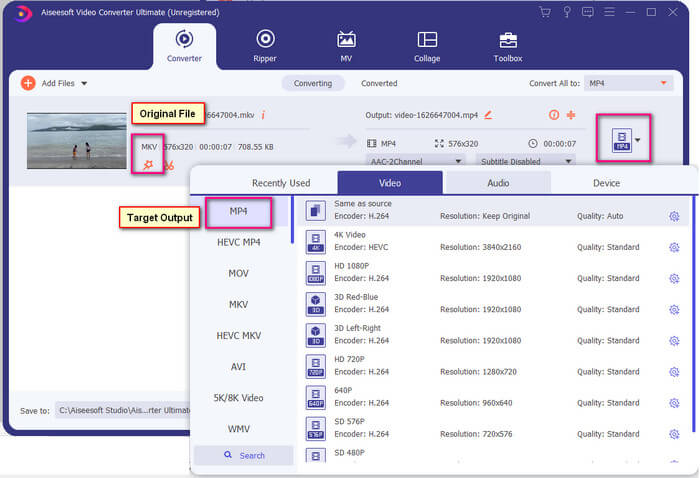
Langkah 4. Setelah format ditetapkan, klik butang Convert All untuk memulakan proses penukaran. Setelah penukaran selesai, folder tempat fail disimpan akan dipaparkan.
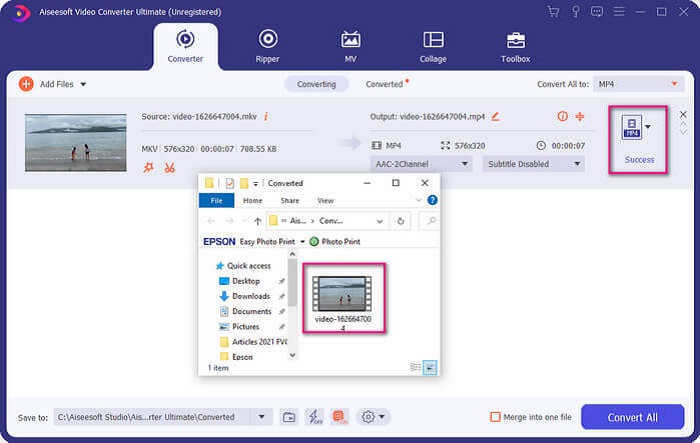
Terdapat lebih banyak lagi dengan penukar video Ultimate. Anda boleh menyemak senarai kelebihan dan kekurangan di bawah untuk mengetahui ciri baik lain yang ditawarkannya.
● Alat ini menukar sepantas tiga saat.
● Ia mempunyai teknologi mempercepatkan yang boleh meningkatkan fail yang ditukar.
● Ia menyokong kualiti HD.
● Ia mempunyai ciri pengeditan seperti menambah penapis dan kesan asas.
● Anda boleh melaraskan sari kata dan trek audio.
Jika anda sedang mencari penukar percuma, anda juga boleh mempertimbangkan FVC Free Online Video Converter. Ia mungkin tidak sebaik Ultimate Video Converter, namun masih boleh menyainginya. Sudah pasti, ia boleh menukar fail dan menjadikannya serasi dengan Plex atau DivX. Apa yang anda perlu lakukan ialah…
Langkah 1. Lancarkan alat ini dengan melawati laman rasmi yang tertera dalam penerangan.
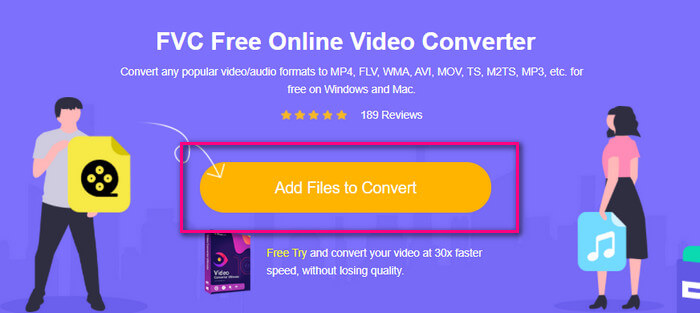
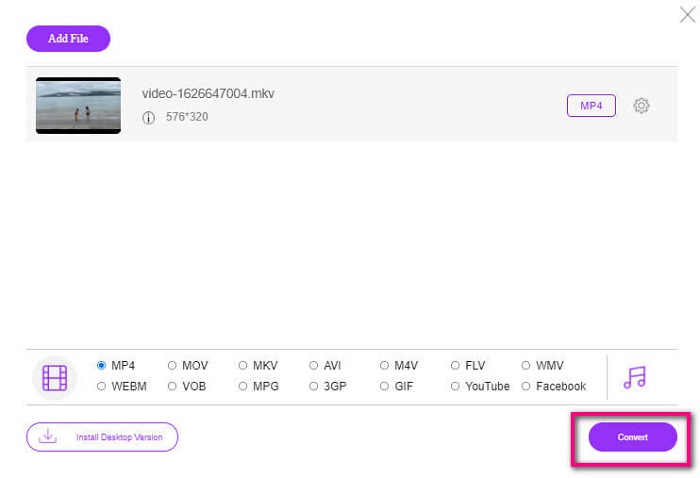
Langkah 2. Muat naik video dengan mengklik Add Files to Convert.
Langkah 3. Tukar format dengan menandakan bulatan di bawah.
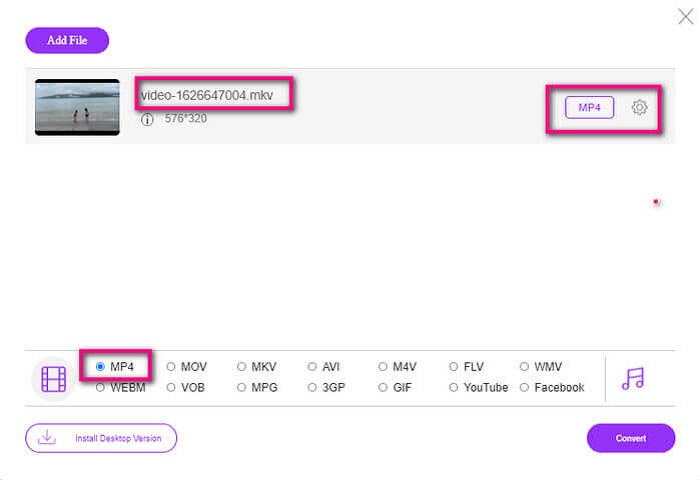
Langkah 4. Akhir sekali, klik butang Convert dan pilih lokasi fail di mana anda mahu fail tersebut disimpan. Dari situ klik Okay. Anda boleh klik ikon Folder untuk melihat fail yang telah ditukar.
Bacaan Lanjut
Mainkan MKV dalam Windows Media Player
Bahagian 4. Maklumat lanjut tentang Memainkan Fail MKV pada PS4
Berapa harga PS4?
Harga runcit pasaran ialah 399.99 USD di Amerika Syarikat dan di Kanada ialah CAD 399.99 . Harga mungkin berbeza bergantung pada harga runcit di negara anda.
Adakah terdapat kemungkinan untuk memainkan CC atau Close Caption MKV pada PS4?
Ya ada. Ia berada dalam Accessibility Settings. Laluan tetapan ialah, pergi ke Settings PS4 anda, Accessibility dan kemudian pilih Display Closed Captions. Dari situ klik Options untuk mengaktifkan sarikata tertutup (closed caption).
Jika PS4 menyokong MKV, mengapa fail saya tidak dimainkan?
Seperti yang dinyatakan di atas, anda perlu memastikan fail MKV memenuhi standard pemain yang anda gunakan. Anda hanya perlu menyemak keperluan PS4 atau pelayan penstriman media lain. Kebanyakan pelayan media juga mempunyai klasifikasi untuk memainkan fail MKV.
Apakah format yang disokong oleh PS4?
Terdapat beberapa format fail yang Disokong PS4. Tetapi anda akan melihat bahawa kebanyakan format tidak dimampatkan dan menyimpan fail besar. Walaupun ia juga menyokong yang tidak dimampatkan seperti Mp4. Sementara itu, berikut ialah senarai format yang kita bincangkan: MKV, AVI, MPEG-2 PS, MPEG-2 TS, AVCHD, dan XAVC dan MP4.
Kesimpulannya
Untuk membuat kesimpulan terdapat banyak cara anda boleh secara langsung atau tidak langsung memainkan fail MKV pada PS4. Apa yang disenaraikan adalah medium yang paling biasa digunakan. DivX Stream Server dan Plex hanyalah beberapa alternatif yang boleh anda gunakan. Adalah sangat dicadangkan untuk menukar fail sebaliknya untuk mengelakkan kerumitan dan terlalu banyak proses.
-
 [Diselesaikan] Pemain VLC Tidak Akan Memainkan MKV, Cara Membaikinya
 Adakah pemain VLC menyokong fail MKV? Mengapa VLC tidak akan memainkan MKV? Siaran ini berkongsi 4 petua berguna untuk anda memperbaiki pemain VLC tidak akan memainkan fail MKV.
-
 Cara Memainkan Fail MKV pada iPad 2025
 Bagaimana cara memainkan fail MKV pada iPad 2? Bolehkah saya menukar MKV ke MP4 untuk bermain di iPad Pro / Air / 2? Catatan ini berkongsi 2 cara mudah untuk bermain MKV di iPad.
-
 Cara memuat turun MKV Codec di Windows Media Player untuk Main semula yang lancar
 Tidak dapat memainkan video MKV di Windows Media Player? Anda boleh memuat turun codec MKV percuma untuk Windows Media Player. Sebaliknya, ubah MKV untuk membuatnya dimainkan di Windows Media Player.
