


 Video Converter Ultimate
 Perakam Skrin
 Pembaikan Video
 Muat Turun Selamat
Senarai Alat dan Platform yang Ada di Web untuk Perakam Suara / Video 3GP
Sebuah bekas format piawai ISO yang terkenal dengan saiznya yang kecil dan sangat sesuai untuk memindahkan data melalui rangkaian 3G dan seumpamanya. Sesetengah perakam panggilan 3GP termaju menggunakan ini sebagai format berasaskan piawai mereka. Tidak lama kemudian, kemunculan format 3GP membantu kita menonton fail yang besar pada telefon pintar walaupun dengan sambungan internet yang perlahan. Kebanyakan pengguna menggunakan fail ini kerana ia menyokong format video, audio dan teks. Atas sebab ini, pengguna masih mahu merakam video 3GP atau menyimpan fail audio 3GP ke format baharu, seperti MP3. Dalam hal itu, perakam video 3GP atau perakam suara 3GP menjadi alat yang sangat diperlukan. Jadi, teruskan dan lihat butiran di bawah.

Bahagian 1. Perakam 3GP Dalam Talian Terbaik untuk Menangkap Video 3GP Secara Percuma
Perakam Skrin Percuma FVC
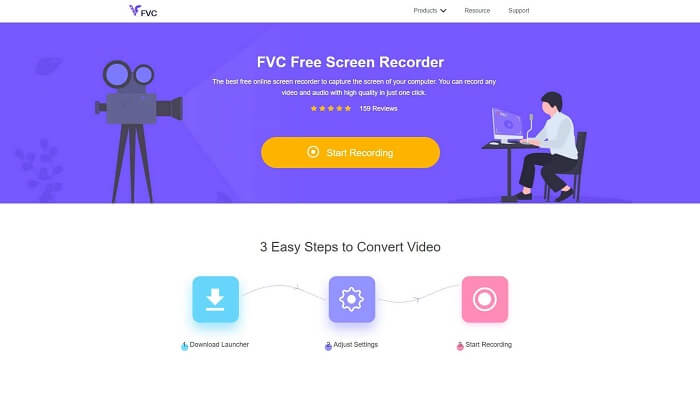
Alat yang paling sesuai untuk pengguna yang tidak mahu memuat turun sebarang fail dan mempunyai sambungan yang stabil untuk membuat rakaman. Jika anda pengguna seperti itu, inilah perakam skrin dalam talian percuma terbaik yang dibangunkan oleh FVC, iaitu FVC Free Screen Recorder. Alat ini membolehkan pengguna menangkap semua aksi paparan skrin pada komputer anda. Jika anda mahu merakam permainan, mesyuarat perniagaan, perbincangan dan sebagainya, ini ialah pilihan terbaik. Untuk maklumat lanjut dan langkah terperinci, sila baca dengan teliti dan ikut arahan yang disenaraikan.
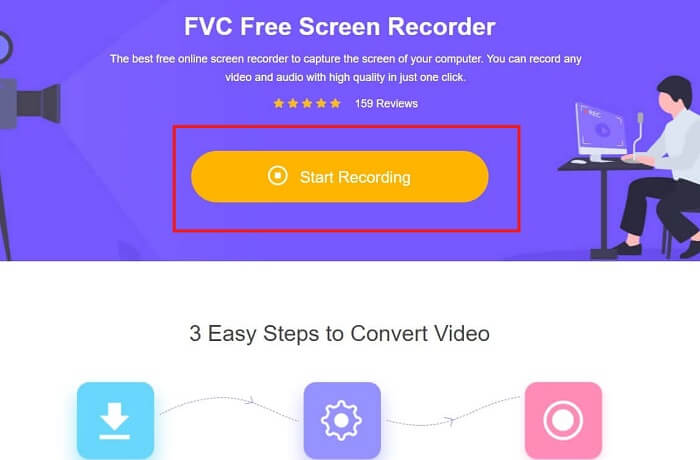
Langkah 1. Klik pautan ini untuk pergi ke antara muka utama laman web. Klik Start Recording dan lancarkan alat tersebut.
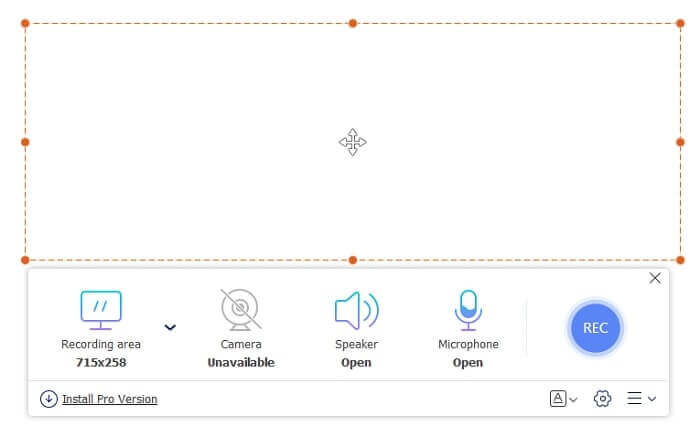
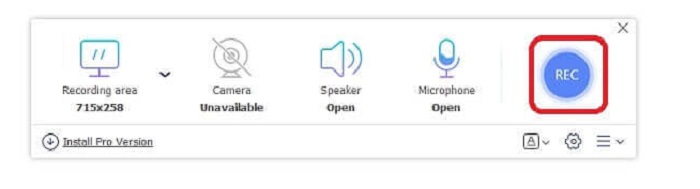
Langkah 2. Jika alat sudah dibuka, anda akan nampak skrin terapung seperti ini.
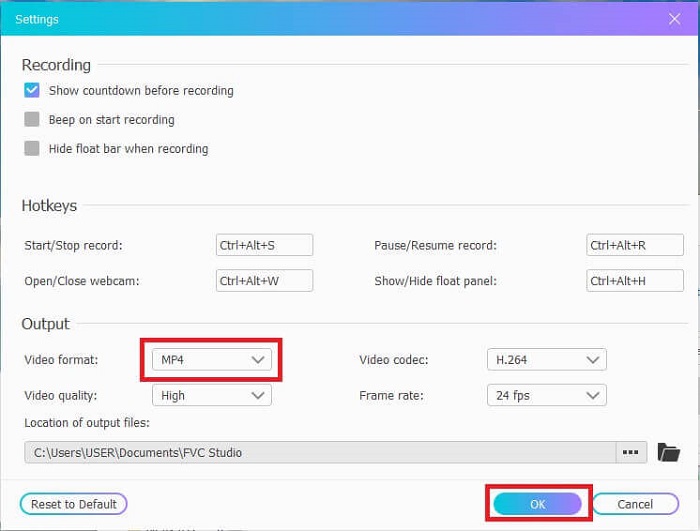
Langkah 3. Tekan Settings untuk melaraskan format dan tetapan lain yang anda inginkan, kemudian klik OK untuk menyimpan.
Langkah 4. Pada bar alat terapung, anda boleh melaraskan saiz bingkai atau klik Full Screen untuk paparan penuh. Di sebelah saiz bingkai ialah Webcam untuk menambah wajah anda semasa merakam, Speaker untuk bunyi sistem, dan akhirnya Mic untuk menambah suara anda. Jika anda sudah bersedia, klik butang berbentuk cakera untuk mula merakam.
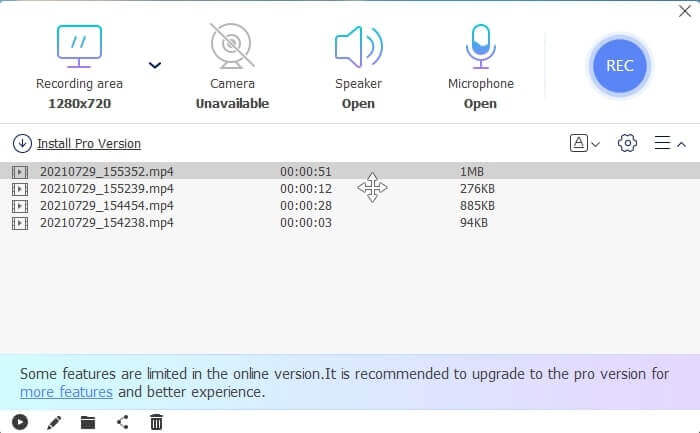
Langkah 5. Jika rakaman selesai, klik butang segi empat, satu senarai History akan dipaparkan di bawah bar alat terapung, disusun daripada yang terbaharu hingga yang terlama.
Kelebihan
- Alat percuma dalam talian terbaik yang tersedia untuk semua platform.
- Tidak seperti alat dalam talian yang lain, ia mudah digunakan dan tidak ada iklan yang tiba-tiba muncul semasa merakam.
- Untuk mendaftar, anda perlu menggunakan alat tersebut.
Keburukan
- Bergantung pada internet, ia tidak akan berfungsi tanpa sambungan internet atau data.
- Ia tidak mempunyai ciri Skrin Kunci. Alat ini hanya tersedia dalam versi premium alat.
Bahagian 2. Perakam Video & Suara 3GP Popular lain untuk Windows dan Mac
1. Perakam Skrin FVC
Pernah dengar salah satu perakam skrin terbaik yang dipilih oleh pengguna di seluruh dunia? Jika tidak, ini adalah untuk anda. Perakam Skrin FVC Perakam skrin ini boleh didapati di semua platform yang berbeza. Masalah yang paling biasa anda hadapi dengan perakam skrin lain, beberapa perakam suara android 3gp tidak mengeluarkan output suara. Semasa menggunakan alat ini, anda tidak akan menghadapi masalah seperti ini selagi anda tidak mematikan pembesar suara untuk bunyi sistem dan mikrofon untuk menambahkan suara anda. Sekiranya anda ingin mengetahui cara menggunakan alat serbaguna ini, baca dengan teliti dan ikuti arahan di bawah.
Langkah 1. Muat turun alat tersebut. Pilih antara dua sistem operasi yang anda sedang gunakan. Pasang alat itu kemudian laraskan Preferences mengikut kehendak anda, klik Finish untuk meneruskan.
Muat Turun PercumaUntuk Windows 7 atau lebih baharuMuat Turun Selamat
Muat Turun PercumaUntuk MacOS 10.7 atau lebih baharuMuat Turun Selamat
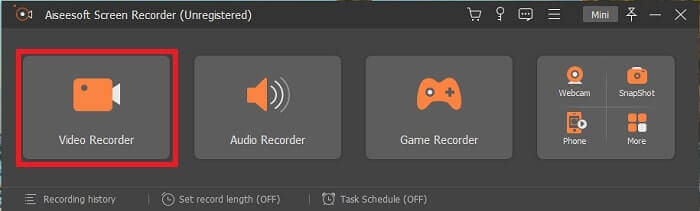
Langkah 2. Selepas pemasangan, satu bar alat terapung seperti ini akan muncul pada skrin anda. Ini menandakan aplikasi yang anda gunakan sudah berjalan melalui program tersebut. Klik Video Recorder.
Langkah 3. Selepas mengkliknya, laraskan paparan kepada skrin penuh atau anda juga boleh memilih kawasan tertentu. Tekan System Sound untuk menambah bunyi komputer anda. Pilihan lain ini bergantung sama ada anda mahu menggunakannya atau tidak. Anda juga boleh menambah wajah dan suara anda dengan menghidupkan Webcam dan Microphone.
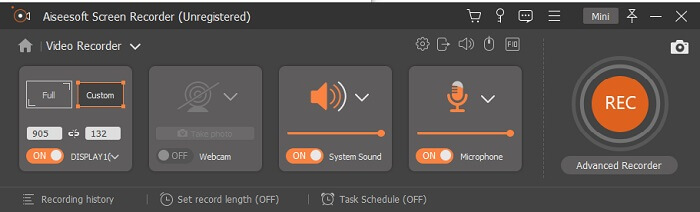
Langkah 4. Sebelum memulakannya, klik butang Gear dan laraskan tetapan jika perlu, kemudian klik OK untuk menyimpan tetapan. Selepas semua persediaan selesai, klik butang berbentuk bulat untuk memulakan rakaman.
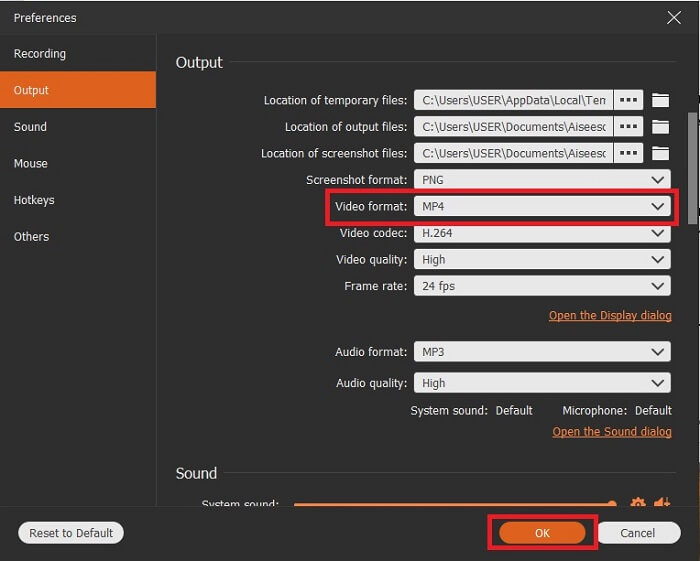
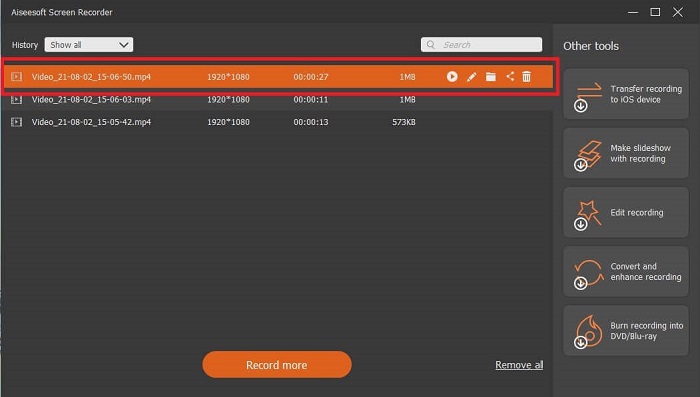
Langkah 5. Jika anda mahu menamatkan rakaman, klik butang kecil berbentuk segi empat pada bar alat untuk Stop. Klik Save dan pilih lokasi simpanan. Kemudian satu senarai akan dipaparkan pada skrin anda. Ia disusun daripada yang terbaharu hingga yang terlama. Klik video pertama di bahagian atas untuk menonton semula rakaman.
Kelebihan
- Ia tidak bergantung kepada internet. Rakam seberapa banyak yang anda mahukan, bila-bila masa dan di mana sahaja.
- Ia mesra pengguna dan pilihan terbaik untuk pemula yang mahukan output profesional atau untuk profesional yang mencari perakam skrin yang mudah digunakan.
- Ia mempunyai ciri unik ini, iaitu Lock-in Screen.
Keburukan
- Alat bayar untuk digunakan namun pengguna masih menggunakannya.
- Ia memerlukan 2.4MB storan anda untuk dimuat turun.
2. Aliran Skrin
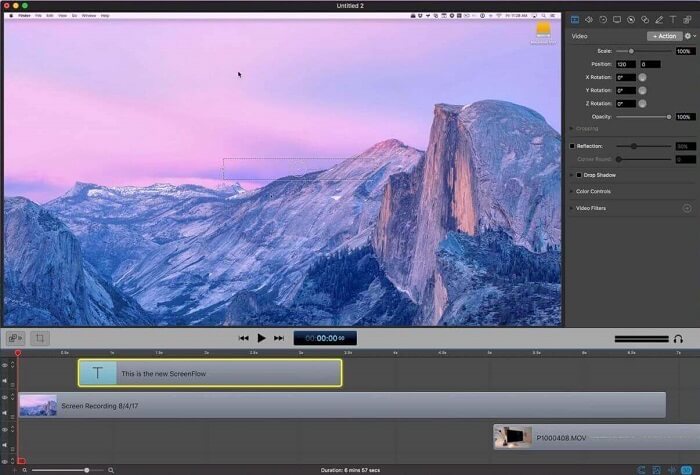
Alat terbaik lain untuk pengguna mac. Screenflow adalah alat yang dianggap sebagai alat rakaman skrin terbaik dalam sistem operasi mac. Ini adalah alat bayar untuk digunakan. Oleh itu, jika anda berpendapat bahawa alat ini murah maka jawapannya tidak. Alat ini berharga hampir melebihi had yang dapat ditawarkan oleh perakam skrin. Ia boleh menawarkan apa yang boleh ditawarkan oleh perakam skrin bayar untuk digunakan. Dan atas sebab tertentu, pengguna mac lebih suka ini sebagai perakam skrin pilihan peribadi mereka.
Kelebihan
- Alat yang senang digunakan yang tersedia untuk mac.
- Alat terkini.
- Tiada masalah perisian hasad.
Keburukan
- Hanya terdapat pada Mac.
- Ia semestinya mahal seperti pilihan anda.
3. Tepung
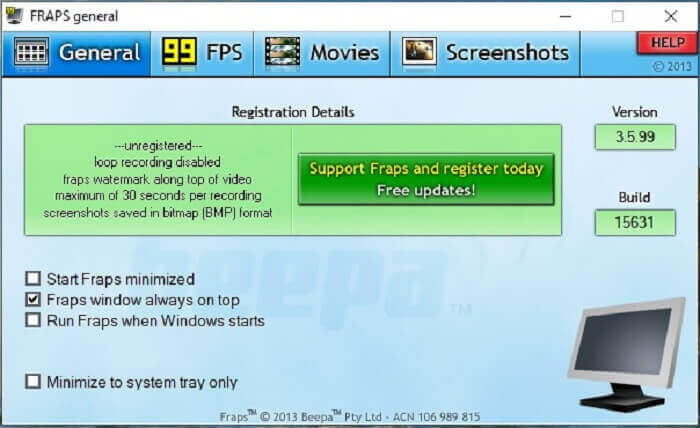
Seperti alat lain, Fraps boleh diletakkan dengan mudah dalam 10 perakam skrin terbaik. Alat ini menjadikan rakaman skrin anda semudah mungkin. Kerana arahan alat ini. Tetapi alat ini tidak ada dalam kemas kini. Oleh kerana semakin sedikit kemas kini yang diberikan kepada alat ini, popularitinya semakin berkurang tetapi masih ada, beberapa pengguna lebih menyukainya.
Kelebihan
- Alat unik yang menyokong format fail AVI.
- Antara muka yang mesra pengguna dengan arahan terperinci.
- Menyokong resolusi sehingga 7680x4800.
Keburukan
- Antaramuka membosankan untuk dilihat.
- Kerana format fail AVI. Sekiranya anda merakam video selama 20 minit, ia akan memerlukan hampir 4gib penyimpanan. Bukan pilihan terbaik untuk rakaman panjang.
Bahagian 3. Carta Perbandingan
| Fungsi | Perakam Skrin Percuma FVC | Perakam Skrin FVC | Aliran Skrin | Fraps |
| Rakaman Skrin Video / Audio |  | | | |
| Beri komen | | | | |
| Selamat Perisian Perisian | | | | |
| Pecutan Perkakasan |  | | | |
| Skrin Kunci dalam | | | | |
| Saiz fail | Beberapa kbps untuk pelancar | 2.1mb | 85.3 mb | 2.4mb |
| Sistem Operasi yang Ada | Di Semua Platform | Di Semua Platform | OS Mac | Windows XP, 2003, Vista, dan Windows 7 |
| Julat harga | Perakam Dalam Talian Sumber Terbuka Percuma | Selama 1 bulan: $25.00 Selama setahun: $31.20 Untuk Lesen Sepanjang Hayat: $55.20 | SCREENFLOW (Harga potongan harga): $149 SKREENFLOWSuper Pak: $209 SCREENFLOWSokongan Pak + Premium: $239 | Ia percuma, tetapi anda juga boleh mendaftar untuk $37 |
Bahagian 4. Soalan Lazim mengenai Perakam 3GP
Mengapa saya tidak dapat memainkan format fail media 3GP saya pada pemain media saya?
Mungkin kerana pemain media anda tidak menyokong jenis codec ini. Jika anda mahu menonton format fail 3GP anda, anda boleh menggunakan FVC Free Video Player. Pemain media ini percuma dan menyokong pelbagai format video dan audio. Asalkan anda mempunyai internet, anda juga boleh mendapatkan versi premium dengan lebih banyak pilihan dan ciri berbanding versi percuma. Atau anda boleh membaca Best 3GP Players untuk mencari yang anda mahukan.
Bagaimana cara menyimpan fail audio .3gp dari perakam suara android ke mp3?
Gunakan penukar yang boleh menukar 3GP kepada MP3. Contoh yang baik ialah FVC Free Online Video Converter. Ia boleh menukar lebih daripada 200+ format fail media yang tersedia pada semua platform.
Adakah mungkin untuk menggabungkan fail 3GP yang berbeza dalam satu output media?
Ya, ia boleh dilakukan dengan bantuan FVC Free Online Merger. Alat dalam talian ini membolehkan anda menggabungkan 2 atau lebih fail 3GP menjadi satu. Ia adalah satu lagi alat terbaik yang dihasilkan oleh FVC. Klik merger untuk meneruskan.
Kesimpulannya
Kami menyimpulkan bahawa kebanyakan pengguna masih melakukan rakaman untuk pelbagai jenis tujuan. Sama ada mereka menggunakannya sebagai perakam untuk montaj, mesyuarat perniagaan, perbincangan guru, dan banyak lagi. Tetapi tetap, apa pun alasan anda merakam atau format apa sahaja yang anda mahukan sebagai hasil produk akhir. Semua perakam boleh melakukan tugas seperti yang anda minta.
Tetapi dengan semua perakam berbeza di web dan dalam senarai ini, mungkin anda masih tertanya-tanya yang mana satu paling sesuai untuk anda. Sebelum memberi anda idea tentang apa yang patut anda pilih, anda perlu memikirkannya dengan teliti. Sama ada perakam skrin anda boleh memenuhi keperluan yang anda mahukan hari ini dan mungkin pada masa hadapan. FVC Screen Recorder ialah alat terbaik untuk anda. Tidak seperti alat lain yang tersenarai di sini. Alat ini begitu unik sehingga ia boleh menonjol berbanding semua perakam skrin di web. Namun ia sentiasa mudah digunakan dan mampu memberikan prestasi terbaik yang patut diminta oleh pengguna baharu atau profesional. Jadi, apa yang anda tunggu lagi? Jangan hanya bergantung pada yang percuma atau yang mahal jika anda boleh membeli versi murah yang boleh melakukan lebih daripada alat ini.
-
 4 Perakam Pelancaran Web Percuma Terbaik untuk Menangkap Video Skrin
 Mencari kaedah terbaik untuk merakam aktiviti di skrin di desktop anda tanpa membayar sesen pun? Berikut adalah 4 perakam pelancaran web percuma yang paling kerap digunakan.
-
 Perakam Audio Ulasan Cinch yang Tidak Berkelayakan dan Alternatif Terbaik
 Perekam Audio Cinch adalah kaedah terbaik untuk memuat turun muzik dari laman streaming. Ketahui lebih lanjut mengenai ulasan yang tidak berat sebelah dan alternatif terbaik dari artikel tersebut.
-
 5 Perakam Tetikus dan Papan Kekunci Terbaik untuk Windows dan Mac
 Berikut adalah lima program perakam tetikus dan papan kekunci terbaik yang dapat menyelamatkan pergerakan tetikus dan klik papan kekunci anda, dan mengulangi acara.
