


 Video Converter Ultimate
 Perakam Skrin
 Pembaikan Video
 Muat Turun Selamat
3 Perakam Panggilan Facebook Terbaik - Cara Merakam Panggilan Video Facebook
How to record Facebook video calls to remain the precious time between you and your friends and families? After Facebook equips the feature of video calling, more and more users are likely to contact others through Facebook calls rather than phone calls. But as an additional communication function of a social media platform, it doesn’t have the recording feature as the phone call. However, the derived standalone app—Facebook Messenger doesn’t have a built-in recorder. In this case, you can learn about 3 easy-to-use Facebook call recorders for computers, iOS devices, and Android mobile with the detailed guidelines in this article.

Bahagian 1: Perakam Panggilan Facebook Dalam Talian Terbaik untuk Windows / Mac
Without downloading any third-party software, you can use FVC Free Screen Recorder to record Facebook video calls online for free. It is a user-friendly Facebook call recorder that has a concise interface with multiple features you need.
- 1. Rakam panggilan dan video Facebook secara dalam talian secara percuma dengan langkah mudah.
- 2. Rakaman audio dan video tanpa kerugian untuk menyimpan video berkualiti tinggi.
- 3. Tiada tanda air untuk melindungi hak milik anda.
- 4. Rakaman akan disimpan secara automatik di perpustakaan media, dan anda boleh memilih untuk menghapus, memuat turun, dan berkongsi di SNS secara bebas.
Step 1: Navigate to the website of FVC Free Screen Recorder on any browser. Click the Start Recording button to install the launcher in a few seconds, and then click the Start Recording button again to launch the recorder.

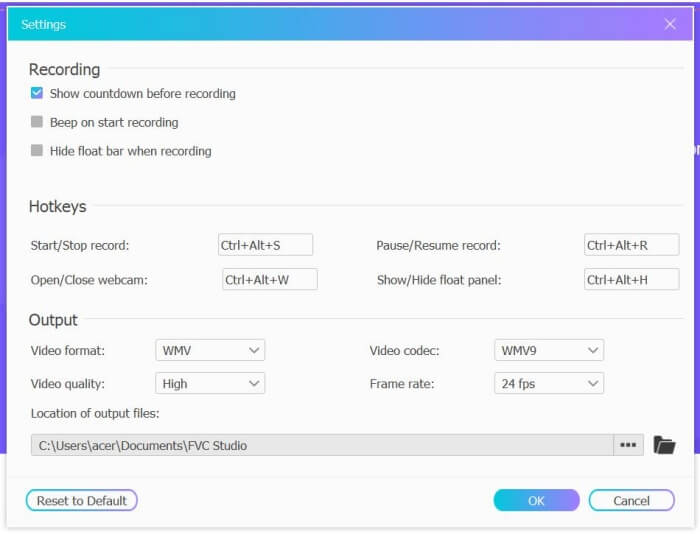
Step 2: Click the Recording Area menu to choose the full screen or select region freely. Then turn on the Microphone and the Speaker voice. As for adjusting the video settings, you can click the Setting icon. And you can choose the MP4 format, High quality, and 24 fps to keep the high quality of the recordings. Then click the REC button to start recording Facebook calls.
Step 3: There will pop up a toolbox with multiple editing tools. You can choose to add shapes, words, and lines according to your need. Then click the Stop icon to save your recording in the cloud. You can click the right mouse to choose to download it on your computer.
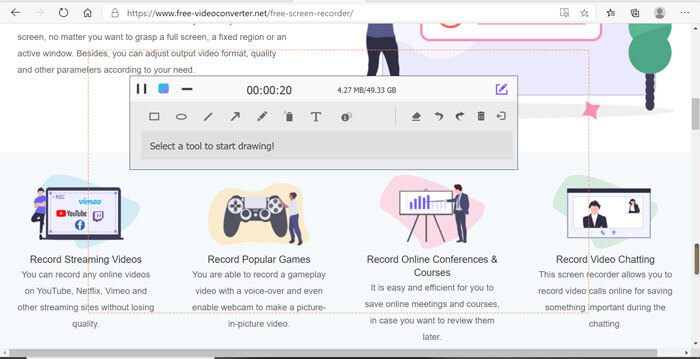
Menggunakan perakam panggilan video Facebook dalam talian percuma ini adalah kaedah terbaik bagi pengguna komputer untuk merakam panggilan video Facebook secara dalam talian. Dengan menyesuaikan pengaturan rakaman terlebih dahulu, ia dapat menyimpan panggilan Facebook dalam format MP4 dengan ukuran kecil dan berkualiti tinggi. Sekiranya anda terbiasa melakukan panggilan Facebook di telefon bimbit, teruskan membaca artikel ini.
Bahagian 2: Cara Merakam Panggilan Facebook untuk iOS melalui Perakam Lalai
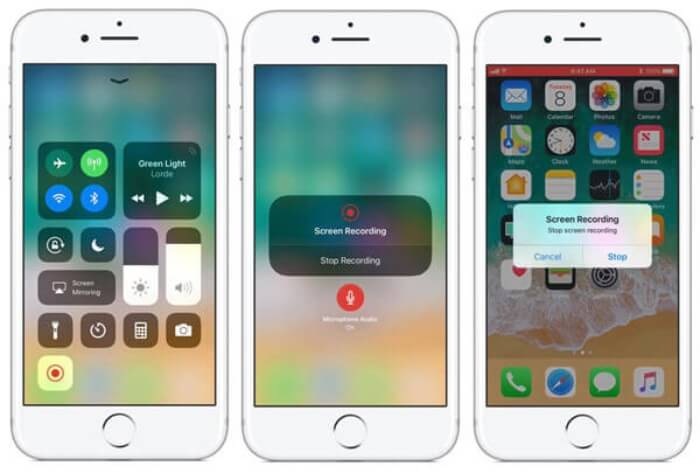
Versi iOS 11 atau lebih tinggi yang dikemas kini mempunyai perakam lalai baru pada iPhone dan iPad anda yang merupakan pilihan terbaik untuk merakam panggilan video Facebook tanpa memuat turun sebarang aplikasi. Di sini anda dapat mempelajari cara menambahkan perakam panggilan Facebook ke jalan pintas di pusat kawalan dan cara menggunakannya.
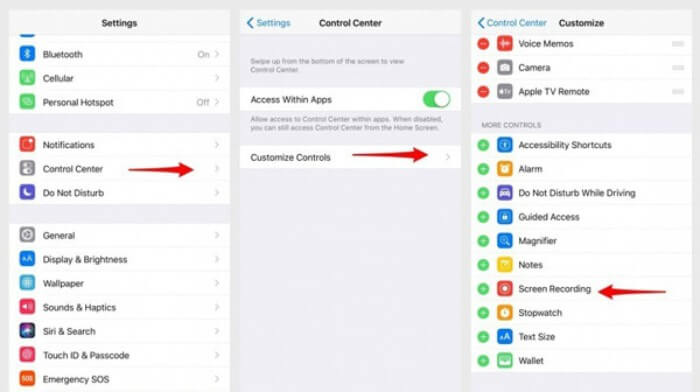
Step 1: Tap the Settings app on your iPhone/iPad and scroll down to choose the Control Center option. Then tap the Customize Controls tab and find the Screen Recording function. Tap the Plus icon to add this feature to the control center.
Step 2: Pull down from the top of the phone screen to open the control center and you will find the recording app at the bottom. Tap the Screen Recording icon to start the recording, and you can choose to capture the videos or only record the audio track. If you want to finish it, tap the red Status Bar at the top and tap the Stop option in the pop-up window.
Bahagian 3: Perakam Facebook Messenger Mudah untuk Android
Sebilangan telefon Android tidak mempunyai perakam bawaan, dan terlalu banyak perakam panggilan video Facebook untuk dipilih. Oleh itu, anda boleh mempelajari salah satu perakam terbaik untuk telefon bimbit Android dengan langkah terperinci di bahagian berikut.
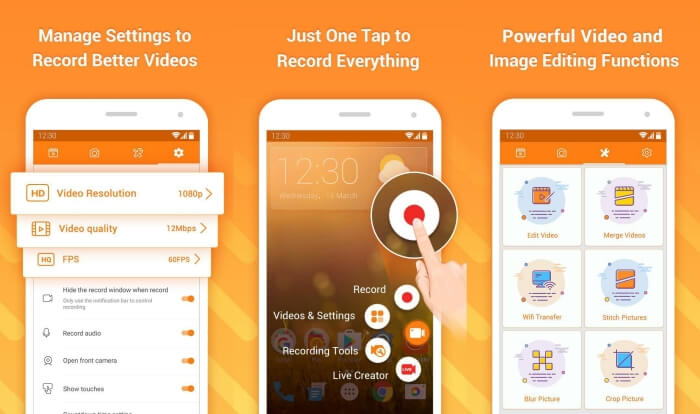
DU Recorder is an easy-to-use Facebook call recorder for Android and it’s famous for its smooth recording. Without root, everyone can use it to record Facebook Messenger calls in one tap.
Step 1: Launch the recorder and there are four menus including recordings, screenshots, editing tools, and settings. Firstly, tap the Settings menu to adjust the video parameters. To keep high quality, you can choose 1080p resolution and 30 fps frame rate.
Step 2: Don’t close the recorder and just launch Facebook Messenger. Then you can see the recorder icon. Tap the icon and choose the Recording icon to start capturing the screen and voice. And you can tap it again to stop the recording. Then you can tap the Editing icon to clip the recording and add music to it.
Mungkin anda juga berminat:
Bahagian 4: Soalan Lazim Perakam Panggilan Facebook
1. Adakah Facebook mempunyai perakam lalai untuk merakam panggilan video di PC?
Tidak, tidak. Oleh itu, anda harus bergantung pada perakam panggilan Facebook profesional yang lain. Sekiranya anda tidak mahu memuat turun perisian lain yang akan memenuhi ruang simpanan komputer anda, FVC Free Screen Recorder adalah pilihan terbaik anda.
2. Bagaimana memulakan perbincangan dengan rakan di Facebook Messager App?
Pertama, buka Facebook Messenger di telefon bimbit anda, kemudian pilih kotak sembang rakan yang anda mahu lakukan panggilan Facebook. Dan sekarang anda dapat melihat ikon Video, jadi anda boleh mengkliknya untuk memulakan panggilan video.
3. Format apa yang harus saya pilih untuk menyimpan rakaman semasa menggunakan perakam Facebook Messenger?
Sama ada anda menggunakan perakam panggilan Facebook di komputer atau telefon bimbit, format terbaik untuk menyimpan panggilan video Facebook adalah MP4. Ia dapat menjimatkan lebih banyak ruang simpanan dan serasi dengan semua peranti.
Kesimpulannya
The above article has introduced 3 Facebook video call recorders. For iPhone, iPad, and some Android mobiles, you can use the built-in recorder on your phone easily. Otherwise, you can choose any recorder including the DU recorder on Google Play. As for PC, FVC Free Screen Recorder is your best choice to capture Facebook calls. If you encountered other problems when using Facebook call recorders, please leave your comment below.
-
 Ulasan Snagit 2021 - Kebaikan, Kekurangan dan Alternatif Terbaik
 Apakah alternatif terbaik untuk Snagit? Adakah terdapat alat tangkapan skrin seperti Snagit? Catatan ini akan mengulas Snagit dan berkongsi alternatif terbaik untuk Snagit untuk menangkap skrin.
-
 6 Perakam WAV Terbaik yang Anda Tidak Boleh Lupa di Desktop dan Dalam Talian
 Perisian rakaman WAV terbaik yang kami kongsi dalam artikel ini mempunyai pelbagai ciri berguna, yang membantu anda menangkap audio dan suara seperti profesional.
-
 4 Perakam Suara AIFF Percuma yang Menghasilkan Audio Berkualiti Tinggi
 Artikel ini membincangkan tentang AIFF dan beberapa alatan paling popular yang boleh anda gunakan untuk menghasilkan format AIFF berkualiti tinggi.
