


 Video Converter Ultimate
 Perakam Skrin
 Pembaikan Video
 Muat Turun Selamat
M4A lwn. MP3 Kajian Mendalam dan Perbandingan Dua Format Audio
Kerana percambahan muzik digital, memilih format audio yang sesuai kini lebih penting berbanding sebelum ini. Walaupun M4A dan MP3 digunakan secara meluas, terdapat perbezaan penting antara keduanya. Walaupun MP3 ialah standard de facto untuk fail muzik, M4A kerap digunakan untuk kualiti audio yang unggul.
Dalam perbandingan M4A vs. MP3, kami akan meneliti dengan lebih terperinci perbezaan antara format fail M4A dan MP3 supaya anda dapat membuat keputusan yang tepat. Kami juga akan membentangkan analisis menyeluruh tentang perbezaan dan persamaan antara kedua-dua jenis fail ini dari segi kualiti audio, keserasian, saiz fail, dan banyak lagi. Jika anda seorang peminat muzik atau pemuzik profesional, anda pasti ingin terus membaca untuk mengetahui format manakah yang paling sesuai untuk anda.

Bahagian 1. M4A lwn MP3
Berikut ialah jadual ringkas yang membandingkan format ini dalam aspek penting yang berbeza untuk keputusan termaklum. Semak jadual di bawah.
| M4A | MP3 | |
| Kualiti Bunyi | tinggi | Baik |
| Saiz fail | Besar | Kecil |
| Keserasian | Terhad | Serasi secara meluas |
| Metadata | Disokong | Terhad |
| Perlindungan DRM | Ya | Tidak |
| Kegunaan Popular | Muzik, buku audio, podcast | Muzik, podcast, nada dering |
Bahagian 2. Pengenalan M4A dan MP3
Cukup dengan pertempuran MP3 vs M4A. Marilah kita berhenti seketika dan ketahui lebih lanjut tentang format ini melalui pengenalan ringkas setiap satu daripadanya.
Pengenalan M4A
Format audio digital proprietari Apple ialah Audio MPEG-4 (atau singkatannya M4A). Ia merupakan format audio yang hebat untuk muzik, buku audio dan podcast kerana ia boleh menampung banyak kadar bit dan kadar sampel. Fail M4A boleh dibuka dalam iTunes, QuickTime dan pemain media lain, menjadikannya sesuai untuk peranti Apple.
Pengenalan MP3
MP3, yang bermaksud 'Lapisan Audio MPEG-1 3', ialah format audio digital yang telah menjadi standard untuk audio termampat kerana penggunaannya yang meluas dan mampatan kadar bit yang rendah. Fail MP3 bagus untuk muzik, podcast dan nada dering kerana saiznya yang padat berbanding dengan format audio lain. Ia boleh dimainkan pada banyak peranti yang berbeza dan dimuat turun dengan cepat dan mudah daripada internet. Fail MP3, sebaliknya, selalunya mempunyai kualiti audio yang lebih lemah daripada format alternatif seperti M4A.
Bahagian 3. Adakah M4A Lebih Baik daripada MP3?
M4A dan MP3 mempunyai kekuatan dan kelemahan yang berbeza. M4A terkenal dengan kualiti bunyi yang unggul dan digemari oleh peminat muzik dan profesional. MP3, sebaliknya, mempunyai saiz fail yang lebih kecil dan serasi secara meluas dengan pelbagai peranti dan pemain media.
Memilih antara M4A dan MP3 bergantung pada perkara yang lebih penting kepada anda: kualiti bunyi yang tinggi atau saiz dan keserasian fail yang lebih kecil.
Bahagian 4. Perbezaan Antara MP3 dan M4A
Format muzik digital popular MP3 dan M4A mempunyai ciri yang berbeza. Berikut ialah penjelasan terperinci tentang perbezaan antara MP3 dan M4A:
Kualiti Bunyi: M4A terkenal dengan kualiti bunyi yang lebih baik berbanding MP3. M4A menggunakan algoritma pemampatan yang lebih baik dan menyokong julat bitrate serta kadar sampel yang lebih luas. M4A juga menyokong pemampatan tanpa hilang (lossless), yang mengekalkan kualiti audio asal, manakala MP3 menggunakan pemampatan hilang (lossy), yang mengurangkan saiz fail tetapi turut mengurangkan kualiti audio.
Saiz Fail: Fail MP3 lebih kecil dari segi saiz berbanding fail M4A. Ini kerana MP3 menggunakan algoritma pemampatan yang lebih cekap yang mengurangkan saiz fail tanpa menjejaskan kualiti audio secara ketara. M4A pula menggunakan algoritma pemampatan yang kurang cekap yang menghasilkan saiz fail lebih besar tetapi dengan kualiti audio yang lebih baik.
Keserasian: MP3 diiktiraf secara meluas sebagai piawaian industri untuk audio digital dan serasi dengan pelbagai jenis peranti dan pemain media, termasuk telefon pintar, tablet, dan komputer. M4A pula kurang meluas keserasiannya dan digunakan terutamanya pada peranti dan perisian Apple, seperti iTunes dan QuickTime.
Metadata: M4A menyokong julat metadata yang lebih luas berbanding MP3. Ini bermakna fail M4A boleh menyimpan lebih banyak maklumat tentang audio, seperti seni kulit album, lirik, dan maklumat trek.
Perlindungan DRM: M4A menyokong perlindungan Pengurusan Hak Digital (DRM), yang membolehkan pemegang hak cipta mengawal penggunaan dan pengedaran fail audio mereka. MP3 pula tidak menyokong perlindungan DRM.
Bahagian 5. Cara Menukar M4A kepada MP3 atau MP3 kepada M4A
Lebih daripada membandingkan dan menyemak kedua-dua format audio ini, adalah penting juga untuk mempelajari cara menukar daripada M4A kepada MP3 atau sebaliknya. Berikut adalah beberapa program yang boleh anda gunakan:
Sama ada anda dalam talian atau luar talian, Video Converter Ultimate ialah alat hebat yang boleh anda gunakan untuk menukar antara M4A dan MP3. Utiliti ini didatangkan dengan banyak ciri yang boleh anda manfaatkan. Alat ini menawarkan keupayaan untuk menukar berbilang fail secara kelompok, yang bermaksud anda boleh menukar satu koleksi fail muzik. Yang menariknya, ia memberi anda akses kepada tetapan output fail audio anda. Ketahui cara alat ini berfungsi dengan melihat langkah-langkah di bawah.
Langkah 1. Mulakan muat turun dengan mengklik salah satu butang Muat Turun Percuma dan kemudian ikut arahan pada skrin. Langkah seterusnya ialah melancarkan aplikasi dan membiasakan diri dengan antara muka ringkasnya.
Muat Turun PercumaUntuk Windows 7 atau lebih baharuMuat Turun Selamat
Muat Turun PercumaUntuk MacOS 10.7 atau lebih baharuMuat Turun Selamat
Langkah 2. Klik butang tambah pada skrin utama, kemudian cari fail audio yang ingin anda tukar. Pratonton fail yang dimuat naik akan dipaparkan pada UI sejurus selepas muat naik. Anda boleh menukar berbilang M4A sekali gus kepada MP3 dengan memuat naik satu folder.
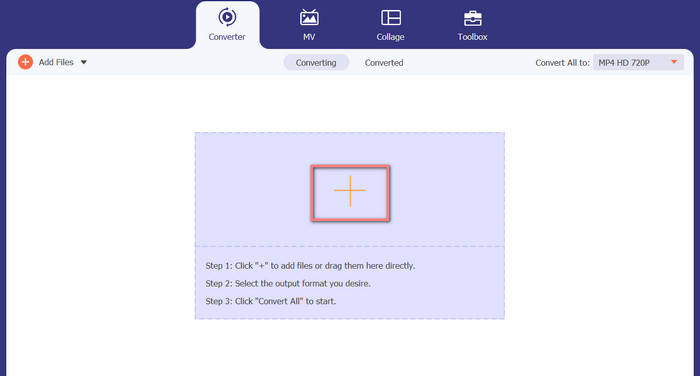
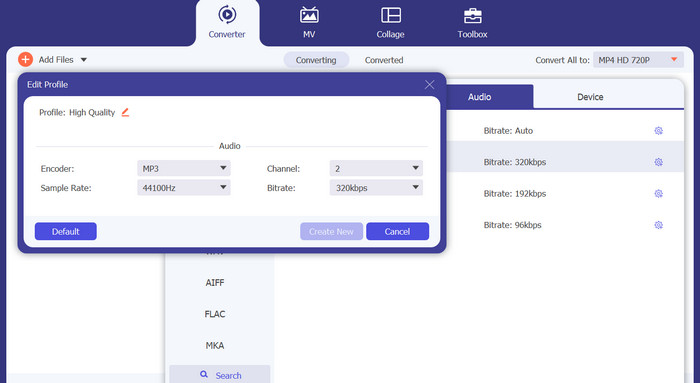
Langkah 3. Untuk menukar format output alat ini, pergi ke tab Audio dalam menu Profil (terletak di bahagian atas kanan alat). Anda boleh menukar fail M4A kepada fail MP3 dan sebaliknya.
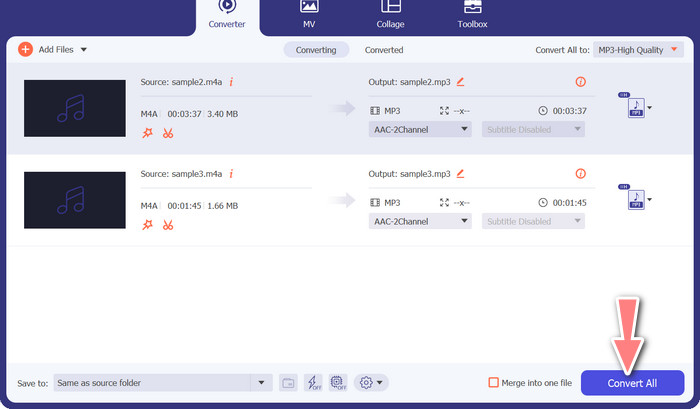
Langkah 4. Pilih lokasi yang dikehendaki di bahagian paling bawah skrin. Untuk memulakan penukaran, pilih Tukar Semua.
Penukar Video Percuma Dalam Talian (Dalam Talian)
Tiada ruang untuk satu lagi rancangan disiarkan? Berita baiknya ialah menggunakan penukar berasaskan web boleh mengelakkan anda daripada memuat turun perisian sama sekali. Alat web Free Video Converter Online membolehkan penukaran terus dalam pelayar. Ia juga menyokong pelbagai jenis fail muzik dan video. Di samping itu, alat web ini menyokong penukaran secara kelompok. Selain itu, pengguna boleh mengubah suai tetapan fail audio akhir. Ketahui cara menukar MP3 kepada M4A dalam talian.
Langkah 1. Mula-mula, buka pelayar web pilihan anda dan pergi ke laman web Free Video Converter Online.
Langkah 2. Klik pilihan Add Files to Convert, kemudian cari fail M4A yang ingin anda tukar dan pilih ia.
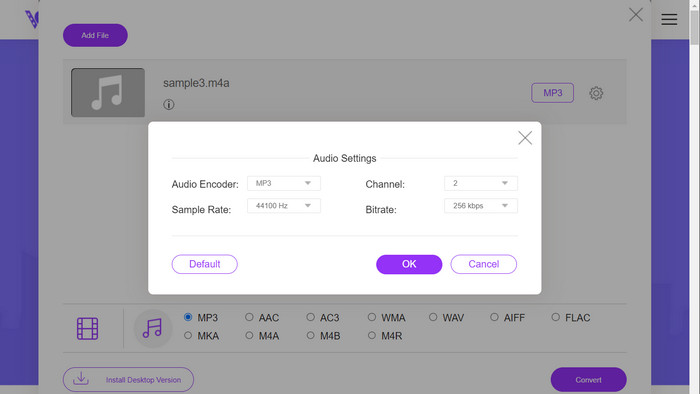
Langkah 3. Pilih MP3 sebagai jenis fail output daripada menu format Audio. Anda juga boleh melaras bitrate, atau kualiti output, bagi fail MP3 tersebut.
Langkah 4. Untuk memulakan proses penukaran, klik butang Convert. Itulah prosedur untuk menukar M4A kepada MP3 di web.
Bacaan Lanjut:
Garis Panduan tentang Cara Menukar M4A kepada WAV [PC dan Mac]
Alat Terbaik yang Boleh Anda Guna untuk Menukar Secara Pukal MP3 kepada Fail M4R
Bahagian 6. Soalan Lazim tentang M4A dan MP3
Apakah itu MP3 lwn. M4A dari segi metadata?
M4A menyokong julat metadata yang lebih luas daripada MP3, yang bermaksud bahawa fail M4A boleh menyimpan lebih banyak maklumat tentang audio.
Bolehkah saya mengedit fail MP3 atau M4A?
Anda boleh mengedit fail MP3 dan M4A menggunakan pelbagai perisian penyuntingan audio.
Mana yang lebih baik untuk podcast, MP3 atau M4A?
MP3 lebih baik untuk podcast kerana saiz failnya yang lebih kecil dan keserasian yang lebih luas.
Kesimpulannya
Memahami perbandingan MP3 vs. M4A boleh membantu anda memilih format audio digital yang terbaik. Sama ada anda menstrim muzik atau menghasilkannya, memilih format yang betul adalah penting untuk memastikan kualiti audio dan keserasian yang sebaik mungkin.
-
 MP3 VS MP4: Apa Perbezaan Antara MP3 dan MP4
 MP3 atau MP4, yang mana lebih baik? Apakah perbezaan antara MP3 dan MP4? Artikel ini akan membandingkan MP3 dengan MP4 dari semua aspek yang dapat anda gambar.
-
 Pemain M4A - 5 Pemain M4A Teratas untuk Android dan Komputer
 Bagaimana cara memainkan fail M4A di telefon Android? Pemain apa yang boleh bermain M4A? Catatan ini berkongsi 5 pemain M4A percuma terbaik untuk Android, Mac dan PC.
-
 4 Kaedah Terbaik untuk Membetulkan & Mengedit Metadata MP3 pada Windows dan Mac
 Ingin tahu rahsia mengedit metadata MP3 dengan mudah? Blog ini akan mengajar anda teknik yang berbeza dengan alatan berbeza yang anda akses dengan mudah.
