


 Video Converter Ultimate
 Perakam Skrin
 Pembaikan Video
Bagaimana untuk Menukar 3GP kepada WMV dengan Cara Profesional [Dalam Talian & Luar Talian]
3GP ialah format mudah alih yang popular yang memindahkan data melalui telefon bimbit tanpa menggunakan terlalu banyak jalur lebar sambil menjimatkan sedikit ruang. Selain itu, format ini menjadi piawaian untuk merakam video pada telefon mudah alih generasi ke‑3, tetapi jangan bimbang, anda masih boleh memainkan video tersebut pada telefon generasi ke‑2 dan ke‑4. Walaupun ia sangat baik pada telefon, ia terhad kepada telefon pintar sahaja. Jadi, tidak menghairankan jika fail .3gp tidak begitu baik pada komputer desktop. Walau bagaimanapun, anda boleh belajar menukar 3GP kepada format yang mempunyai sokongan jauh lebih meluas pada desktop, seperti WMV. Mahu tahu cara menukar 3GP kepada WMV secara profesional? Jika begitu, mari kita teliti dan jangan bazirkan masa lagi.

Bahagian 1. Apa Itu 3GP
Ia ialah format berasaskan ISO yang menyimpan strim media seperti H.263 atau H.264 untuk video dan AMR atau AAC untuk audio, sesuai untuk pemampatan lossy. Selain itu, format generasi ke-3 ini mesra storan untuk menyimpan data pada pemacu mudah alih pada telefon kami, walaupun pada IOS. Walaupun 3GP masih tersedia, kadar keberkesanan format ini mula menurun, dan atas sebab itu, 3GPP menyertai tempat kejadian dan menjadi versi yang lebih baik daripadanya.
Bahagian 2. Apa Itu WMV
Ia ialah format multimedia proprietari yang dibangunkan oleh Windows untuk penstriman video dalam talian. Tidak seperti mana-mana format lain, seperti 3GP, WMV menggunakan pengekod berbilang lipatan untuk menjadikan fail lebih termampat. Oleh kerana keupayaan untuk menggunakan banyak pengekod, lebih mudah untuk berkongsi video dalam format ini dengan cekap. Walau bagaimanapun, terdapat kelemahan menggunakan banyak pengekod, terutamanya pada pengeditan dan bermain, kerana tidak semua pemain media dan editor menyokong pelbagai codec. Walaupun format menggunakan pemampat, kualiti media tidak akan diubah atau dikurangkan.
Bahagian 3. Cara Profesional untuk Menukar 3GP kepada WMV dengan Video Converter Ultimate
Adakah anda mahu mendapatkan perisian penukar profesional 3GP ke WMV yang boleh dimuat turun percuma pada platform anda? FVC Video Converter Ultimate menawarkan prosedur penukaran bertaraf pakar tanpa memerlukan terlalu banyak usaha. Penukar ini membawa anda ke tahap penukaran yang lain yang tidak dapat disediakan oleh mana‑mana penukar dalam talian atau luar talian. Selain itu, alat versi ultimanya menyokong lebih 200 format media untuk dipilih, tidak seperti kebanyakan alat lain.
Selagi anda mempunyai penukar ini, sentiasa mengharapkan output profesional pada format media anda yang ditukar. Ingin menggunakan penukar profesional untuk menukar fail 3GP anda? Jika itu yang berlaku, anda boleh mengikuti langkah di bawah untuk menukar dengan alat muktamad dengan jayanya.
Langkah-langkah Cara Menukar Fail 3GP ke WMV dengan FVC Video Converter Ultimate
Langkah 1. Di bawah disediakan butang muat turun; pilih mengikut platform yang anda gunakan. Sebagai contoh, klik butang muat turun Windows jika anda pengguna Windows. Tetapi jika anda pengguna Mac, klik butang yang satu lagi. Selepas proses muat turun, pasang penukar tersebut dan jalankan ia dengan mengklik Start Now. Lebih penting lagi, selepas melancarkannya, anda perlu membiasakan diri dengan antara mukanya sebelum meneruskan ke langkah seterusnya.
Muat Turun PercumaUntuk Windows 7 atau lebih baharuMuat Turun Selamat
Muat Turun PercumaUntuk MacOS 10.7 atau lebih baharuMuat Turun Selamat
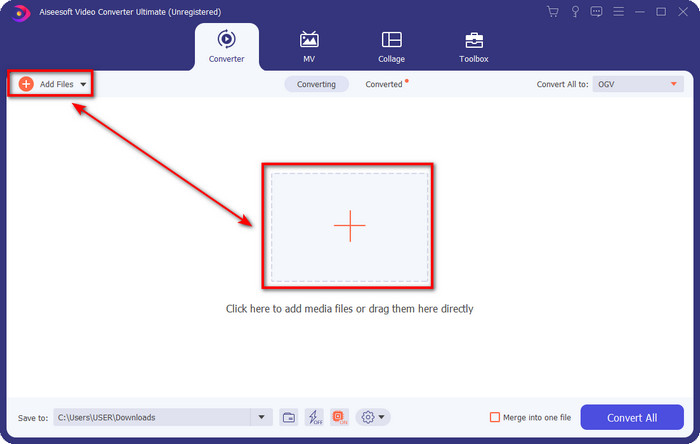
Langkah 2. Anda akan melihat Add Files di bahagian kiri atas antara muka; klik butang itu, dan satu folder akan dipaparkan. Semak imbas fail .3gp dalam pemacu komputer anda, kemudian muat naik dengan menekan Open.
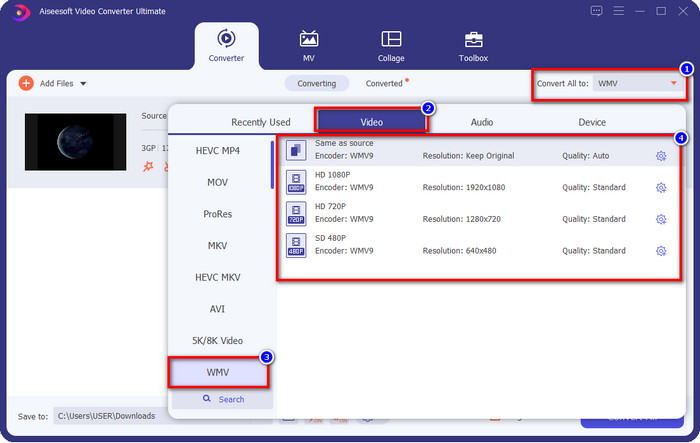
Langkah 3. Klik Convert All to untuk memilih format WMV yang anda mahu atau WMV sebagai output akhir.
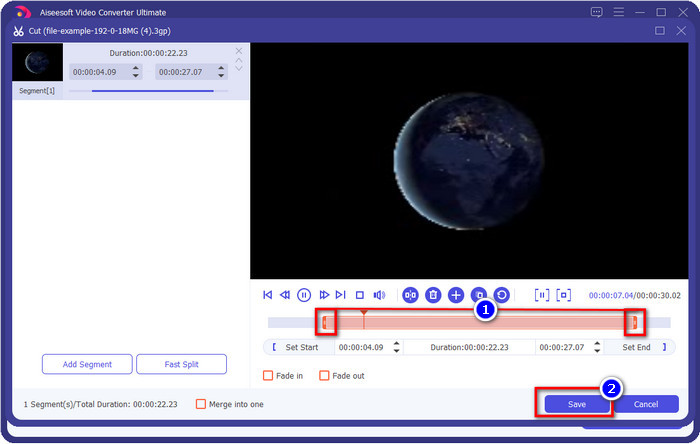
Pilihan. Sebelum kita menukar fail 3GP kepada WMV, mari bincangkan secara ringkas ciri‑ciri lain yang ditawarkan oleh alat ini. Perlu memotong video? Tiada masalah. Tekan butang scissor, seret slide bar pada kedua‑dua sisi jika perlu, dan tekan Save untuk menerapkan pemotongan yang telah anda buat.
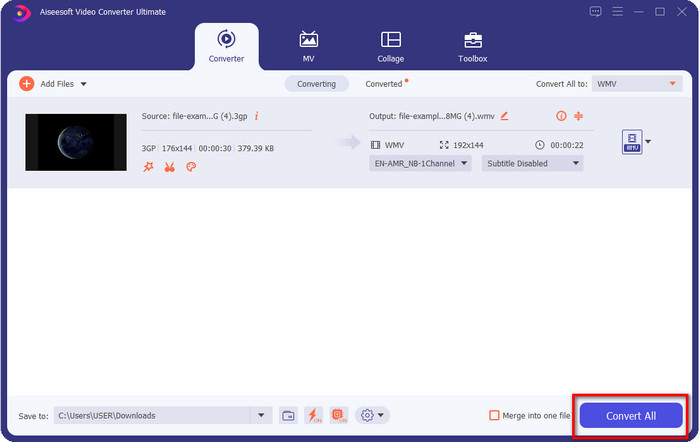
Langkah 4. Mulakan proses penukaran dengan mengklik butang Convert All. Proses penukaran akan tamat dalam masa yang singkat, dan akhirnya, fail WMV akan disimpan pada pemacu komputer anda.
Bahagian 4. Cara Dalam Talian untuk Menukar MXF kepada WMV dengan Penukar Video Percuma Dalam Talian
Satu lagi produk FVC tetapi kali ini dalam bentuk penyelesaian dalam talian ialah FVC Free Video Converter Online. Penukar profesional dalam talian ini menyediakan antara muka yang kemas dan teratur berbanding penukar web yang lain. Selain itu, anda tidak perlu memuat turun penukar ke dalam peranti anda sebelum menggunakannya; sebaliknya, anda hanya perlu membuka pelayar dan akses penukar tersebut. Walaupun penukar web ini bagus, masih banyak fungsi berperingkat profesional yang tidak dapat disediakannya. Namun begitu, inilah pilihan yang sesuai jika anda mahu menukar 3GP ke WMV secara dalam talian; ikuti langkah‑langkah di bawah untuk menggunakan alat ini.
Langkah-langkah Cara Menukar 3GP ke WMV Dalam Talian Secara Percuma dengan FVC Free Video Converter Online
Langkah 1. Klik pautan ini untuk membuka penukar dalam talian.
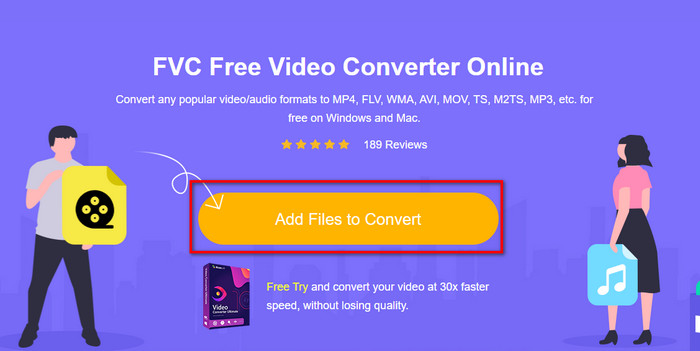
Langkah 2. Selepas mengklik pautan tersebut, tekan Add Files to Convert untuk melancarkan penukar. Jika ini kali pertama anda menggunakan penukar ini, anda perlu memasang pelancar dengan mengklik Add Files to Convert, tetapi saiznya tidak sebesar alat Ultimate. Cari fail 3gp yang ingin anda tukar dan tekan Open.
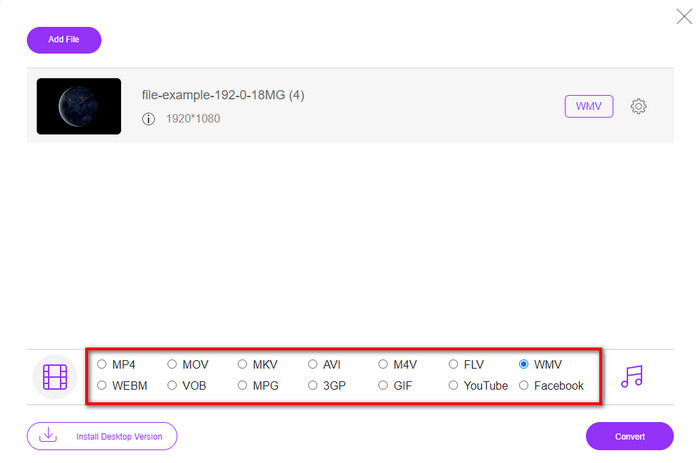
Langkah 3. Selepas memuat naik fail 3GP, kini tiba masanya untuk memilih format yang dipaparkan di bawah atau klik WMV.
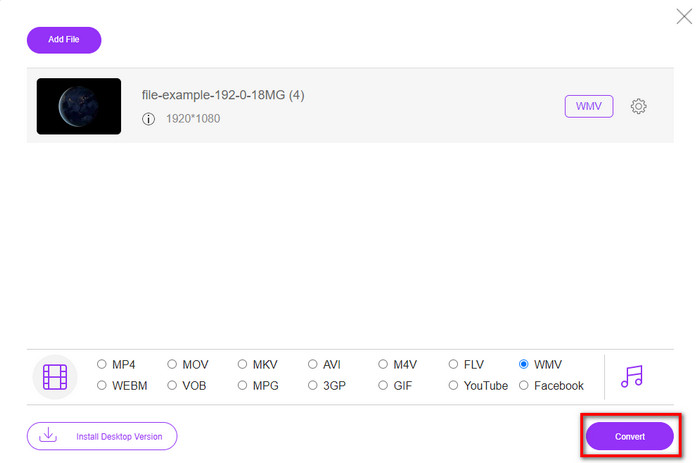
Langkah 4. Sudah memilih format? Jika ya, klik Convert untuk memulakan proses penukaran fail.
Bahagian 5. Soalan Lazim tentang Penukaran 3GP ke WMV
Adakah idea yang bagus untuk menggunakan penukar 3GP ke WMV dalam talian?
Jika anda tidak mahu memuat turun penukar pada peranti anda, adalah sesuai untuk menggunakan penukar dalam talian. Tetapi ingat, bukan semua penukar dalam talian atau luar talian selamat untuk digunakan. Selalunya, mereka mempunyai virus jika anda memasangnya atau tidak melakukan tugas dengan berkesan. Tetapi jika anda mahukan jaminan tentang penukaran anda, kami mengesyorkan menggunakan produk penukar FVC kerana ini adalah 101% bebas perisian hasad dan menjamin proses penukaran anda berjaya.
Adakah mungkin untuk menggabungkan berbilang video 3GP?
Ya, dengan bantuan alat gabungan FVC, anda boleh menggabungkan berbilang video dalam format 3GP. Jadi sekarang, jika anda ingin tahu cara menggabungkan beberapa video 3GP anda, anda mesti membaca artikel ini untuk mengetahui caranya.
Adakah video 3GP mempunyai kualiti yang baik?
3GP mempunyai kualiti yang baik, tetapi ia tidak boleh menyimpan kualiti definisi tinggi jadi harapkan bahawa kualiti video 3GP adalah rendah.
Kesimpulannya
Kesimpulannya, penukar yang disenaraikan dalam artikel ini dipilih dengan teliti berdasarkan piawaian tertentu bagi menghasilkan output profesional. Sebagai tambahan, kami juga telah menggunakan alat‑alat ini untuk membentangkan dan menyatakan hanya fakta tentang ciri‑ciri mereka. Selain itu, katakan anda tidak mahu memuat turun penukar ke komputer desktop untuk menjimatkan ruang tetapi masih mahukan output profesional, kami amat mengesyorkan anda menggunakan FVC Free Video Converter Online. Tetapi jika anda mahu menukarkan 3GP anda dengan cara yang lebih profesional, kami sangat mencadangkan anda menggunakan FVC Video Converter Ultimate. Masih belum puas hati dengan penjelasan yang kami berikan? Kalau begitu, anda mesti mencubanya sendiri untuk merasai penukaran bertaraf pakar yang ditawarkan alat ini dan mempelajari cara menukar 3GP ke WMV.
-
 4 Cara Paling Berkesan tentang Cara Menukar 3GP kepada Format AVI [2025]
 Bolehkah saya menukar fail 3GP saya kepada AVI? Nah, anda boleh menukarnya dengan mudah jika anda mencuba alatan ini yang tersedia kerana kami mengumpulkan semua penyelesaian yang mungkin untuk masalah penukaran 3GP kepada AVI anda.
-
 Penukar 3GP ke FLV Terbaik untuk Digunakan dalam Menukar 3GP kepada FLV [2025]
 Pernahkah anda cuba menukar 3GP kepada FLV, tetapi anda tidak tahu jenis penukar yang akan anda gunakan? Baca artikel ini untuk mengetahui semua butiran tentang menukar 3GP kepada FLV.
-
 2 Cara Terbaik Kemungkinan untuk Menukar 3GP Tidak Disokong kepada DivX [2025]
 Ramai pengguna bertanya bagaimana untuk menukar 3GP kepada DivX. Jadi sekarang, kami menyediakan artikel untuk itu untuk membantu anda menukar fail .3gp anda tanpa kerumitan.
