


 Video Converter Ultimate
 Perakam Skrin
 Pembaikan Video
Bagaimana untuk Menukar AVI kepada Fail 3GP dengan Mudah
Peranti mudah alih generasi ketiga tidak boleh memainkan fail AVI kerana peranti mudah alih 3G tidak menyokongnya. Jika anda ingin memainkan fail AVI pada peranti mudah alih 3G anda, salah satu caranya ialah menukar fail AVI anda kepada fail 3GP. Nasib baik, kami telah mencari cara terbaik untuk anda menukar fail AVI kepada 3GP dengan mudah, menggunakan penukar terbaik.

Bahagian 1. 2 Pilihan Terbaik untuk Menukar Fail AVI Anda kepada 3GP pada Desktop
Jika anda sedang mencari penukar yang boleh anda gunakan di luar talian pada desktop anda, pilihan ini mungkin penyelesaian kepada masalah anda. Bahagian artikel ini menyenaraikan 2 pilihan teratas untuk menukar format fail AVI kepada 3GP.
Pilihan 1. Gunakan FVC Video Converter Ultimate [Alat Luar Talian]
Tanpa ragu, FVC Video Converter Ultimate ialah salah satu penukar luar talian terbaik yang ada di pasaran. Penukar ini menyokong lebih daripada 1000 format fail, termasuk AVI, 3GP, MOV, MP4, WMV, WebM dan banyak lagi. Ia juga mempunyai ciri terbaik yang boleh anda cuba, seperti menambah kesan pada video anda, memampatkan fail anda dan juga menggabungkan berbilang fail video menjadi satu. Selain itu, alat ini sangat mudah digunakan kerana mempunyai antara muka yang mesra pengguna. Ikuti langkah di bawah untuk menukar AVI kepada 3GP dengan menggunakan FVC Video Converter Ultimate.
Langkah 1. Muat turun FVC Video Converter Ultimate pada desktop anda dengan mengklik butang Download di bawah. Ikuti proses pemasangan, kemudian buka aplikasinya.
Muat Turun PercumaUntuk Windows 7 atau lebih baharuMuat Turun Selamat
Muat Turun PercumaUntuk MacOS 10.7 atau lebih baharuMuat Turun Selamat
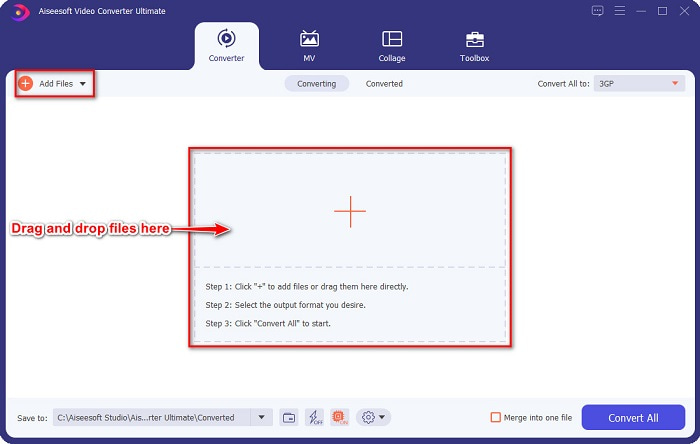
Langkah 2. Pada antara muka utama penukar, klik butang Add Files, atau anda boleh seret dan lepas fail AVI anda ke butang tanda + untuk memuat naik fail AVI anda.
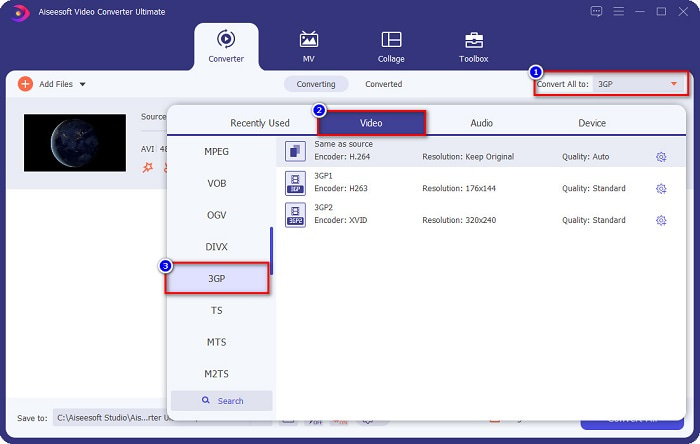
Langkah 3. Kemudian, klik butang Convert All to untuk memilih format output yang anda mahu. Klik format fail 3GP.
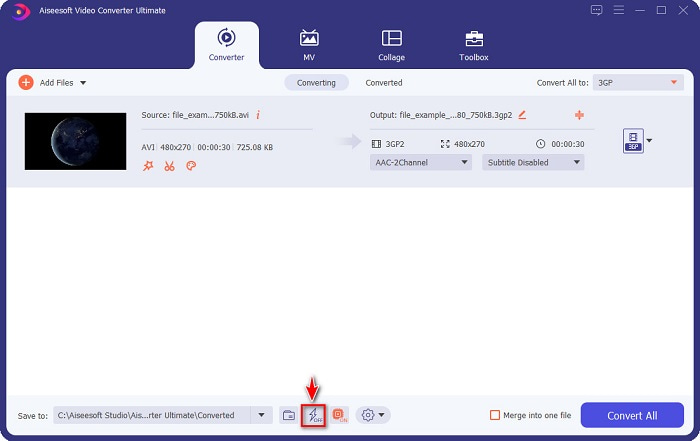
Aktifkan penukaran ultra pantas dengan menandakan tanda kilat di bawah antara muka perisian.
Langkah 4. Setelah memilih format output fail anda, klik butang Convert All untuk menukar fail AVI anda kepada fail 3GP.
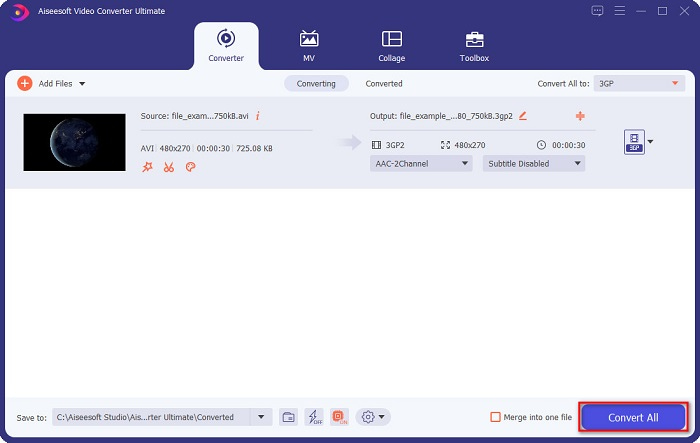
Kemudian hanya tunggu beberapa saat. Dan voila! Anda boleh menukar AVI kepada fail 3GP dengan mudah semudah itu.
Kelebihan
- Ia membolehkan anda mengedit, meningkatkan dan memampatkan fail anda.
- Ia menawarkan penukaran kelompok untuk menggabungkan berbilang format fail menjadi satu.
- Boleh menukar fail sepantas kilat.
- Tersedia pada semua platform, termasuk Windows dan Mac.
Keburukan
- Untuk menggunakan cirinya secara eksklusif, anda perlu membeli aplikasinya.
Pilihan 2. Prism Video Converter [Freeware Tool]
Prism Video Converter Software ialah perisian penukar percuma yang menyokong pelbagai format fail. Selain itu, penukar ini sangat mudah digunakan. Namun, ia tidak menyokong begitu banyak format fail seperti penukar lain. Walau bagaimanapun, ramai orang menggunakan penukar ini kerana kecekapan kerjanya.
Berikut ialah langkah-langkah untuk menggunakan Pemain Media VLC sebagai penukar:
Langkah 1. Muat turun Prism Video Converter, kemudian buka aplikasinya.
Langkah 2. Klik Add Files untuk memuat naik fail AVI. Pada Output Format, klik butang jatuh turun, dan pilih format 3GP.
Langkah 3. Akhir sekali, klik Convert untuk memulakan proses penukaran.
Bahagian 2. Tukar AVI kepada 3GP Menggunakan Penukar Dalam Talian Terbaik
Menggunakan penukar dalam talian lebih mudah berbanding alat luar talian atau perisian percuma kerana anda tidak perlu memuat turunnya. Dan jika anda sedang mencari penukar dalam talian terbaik yang ada di web, maka FVC Free Online Video Converter ialah jawapannya untuk anda. Penukar dalam talian ini boleh menukar banyak format fail seperti AVI, 3GP, MP4, MOV, FLV, WMV, MKV dan sebagainya. Dan jika anda mahu menukar kadar bingkai video anda, penukar ini mempunyai ciri tersebut untuk anda. Selain itu, ia boleh menukar lebih pantas berbanding mana-mana alat dalam talian lain yang anda akan lihat di internet. Oleh itu, ikuti langkah yang disediakan di bawah untuk menggunakan penukar dalam talian ini.
Langkah 1. Taip FVC Free Online Video Converter pada pelayar anda, atau anda boleh pergi terus ke laman web mereka dengan mengklik pautan ini.
Langkah 2. Klik butang Add Files to Convert. Fail komputer anda akan muncul, kemudian pilih fail AVI yang ingin anda tukar.
Muat turun Versi Desktop untuk menukar fail secara kelompok.
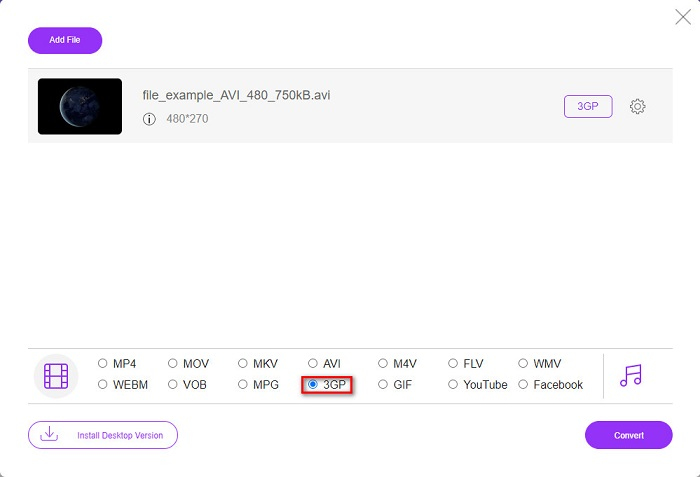
Langkah 3. Seterusnya, pada antara muka kedua perisian, tandakan bulatan bagi format fail 3GP.
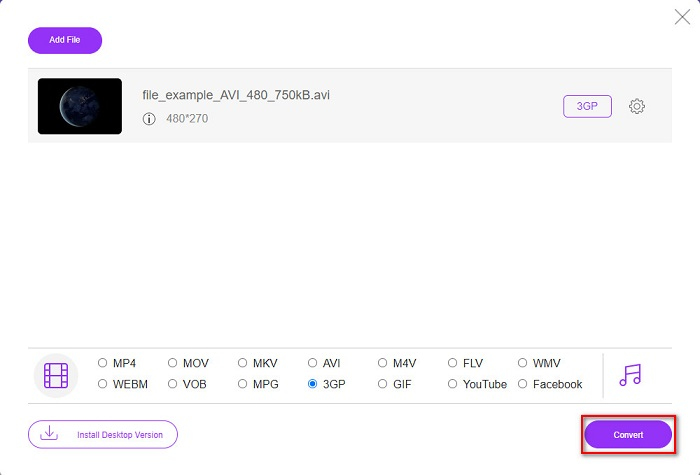
Langkah 4. Dan akhirnya, klik butang Convert untuk menukar fail AVI anda kepada 3GP.
Bahagian 3. Pengetahuan Lanjutan tentang AVI dan 3PG
Untuk pengetahuan lanjut tentang kedua-dua format ini, baca maklumat di bawah:
AVI atau Audio Video Interleave ialah format fail meluas yang dicipta oleh Microsoft. Fail jenis ini mengandungi pemampatan video yang berbeza seperti DivX dan XviD. Di samping itu, hampir semua platform media boleh memainkan fail AVI, dan Windows menyokongnya secara meluas. Ia juga dikenali sebagai standard untuk menyimpan filem dan arkib media.
Sebaliknya, format fail 3GP yang disokong oleh peranti mudah alih generasi ketiga. Ia dibangunkan oleh Projek Perkongsian Generasi Ketiga (3GPP). Tambahan pula, fail jenis ini hanya mempunyai saiz fail yang kecil kerana ia dibuat untuk berkongsi peranti mudah alih 3G. Selain itu, kedua-dua format fail adalah hebat, walaupun mempunyai perbezaannya.
| AVI | VS | 3GP |
| Tidak dimampatkan | Mampat/Tidak Mampat | Termampat |
| Tersedia Pada Hampir Semua Peranti | Keserasian | Tersedia Pada Peranti Mudah Alih Generasi Ketiga |
| Resolusi Definisi Tinggi | Resolusi Disokong | Resolusi rendah |
| Boleh dimainkan | Boleh Dimainkan Pada Peranti Mudah Alih 4g | Tidak Boleh Dimainkan |
| Jika Anda Ingin Mempunyai Format yang Lebih Biasa, Yang Disokong Oleh Hampir Semua Peranti, Gunakan Format Fail Ini | Kelebihan Menggunakan Format Fail Ini | Jika Anda Menggunakan Peranti Mudah Alih Generasi Ketiga, Dan Mahukan Saiz Fail Yang Lebih Rendah, Gunakan Format Fail Ini |
AVI lwn 3GP
Berdasarkan Format Fail Pertukaran Sumber (RIFF), format AVI telah diperkenalkan oleh Microsoft pada tahun 1992. Ia boleh menyimpan video/audio berkualiti tinggi kerana ia menggunakan kurang pemampatan. Tetapi itu juga menyebabkan saiz fail besar fail AVI, yang mungkin menjadi masalah apabila terdapat ruang yang terhad.
Projek Perkongsian Generasi Ketiga (3GPP) menghasilkan format 3GP/3GPP sebagai format kontena multimedia. Ia sebenarnya berdasarkan format fail media ISO. Kami sering menggunakannya untuk menyimpan strim video/audio yang dihantar antara telefon mudah alih 3G dan dalam talian.
Bahagian 4. Soalan Lazim tentang Menukar AVI kepada 3GP
Bolehkah anda memainkan fail AVI pada Mac?
Malangnya, tidak. Pemain media asli Mac, QuickTime, tidak menyokong AVI. Namun, anda boleh menukar fail AVI anda kepada format fail yang disokong Mac, iaitu MOV. Untuk mengetahui cara menukar AVI kepada MOV dengan mudah, klik pautan ini.
Bolehkah saya menukar AVI kepada 3PG tanpa kehilangan?
Ya. Anda boleh menukar fail AVI kepada 3PG tanpa kehilangan kualiti dengan menggunakan FVC Video Converter Ultimate. Penukar hebat ini boleh menukar AVI kepada 3PG secara lossless.
Bolehkah anda memainkan fail 3GP pada peranti mudah alih 4G?
Malangnya, tidak. Seperti yang dinyatakan pada namanya, peranti mudah alih 3G ialah peranti yang boleh memainkan fail 3GP. Tetapi jika anda mahu memainkan fail 3GP pada peranti mudah alih 4G anda, anda boleh menukar 3GP anda kepada MOV. Untuk mengetahui cara menukar fail 3GP kepada MOV, baca artikel dengan mengklik pautan ini.
Kesimpulannya
Jika anda sedang mencari penyelesaian untuk menukar fail AVI kepada 3GP, kami mendapat perlindungan anda. Mencari penukar yang mempunyai standard yang tinggi adalah sukar. Tetapi jika anda sedang mencari penukar yang terkemuka, FVC Video Converter Ultimate ialah alat yang paling sesuai untuk anda. Penukar ini menawarkan anda ciri yang paling unik dan berguna hanya untuk anda! Jadi, jika anda ingin menggunakan Penukar yang sangat baik ini, muat turunnya sekarang secara percuma.
-
 4 Cara Paling Berkesan tentang Cara Menukar 3GP kepada Format AVI [2021]
 Bolehkah saya menukar fail 3GP saya kepada AVI? Nah, anda boleh menukarnya dengan mudah jika anda mencuba alatan ini yang tersedia kerana kami mengumpulkan semua penyelesaian yang mungkin untuk masalah penukaran 3GP kepada AVI anda.
-
 Penukar 3GP ke FLV Terbaik untuk Digunakan dalam Menukar 3GP kepada FLV [2022]
 Pernahkah anda cuba menukar 3GP kepada FLV, tetapi anda tidak tahu jenis penukar yang akan anda gunakan? Baca artikel ini untuk mengetahui semua butiran tentang menukar 3GP kepada FLV.
-
 2 Cara Terbaik Kemungkinan untuk Menukar 3GP Tidak Disokong kepada DivX [2022]
 Ramai pengguna bertanya bagaimana untuk menukar 3GP kepada DivX. Jadi sekarang, kami menyediakan artikel untuk itu untuk membantu anda menukar fail .3gp anda tanpa kerumitan.

