


 Video Converter Ultimate
 Perakam Skrin
 Pembaikan Video
 Muat Turun Selamat
Cara Terpantas untuk Menukar FLAC dan WAV (Luar Talian / Dalam Talian)
Free Lossless Audio Codec, yang biasanya dikenali sebagai FLAC, ialah format fail audio yang mempunyai persamaan yang ketara dengan MP3. Ia memberikan kualiti audio yang sangat baik sambil hanya mengambil ruang yang agak kecil pada cakera anda. Selain itu, format ini adalah lossless, yang bermaksud sebahagian besar data audio anda dikekalkan walaupun selepas proses pemampatan. Dalam situasi lain, ada kalanya anda perlu menukar fail FLAC kepada format lain seperti WAV jika anda mahu pengalaman mendengar pada tahap optimum dan berkualiti tinggi. Perlukah anda memilih salah satu daripadanya? Ketahui di bawah cara anda boleh mendapatkan kedua‑duanya dengan menggunakan alat penukaran FLAC ke WAV terbaik yang ada.

Bahagian 1. Tukar FLAC dan WAV Luar Talian
Video Converter Ultimate ialah alat bertaraf tinggi untuk menukar fail kepada sebarang format audio, termasuk WAV dan FLAC. Program ini menawarkan ciri penukaran kelompok yang membolehkan anda menukar sekumpulan fail audio dalam satu sesi. Selain itu, anda boleh memaksimumkan kualiti setiap lagu yang ingin anda sunting kerana program ini membenarkan pengguna melaraskan tetapan teknikal output seperti kadar pensampelan dan bitrate. Jika anda ingin menukar WAV ke FLAC atau sebaliknya secara kelompok, baca panduan ringkas yang kami sediakan di bawah.
Langkah 1. Lancarkan program pada peranti anda dengan memilih butang Muat Turun Percuma yang sesuai di bawah. Seterusnya, ikut arahan pada skrin untuk memulakan program. Anda boleh membiasakan diri dengan antara mukanya setelah ia dipasang.
Muat Turun PercumaUntuk Windows 7 atau lebih baharuMuat Turun Selamat
Muat Turun PercumaUntuk MacOS 10.7 atau lebih baharuMuat Turun Selamat
Langkah 2. Tekan ikon Tambah pada skrin utama dan import fail audio yang ingin anda proses. Selepas itu, anda akan dibawa ke pratonton fail yang telah diimport. Anda boleh memuat naik satu folder jika anda ingin menukar secara pukal. Pilih dari direktori anda folder yang mengandungi semua fail audio yang diperlukan.
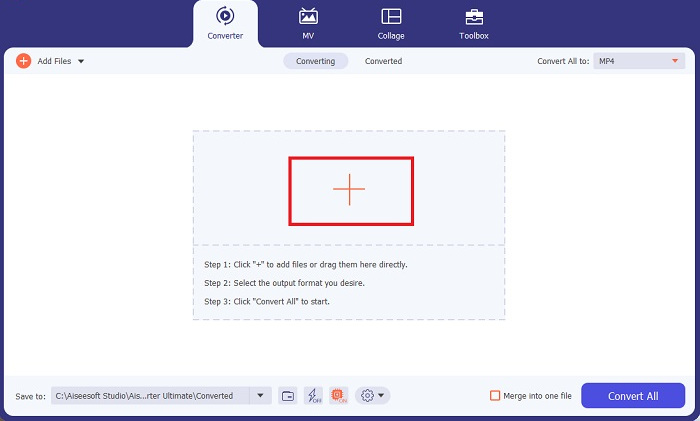
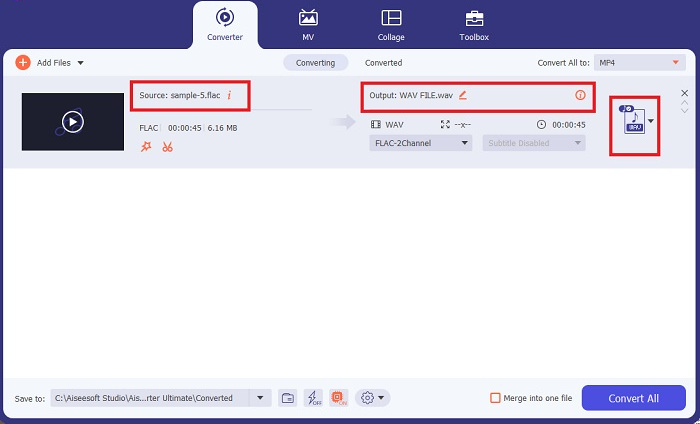
Langkah 3. Kini anda boleh menukar format output dengan mengklik butang Penukar di bahagian atas skrin program. Dari situ, pilih WAV daripada tab pilihan Output Audio. Dalam masa yang sama, anda boleh melaraskan kadar pensampelan dan bitrate fail output anda agar sepadan dengan kualiti yang anda inginkan.
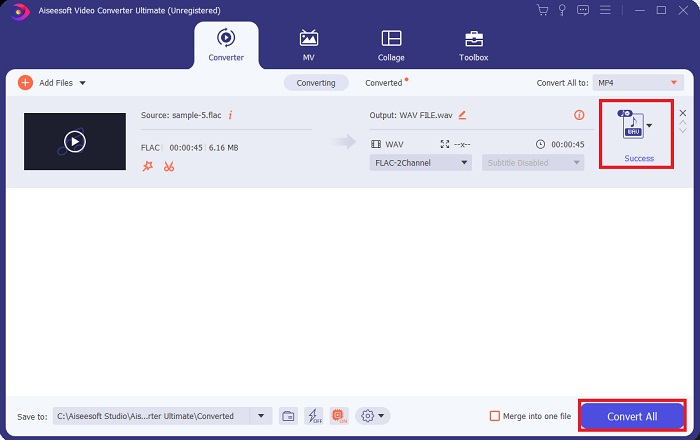
Langkah 4. Untuk langkah terakhir, mulakan proses penukaran dengan mengklik butang Tukar Semua di bahagian bawah. Selepas itu, program akan membuka folder output secara automatik untuk membolehkan anda menyemak format baharu fail anda.
Kelebihan
- Ia boleh menukar kumpulan FLAC ke format fail audio WAV.
- Program ini berfungsi dengan baik dengan kedua-dua Windows dan Mac OS.
- Ia mempunyai kelajuan penukaran yang cepat.
Keburukan
- Ia memerlukan yuran langganan berbayar selepas percubaan percuma.
- Program ini tidak berfungsi pada peranti OS Linux.
Bahagian 2. Tukar FLAC kepada WAV atau WAV kepada FLAC Dalam Talian
Walaupun enjin carian anda mungkin memaparkan pelbagai penukar dalam talian FLAC ke WAV atau WAV ke FLAC, inilah yang boleh kami lakukan untuk memudahkan urusan anda. Free Audio Converter Online ialah pilihan yang sangat baik untuk mengelakkan pemasangan program desktop. Penukar dalam talian ini berfungsi dengan lancar sambil memberikan keselamatan dan perlindungan terhadap data peribadi anda ketika proses penukaran dijalankan. Selain itu, anda boleh memanfaatkan ciri penukaran pukal perisian ini seolah‑olah anda menggunakan program desktop.
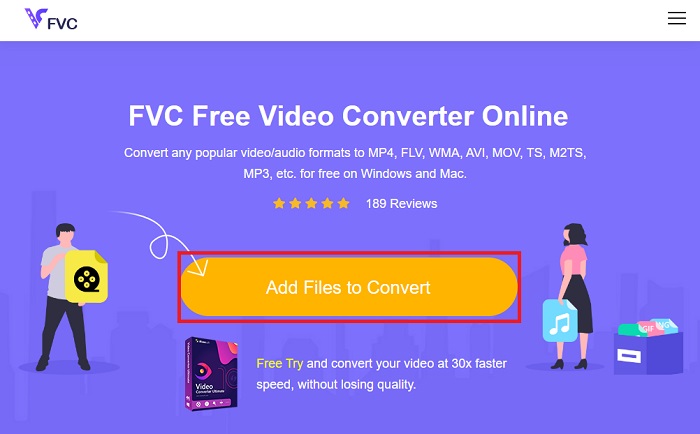
Langkah 1. Klik pautan di atas untuk pergi ke laman utama Free Online Video Converter. Pilih Tambah Fail untuk Ditukar pada skrin utama dan muat naik fail audio anda.
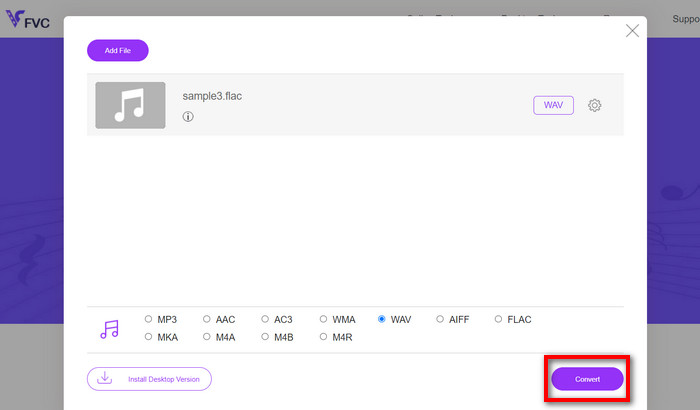
Langkah 2. Pratonton fail asal anda akan dipaparkan pada skrin. Dari panel yang sama, tatal ke bawah dan pilih format output yang anda inginkan.
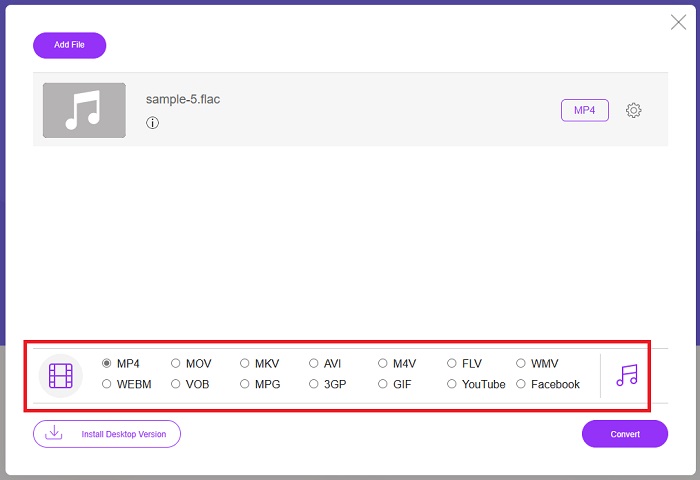
Langkah 3. Tekan butang Tukar untuk menukar format FLAC kepada WAV. Jika anda ingin menukar fail lain, ulangi panduan ini dari awal.
Kelebihan
- Ia berfungsi pada mana-mana enjin carian seperti Google Chrome, Safari, Firefox dan banyak lagi.
- Ia menawarkan pelbagai format fail audio yang popular seperti MP3, AAC, dan WMA.
- Pengguna boleh menikmati penukaran tanpa had setiap hari.
Keburukan
- Kelajuan penukaran bergantung pada kekuatan sambungan internet.
Bacaan Lanjut:
Tukar FLAC ke MP3 untuk Mengekalkan Kualiti Audio
Langkah Mudah Menukar WAV ke OGG untuk Saiz Audio Optimum
Bahagian 3. Soalan Lazim tentang Penukaran FLAC dan WAV
Adakah penukaran fail daripada FLAC kepada WAV akan mengurangkan kualiti?
Menukar fail audio anda daripada FLAC kepada WAV tidak akan menurunkan kualiti kerana peleraiannya tidak dimampatkan. Walau bagaimanapun, katakan anda menukar fail daripada WAV kepada FLAC. Dalam kes itu, anda mungkin melihat sedikit perubahan, terutamanya bagi mereka yang telinganya agak terperinci. Jika anda memerlukan bantuan dalam memutuskan yang mana satu untuk dikekalkan, berikut ialah sekeping perspektif yang boleh anda lihat; Format audio FLAC ialah pilihan yang baik untuk menyimpan timbunan lagu, manakala saiz fail WAV lebih besar tetapi sesuai untuk penyuntingan audio.
Adakah WAV format audio resolusi tertinggi?
WAV ialah singkatan Format Fail Audio Bentuk Gelombang yang dibangunkan oleh IBM dan Microsoft. Format ini dianggap sebagai format resolusi tertinggi dalam industri muzik digital kerana ia mengandungi frekuensi audio mentah dan tidak terjejas.
Apakah penukar FLAC ke WAV dalam talian yang terbaik?
Tanpa ragu-ragu, FVC Free Online Video Converter ialah penukar FLAC ke WAV percuma terbaik dalam talian. Anda tidak perlu memperoleh kehebatan teknikal untuk mengubah mana-mana fail video dan audio menggunakan perisian. Ia boleh melakukan tugas anda dengan cekap kerana ia mesra pengguna dan mempunyai kelajuan penukaran yang tiada tandingan. Lebih-lebih lagi, program dalam talian ini menyediakan, jika tidak semua tetapi kebanyakan format audio popular yang kita tahu.
Kesimpulannya
Penukaran boleh dilakukan dua hala sama ada daripada FLAC ke WAV atau WAV ke FLAC. Memandangkan kedua‑dua format fail ini meluas digunakan dalam muzik digital hari ini, pilihan yang mana satu untuk digunakan mungkin bergantung pada tugas yang akan anda lakukan dengannya. Dengan alat yang dinyatakan di atas, anda boleh bertukar antara format ini pada bila‑bila masa. Ikuti langkah yang disebutkan di atas untuk menukar FLAC ke WAV atau WAV ke FLAC, dan anda seharusnya tidak menghadapi sebarang kesukaran.
-
 Ketahui mengenai Cara Menukar MP3 ke Format WAV
 Adakah anda ingin tahu bagaimana untuk menukar MP3 ke WAV? Tentukan alat mana yang menghasilkan penukaran kualiti terbaik yang boleh anda perolehi.
-
 WAV Player - 5 Aplikasi WAV Player Teratas untuk Android, iPhone, PC dan Mac
 Bagaimana cara memainkan fail WAV di telefon Android? Pemain apa yang boleh bermain WAV? Catatan ini berkongsi 5 pemain WAV percuma terbaik untuk Android, iPhone, Mac dan PC.
-
 3 Editor Metadata FLAC Teratas pada Mac dan Windows [Dikemas kini 2023]
 Adakah anda ingin menukar metadata FLAC? Dalam kes ini, anda mesti membaca artikel ini kerana kami menyediakan pengetahuan yang mencukupi tentang editor metadata FLAC terkini yang boleh digunakan.
