


 Video Converter Ultimate
 Perakam Skrin
 Pembaikan Video
 Muat Turun Selamat
Tukar DIVX kepada 3GP dengan Prosedur Paling Berkesan
Anda tidak dapat memainkan video DIVX pada peranti anda kerana ia tidak disokong? Kebanyakan orang menghadapi masalah yang sama. Namun anda bernasib baik kerana kami akan membincangkan kaedah yang paling berkesan dan paling mudah untuk menukar DIVX kepada 3GP. Jangan lepaskan peluang ini, dan ketahui lebih lanjut tentang cara menukar pelbagai jenis fail menggunakan pelbagai aplikasi yang dipercayai dan telah diuji yang akan kami perkenalkan.

Bahagian 1: Perisian Terbaik untuk Menukar DIVX kepada 3GP
Adakah anda mahu menukar DIVX kepada 3GP pada peranti anda seperti komputer Windows dan Mac? Maka masalah anda sudah pun selesai. Untuk menukar fail DIVX anda, anda boleh menggunakan Video Converter Ultimate. Daripada namanya sendiri, alat ini merupakan aplikasi terbaik di mana anda boleh menukar lebih 1000 format fail video, termasuk DIVX, 3GP, MP4, MOV, MTS, WEBM dan banyak lagi. Anda juga boleh menukar dua atau lebih fail secara serentak kerana alat ini menawarkan penukaran kelompok (batch conversion). Selain itu, Video Converter Ultimate mempunyai proses penukaran yang pantas, yang sangat berguna jika anda merancang untuk menukar banyak format fail.
Tambahan pula, anda masih boleh menggunakan aplikasi luar talian ini jika anda berminat untuk mengedit fail DIVX anda sebelum menukarnya. Dengan mengandaikan bahawa anda ingin membetulkan warna video anda, anda boleh meneruskan ke panel Kotak Alat dan pilih alat Pembetulan Warna untuk melaraskan kecerahan, kontras dan ketepuan video anda. Selain itu, katakan anda ingin menyegerakkan audio dalam fail video DIVX anda sebelum menukarnya. Dalam kes itu, anda boleh berbuat demikian kerana ia menawarkan fungsi Penyegerakan Audio, jadi penyegerakan audio dengan video adalah mudah untuk anda.
Ciri-ciri:
◆ Tukar format fail video, termasuk MP4, M4V, FLV, AVI, dsb.
◆ Boleh mencipta Video Muzik dengan pelbagai tema.
◆ Kotak Alat mengandungi penambah video, penghilang tera air, pemampat dan banyak lagi.
◆ Mampu membuat kolaj.
Kelebihan
- Ia menyokong pelbagai format fail, seperti MP4, AVI, FLV, MOV, MTS, DIVX, 3GP, dll.
- Mempunyai antara muka pengguna yang mesra yang sesuai untuk pemula.
- Mempunyai proses penukaran 30x lebih pantas
- Boleh diakses pada kedua-dua Windows dan Mac.
- Ia boleh menukar berbilang video dalam satu perjalanan.
Keburukan
- Beli Video Converter Ultimate untuk menikmati lebih banyak ciri unik.
Untuk menukar DIVX kepada 3GP dengan mudah, anda mesti mengikuti panduan mudah ini di bawah.
Langkah 1: Pertama, anda hanya perlu memuat turun Video Converter Ultimate pada peranti anda, seperti komputer Windows atau Mac. Kemudian, jalankan proses pemasangan dan buka aplikasi tersebut.
Muat Turun PercumaUntuk Windows 7 atau lebih baharuMuat Turun Selamat
Muat Turun PercumaUntuk MacOS 10.7 atau lebih baharuMuat Turun Selamat
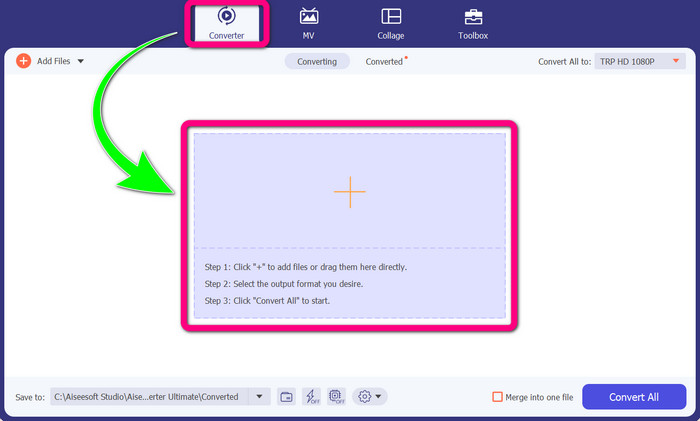
Langkah 2: Setelah anda membuka Video Converter Ultimate pada peranti anda, pilih panel Converter. Kemudian, klik ikon + untuk menambah fail video DIVX anda.
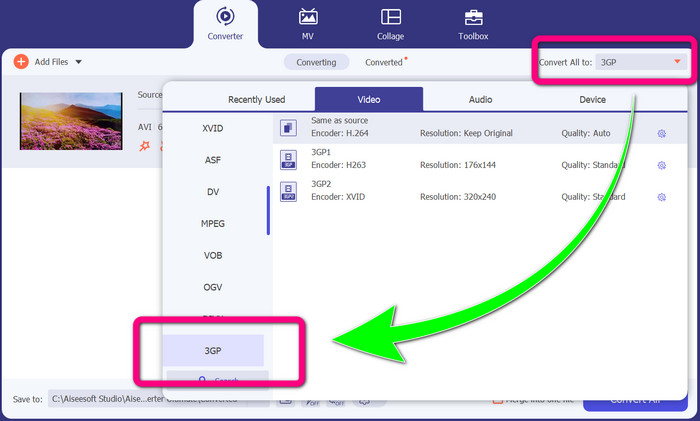
Langkah 3: Selepas menambah fail video anda, klik pilihan Convert all to, cari format fail 3GP dan pilihnya.
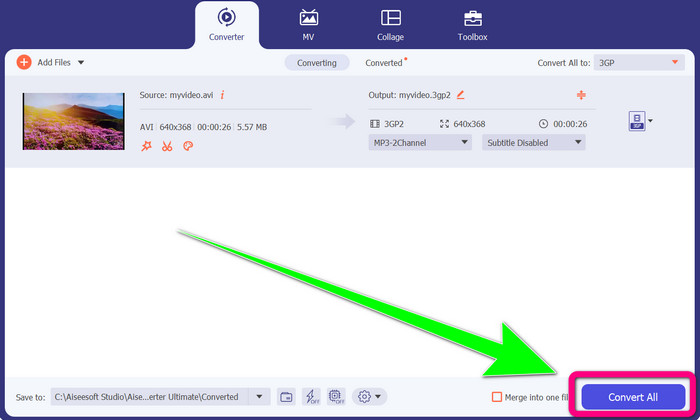
Langkah 4: Setelah selesai memilih format fail 3GP, klik butang Convert All. Tunggu proses penukaran dan simpan video akhir anda ke peranti.
Bahagian 2: Penukar Dalam Talian Cemerlang untuk Menukar DIVX kepada 3GP
Menggunakan FVC Free Video Converter Dalam Talian
Salah satu alat dalam talian terbaik untuk menukar DIVX kepada 3GP ialah FVC Free Video Converter Online. Alat ini boleh membantu anda menukar pelbagai format fail hanya dengan beberapa klik. Ia menyokong hampir semua video dan audio arus perdana kepada MP4, MOV, MKV, FLV, VOB, MP3, AAC dan banyak lagi. FVC Free Video Converter Online mudah dan ringkas untuk digunakan. Malah pemula juga boleh menggunakan aplikasi ini. Selain itu, sama ada anda pengguna Windows atau Mac, anda boleh bergantung pada alat ini kerana ia tersedia pada kedua-dua Windows dan Mac. Ikuti kaedah mudah di bawah untuk menukar DIVX kepada 3GP.
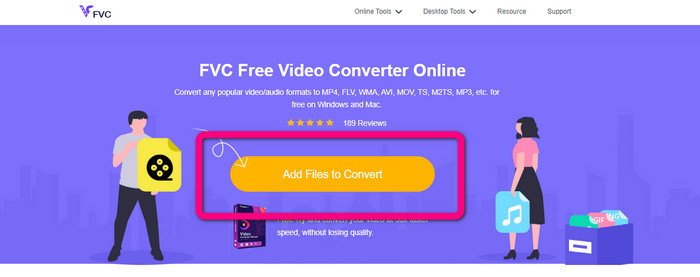
Langkah 1: Lawati FVC Free Video Converter Online. Kemudian, pilih butang Add Files to Convert untuk mengimport fail DIVX yang anda mahu tukar.
Langkah 2: Selepas menambah fail DIVX anda, klik format fail 3GP daripada pilihan format di bawah.
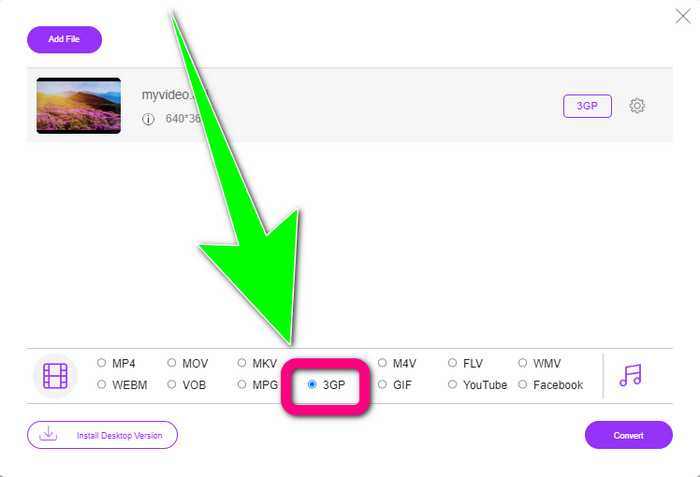
Langkah 3: Teruskan dengan mengklik butang Convert. Tunggu proses penukaran dan simpan video yang telah ditukar.
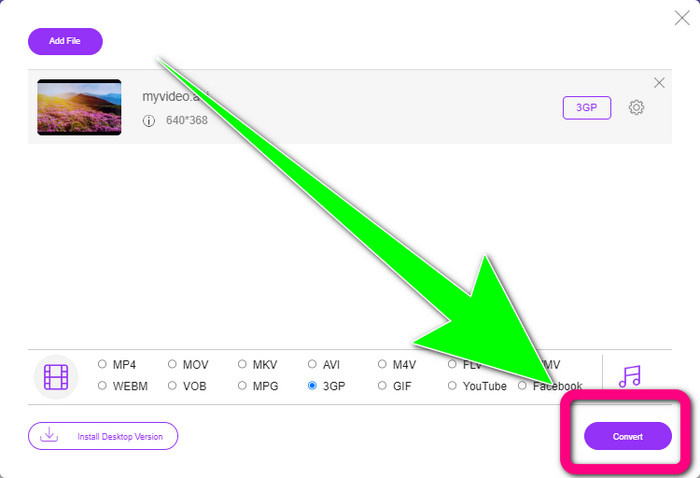
Menggunakan Convertio
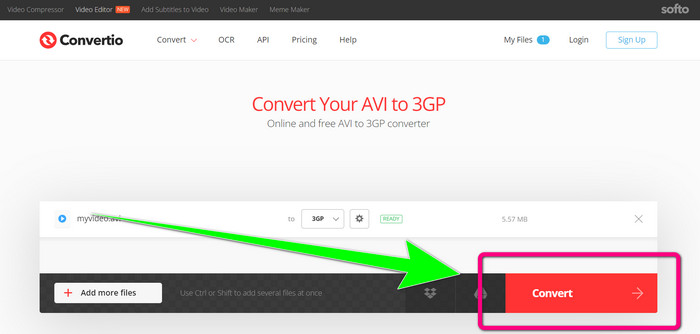
Jika anda mahu menukar DIVX kepada 3GP secara dalam talian, Convertio ialah salah satu alat yang boleh anda gunakan. Ia menyokong banyak format, seperti 3GP, DIVX, XVID, AVID, MP4, M4V, ASF, HEVC dan banyak lagi. Selain daripada menukar fail video, anda boleh menukar imej, audio, dokumen, arkib dan fail lain. Convertio juga merupakan alat yang ringkas kerana anda boleh menukar dalam beberapa langkah sahaja, jadi anda tidak perlu menyusahkan diri untuk menukar fail DIVX kepada fail 3GP. Namun, seperti alat dalam talian yang lain, anda tidak boleh mengendalikan perisian ini jika anda tidak mempunyai akses internet. Selain itu, ada kalanya alat dalam talian ini tidak berfungsi dengan begitu baik. Versi percuma Convertio mempunyai had. Anda hanya boleh menukar dengan saiz fail maksimum 100Mb. Anda perlu membeli perisian tersebut untuk meningkatkan saiz fail maksimum dan mendapatkan prestasi yang lebih baik. Ikuti langkah di bawah untuk menukar fail DIVX kepada format fail 3GP.
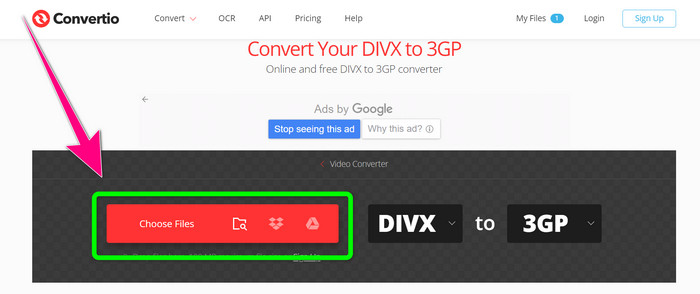
Langkah 1: Pergi ke laman web Convertio. Klik butang Choose Files dan tambah video anda yang berformat DIVX.
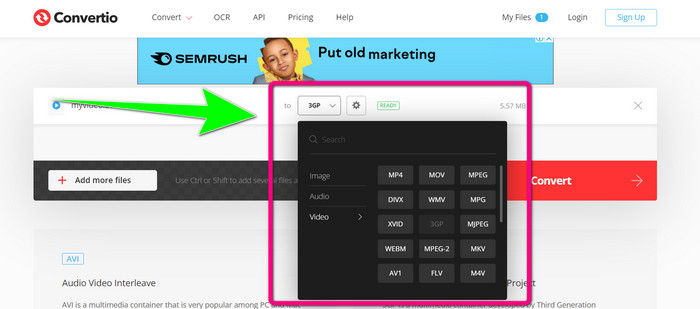
Langkah 2: Selepas menambah video anda, pergi ke pilihan format dan pilih format fail 3GP.
Langkah 3: Setelah anda memilih format fail 3GP, klik butang Convert, tunggu proses penukaran dan simpan fail video 3GP anda.
Bahagian 3: Gambaran Keseluruhan Format Fail DIVX dan 3GP
DIVX
DIVX ialah perisian pemampatan video yang mampu memampatkan fail video sehingga satu per dua belas daripada video asal dengan kehilangan kualiti yang minimum. Format video ini biasa digunakan oleh syarikat filem besar seperti Disney, Dreamworks SKG, Universal dan Paramount.
3GP
3GP ialah sebuah kontena multimedia. Ia dibangunkan oleh Third Generation Partnership Project pada tahun 1998 untuk telefon berasaskan GSM (Global System for Mobile Communications). Kontena 3GP memerlukan ruang storan, penggunaan data dan lebar jalur yang sedikit, yang sangat sesuai untuk telefon bimbit.
Bacaan Lanjut
Tukar MTV ke MKV dengan Mudah Menggunakan Penukar Terbaik Ini
Cara Menukar TRP kepada MKV Tanpa Menjejaskan Kualiti
Bahagian 4: Soalan Lazim tentang Menukar DIVX kepada 3GP
Apakah penukar DIVX?
Ia merupakan alat yang hebat yang mampu menukar pelbagai jenis fail kepada banyak format fail lain. Ini termasuk AVI, MP4, MPEG, MOV, FLV dan banyak lagi. Setelah anda selesai menukar, anda boleh memainkan video anda pada mana-mana pemain media lain yang menyokong format tersebut. FVC Free Video Converter Online adalah salah satu penukar terbaik yang boleh anda gunakan.
Adakah format fail DIVX sama dengan AVI?
Format fail DIVX adalah berdasarkan bekas AVI, tetapi ia boleh mengandungi ciri hebat seperti bab dan sari kata. Selain itu, kedua-dua format fail AVI dan DIVX boleh dimainkan pada peranti yang diperakui DIVX.
Bolehkah saya menukar fail DIVX kepada 3GP tanpa kehilangan kualiti?
Ya, sudah tentu boleh. Dengan menggunakan Video Converter Ultimate, anda boleh menukar fail DIVX kepada 3GP tanpa perlu risau sama ada kualitinya akan berubah. Penukar yang hebat ini boleh menukar pelbagai fail tanpa menjejaskan kualiti video anda.
Kesimpulannya
Seperti yang anda lihat, terdapat pelbagai kaedah berkesan untuk menukar DIVX kepada 3GP menggunakan alat luar talian dan dalam talian. Namun kadangkala, sesetengah alat dalam talian agak menyusahkan, terutamanya jika sambungan internet anda lemah, jadi anda boleh menggunakan aplikasi yang boleh dimuat turun. Jika anda sedang mencari alat luar talian yang hebat, anda boleh cuba Video Converter Ultimate.
-
 4 daripada The Best MKV to 3GP Converters untuk Windows dan Mac
 Jika anda sedang mencari penukar MKV ke 3GP yang mudah digunakan, anda bertuah! Kami menemui penukar MKV ke 3GP terbaik dan percuma yang anda mesti cuba.
-
 5 Penukar Ultimate MOV ke 3GP Terbaik yang Anda Jangan Terlepas
 Jika anda sedang mencari penukar MOV ke 3GP dalam talian dan luar talian yang terbaik, maka anda berada di landasan yang betul. Baca artikel ini untuk menukar MOV anda kepada fail 3GP.
-
 3 Cara untuk Menukar MPG kepada 3GP pada Windows dan Mac [Percuma]
 Jika anda sedang mencari cara untuk menukar MPG kepada 3GP, baca artikel ini untuk mengetahui cara terbaik untuk menukar MPG kepada 3GP pada Windows dan Mac.
