


 Video Converter Ultimate
 Perakam Skrin
 Pembaikan Video
Fahami tentang Apakah Penukar yang Sedia Digunakan untuk Menukar DivX kepada AVI
DivX dan AVI sebenarnya bukan pesaing antara satu sama lain walaupun kedua-duanya sering dikaitkan dengan fail video, namun kedua format ini mempunyai banyak perbezaan. Sebagai contoh, DivX digunakan untuk memampatkan kandungan video yang panjang dan menjadikannya sekecil mungkin tanpa menjejaskan kualiti video itu sendiri. Manakala AVI ialah salah satu contoh bekas (container) video yang boleh anda gunakan untuk menyimpan video definisi tinggi tetapi dengan saiz fail yang lebih besar. Kini kita sudah mempunyai sedikit latar belakang tentang kedua-duanya. Seterusnya, mari kita teliti dengan lebih mendalam untuk memahami kedua format ini dan pelajari cara menukar DivX kepada AVI secara percuma dengan meneruskan pembacaan artikel ini.
Bahagian 1. DivX lwn AVI
Seperti yang dikatakan sebelum ini DivX dan AVI bukanlah pesaing mereka sendiri kerana ia boleh digunakan dalam satu fail atau yang lain. Selain itu, DivX ialah pemampat fail yang dibangunkan oleh DivX, Inc. sendiri. Pemampat ini adalah proprietari dan ia dikatakan sebagai generasi penyewaan video DVD seterusnya. Tetapi kini DivX telah ditutup kerana percubaan yang gagal untuk menggantikan DVD. Tetapi sekarang, anda masih boleh mengakses alat dan menontonnya dalam beberapa pemain media lama yang menyokong jenis pemampatan yang disediakan oleh DivX.
AVI ialah format fail media yang digunakan untuk menampung sebarang fail video dan audio dengan pelbagai codec. Format ini dibangunkan oleh Microsoft untuk digunakan sebagai pemacu main balik (playback) bagi mana-mana strim video atau audio. Pada penghujung tahun 1992, AVI dicipta untuk memberikan pengalaman video dan audio yang lebih maju dan futuristik yang hanya digunakan pada sistem pengendalian Windows. Namun kini anda boleh menggunakan AVI pada Mac atau Linux malah pada telefon anda juga. Walau bagaimanapun, masih ada satu perkara tentang format AVI yang belum banyak ditambah baik, iaitu dari segi pemampatan dan saiz failnya.
DivX
◆ Pemampat digunakan untuk menjadikan saiz fail bekas lebih kecil tanpa menyentuh kualitinya.
◆ Ia adalah pemampat proprietari DivX Inc.
◆ Ia dikatakan sebagai versi DVD yang lebih baik tetapi ia gagal dalam percubaannya.
◆ Kebanyakan pemain media baharu pada masa kini tidak menyokong DivX.
AVI
◆ Ia dikenali sebagai salah satu bekas video dan audio yang telah direvolusikan dalam era moden ini.
◆ Format ini disokong dalam kebanyakan platform dan perisian.
◆ Ia tidak mempunyai pemampatan tepat yang disokong kerana ia tidak rugi.
Dan sekarang setelah kita mengetahui perbezaan antara kedua-duanya, kini adalah masa yang sesuai untuk mengetahui penukar DivX ke AVI dalam talian dan luar talian yang boleh anda gunakan untuk menonton fail DivX.
Bahagian 2. 4 daripada Penukar Terbaik dan Ketahui Cara Menukar DivX kepada AVI
Teratas 1. FVC Video Converter Ultimate
Jika menukar DivX anda menjadi masalah, maka FVC Video Converter Ultimate ialah jawapannya. Tidak seperti penukar lain, perisian ini telah dipertingkat selama bertahun-tahun sehingga menjadi salah satu penukar yang sangat terkenal. Selain menjadi antara yang terbaik, ia juga mempunyai proses penukaran terpantas yang dapat anda alami kerana ia dikuasakan oleh pecutan perkakasan dan penukaran pantas. Dan disebabkan ciri terbina dalamnya, ia dengan mudah berada di kedudukan teratas. Walaupun ia berbayar, anda tidak perlu membayar dengan mahal untuk menggunakannya. Jadi, jika anda ingin belajar cara menukar DivX kepada AVI pada Mac atau PC, ikut langkah di bawah sambil kita mencubanya sendiri.
Langkah 1. Pertama sekali, sebelum anda boleh menggunakan alat ini, anda perlu memuat turunnya dahulu ke dalam pemacu anda. Kemudian pasang, lakukan tetapan dan klik Start Now untuk meneruskan.
Muat Turun PercumaUntuk Windows 7 atau lebih baharuMuat Turun Selamat
Muat Turun PercumaUntuk MacOS 10.7 atau lebih baharuMuat Turun Selamat
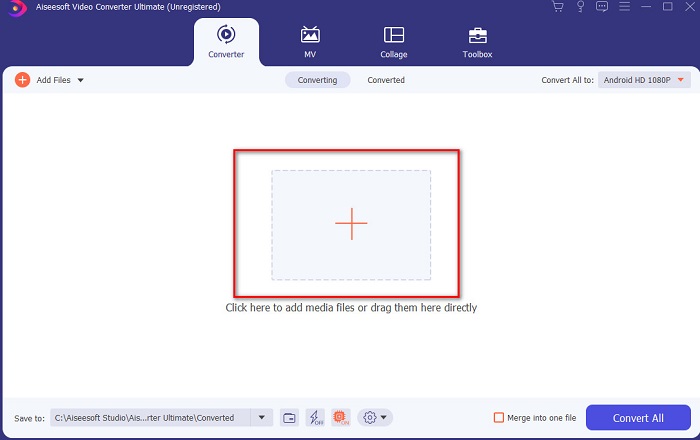
Langkah 2. Lancarkan alat ini untuk meneruskan, kemudian antara muka seperti ini akan dipaparkan. Di bahagian tengah, klik butang + dan cari fail DivX yang ingin anda masukkan kemudian klik Open.
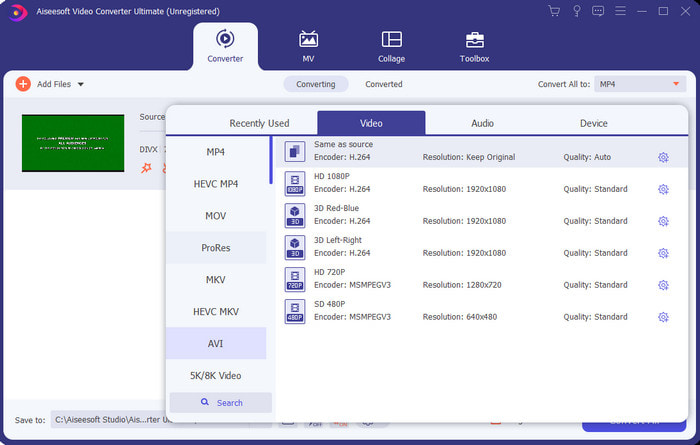
Langkah 3. Untuk menukar DivX kepada AVI, klik Convert All to dan cari format AVI lalu klik padanya.
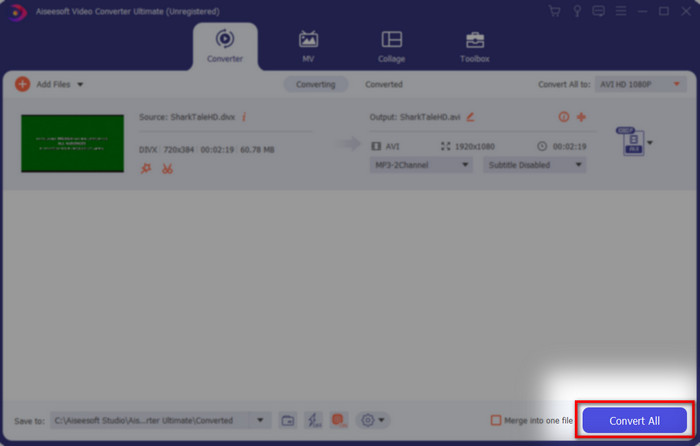
Langkah 4. Untuk memulakan proses penukaran, klik Convert All dan tunggu sehingga proses selesai.
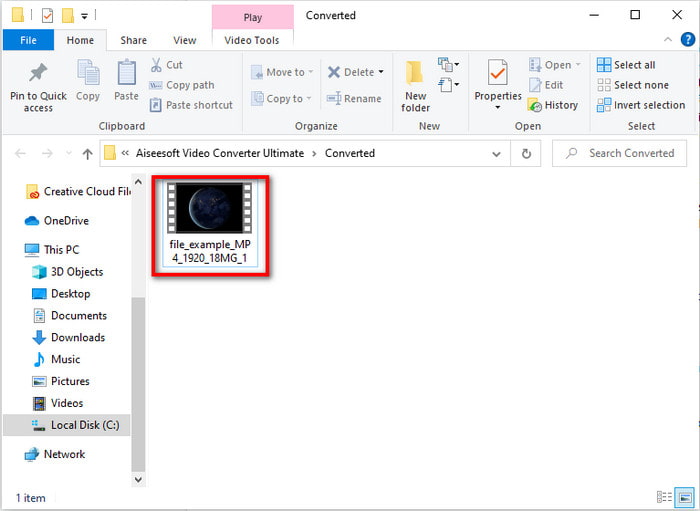
Langkah 5. Tunggu sehingga proses penukaran selesai; apabila siap, satu folder akan muncul pada skrin anda bersama fail yang telah ditukar. Klik fail tersebut untuk menontonnya dan nikmati.
Top 2. Penukar Video Freemake
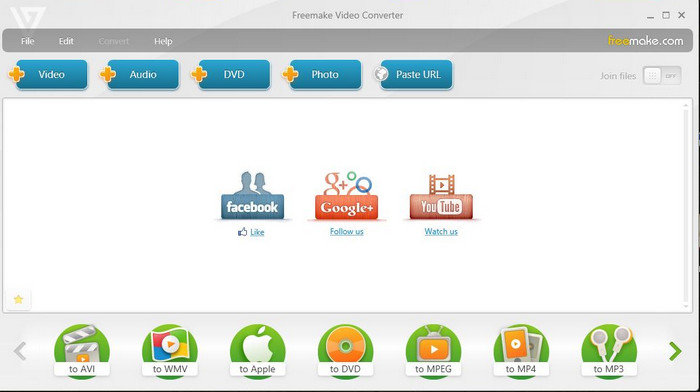
Perisian boleh muat turun lain yang boleh anda gunakan untuk menukar format ialah Freemake Video Converter. Alat ini sudah banyak membantu pengguna menukar sebarang fail media kepada format baharu. Ia juga dianggap secara meluas sebagai salah satu perisian terbaik yang boleh anda muat turun dan harapkan. Walaupun alat ini bagus, ia masih kekurangan sokongan untuk beberapa format dan proses penukarannya sangat perlahan. Ini kerana alat ini tidak mempunyai pecutan perkakasan seperti FVC Video Converter Ultimate. Jadi, jika anda ingin menukar DivX kepada AVI secara percuma, inilah perisian yang boleh anda gunakan.
Kelebihan
- Percuma untuk memuat turun sebarang perisian.
- Penampilan bijak adalah mudah.
Keburukan
- Tidak mempunyai pecutan perkakasan.
- Sesetengah format tidak disokong di sini.
3 Teratas. Penukar Video Percuma FVC
Bagaimana jika anda mahu menukar fail media kepada format baharu tetapi anda tidak mahu memuat turun apa-apa? Maka FVC Free Video Converter sedia membantu anda. Tidak seperti dua alat yang disebutkan di atas, alat ini boleh diakses walaupun anda tidak perlu memuat turunnya. Walaupun perisian ini boleh diakses secara percuma, masih ada beberapa format yang tidak disokong. Selain itu, pilihan format yang boleh anda tukar juga terhad. Namun begitu, proses penukarannya jauh lebih pantas jika dibandingkan dengan Freemake Video Converter. Jadi, jika anda ingin tahu cara menukar DivX kepada AVI secara dalam talian, ikut langkah di bawah.
Langkah 1. Pergi ke laman utama FVC Free Video Converter dengan mengklik pautan ini.
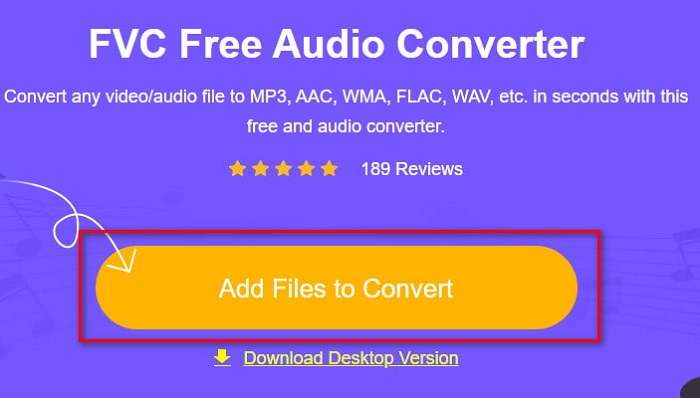
Langkah 2. Tekan Add Files to Convert untuk memuat turun pelancar jika ini kali pertama anda menggunakannya. Jika pelancar sudah dipasang, klik semula Add Files to Convert dan cari fail dalam folder, klik dan tekan Open.
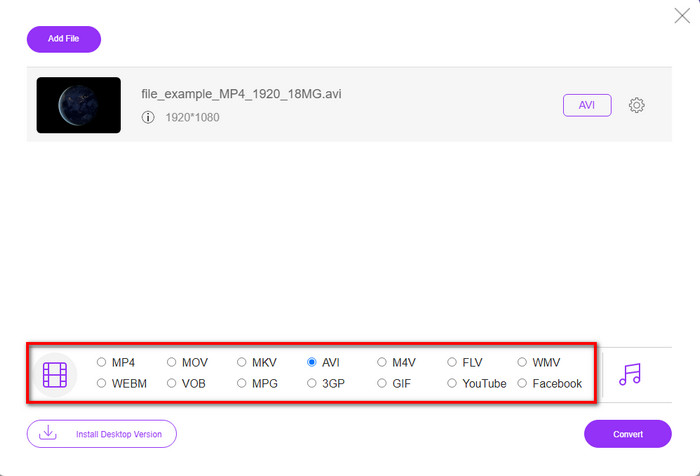
Langkah 3. Pilih format AVI dalam pilihan yang disenaraikan di bawah atau apa sahaja format yang anda mahu tukarkan.
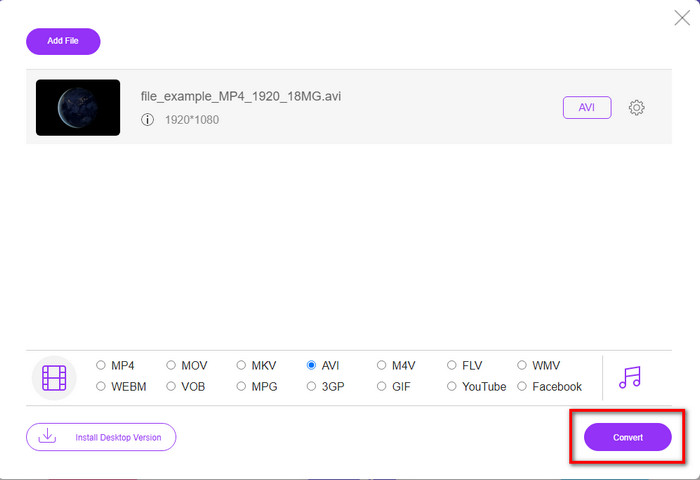
Langkah 4. Jika anda sudah selesai memilih format, kini masanya untuk menyimpannya ke dalam pemacu anda dengan mengklik Convert.
Langkah 5. Jika proses telah dijalankan, tunggu sehingga folder fail muncul pada skrin anda. Buka fail tersebut dengan mengkliknya dan tonton fail media yang telah ditukar.
4 Teratas. Online-Convert.com
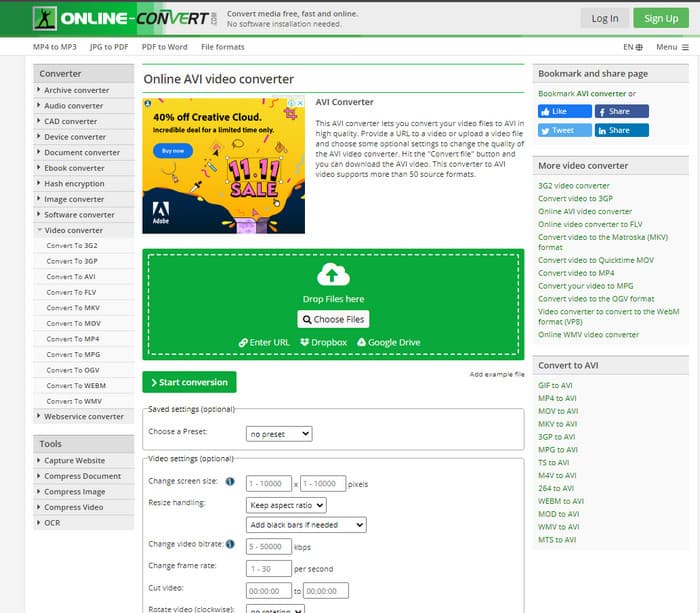
Alat dalam talian lain yang boleh anda gunakan untuk menukar sebarang fail media ialah Online-Convert.com. Sama seperti kebanyakan alat dalam talian, penukar ini menyokong julat format yang agak terhad. Namun, ia mempunyai pelarasan video terbina dalam yang boleh anda gunakan tetapi agak sukar untuk diuruskan, terutamanya jika anda tiada pengetahuan mengenainya. Selain itu, proses memuat naik dan memuat turun fail di sini sangat perlahan berbanding dengan FVC Free Video Converter.
Kelebihan
- Percuma untuk diakses di web.
- Antara muka alat ini hebat dan ia mempunyai sedikit atau tiada iklan.
- Proses penukaran akan bergantung pada sambungan internet.
Keburukan
- Tidak boleh diakses tanpa internet.
- Proses mengimport dan mengeksport akan mengambil banyak masa berbanding alat lain.
Bahagian 3. Mana Satu Yang Terbaik untuk Menukar DivX kepada AVI?
| Ciri-ciri | FVC Video Converter Ultimate | Penukar Video Freemake | Penukar Video Percuma FVC | Online-Convert.com |
| Tukar Video dan Audio |  | | | |
| Penukaran Kumpulan | |  | | |
| Pecutan Perkakasan | | | | |
| Alat Berasaskan Program | Alat Berasaskan Desktop | Alat Berasaskan Desktop | Alat Berasaskan Web | Alat Berasaskan Web |
| Kesambungan Rangkaian | Tidak Diperlukan | Tidak Diperlukan | Dikehendaki | Dikehendaki |
Bahagian 4. Soalan Lazim tentang DivX to AVI Converters
Mana yang lebih baik? DivX dan XviD?
DivX ialah codec proprietari yang terkenal untuk fail kontena video dan audio dan ia juga mengkhusus dalam merobek fail pada cakera sambil memampatkannya tanpa kehilangan kualiti. Walaupun XviD ialah versi tiruan DivX dan ia agak lebih baik daripada DivX. Selain itu, ia bukan hak milik yang bermaksud sesiapa sahaja boleh menggunakan ini pada bila-bila masa atau apa sahaja yang anda mahukan.
Apakah codec?
Codec digunakan untuk memampatkan fail dan mengedarkan mana-mana fail audio dan video dengan lebih pantas dalam saiz fail yang lebih kecil. Juga, ia digunakan untuk menyahmampat fail yang terikat dengan codec tersebut untuk membuka fail termampat yang anda buat tanpa memusnahkan kredibilitinya.
Untuk mempunyai saiz fail yang lebih kecil, adakah ia sesuai untuk memampatkan atau menukar?
Jika anda mahu mengekalkan kualiti video dan menjadikannya lebih kecil, adalah ideal untuk memampatkannya dengan bantuan pautan ini. Tetapi jika anda mahu cara yang lebih mudah, anda harus pertimbangkan untuk menukar video kepada MP4 dengan membaca artikel ini untuk mendapat idea tentang cara melakukannya.
Kesimpulannya
Sebagai penutup artikel ini, kini lebih mudah untuk kita memahami apa itu DivX dan juga apa itu AVI. Kita juga telah memperkenalkan 4 alat berguna yang boleh anda gunakan untuk memainkan fail DivX anda dengan menukarkannya kepada format AVI. Jadi, jika anda mahu merasai kejayaan 100%, gunakanlah FVC Video Converter Ultimate untuk menjamin kejayaan tersebut.
Muat Turun PercumaUntuk Windows 7 atau lebih baharuMuat Turun Selamat
Muat Turun PercumaUntuk MacOS 10.7 atau lebih baharuMuat Turun Selamat
-
 [Percuma & Dalam Talian] 7 Cara Menukar MTS kepada AVI pada Komputer Mac/Windows
 Bagaimana cara menukar MTS ke AVI dengan mudah? Dalam panduan ini, anda akan menemui 7 cara percuma dan mudah untuk menukar fail MTS ke AVI pada Windows atau Mac tanpa kehilangan kualiti.
-
 Tutorial Menukar Fail MP4 ke AVI dengan 7 Penukar Video Percuma
 Ingin mendapatkan semua cara percuma untuk menukar video AVI kepada MP4? Anda tidak sepatutnya terlepas artikel ini. Berikut ialah 7 cara untuk menukar fail AVI kepada MP4 secara percuma pada Windows, Mac, iPhone, Android dan dalam talian.
-
 3 Kaedah Mudah Menukar FLV ke AVI di Desktop dan Dalam Talian
 Berikut adalah tiga kaedah untuk membantu anda menukar fail video FLV anda ke format AVI pada Windows dan Mac dengan berkesan, supaya anda dapat menontonnya dengan kualiti yang tinggi.
