


 Video Converter Ultimate
 Perakam Skrin
 Pembaikan Video
4 Cara Paling Mudah tentang Cara Menukar Fail F4V kepada Format Fail Media AVI
Macromedia memperkenalkan F4V, dan kemudiannya, Adobe membangunkannya untuk bersaing dengan storan video moden dan berkualiti tinggi. Juga, ia dicipta sebagai format pengganti kepada FLV kerana FLV mempunyai had. Penjelasan lanjut ialah fail F4V menggunakan format fail media asas ISO dengan codec H.264 untuk menurunkan saiz fail. Walaupun formatnya mengandungi output berkualiti tinggi, F4V mempunyai keserasian yang lebih rendah daripada format lain. Dan bukan itu sahaja, tetapi format ini juga telah dihentikan secara berperingkat kerana Adobe Flash Player telah pun bersara.
Jadi jika anda mengalami masalah yang sama dengan orang lain kerana fail .f4v mereka tidak dapat dimainkan pada pemain media, teruskan membaca di bawah. Kami mengumpulkan pelbagai alat yang boleh membantu anda memainkan fail .f4v yang tidak boleh dimainkan dengan menukarkan formatnya kepada AVI. Sekarang, mari teruskan dan ketahui cara untuk menukar F4V kepada AVI dengan alat dalam talian dan luar talian yang tersedia.

Bahagian 1. Ketahui Cara Menukar F4V kepada AVI dengan Penukar F4V kepada AVI Fenomenal
Jika anda sedang mencari penukar terbaik yang dapat membantu menyelesaikan masalah anda, maka FVC Video Converter Ultimate mestilah pilihannya. Kami telah menguji alat ini sendiri dan membaca beberapa ulasan; “ultimate” bukan sekadar nama, malah prestasi dan fungsinya juga benar‑benar hebat. Salah satu ciri paling mengagumkan yang ditawarkan alat ini ialah penukaran pantas dan pemecutan perkakasan supaya pengguna tidak perlu menunggu lama.
Selain itu, jika anda mahu mencipta GIF, mempercepatkan video atau memperlahankannya, mengundur, menguatkan audio dan sebagainya, alat ini turut menyediakan fungsi lanjutan. Namun anda perlu membayarnya sebelum boleh digunakan, tetapi jangan risau kerana harganya tidak melebihi seratus dolar. Jadi, jika anda masih dalam proses mempertimbangkan untuk membeli alat ini, cuba baca langkah yang disediakan di bawah dan tukar fail F4V kepada AVI dengan mengikuti langkah‑langkah ini.
Langkah 1. Sebelum anda boleh menggunakan alat berkuasa ini, anda mesti memuat turunnya terlebih dahulu pada desktop anda. Kemudian pasang dan lakukan tetapan dengan pantas; klik Start Now untuk membuka perisian.
Muat Turun PercumaUntuk Windows 7 atau lebih baharuMuat Turun Selamat
Muat Turun PercumaUntuk MacOS 10.7 atau lebih baharuMuat Turun Selamat
Langkah 2. Jika alat sudah dibuka, pergi ke Add Files atau klik butang +, kemudian satu folder akan muncul. Cari sambungan fail .f4v dan klik Open.
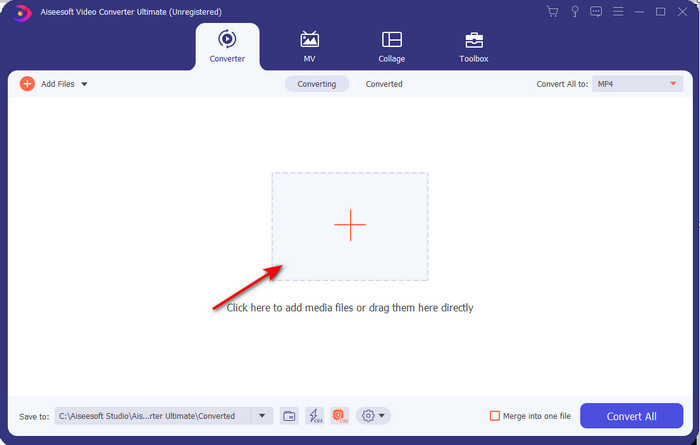
Langkah 3. Selepas memasukkan fail, klik Convert All to di bahagian kanan atas antara muka dan pilih format AVI.
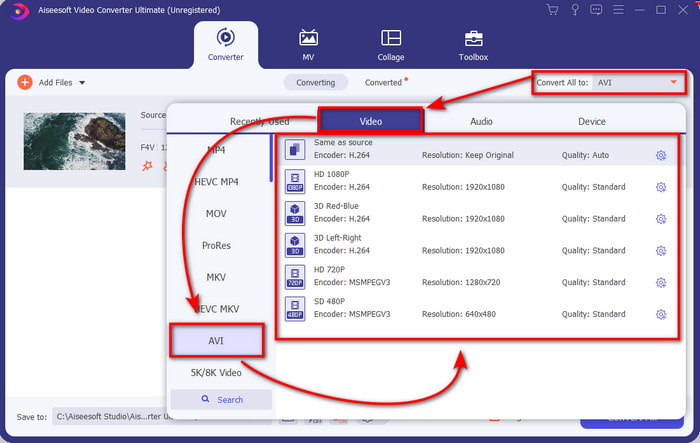
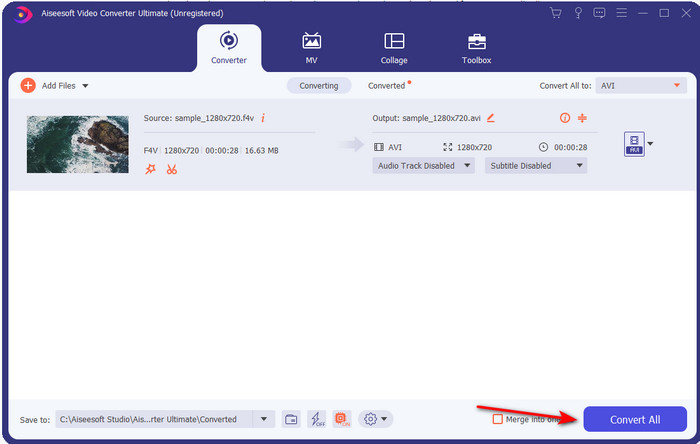
Langkah 4. Sekarang, untuk memulakan proses penukaran, klik Convert All. Tunggu beberapa minit untuk menukar F4V kepada AVI.
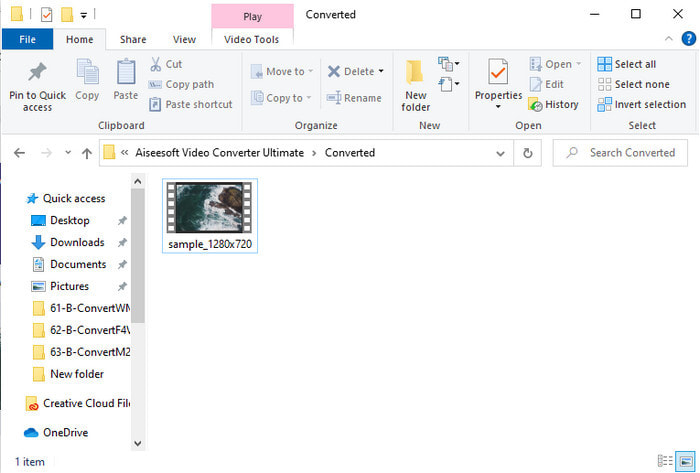
Langkah 5. Satu folder fail akan terbuka secara automatik pada desktop anda dengan format .f4v yang telah ditukar tadi. Klik fail video tersebut untuk menonton video yang sebelum ini tidak boleh dimainkan pada desktop anda, atau pindahkannya ke telefon jika anda mahu.
Bahagian 2. Ketahui Cara Menukar F4V kepada AVI Dalam Talian dengan 3 Penukar Web Tersedia
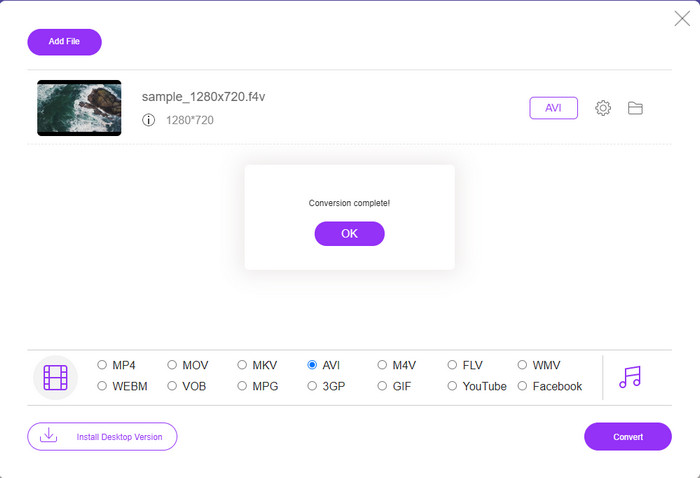
1. Penukar Video Percuma FVC Dalam Talian
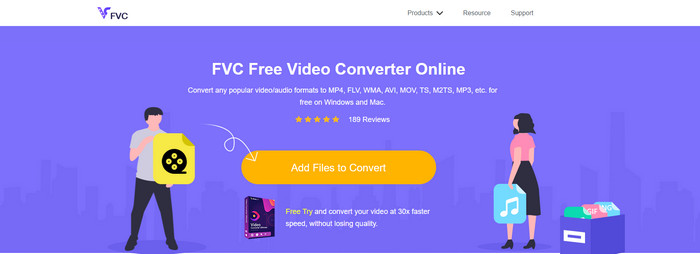
Jika anda ingin tahu penukar web mana yang terbaik, FVC Free Video Converter Online mungkin jawapannya. Semua ciri yang anda ingin gunakan tersedia di sini; anda boleh menukar bitrate dan fps video untuk menjadikannya berkualiti tinggi sebelum menukarnya. Berjuta‑juta pengguna internet telah memuji prestasi keseluruhan alat web ini. Selain itu, alat web ini menyokong julat format yang agak banyak untuk anda pilih dan muat naik. Namun, anda tidak boleh menjadikan video anda kelihatan begitu hebat seperti yang disediakan oleh versi “ultimate”. Walau bagaimanapun, jika anda ingin mencuba dan menukar F4V kepada format AVI, ikuti langkah‑langkah di bawah.
Langkah 1. Klik pautan ini untuk pergi ke FVC Free Video Converter Online.
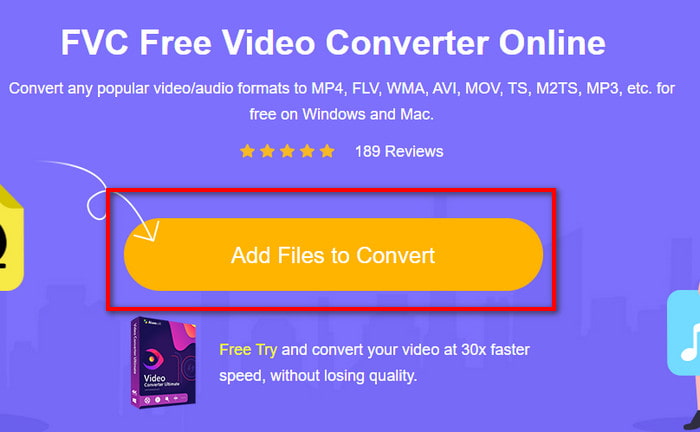
Langkah 2. Kemudian tekan Add Files to Convert untuk melancarkan alat dan pilih fail yang anda mahu tukar kepada format baharu dalam folder dengan mengklik Open.
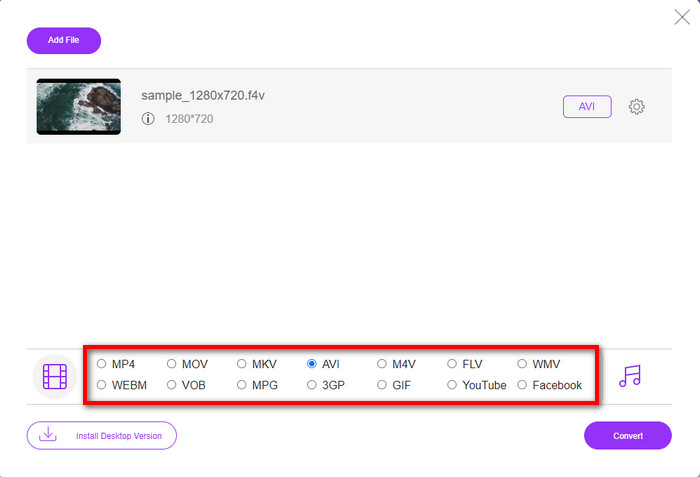
Langkah 3. Setelah fail dimuatkan, pilih format AVI di bahagian bawah daripada mana‑mana format yang anda mahu jadikan sasaran.
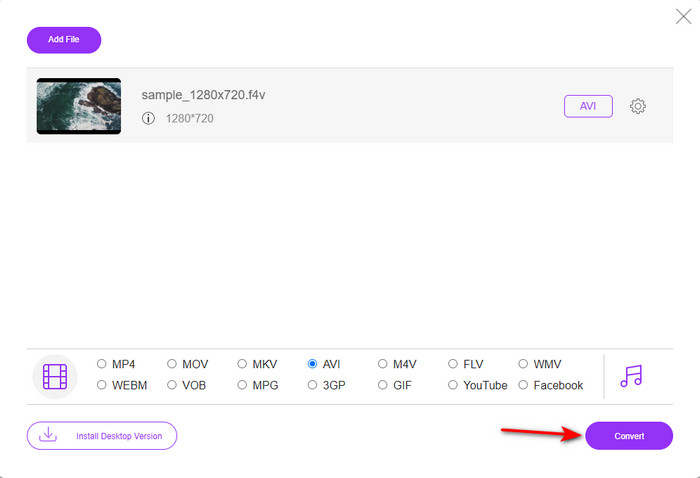
Langkah 4. Selepas memilih format AVI, inilah masanya untuk menukarnya dengan mengklik butang Convert.
Langkah 5. Tunggu beberapa minit sehingga fail dimuat turun, kemudian satu folder fail akan muncul dengan fail yang telah ditukar.
2. Zamzar
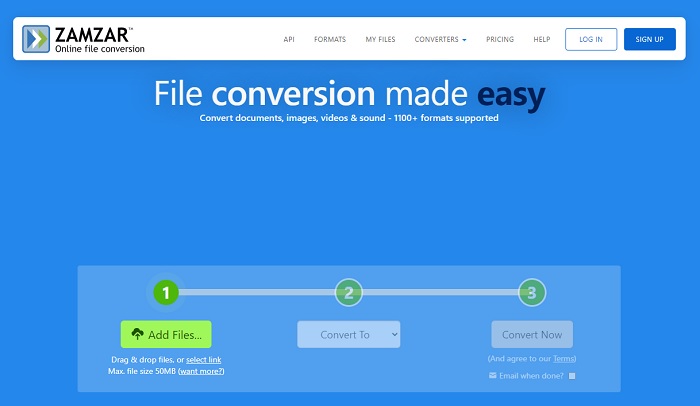
Satu lagi penukar alternatif yang boleh anda gunakan dalam talian ialah Zamzar. Sama seperti penukar lain, alat ini memerlukan sambungan internet untuk digunakan atau diakses. Semua alat web yang dibentangkan di sini memang memerlukan internet untuk menjalankan proses penukaran. Oleh kerana ramai pengguna menggunakannya, Zamzar menjadi popular kerana menyokong banyak format yang boleh anda gunakan dan pilih. Selain itu, ia boleh digunakan secara percuma namun terdapat had saiz fail yang boleh ditukar. Jadi, jika fail .f4v anda melebihi 50MB, anda tidak boleh menukarnya di sini seperti yang dinyatakan. Jika fail anda kurang daripada itu, anda boleh cuba gunakan alat ini untuk menukar F4V kepada AVI secara dalam talian dengan mengikuti prosedur di bawah.
Langkah 1. Buka pelayar web anda dan cari Zamzar.
Langkah 2. Tekan Add Files dan cari fail yang anda mahu tukar. Kemudian pilih format AVI di bahagian Convert to; selepas itu, klik Convert.
Langkah 3. Tunggu proses selesai; kemudian satu antara muka baharu akan dipaparkan, dan klik Download untuk menyimpan fail tersebut.
3. ConvertFiles
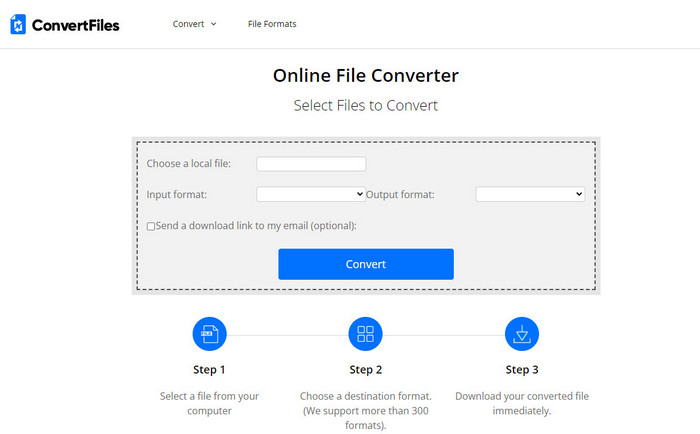
Jika anda mahukan proses penukaran yang lebih ringkas dan hanya mengambil masa beberapa minit, cuba gunakan ConvertFiles. Alat ini berfungsi dengan baik semasa penukaran dan selepas penukaran juga. Tetapi iklan yang terlalu banyak pada antara muka alat web ini agak mengganggu. Selain itu, prosesnya mengambil masa yang lebih lama berbanding penukar lain dalam talian dan luar talian. Namun, saiz fail yang boleh anda masukkan di sini lebih besar berbanding Zamzar. Jadi, jika anda mahu menggunakan alat ini untuk menukar fail F4V kepada AVI, ikuti langkah‑langkah berikut.
Langkah 1. Pergi ke pelayar web anda dan cari ConvertFiles, kemudian buka laman tersebut.
Langkah 2. Klik Choose a Local File untuk membuka folder dan cari fail tersebut; di bawah Output Format, klik AVI. Kemudian klik Convert untuk memulakan penukaran.
Langkah 3. Selepas penukaran, klik URL berwarna biru yang akan membawa anda ke laman baharu. Klik pautan ini untuk memuat turun format yang telah ditukar.
Bahagian 3. Format Mana Yang Lebih Baik; F4V lwn. AVI
Nah, F4V dan AVI melakukan tugas mereka sebagai bekas dengan sebaik-baiknya. Walau bagaimanapun, terdapat banyak format ini yang sama, dan tujuannya tidak sama. Contohnya, jika anda ingin menyimpan video berkualiti tinggi dalam saiz fail yang kecil dan menahan serta melindungi data video DRM MPEG-4, F4V ialah pilihan terbaik. Tetapi katakan anda ingin menyimpan video berkualiti tinggi yang menyokong main balik media yang disegerakkan. Dalam kes itu, anda mesti memilih format AVI kerana ia mempunyai bekas yang berbeza untuk kedua-dua audio dan video. Walaupun begitu, saiz fail AVI terlalu besar untuk dikendalikan oleh banyak peranti dan juga desktop kerana ia tidak dimampatkan.
Bahagian 4. Soalan Lazim tentang Penukaran F4V ke AVI
Adakah menukar F4V menurunkan resolusi selepas menukar?
Peleraian video mesti mengekalkan kualiti asalnya walaupun selepas anda menukarnya kepada format baharu. Dalam sesetengah kes, ramai pengguna mengalami bahawa kualiti F4V mereka telah menjadi lebih rendah. Salah satu sebabnya mestilah kadar kualiti yang anda tetapkan adalah rendah atau alat yang anda gunakan tidak menyokong video 1080 atau 4k.
Mengapa F4V tidak boleh dimainkan pada pemain media saya?
Format ini boleh dimainkan pada beberapa pemain media, tetapi tidak semua pemain media menyokongnya. Jadi, jika anda mahu menonton video dalam format ini, pilihan terbaik ialah menukarnya kepada format lain atau mencari pemain media pihak ketiga yang baharu untuk menonton video F4V anda.
Adakah saya perlu memampatkan F4V untuk menjadikannya lebih rendah?
Saiz fail F4V tidak begitu besar berbanding format AVI. Namun, jika anda cuba memampatkan bekas fail ini, ada kemungkinan kualiti video akan berkurang. Di sini anda boleh belajar cara memampatkan video F4V anda.
Kesimpulannya
Semasa kami menamatkan artikel ini, kami kini mempunyai pandangan tentang apa itu F4V dan sebab anda perlu menukarnya. Semua perisian dalam talian dan luar talian yang dinyatakan dalam artikel ini berfungsi dengan baik. Walaupun semua alat hebat, FVC Video Converter Ultimate masih menonjol di antara yang lain. Kerana perisian ini berfungsi dengan baik, anda tidak mempunyai sambungan internet, dan alat ini boleh menyelesaikan proses penukaran dalam sekelip mata. Jadi sekarang, jika anda ingin mengalami penukaran fenomenal yang kita bicarakan, kemudian muat turunnya sekarang.
-
 Cara Menukar TS ke AVI / MKV / MOV / WMV Dalam Talian & Percuma di Win / Mac
 Ingin menukar fail TS ke AVI / MKV / MOV / WMV dengan cepat? Artikel ini menunjukkan penukar video dalam talian dan luar talian dengan panduan lengkap. Mungkin anda boleh mendapatkan penukar TS percuma terbaik di sini.
-
 [Percuma & Dalam Talian] 7 Cara Menukar MTS kepada AVI pada Komputer Mac/Windows
 Bagaimana cara menukar MTS ke AVI dengan mudah? Dalam panduan ini, anda akan menemui 7 cara percuma dan mudah untuk menukar fail MTS ke AVI pada Windows atau Mac tanpa kehilangan kualiti.
-
 Tutorial Menukar Fail MP4 ke AVI dengan 7 Penukar Video Percuma
 Ingin mendapatkan semua cara percuma untuk menukar video AVI kepada MP4? Anda tidak sepatutnya terlepas artikel ini. Berikut ialah 7 cara untuk menukar fail AVI kepada MP4 secara percuma pada Windows, Mac, iPhone, Android dan dalam talian.
