


 Video Converter Ultimate
 Perakam Skrin
 Pembaikan Video
 Muat Turun Selamat
Kaedah Paling Mudah tentang Cara Menukar M2TS ke Format Fail M4V
Banyak format, seperti M2TS, semakin kurang mendapat sokongan apabila kita bergerak ke hadapan pada masa hadapan. Bekas Audio Video Blu-ray asal, yang memindahkan data menggunakan strim MPEG-2, masih digunakan dalam format ini. Sesetengah peranti, termasuk iPhone, iPod dan Android, tidak dapat membaca struktur format ini. Oleh itu, anda tidak boleh mengakses format ini pada peranti tersebut. Tetapi jika anda masih mempunyai format ini, tukarkannya kepada format fail lain, seperti M4V. Dan jika anda ingin menukarnya, baca artikel ini. Kami akan menawarkan kaedah terbaik yang boleh anda pelajari tentang cara untuk menukar M2TS kepada M4V.

Bahagian 1: Cara Percuma untuk Menukar M2TS kepada M4V
Anda tidak perlu risau lagi tentang cara menukar fail M2TS jika anda menggunakan FVC Free M2TS Converter. Anda boleh menukar fail M2TS dengan alat percuma ini kepada pelbagai format video piawai, termasuk M4V, MP4 (video HD H.264/MPEG-4 AVC), MOV, AVI, TS, VOB, MKV, FLV, SWF, ASF, WMV, MP3, M4A, OGG, WAV, WMA, FLAC dan banyak lagi. Selain itu, alat ini menawarkan proses penukaran kelompok. Ini bermakna anda boleh menukar berbilang fail sekaligus dengan serta‑merta. Di samping itu, ia mempunyai proses penukaran berkelajuan ultra. Ia boleh menukar fail sehingga 50x lebih pantas berbanding penukar biasa yang lain.
Tambahan pula, FVC Free M2TS Converter bukan sahaja boleh dipercayai dalam menukar berbilang fail. Ia juga menawarkan editor video terbina dalam. Ia memudahkan untuk memuatkan banyak fail M2TS secara serentak dan menggabungkannya menjadi satu. Selain itu, anda boleh memilih tema khusus untuk setiap fail video, seperti hari lahir, keluarga, makanan, suasana, sukan atau perayaan seperti Halloween. Dengan cara ini, anda boleh memastikan bahawa anda akan mendapat video yang menarik dan hebat. Akhir sekali, alat ini selamat digunakan. Ia akan memastikan untuk mengelakkan kehilangan audio dan imej semasa proses penukaran.
Ciri-ciri
◆ Tukar pelbagai fail video, seperti M2TS, M4V, MP4, MOV, AVI, FLV, WMV dan banyak lagi.
◆ Menawarkan proses penukaran berkelajuan tinggi sehingga 50x lebih pantas daripada purata kelajuan penukaran.
◆ Tukar berbilang fail serentak.
◆ Menawarkan fungsi penambah video untuk menambah baik video.
◆ Gabungkan berbilang video untuk menghasilkan satu bahagian.
Ikuti prosedur mudah di bawah untuk mengetahui cara menukar berbilang fail M2TS menjadi satu M4V menggunakan FVC Free M2TS Converter.
Langkah 1: Muat turun FVC Free M2TS Converter pada komputer anda dengan mengklik butang Muat Turun di bawah. Kemudian, teruskan proses pemasangan dan lancarkan aplikasi.
Muat Turun Percuma Untuk Windows 7 atau lebih baru Muat Turun Selamat
Muat Turun Percuma Untuk MacOS 10.7 atau lebih baru Muat Turun Selamat
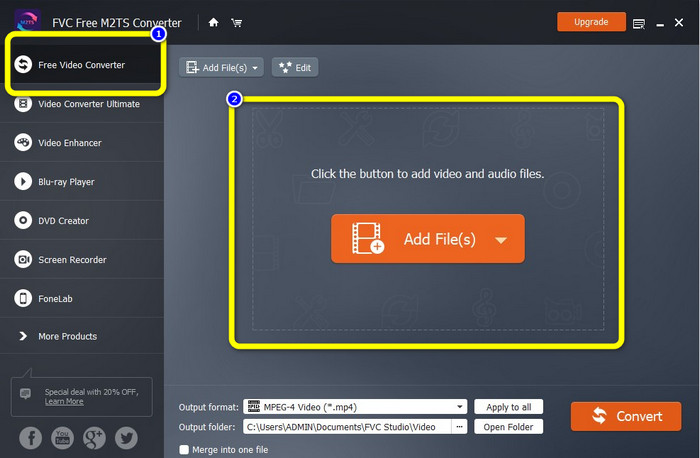
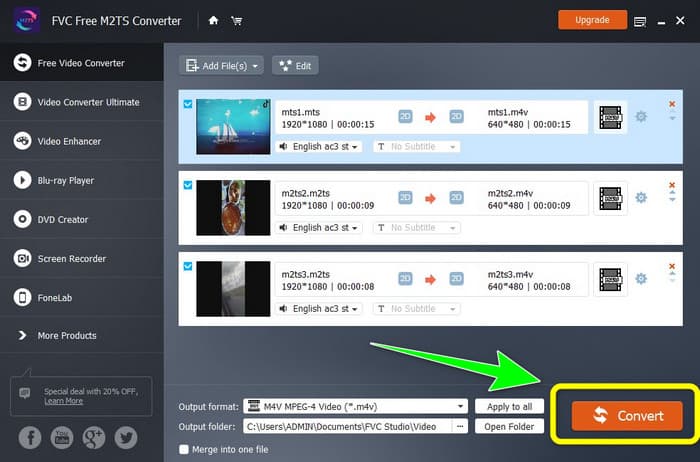
Langkah 2: Pilih pilihan Free Video Converter di bahagian kiri antara muka. Kemudian, klik butang Add File untuk melampirkan fail video M2TS yang ingin anda tukar.
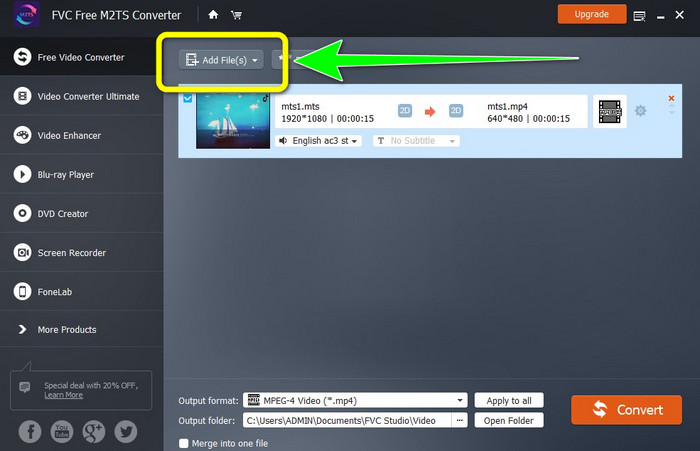
Langkah 3: Jika anda mahu memasukkan berbilang fail video M2TS, klik butang Add Files.
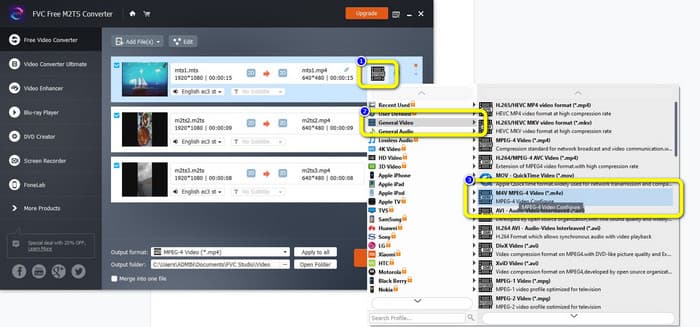
Langkah 3: Pergi ke simbol Video di bahagian kanan antara muka. Pilih pilihan General Video dan pilih format fail yang anda kehendaki, iaitu M4V.
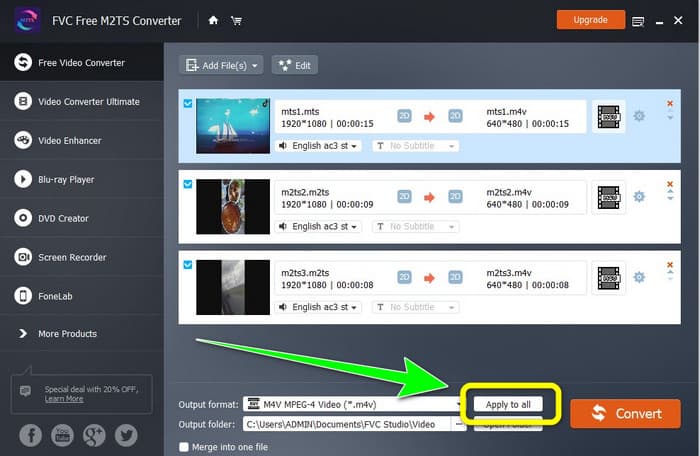
Langkah 4: Anda boleh melakukan prosedur yang sama untuk menukar format output bagi fail M2TS yang lain. Anda juga boleh klik butang Apply to all untuk menukar format output mereka kepada M4V dengan serta‑merta.
Langkah 5: Selepas menukar semua fail M2TS kepada format fail M4V, klik butang Convert. Tunggu proses penukaran dan simpan video anda ke lokasi yang anda inginkan.
Bahagian 2: Kaedah Terbaik untuk Menukar M2TS kepada M4V Tanpa Kehilangan
Jika anda mahukan cara hebat yang lain untuk menggabungkan berbilang fail M2TS kepada satu M4V, anda boleh cuba Video Converter Ultimate. Dengan aplikasi boleh muat turun ini, anda boleh menukar M2TS kepada M4V tanpa kehilangan kualiti kerana ia menawarkan proses penukaran kelompok. Selain itu, ia mempunyai kelajuan penukaran 30x lebih pantas berbanding penukar lain. Dengan cara ini, anda boleh menukar lebih banyak fail tanpa membazirkan masa. Tambahan pula, Video Converter Ultimate mempunyai antara muka yang intuitif dan menyediakan langkah yang mudah untuk menukar fail, yang sesuai untuk semua pengguna.
Tambahan pula, penukar ini juga menawarkan lebih banyak ciri hebat. Jika anda ingin menggabungkan berbilang video M2TS dan menjadikannya satu bahagian, maka anda boleh menggunakan aplikasi ini kerana ia mempunyai alat Penggabungan Video. Dengan cara ini, anda boleh menggabungkan video M2TS anda dengan mudah. Selain itu, alat ini membolehkan anda membuat kolaj, di mana anda boleh menggabungkan imej dan video. Anda juga boleh menggunakan banyak templat dan penapis percuma. Jadi anda boleh membuat kolaj yang cantik. Terdapat lebih banyak ciri yang boleh anda nikmati menggunakan Video Converter Ultimate.
Ciri-ciri
◆ Tukar 100+ format fail video, termasuk M4V, M2TS, MP4, AVI, FLV, MKV, WMV, VOB, MOV, SWF, dsb.
◆ Cipta Kolaj yang menarik dengan penapis dan templat percuma.
◆ Menawarkan pembuat Video Muzik.
◆ Menyediakan Toolbox untuk penyuntingan video.
◆ Menawarkan proses penukaran kelompok dengan kelajuan penukaran 30x lebih pantas.
Gunakan langkah terperinci di bawah untuk menukar berbilang fail M2TS secara serentak menggunakan FVC Video Converter Ultimate.
Langkah 1: Muat turun Video Converter Ultimate pada komputer anda. Untuk memuat turunnya, anda boleh klik butang Muat Turun di bawah. Selepas itu, buka aplikasi.
Muat Turun PercumaUntuk Windows 7 atau lebih baharuMuat Turun Selamat
Muat Turun PercumaUntuk MacOS 10.7 atau lebih baharuMuat Turun Selamat
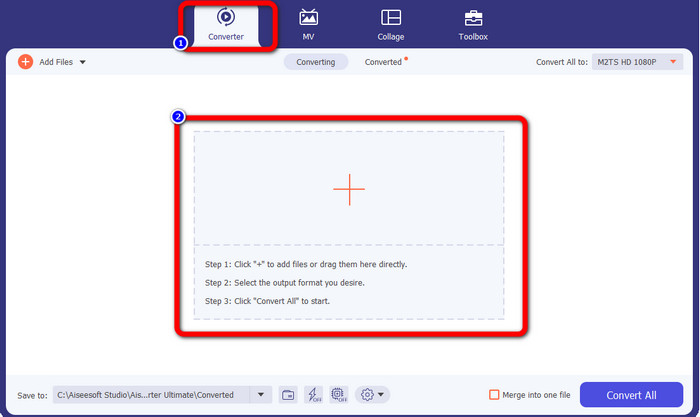
Langkah 2: Pilih panel Converter dan klik butang tanda Plus untuk menambah fail M2TS anda.
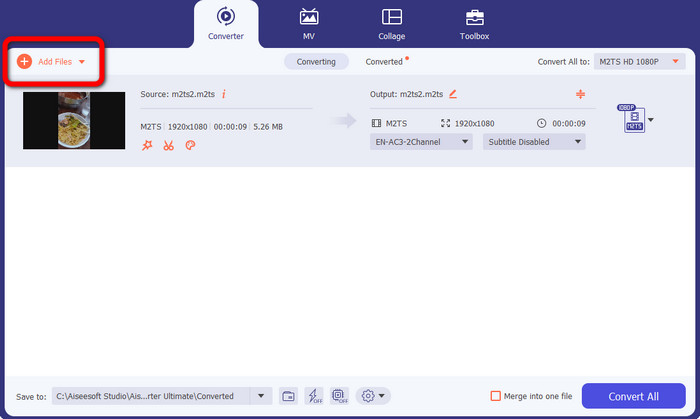
Langkah 3: Klik butang Add File di bahagian kiri antara muka untuk memasukkan lebih banyak fail M2TS.
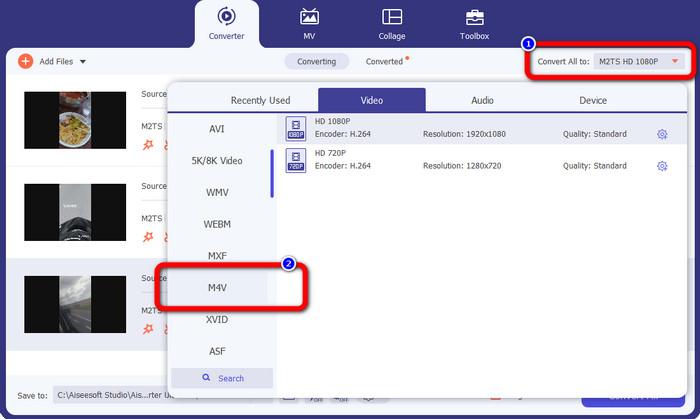
Langkah 4: Untuk menukarnya kepada fail M4V, klik butang Convert All to untuk melihat pilihan format. Selepas itu, pilih format fail M4V.
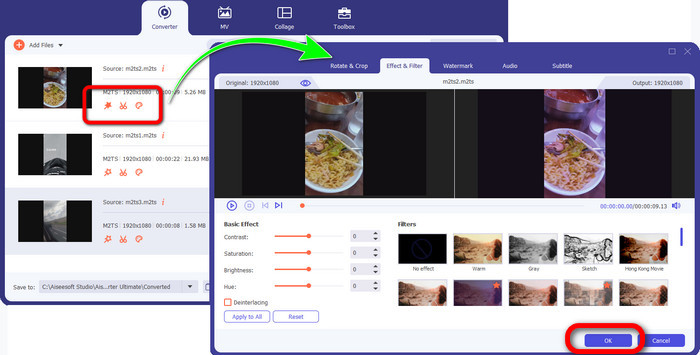
Langkah 4: Untuk menyunting video anda, klik alat penyuntingan ini. Anda boleh menambah baik, menyunting, menambah penapis dan kesan, serta memotong video anda. Selepas menyunting video anda, klik OK.
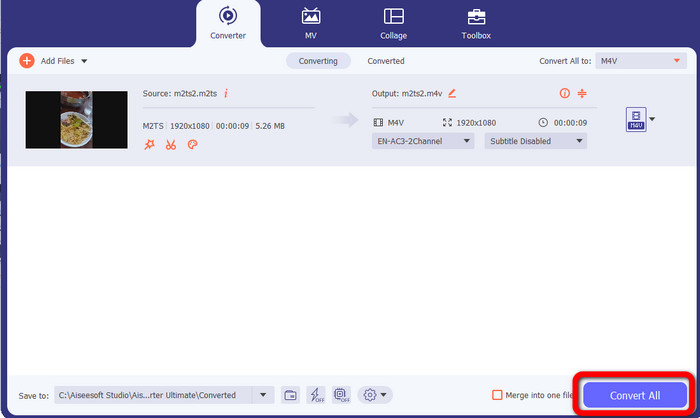
Langkah 5: Selepas menyunting video anda, anda boleh menukarnya dengan mengklik butang Convert All. Simpan video anda selepas proses penukaran.
Bahagian 3: Apakah M2TS?
Sambungan Fail: .m2ts
Format fail bekas Blu-ray Disc Audio-Video (BDAV) MPEG-2 Transport Stream (M2TS) menggunakan sambungan nama fail M2TS. Ia digunakan untuk berbilang audio, video dan aliran lain. Bekas aliran pengangkutan MPEG-2 berfungsi sebagai asasnya. Pada Cakera Blu-ray dan AVCHD, jenis bekas ini kerap digunakan untuk video berkualiti tinggi. Persatuan Cakera Blu-ray membangunkan M2TS. Semua program yang berkaitan ialah Semua Pemain, Pemain Media VLC, Pemain Periuk dan MPlayer.
Bahagian 4: Apakah M4V?
Sambungan Fail: .m4v
Apple mencipta format fail M4V, format bekas video yang serupa dengan standard MP4. Perbezaan utama ialah fail M4V boleh mempunyai perlindungan salinan. Dalam iTunes Storenya, Apple mengekod fail video menggunakan format M4V. Program yang berkaitan untuk format ini ialah Apple QuickTime Player, Apple iTunes, Media Player Classic, KMPlayer, Real Player, Zoom Player dan VLC Media Player.
Bacaan Lanjut:
Cara Menukar M2TS kepada AVI dengan Penukar Terbaik di Web & Desktop
Pendekatan Hebat untuk Menukar M2TS kepada FLV Secara Dalam Talian & Luar Talian
Bahagian 5: Soalan Lazim tentang Menukar M2TS kepada M4V
Adakah M2TS lebih baik daripada MP4?
Memandangkan M2TS menjimatkan lebih banyak memori dan resolusi tinggi, ia memerlukan lebih banyak ruang. MP4 lebih baik daripada M2TS untuk penjimatan ruang storan.
Bagaimana untuk menggunakan Handbrake untuk menukar M2TS kepada M4V?
Muat turun Brek Tangan. Kemudian pergi ke sumber terbuka dan tambah fail M2TS. Kemudian, pergi ke pilihan format dan pilih M4V. Selepas itu, klik butang Mula Encode.
Adakah MTS sama dengan M2TS?
Dari segi fungsi, fail MTS dan M2TS adalah sama. Kedua-dua fail HD ini disambungkan kepada format video AVCHD. Anda boleh menukar sambungan fail M2TS kepada sambungan fail MTS dan sebaliknya.
Kesimpulannya
Perbincangan di atas membantu anda mempelajari lebih lanjut tentang cara untuk menukar M2TS kepada M4V. Dua aplikasi boleh muat turun tersebut ialah penukar terbaik yang boleh anda gunakan untuk menukar fail. Ia boleh menukar dengan lebih pantas dan tanpa kehilangan kualiti.
-
 Pelbagai Kaedah Cara Tukar MOV ke Format Fail M4V
 Adakah anda inginkan kaedah yang berkesan untuk menukar fail MOV kepada format M4V? Kemudian, artikel ini akan memenuhi keinginan anda. Berikut ialah penukar terbaik yang boleh anda gunakan.
-
 Teknik Cemerlang untuk Menukar GIF kepada M4V dengan serta-merta
 Tiang panduan ini memberi anda strategi paling berkesan untuk menukar GIF kepada M4V. Selain itu, kami akan memperkenalkan anda kepada dua penukar terbaik yang boleh anda cuba.
-
 Proses Mudah untuk Menukar SWF kepada M4V dengan Cekap
 Jangan lepaskan peluang ini untuk mempelajari kaedah yang tidak rumit untuk menukar SWF kepada M4V dalam talian dan menggunakan aplikasi yang boleh dimuat turun. Baca siaran ini untuk mengetahui!
