


 Video Converter Ultimate
 Perakam Skrin
 Pembaikan Video
 Muat Turun Selamat
Trik Pantas untuk Menukar M4V kepada 3GP Dengan Mudah
Adakah anda mahu menukar M4V kepada 3GP? M4V ialah format bekas video yang dikeluarkan secara eksklusif untuk produk Apple. Jadi, jika anda mempunyai fail video M4V dan mahu memainkannya pada peranti yang menyokong 3G, penyelesaian terbaik ialah menukarnya. Paparan ini akan menerangkan proses mudah untuk menukar fail M4V anda kepada format 3GP dengan pantas dan tanpa kesukaran menggunakan peranti anda. Jadi, baca artikel ini dan serap semua maklumatnya.

Bahagian 1: Perisian Cemerlang untuk Menukar M4V kepada 3GP
Penukar luar talian terbaik untuk anda ialah Video Converter Ultimate. Aplikasi yang berguna ini membolehkan anda menukar M4V kepada 3GP dengan mudah dan serta-merta. Ia menyokong lebih daripada 1000 format, seperti MP4, FLV, MTS, DIVX, XVID, VOB, MOV, MKV dan lain-lain. Dengan bantuan perisian luar talian ini, anda boleh menukar fail 30x lebih pantas berbanding penukar lain. Selain itu, ia mempunyai antara muka yang ringkas dan kaedah yang mudah untuk menukar M4V kepada 3GP, yang memudahkan semua pengguna.
Selain itu, Video Converter Ultimate tersedia pada hampir semua platform media, seperti Windows dan Mac. Tambahan pula, ia mempunyai ciri lain yang boleh anda nikmati. Anda boleh memilih ciri Kotak Alat jika anda ingin meningkatkan video M4V anda sebelum atau selepas menukar. Ia boleh menambah baik video anda dalam pelbagai cara. Jika anda ingin menukar kelajuan video anda, maka anda boleh mengklik fungsi pengawal kelajuan video. Jika anda berminat untuk membetulkan warna video anda, maka anda boleh menggunakan fungsi Pembetulan Warna.
Ciri-ciri
◆ Tukar pelbagai format fail video, seperti M4V, MP4, FLV, AVI, TS, SWF, dll.
◆ Hebat dalam mencipta Video Muzik dan menawarkan pelbagai tema.
◆ Ia menawarkan Kotak Alat untuk mempertingkatkan video.
◆ Membuat Kolaj tersedia.
◆ Tukar format imej seperti JPG, PNG, WEBP, BMP, TIF dan banyak lagi.
◆ Gabungkan banyak klip video menjadi satu bahagian.
◆ Mampu melaraskan kelajuan video video.
Kelebihan
- Tersedia untuk semua pengguna.
- Boleh dipercayai dalam memperibadikan video 3D daripada 2D.
- Boleh diakses pada hampir semua platform media, seperti Mac dan Windows.
- Kelajuan penukaran adalah 30x lebih pantas.
- Tingkatkan video dalam beberapa cara.
- Ia menyokong 1000+ format fail.
Keburukan
- Untuk menikmati lebih banyak ciri hebat, beli langganan.
Ikuti langkah mudah di bawah untuk menukar M4V kepada 3GP serta-merta.
Langkah 1: Muat turun Video Converter Ultimate pada Windows atau Mac anda. Kemudian, teruskan dengan proses pemasangan dan lancarkan aplikasi tersebut.
Muat Turun PercumaUntuk Windows 7 atau lebih baharuMuat Turun Selamat
Muat Turun PercumaUntuk MacOS 10.7 atau lebih baharuMuat Turun Selamat
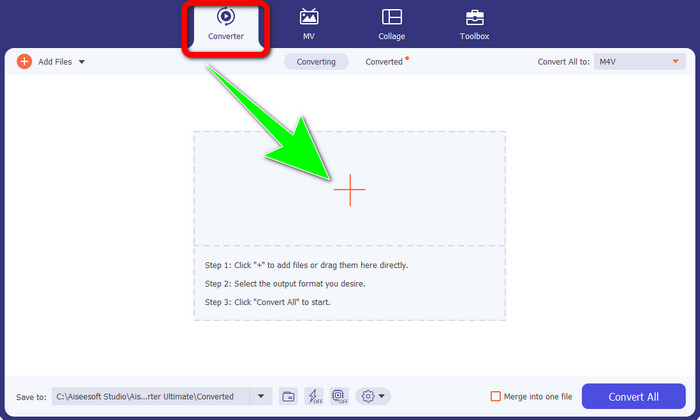
Langkah 2: Selepas anda melancarkan perisian pada Windows atau Mac, pilih panel Converter dan klik ikon + untuk memasukkan fail M4V yang ingin anda tukar.
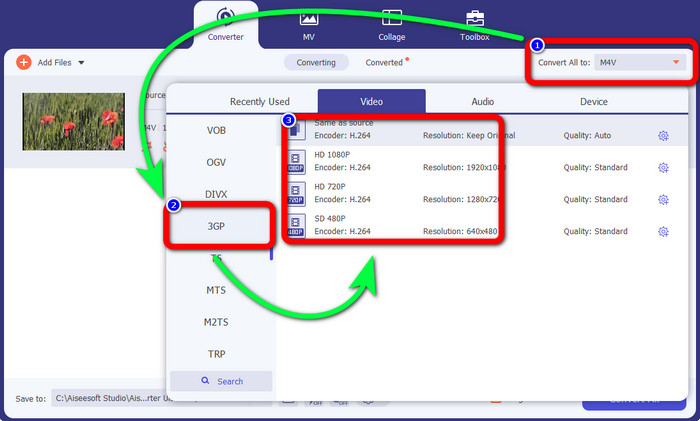
Langkah 3: Sebaik sahaja anda memasukkan fail M4V anda, klik butang Convert all to. Pilihan format akan dipaparkan, dan pilih format fail 3GP. Anda juga boleh memilih resolusi yang anda inginkan.
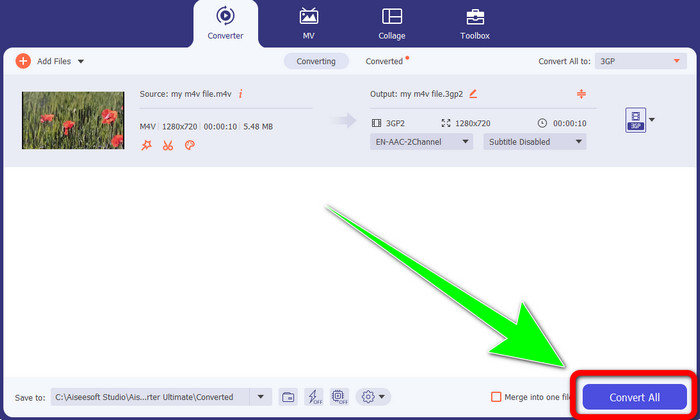
Langkah 4: Akhir sekali, setelah selesai memilih format fail 3GP, klik butang Convert All dan simpan output akhir anda. Aplikasi ini menawarkan penukaran kelompok, jadi anda juga boleh menambah lebih banyak fail dan menukarnya sekali gus.
Bahagian 2: Alat Dalam Talian untuk Menukar M4V kepada 3GP
Selepas mengetahui penukar luar talian terbaik, kita boleh beralih kepada penukar dalam talian yang paling baik untuk anda. Aplikasi dalam talian ini ialah FVC Free Video Converter Online. Aplikasi ini membolehkan anda menukar M4V kepada 3GP dengan mudah hanya dalam beberapa klik. Ia juga menyokong pelbagai format video/audio, seperti MP4, WMA, MOV, FLV, TS, MP3 dan lain-lain. Selain itu, alat dalam talian ini adalah percuma dan anda boleh menggunakannya pada Windows dan Mac. Jika anda ingin menukar fail M4V kepada format 3GP, ikut panduan terperinci di bawah.
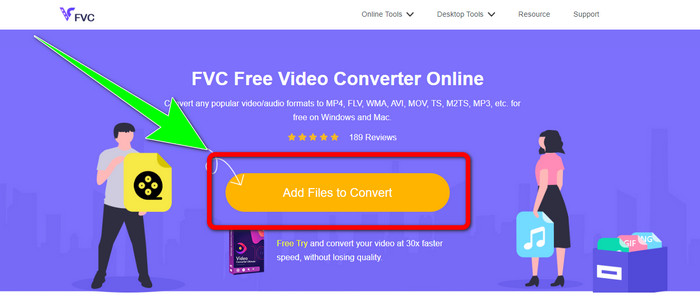
Langkah 1: Pergi ke laman web FVC Free Video Converter Online. Klik butang Add Files to Convert dan import fail M4V anda.
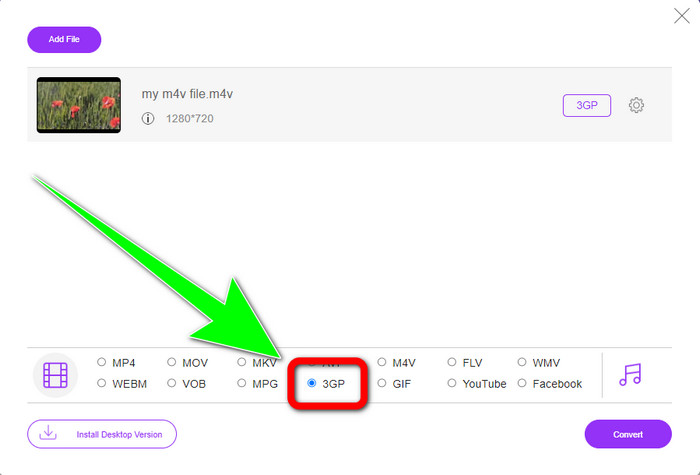
Langkah 2: Klik format fail 3GP daripada pilihan format.
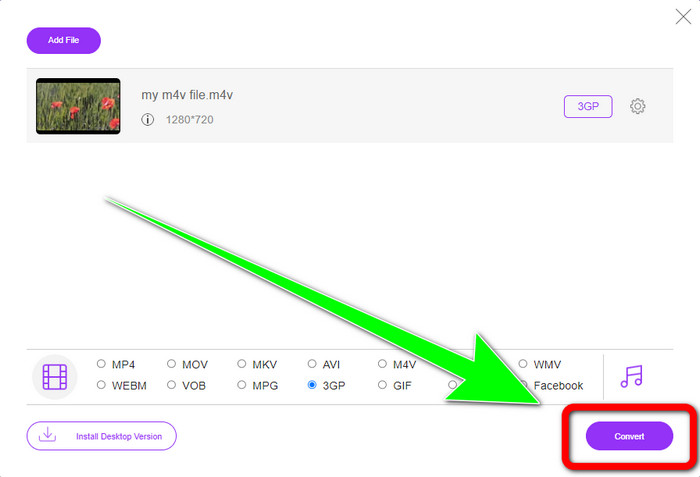
Langkah 3: Selepas memilih format fail 3GP, anda sudah boleh klik butang Convert untuk menukar fail M4V anda kepada format 3GP. Kemudian tunggu proses penukaran dan simpan video anda.
Bahagian 3: Apa M4V to 3GP Converter untuk Pilih
Adakah anda ingin tahu aplikasi manakah yang terbaik antara kedua-duanya? Sejujurnya, kedua-duanya sangat baik. Jika anda merancang untuk memuat turun penukar video yang hebat, aplikasi yang paling disarankan untuk anda gunakan ialah Video Converter Ultimate. Ia mempunyai proses penukaran kelompok yang membolehkan anda menukar berbilang fail dalam satu proses. Ia juga menawarkan antara muka yang intuitif dan sesuai untuk pengguna bukan profesional. Selain daripada menukar, ia juga mempunyai lebih banyak ciri yang boleh anda nikmati, seperti mengedit video, membuat kolaj, video muzik dan banyak lagi. Sebaliknya, jika anda lebih suka menggunakan penukar dalam talian, gunakan FVC Free Video Converter Online. Perisian ini juga boleh menawarkan proses penukaran kelompok. Ia juga sangat sesuai untuk pemula. Anda tidak perlu membayar kerana penukar ini 100% percuma. Dengan maklumat ini, kita boleh mengatakan bahawa kedua-dua penukar adalah hebat dan boleh dipercayai.
Bahagian 4: Jadual Perbandingan Antara M4V dan 3GP
| M4V | 3GP | |
| Jenis fail | MPEG4-Video | Format Multimedia 3GP |
| Penerangan | M4V ialah sejenis bekas video yang digunakan untuk menyimpan kedua-dua maklumat audio dan video untuk fail iTunes. Apple FairPlay DRM boleh digunakan untuk melindungi fail jenis ini daripada tontonan dan penyalinan tanpa kebenaran; dalam kes ini, fail audio atau video hendaklah dibeli daripada gedung iTunes. Oleh kerana formatnya berdasarkan struktur MPEG-4, pemain semasa hampir sentiasa boleh melihat fail yang tidak dilindungi. | Bekas multimedia yang dikenali sebagai 3GP telah dicipta pada tahun 1998 untuk telefon berasaskan GSM (Global System for Mobile Communications). Ia adalah yang terbaik untuk telefon bimbit kerana bekas menggunakan sedikit data, lebar jalur dan storan. Untuk fail yang dihantar melalui MMS, ia berfungsi sebagai bekas standard. |
| Dibangunkan oleh | Apple Inc. | Projek Perkongsian Generasi Ketiga |
| Kelebihan | Dilampirkan pada perlindungan Apple. | Serasi dengan hampir Peranti, |
| Keburukan | Hanya serasi dengan hampir peranti dan program Apple | Menyimpan video dalam resolusi rendah. |
Bahagian 5: Soalan Lazim tentang Menukar M4V kepada 3GP
Bagaimanakah saya menukar M4V kepada 3GP tanpa kehilangan kualiti?
Jika anda ingin menukar fail M4V anda kepada format 3GP tanpa kehilangan kualiti, maka anda mesti menggunakan Video Converter Ultimate. Aplikasi ini akan memastikan kualiti video anda tidak akan berubah. Anda juga boleh menggunakan alat ini untuk menukar M4V kepada DIVX.
Adakah fail M4V serasi dengan peranti/sistem lain?
Sudah tentu, ya. Anda boleh menggunakan pelbagai pemain M4V untuk memainkan jenis video ini pada pelbagai peranti. Pemain M4V memberikan banyak kelebihan, seperti keserasian dengan beberapa sistem seperti Android, Linux, iOS, Windows dan Mac.
Adakah M4V lebih kecil daripada MP4?
Saiz bergantung pada apa yang ada di dalam. Seperti codec audio dan video, kadar bingkai, peleraian dan banyak lagi.
Kesimpulannya
Inilah kaedah untuk menukar M4V kepada 3GP menggunakan alat luar talian dan dalam talian. Jika anda mahu menukar pelbagai format fail pada Windows atau Mac, maka anda boleh menggunakan Video Converter Ultimate. Selain itu, jika anda mencari alat dalam talian yang hebat, maka FVC Free Video Converter Online adalah yang terbaik.
-
 Bagaimana untuk Menukar DIVX kepada 3GP pada Windows, Mac dan Dalam Talian
 Bagaimana untuk menukar DIVX ke 3GP? Jika anda sedang mencari jawapan, baca artikel ini. Kami akan menunjukkan kepada anda prosedur yang hebat dengan bantuan penukar yang berbeza.
-
 4 Cara Terbaik untuk Menukar SWF kepada 3GP pada Windows, Mac & Dalam Talian
 Berikut ialah kaedah yang paling berguna untuk menukar SWF kepada 3GP serta-merta. Selain itu, siaran ini akan menunjukkan kepada anda beberapa alat Windows dan Dalam Talian yang berkesan yang boleh anda gunakan.
-
 Cari Kaedah Terbaik dan Mudah untuk Menukar TS kepada 3GP
 Artikel ini akan menawarkan muat turun percuma penukar TS ke 3GP yang menakjubkan yang boleh anda cuba pada peranti anda. Baca artikel ini untuk mengetahui lebih banyak butiran penting yang anda perlukan.
