


 Video Converter Ultimate
 Perakam Skrin
 Pembaikan Video
Tukar MPEG kepada AVI dengan 5 Penukar Video MPEG ke AVI yang Boleh Diakses
MPEG ialah salah satu format terbaik yang mungkin sudah pernah anda temui kerana ia menyimpan fail video dan audio. Selain itu, ia bukan sekadar bekas (container), tetapi juga menggunakan pemampatan MPEG‑1 dan MPEG‑2. Namun, MPEG‑1 dan MPEG‑2 ialah format lama yang dahulunya digunakan pada Blu-ray. Jadi sekarang, kami akan jelaskan cara menambah baiknya dengan menukarkan format tersebut kepada AVI. Dalam senarai di bawah, kami membentangkan pelbagai alat yang boleh anda gunakan untuk menukar MPEG kepada AVI dan perincian lanjut tentang MPEG dan AVI.
Bahagian 1. Penjelasan Ringkas Mengenai Format Fail MPEG dan AVI
MPEG dan AVI ialah salah satu format terkemuka yang boleh anda gunakan untuk menyimpan fail media. Walaupun ia hebat, masih terdapat beberapa sebab mengapa anda perlu menggunakan penukar video MPEG ke AVI. Tetapi buat masa ini, kami akan menerangkan banyak butiran mengenai kedua-dua format dan mempunyai idea tentang MPEG dan AVI.
Seperti yang dinyatakan sebelum ini, MPEG bukan sahaja bekas, tetapi ia juga mempunyai pemampat terbina dalam. Pada asasnya, ia adalah format fail dua guna. Selain itu, format ini menjadi format yang paling banyak digunakan pada Blu-ray kerana kualiti dan pemampatan yang disediakannya. Selain itu, format MPEG dikelaskan kepada 6 tetapi kita akan membincangkan dua yang biasa digunakan dan iaitu MPEG-1 dan MPEG-2. Tambahan pula, MPEG-1 ialah generasi pertama MPEG. Format ini menyimpan resolusi berasaskan standard tetapi berbanding dengan resolusi format lain MPEG-1 adalah lebih rendah. Walaupun MPEG-2 menawarkan kualiti yang jauh lebih baik daripada MPEG-1 namun ia berfungsi paling baik pada Blu-ray dan DVD. Juga, format ini paling biasa digunakan oleh stesen TV untuk memindahkan dan memainkan video.
Tetapi AVI sangat berbeza daripada MPEG kerana ia tidak dimampatkan. Selain itu, kualiti yang disediakan oleh format ini adalah tinggi kerana ia tidak memampatkan fail yang dikandungnya. Walaupun saiz format ini sangat besar, ia tetap mendapat banyak sokongan pada semua platform berbanding fail MPEG.
Bahagian 2. 2 daripada Penukar Terbaik Digunakan untuk Menukar MPEG kepada Format AVI Luar Talian
1. FVC Video Converter Ultimate
Jika anda mencari penukar dan pemuat turun MPEG ke AVI serba guna, maka FVC Video Converter Ultimate mestilah menjadi alat pilihan anda. Alat ini sudah mendapat kedudukan tinggi dalam artikel ini kerana ciri dan kesederhanaan yang ditawarkan. Walaupun ia mudah digunakan, anda tetap boleh memperoleh output luar biasa seperti yang anda inginkan. Juga, tidak seperti penukar lain, perisian ini meletakkan piawaian pada tahap yang tinggi. Jadi, jika anda mahu mencapai kejayaan 100% sebelum, semasa dan selepas penukaran anda, maka anda mesti menggunakan alat ini. Dan sekarang, mari teruskan dengan tutorial langkah demi langkah tentang cara menggunakan FVC Video Converter Ultimate.
Langkah 1. Untuk memuat turun alat ini pada desktop anda, klik butang yang dipaparkan di bawah. Pasangnya selepas proses muat turun selesai, lakukan persediaan ringkas dan klik Start Now.
Muat Turun PercumaUntuk Windows 7 atau lebih baharuMuat Turun Selamat
Muat Turun PercumaUntuk MacOS 10.7 atau lebih baharuMuat Turun Selamat
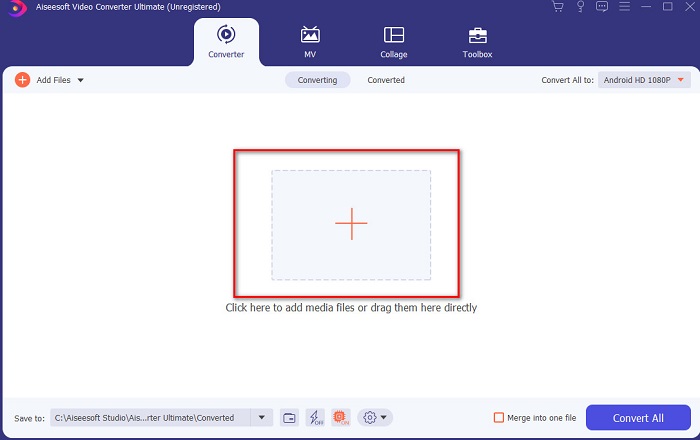
Langkah 2. Antara muka alat ini sepatutnya kelihatan seperti ini lalu klik tanda + di bahagian tengah. Seterusnya satu folder akan dipaparkan pada skrin, pilih fail video MPEG yang ingin anda tukar dan klik Open.
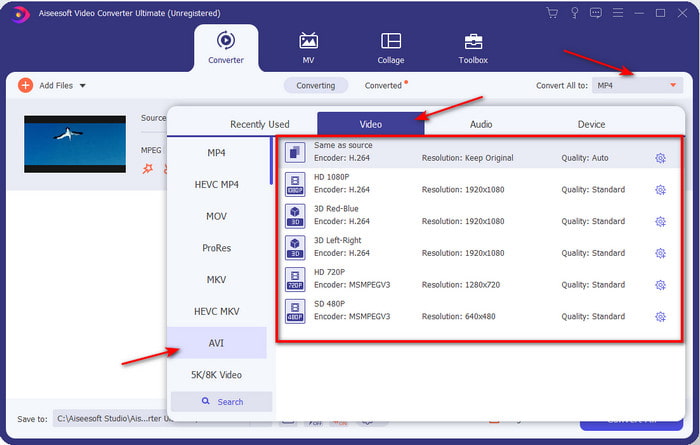
Langkah 3. Jika fail sudah berada dalam antara muka, klik Convert All to: dan cari format AVI.
Langkah 4. Dan sekarang untuk memulakan penukaran filem MPEG‑4 kepada format AVI, tekan Convert All.
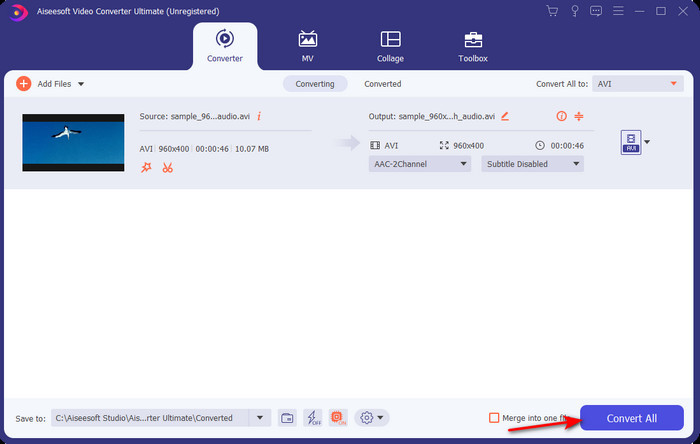
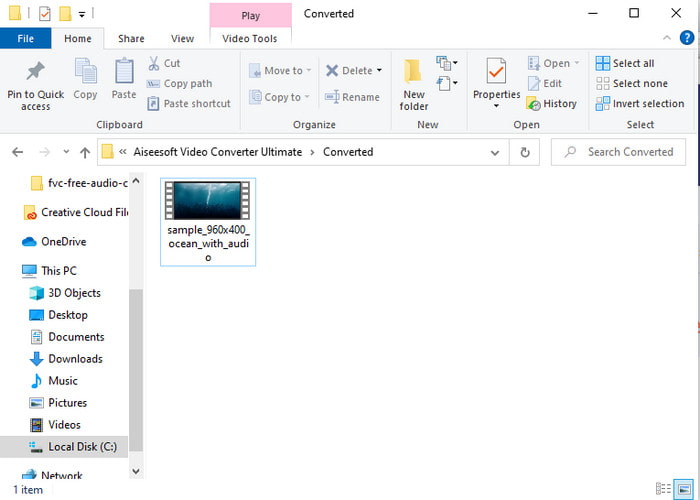
Langkah 5. Proses memuat turun fail hanya akan mengambil masa beberapa minit dan apabila selesai, satu folder akan muncul dengan format yang telah ditukar. Sekarang, klik fail tersebut untuk menonton format baharu MPEG anda yang telah ditukar.
2. FFmpeg
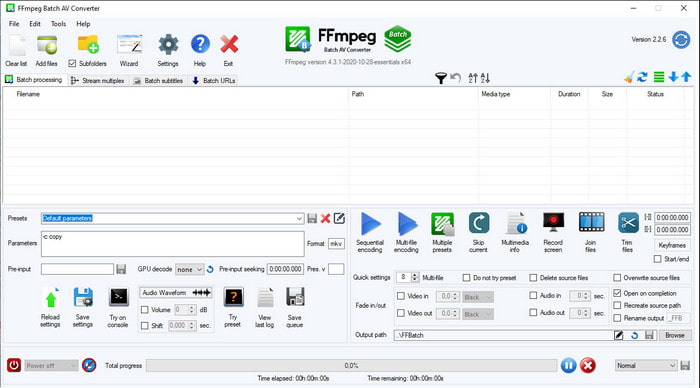
Perisian lain yang tersedia dalam senarai ini ialah FFmpeg. Jika anda mencari perisian sumber terbuka, ini adalah salah satu pilihan yang boleh anda temui di web. Namun, antara muka alat ini sukar difahami, terutamanya bagi pemula dan juga pengguna berpengalaman. Proses penukaran di sini secara umum sangat baik dan menghasilkan output berkualiti tinggi seperti penukar lain. Jadi, jika anda ingin menukar MPEG ke AVI menggunakan FFmpeg, ikut langkah-langkah ini dengan teliti kerana kami telah memudahkannya untuk difahami.
Langkah 1. Muat turun FFmpeg pada desktop anda dan cipta folder baharu kemudian unzip fail tersebut di dalamnya.
Langkah 2. Cari CDM pada Window anda dan buka.
Langkah 3. Cari fail menggunakan command prompt, kemudian masukkan kod ini ffmpeg -i input.mpeg -vn -ar 44100 -ac 2 -b:a 192k output.avi dan tekan Enter pada papan kekunci anda untuk memulakan proses.
Bahagian 3. 3 daripada Penukar Terbaik Digunakan untuk Menukar MPEG kepada Format AVI Dalam Talian
3. Penukar Video Percuma FVC
Jika anda mencari penukar MPEG ke AVI percuma terbaik dalam talian, FVC Free Video Converter ialah penukar dalam talian yang akan menepati kehendak anda. Ini kerana kesederhanaan antara muka alatan web yang disediakannya. Selain itu, perkara hebat tentang alat dalam talian ini ialah anda boleh mengaksesnya dengan mudah melalui pelayar kegemaran anda. Tambahan pula, penukaran dengan alat ini tidak mempunyai had, yang bermaksud anda boleh menukar sebarang format pada bila-bila masa. Namun, anda tidak boleh melakukan penukaran kelompok di sini seperti pada FVC Video Converter Ultimate. Dan sekarang, jika anda ingin cuba menggunakan alat dalam talian ini, ikut langkah-langkah yang disediakan di bawah.
Langkah 1. Untuk pergi ke laman utama penukar FVC, anda mesti klik dahulu pautan ini.
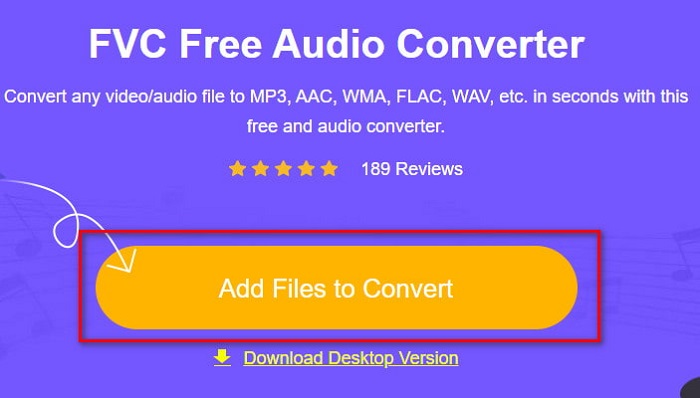
Langkah 2. Klik Add Files to Convert kemudian alat web akan dilancarkan dan satu folder akan muncul. Cari fail dan klik Open.
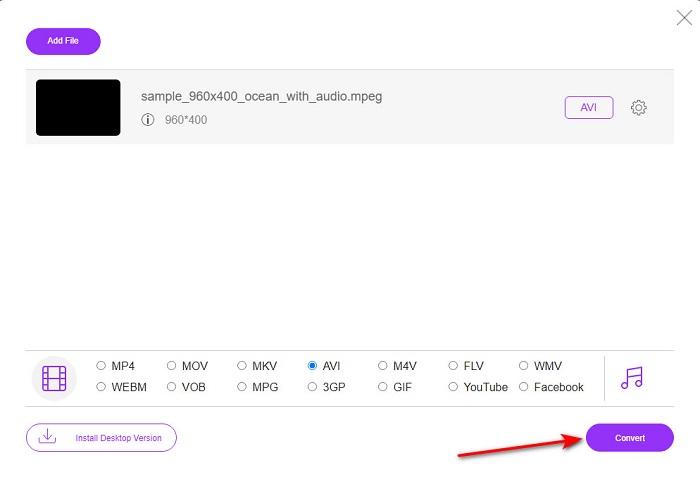
Langkah 3. Selepas alat web dilancarkan, pilih format yang dipaparkan dalam bahagian ini.
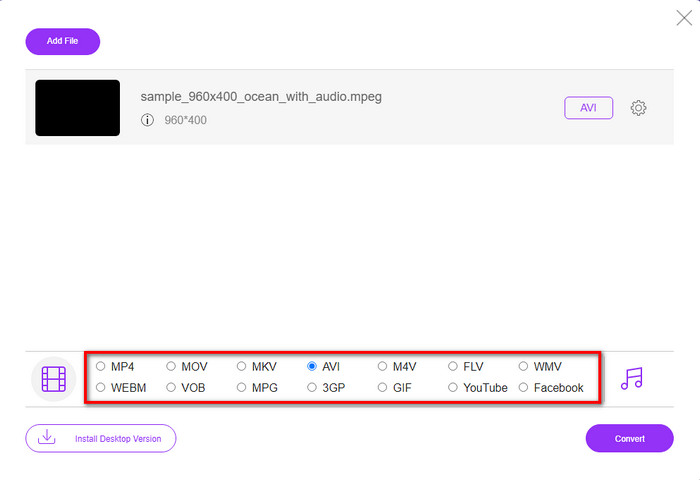
Langkah 4. Jika anda sudah memilih format, kini masanya untuk menukar format tersebut dengan mengklik butang Convert.
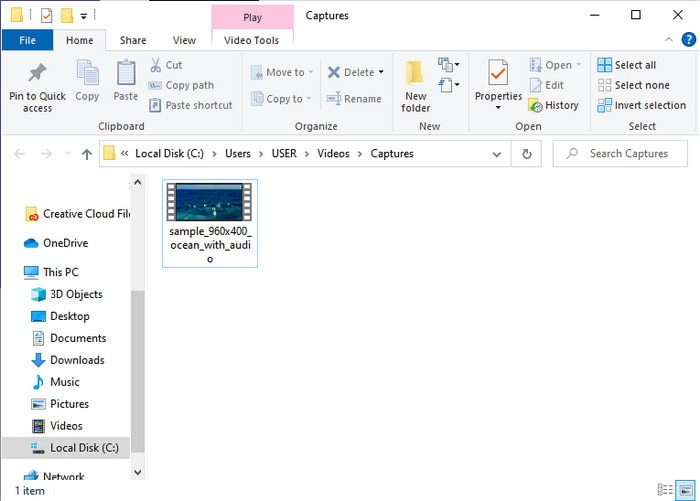
Langkah 5. Tunggu sebentar untuk proses bermula tidak lama lagi. Jika proses sudah selesai, satu folder akan dipaparkan bersama fail yang telah anda tukarkan tadi.
4. Freeconvert.com
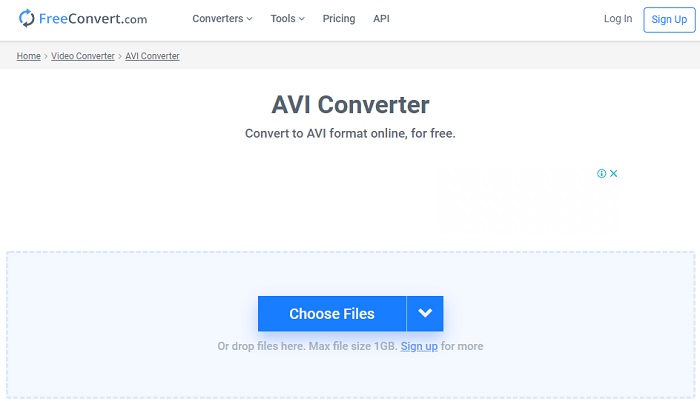
Seperti alat dalam talian yang disebut di atas, ini ialah satu lagi alat dalam talian yang boleh anda gunakan, Freeconvert.com. Alat web ini sudah pun mendapat populariti dalam kalangan pengguna di web. Ramai pengguna juga memuji alat ini kerana betapa mudahnya ia digunakan dan fungsi lainnya. Namun, jika anda memilih alat web ini, terdapat satu kelemahan besar: format yang disokong oleh alat web ini adalah terhad. Satu lagi ialah proses penukaran di sini agak lebih perlahan daripada yang dijangkakan. Jadi sekarang, jika anda ingin tahu cara menggunakan penukar dalam talian ini, ikut langkah-langkah berikut.
Langkah 1. Cari laman web freeconvert.com di web anda. Kemudian klik AVI di bawah Video Converters.
Langkah 2. Tekan Choose File dan cari fail MPEG dalam folder yang akan dipaparkan. Selepas pemilihan fail dibuat, klik Convert To AVI.
Langkah 3. Tunggu proses memuat naik selesai, kemudian klik Download AVI untuk menyimpan fail.
Bahagian 4. Soalan Lazim tentang Penukaran MPEG ke AVI
Adakah penukaran MPEG kehilangan kualiti?
Nah, ia bergantung pada format yang anda akan mengubahnya. Jadi, jika anda menukar MPEG anda kepada GIF maka jangkakan perubahan drastik kerana ia menyokong kombinasi warna yang kurang daripada format lain. Walau bagaimanapun, jika anda menggunakan format lain daripada GIF maka harapkan tiada kerugian.
Adakah MPEG lossy atau lossless?
MPEG menyokong pemampatan lossy jadi jika anda menggunakan format ini maka jangkakan saiz fail yang lebih kecil walaupun anda mempunyai video dan audio yang panjang.
Adakah MPEG format yang baik?
Sebelum ini adalah salah satu format terbaik yang boleh anda gunakan untuk menyimpan data pada DVD anda. Walau bagaimanapun, dalam era ini, MPEG bukanlah pilihan terbaik untuk menyimpan data. Tetapi jika anda ingin menyimpannya pada DVD, CD atau Blu-ray dan memindahkannya dengan lebih cepat, maka ini mesti menjadi pilihan.
Kesimpulannya
Kesimpulannya, semua perisian dalam talian dan luar talian yang dibentangkan di sini bagus untuk digunakan untuk menukar format. Walau bagaimanapun, terdapat satu alat yang membuktikan anda boleh mencapai penukaran yang luar biasa dengan mudah dengan FVC Video Converter Ultimate. Malah, kami boleh menerangkannya dalam 3 perkataan dan ia mudah digunakan, berkesan dan selamat juga. Jadi, jika anda ingin mencapai kehebatan, muat turun alat ini sekarang dan cuba.
-
 Cara Menukar Fail MPEG ke MP4 secara percuma di Windows, Mac, Online
 Baca dan dapatkan 3 cara percuma untuk menukar fail MPEG ke fail MP4 di komputer anda. Anda boleh menggunakan penukar video dalam talian dan desktop untuk mengubah format MPEG ke MP4 dengan mudah.
-
 [2021] Alat Terbaik dan Cara Mudah tentang Cara Menukar MPEG kepada MP3
 Artikel ini terutamanya bercakap tentang cara anda boleh menukar video MPEG anda pada MP3 dengan menggunakan alat yang paling boleh dipercayai dalam senarai.
-
 Tutorial Menukar Fail MP4 ke AVI dengan 7 Penukar Video Percuma
 Ingin mendapatkan semua cara percuma untuk menukar video AVI kepada MP4? Anda tidak sepatutnya terlepas artikel ini. Berikut ialah 7 cara untuk menukar fail AVI kepada MP4 secara percuma pada Windows, Mac, iPhone, Android dan dalam talian.
