


 Video Converter Ultimate
 Perakam Skrin
 Pembaikan Video
 Muat Turun Selamat
Cara Paling Mudah tentang Cara Menukar MPG kepada DivX pada Desktop Anda
Adakah anda mahu menukar fail MPG anda kepada DivX dengan cepat? Dalam kes itu, terdapat aplikasi yang boleh anda gunakan untuk menukar pelbagai format fail. Pada masa kini, seperti yang kita lihat, video yang berbeza mempunyai pelbagai format fail. Namun, ada kalanya sesetengah format tidak serasi dengan peranti lain. Jadi, apa yang perlu anda lakukan ialah mencari penukar yang mampu menukar sesuatu fail kepada format fail yang lain. Dengan cara ini, anda boleh memastikan video anda boleh dimainkan pada peranti anda kerana ia sudah serasi dan sesuai. Untuk menukar fail MPG anda kepada fail DivX, anda mesti teruskan membaca artikel ini untuk mendapatkan idea tentang aplikasi atau penukar yang perlu anda gunakan.

Bahagian 1: Tukar MPG kepada DivX Tanpa Kehilangan Kualiti
Jika anda sedang mencari aplikasi yang hebat dan boleh dipercayai untuk menukar MPG kepada DivX, maka Video Converter Ultimate ialah aplikasi yang boleh anda gunakan. Aplikasi ini membolehkan anda menukar fail MPG anda kepada format fail DivX. Namun bukan itu sahaja. Ia tidak terhad kepada dua format fail ini sahaja. Ia juga boleh menukar pelbagai format fail lain, seperti FLV, MP4, MKV, MOV, VOB, DIVX, OGV, XVID dan banyak lagi. Selain itu, Video Converter Ultimate tersedia pada Mac dan Windows. Tambahan pula, anda tidak perlu risau tentang kualiti video anda kerana anda boleh menukar fail tanpa kehilangan kualiti menggunakan aplikasi ini. Ia juga merupakan aplikasi yang ringkas dan mudah digunakan, yang sesuai untuk pemula yang mahu menukar fail. Dari segi proses penukaran, aplikasi ini boleh menukar fail anda dengan sangat pantas, jadi anda tidak perlu menunggu lama. Dan anda boleh menggunakan perisian ini untuk menukar berbilang fail secara kelompok. Selain itu, ia bukan sahaja boleh dipercayai dalam menukar fail yang berbeza. Aplikasi ini juga mempunyai banyak alat penyuntingan, seperti penguat volum, pembalik video, pemangkas video, pembetulan warna, penggabung video, penanggal tera air, pembuat GIF dan banyak lagi. Jika anda mahu menukar MPG kepada DivX pada Windows dan Mac, ikut langkah mudah di bawah.
Langkah 1: Pergi ke laman web Video Converter Ultimate dan muat turun aplikasi tersebut. Kemudian teruskan dengan proses pemasangan dan lancarkan aplikasi.
Muat Turun PercumaUntuk Windows 7 atau lebih baharuMuat Turun Selamat
Muat Turun PercumaUntuk MacOS 10.7 atau lebih baharuMuat Turun Selamat
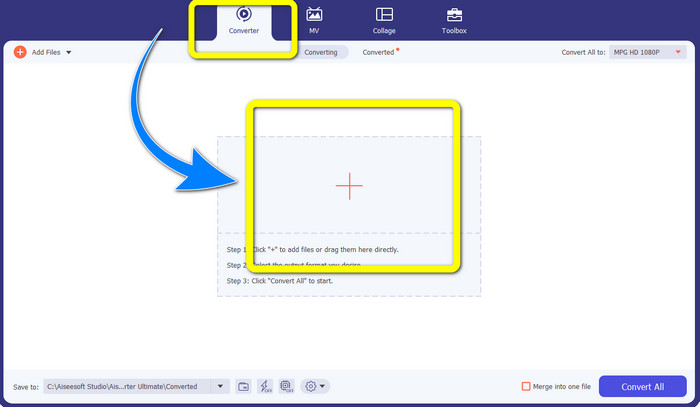
Langkah 2: Selepas anda membuka Video Converter Ultimate, pergi ke bahagian Converter. Kemudian, pilih butang tanda Tambah dan lampirkan fail MPG yang anda mahu tukar kepada fail DivX.
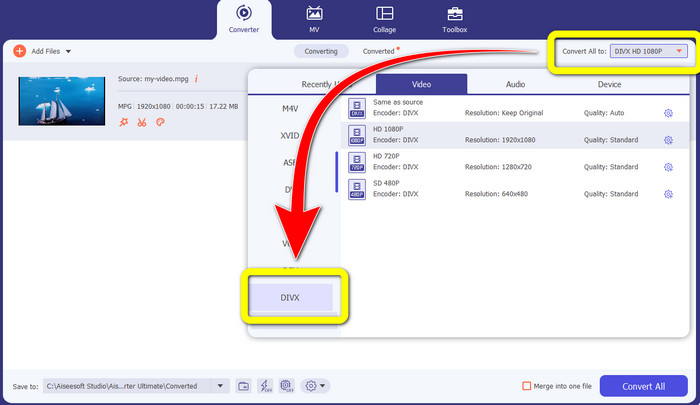
Langkah 3: Selepas anda memasukkan fail MPG anda, teruskan ke butang Convert All to dan pilih fail DIVX pada pilihan format. Anda juga boleh memilih kualiti yang anda kehendaki.
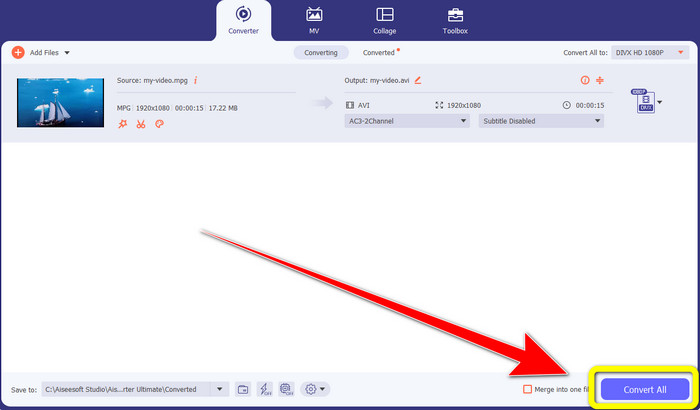
Langkah 4: Jika anda sudah selesai memilih format fail DIVX, klik butang Convert All dan simpan video anda dalam format fail DIVX. Ini ialah cara paling mudah untuk menukar fail MPG anda kepada fail DIVX pada Mac dan Windows anda.
Bahagian 2: Tukar MPG kepada DivX Online secara Percuma
Menggunakan Media.io
Jika anda berminat untuk mencari penukar MPG ke DIVX dalam talian secara percuma, salah satu alat dalam talian yang boleh anda gunakan ialah Media.io. Perisian ini boleh menukar pelbagai fail seperti video, audio, imej dan banyak lagi. Ia menyokong pelbagai format fail video, seperti MP4, AVI, MKV, WMV, MPEG2, FLV, XVID, M4V dan lain-lain. Jadi, anda juga boleh menggunakannya sebagai penukar MPEG ke DivX. Selain itu, Media.io bukan sahaja mampu menukar pelbagai format fail. Ia juga mempunyai banyak alat untuk menyunting video anda, seperti penanggal tera air, potong video, pangkas, gabung video, ubah kelajuan, buat tayangan slaid dan banyak lagi. Malangnya, versi percuma ini mempunyai had. Dalam menukar pelbagai fail, anda hanya boleh memuat naik sehingga saiz maksimum 100Mb, yang tidak sesuai jika anda menukar banyak fail. Jika anda mahu menukar lebih banyak fail dan menikmati lebih banyak ciri menarik aplikasi ini, anda mesti membeli langganan. Selain itu, proses penukarannya perlahan dan mengambil beberapa minit untuk menukar fail anda, yang tidak sesuai bagi mereka yang mahu menukar banyak fail. Jadi, jika anda mahu menukar MPG kepada DIVX dalam talian secara percuma, ikut langkah mudah di bawah.
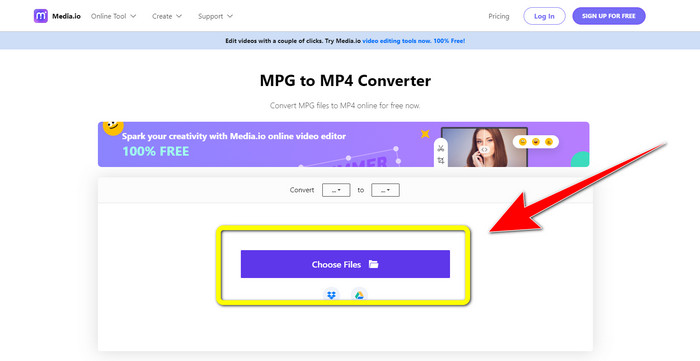
Langkah 1: Lawati laman web Media.io. Kemudian, klik butang Choose Files untuk memasukkan video anda dengan fail MPG.
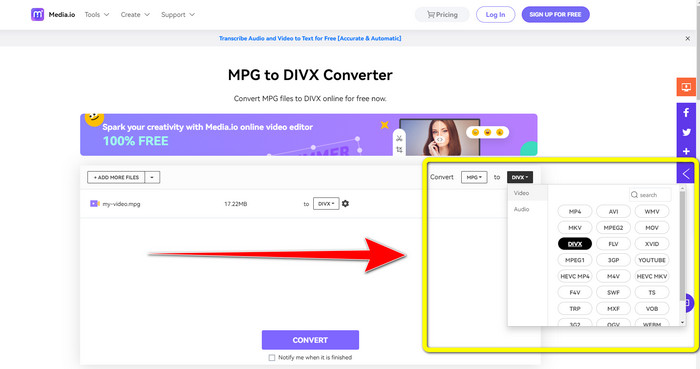
Langkah 2: Selepas anda melampirkan fail MPG anda, pergi ke Convert dan cari fail DIVX pada pilihan format dan pilihnya.
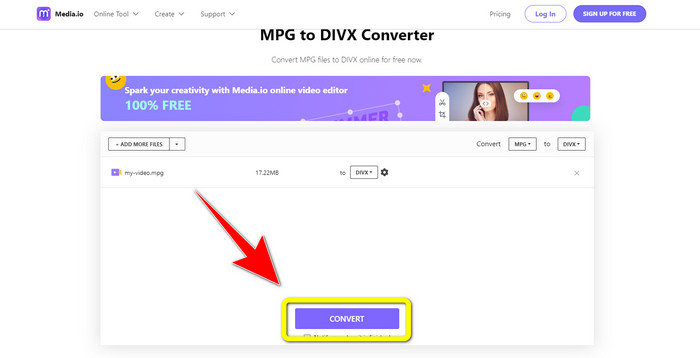
Langkah 3: Jika anda sudah memilih fail DIVX untuk video anda, klik butang Convert dan simpan output akhir anda.
Menggunakan FileProInfo
Satu lagi aplikasi yang boleh anda gunakan untuk menukar MPG kepada DIVX secara dalam talian ialah FileProInfo. Aplikasi dalam talian ini boleh membantu anda menukar video dengan fail MPG kepada fail DIVX. Ia juga menyokong pelbagai format fail, seperti 3GP, AAC, M4A, M4R, M4V, AVI, AMR, MP4, VOC, VOB dan lebih banyak format fail video yang lain. Jadi anda boleh menggunakannya untuk menukar 3GP kepada DivX. Di samping itu, anda boleh menukar fail secara percuma. Ia mudah dan ringkas digunakan untuk penukaran. Tambahan pula, FileProInfo ialah alat yang boleh anda gunakan dalam talian dan anda juga boleh memuat turun aplikasinya ke komputer anda. Selain itu, anda boleh melakukan lebih banyak perkara dalam aplikasi ini, seperti pemeriksa plagiat, pelihat fail, penggabung, pemisah, penyunting dan banyak lagi. FileProInfo sesuai untuk pemula, terutama untuk menukar pelbagai format fail. Namun, alat dalam talian ini terlalu rumit dari segi penyuntingan video. Ia mempunyai beberapa ciri lanjutan yang sukar diikuti, yang tidak sesuai untuk pemula. Selain itu, proses menukar MPG kepada DivX sangat memakan masa. Jika anda mahu menukar video anda dengan fail MPG kepada fail DIVX secara dalam talian, ikut langkah mudah di bawah.
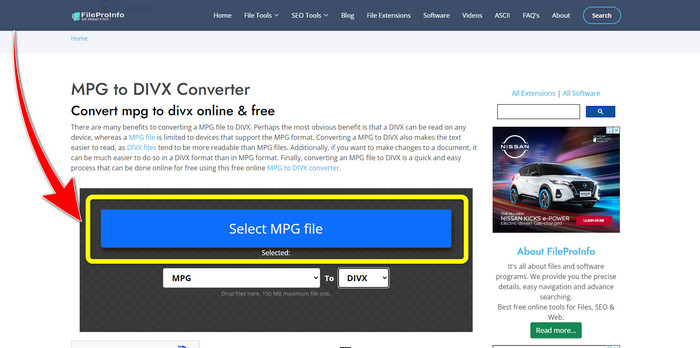
Langkah 1: Lawati laman web FileProInfo. Kemudian, klik butang Select MPG File untuk melampirkan video anda dengan fail MPG.
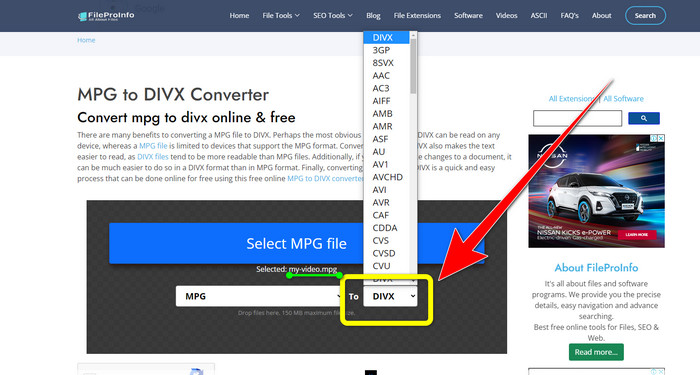
Langkah 2: Selepas menambah video MPG anda, cari format options dan klik fail DIVX.
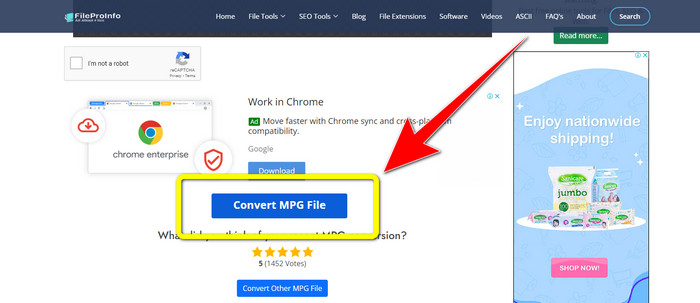
Langkah 3: Apabila anda sudah klik fail DIVX, skrol sedikit ke bawah dan klik butang Convert MPG File.
Bahagian 3: Pengetahuan Lanjutan tentang MPG dan DivX
Apa itu MPG?
Fail MPG ialah format yang menggunakan format fail digital. Juga, ia telah diseragamkan oleh Kumpulan Pakar Moving Pictures. Akhir sekali, format fail ini biasa digunakan dalam filem dan diedarkan di internet.
Apakah DIVX?
DIVX ialah codec video berkualiti tinggi dan mampatan tinggi yang boleh anda gunakan untuk codec digital. Juga, ia diklasifikasikan sebagai fail video. Ia juga tidak sesuai untuk program Windows. Selain itu, ia memampatkan video kepada sebahagian kecil daripada saiz asalnya dengan sedikit kehilangan kualiti.
Bahagian 4: Soalan Lazim tentang Menukar MPG kepada DivX
Apakah kelebihan menukar fail MPG kepada fail DIVX?
Salah satu kelebihan menukar fail MPG kepada fail DIVX ialah format DIVX diterima secara meluas pada program berbanding fail MPG.
Apakah penyemak imbas yang boleh saya gunakan untuk menukar MPG kepada DIVX?
Anda tidak perlu menyusahkan diri sendiri kerana kini anda boleh menggunakan hampir semua penyemak imbas untuk menukar fail MPG kepada DIVX pada Google Chrome, Firefox, Safari, Opera dan banyak lagi.
Adakah terdapat penukar yang mempunyai proses penukaran kelajuan?
Ya, memang ada! Jika anda sedang mencari aplikasi atau penukar dengan proses penukaran kelajuan, anda boleh menggunakan Video Converter Ultimate. Anda boleh menukar fail dalam beberapa saat sahaja, tidak seperti aplikasi lain yang mengambil terlalu banyak masa untuk menukar.
Kesimpulan
Seperti yang ditunjukkan di atas, anda boleh dengan mudah menukar MPG kepada DivX menggunakan aplikasi yang boleh dimuat turun atau secara dalam talian. Menukar fail kepada format lain adalah perlu, terutamanya jika fail tersebut tidak sesuai untuk program atau peranti. Jika anda mahu menukar pelbagai jenis fail, anda boleh menggunakan Video Converter Ultimate.
-
 Cara Menukar GIF kepada DivX dengan Cara yang Mudah dan Mudah
 Adakah anda ingin menukar GIF anda kepada format fail Divx? Kami akan menunjukkan penukar hebat yang boleh anda gunakan untuk menukar GIF kepada DivX.
-
 Kaedah yang Mudah dipelajari tentang Cara Menukar Xvid kepada DivX
 Adakah anda sedang mencari penyelesaian terbaik untuk menukar Xvid kepada DivX secara percuma? Artikel ini akan membantu anda menyelesaikan masalah anda. Jadi, baca post itu secara berterusan.
-
 Cara Menukar M4V kepada DivX secara Percuma pada Mac [Alat Terbaik&93;
 Mencari cara untuk menukar M4V kepada DivX secara percuma? Kami menyenaraikan penukar terbaik untuk anda menukar fail M4V anda kepada DivX pada Mac.
