


 Video Converter Ultimate
 Perakam Skrin
 Pembaikan Video
Cara Paling Mudah untuk Menukar MPG kepada MKV Menggunakan Penukar Terbaik [Percuma]
Sadly, MPG files do not contain subtitle tracks; however, you can convert your file to a file format that stores numerous subtitle tracks in different languages. And if you are looking for a way to convert your MPG file to MKV easily, we provide the simple steps to convert MPG to MKV online and offline; read this article until the end.

Bahagian 1. Mengapa Menukar MPG kepada MKV
Format fail MPG ialah salah satu format fail yang paling biasa digunakan di web. Format fail ini dibangunkan oleh MPEG atau Moving Pictures Expert Groups. Selain itu, jenis fail ini boleh menyimpan video, audio dan metadata. Lebih-lebih lagi, hampir semua pemain media menyokong jenis fail ini secara meluas. Sebaliknya, fail MKV atau Matroska ialah bekas fail media yang menyimpan video, audio dan trek sari kata ke dalam satu fail. Jenis fail ini juga terkenal dengan peminat filem kerana ia boleh mengendalikan trek audio dalam bahasa yang berbeza.
Bahagian 2. Cara Terpantas untuk Menukar MPG kepada MKV Luar Talian
There are a lot of converters in the market that can convert MPG to MKV. However, if you want a converter that can do an ultra-fast conversion, FVC Video Converter Ultimate is the best tool. And if you want to remove watermark from your videos, this converter has the feature to do so. Moreover, it can also do a batch conversion to merge multiple file-formats into one. Want to know the advantages of using this MPG to MKV Converter? Then read the details below.

FVC Video Converter Ultimate
5,689,200+ Muat Turun- Edit dan tingkatkan video anda secara eksplisit.
- Proses penukaran ultra pantas tersedia dalam penukar ini.
- Ia boleh menukar fail MPG kepada MKV, WMV, AVI, MP4 dan 1000+ format fail lain.
- Tersedia pada semua sistem pengendalian seperti Windows dan macOS.
Muat Turun PercumaUntuk Windows 7 atau lebih baharuMuat Turun Selamat
Muat Turun PercumaUntuk MacOS 10.7 atau lebih baharuMuat Turun Selamat
Ikuti langkah di bawah untuk menukar fail MPG anda kepada MKV.
Step 1. Download FVC Converter Ultimate by clicking the Download button below for Windows or macOS. Then follow the installation process, and run the app.
Muat Turun PercumaUntuk Windows 7 atau lebih baharuMuat Turun Selamat
Muat Turun PercumaUntuk MacOS 10.7 atau lebih baharuMuat Turun Selamat
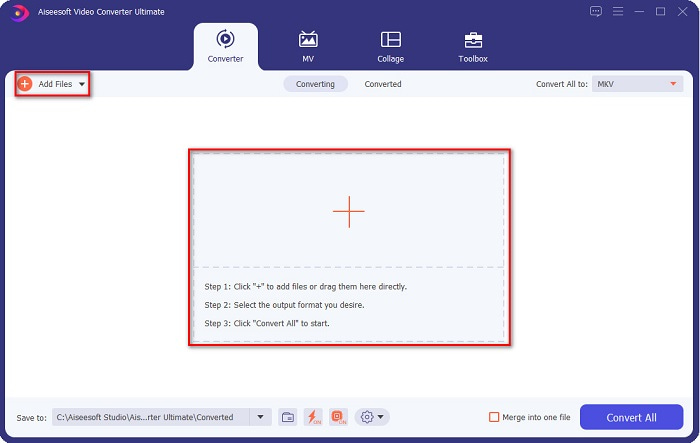
Step 2. For the next step, click the Add Files or the + sign button to upload your MPG file on the software's main interface.
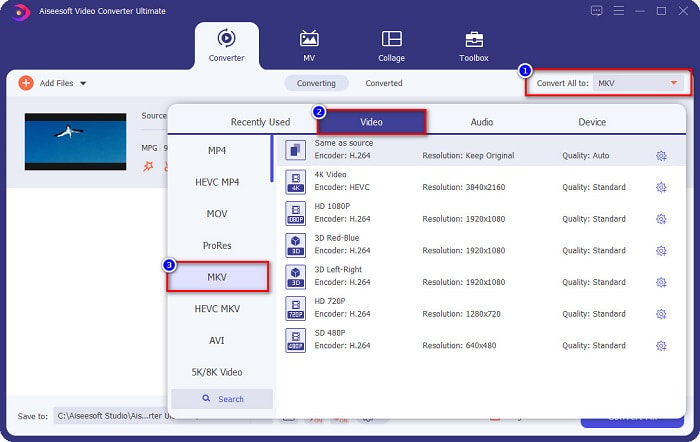
Step 3. After uploading your MPG file, select the output format by clicking the Convert All to button. In your case, choose the MKV file format.
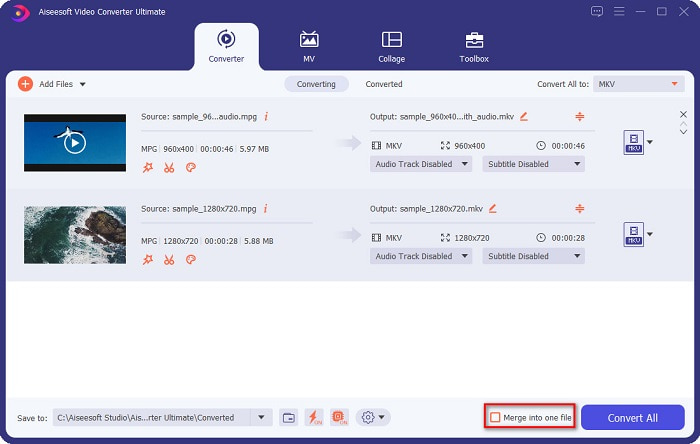
Optional. If you want to convert multiple MPG files into one, tick the Merge into one file box. If not, proceed to the next step.
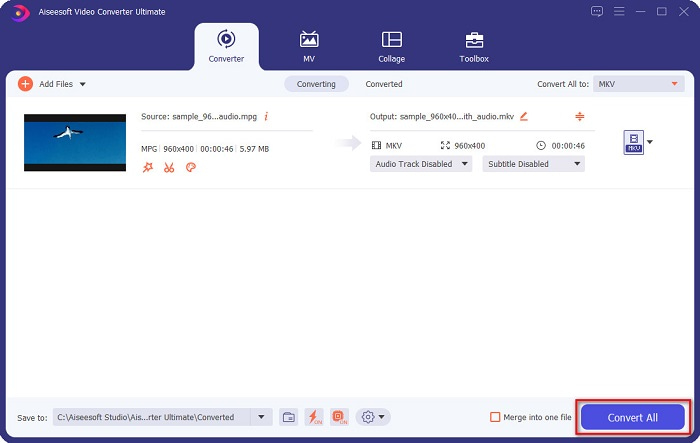
Step 4. To finish, click the Convert All button to convert your MPG file to an MKV file. Wait for a few seconds, and that’s it! As easy as that, you can easily convert MPG to MKV.
Bahagian 3. Tukar MPG kepada MKV Menggunakan Alat Perisian Percuma
Ever wonder what the best freeware tool to convert MPG to MKV is? We observed that many users use HandBrake as the first line of choice. This freeware can convert MPG to MKV, WebM, and MP4 files. In addition, it has an easy-to-use interface, which is a good thing if you are a beginner. However, it can only convert limited file formats. Nonetheless, it is still an effective tool for converting MPG to MKV.
Step 1. Download HandBrake on your device, then run the application. After opening the app, click the File option on the right side of the software’s interface. When your computer files appear, select your MPG file.
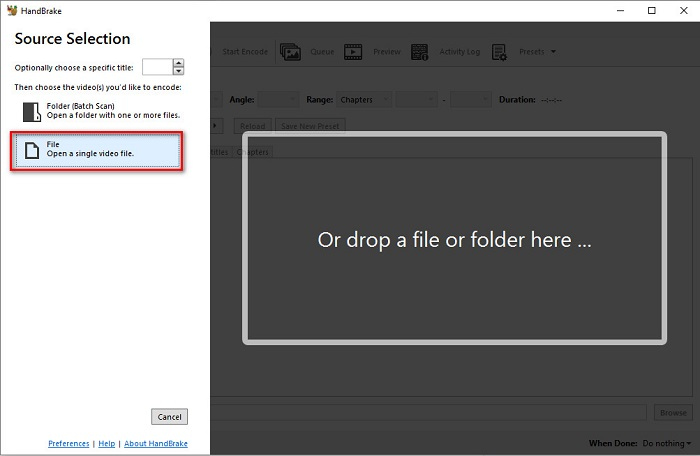
Step 2. Then select the output file format that you want on the drop-down button beside Format. And then, by clicking the Browse button, choose where your file destination will be.
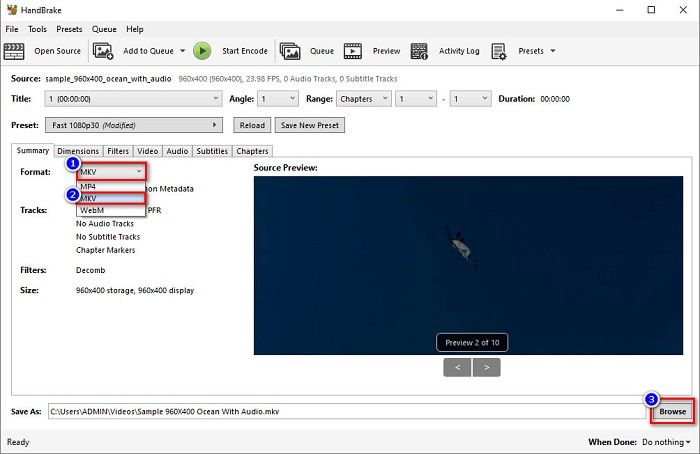
Step 3. Finally, click the Start Encode button to convert your MPG file to MKV file format.
Anda boleh menukar MPG kepada MKV menggunakan penukar perisian percuma dengan mengikuti langkah mudah di atas.
Bahagian 4. 2 Kaedah Menukar MPG ke MKV Dalam Talian
Menukar melalui penukar dalam talian mungkin merupakan pilihan yang paling mudah untuk dilakukan. Selain itu, anda tidak perlu memuat turun apa-apa apabila menggunakan penukar dalam talian. Tetapi sebaliknya, anda boleh terus menukar dalam talian. Walau bagaimanapun, kelajuan penukaran anda bergantung pada kelajuan sambungan internet anda. Walau bagaimanapun, kami menyenaraikan di bawah dua kaedah terbaik untuk menukar fail MPG anda kepada MKV.
Kaedah 1. Gunakan FVC Free Online Video Converter
FVC Free Online Video Converter is a free online converter that conveniently converts various file formats. It supports file formats like MPG to MKV, AVI, MP4, MOV, MP3, and more. It also has a beginner-friendly converter because it has an easy-to-use GUI. Moreover, it has a feature that allows you to change your file's video and audio bitrate. So, if you are interested in this MPG to MKV converter online, follow the steps below.
Step 1. In your browser, search FVC Free Online Video Converter, or go directly to the webpage by clicking this link. And then launch the software application.
Step 2. After launching the app, click the Add Files to Convert button. Your computer files will appear, then select your MPG file.
Muat turun Versi Desktop untuk menukar fail secara kelompok.
Step 3. And then choose MKV as your output format.
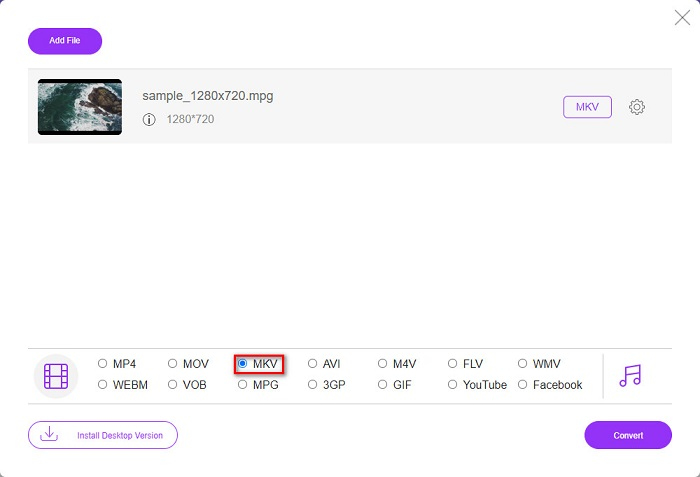
Step 4. For the last step, click the Convert button. Then your MPG to MKV conversion will begin.
Kaedah 2. Gunakan CloudConvert
Another online converter that you can use is CloudConvert. This converter is very efficient to use because of its simple interface. Moreover, you can also compress your files when using it. However, it only supports limited file formats. Despite that, many still use this converter for convenience purposes.
Step 1. In your browser, search CloudConvert. When you are already on the webpage, click the Select Files button. Then select your MPG file when your computer files appear.
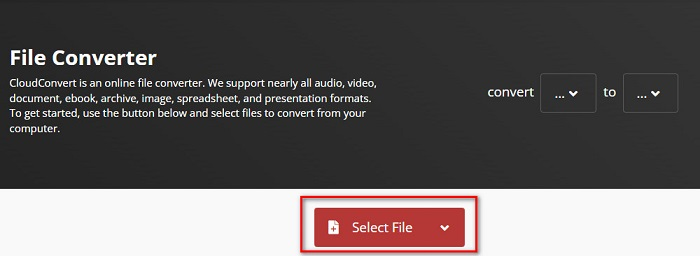
Step 2. Then, choose the MKV file as your output format on the drop-down button.
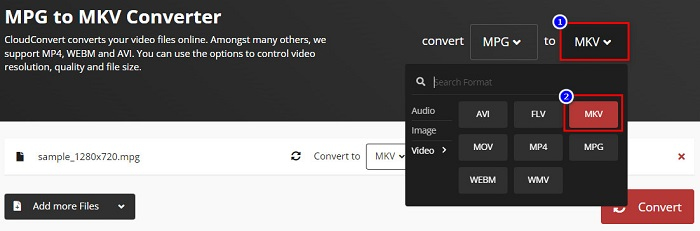
Step 3. Lastly, click the Convert button. Then wait for your file to be converted, and voila! With those three easy steps, you can change MPG to MKV.
MPG lwn MKV
Dibuat oleh Moving Picture Experts Group (MPEG), MPG ialah format video digital biasa untuk menyimpan maklumat video, audio dan metadata. Ia agak berguna apabila mencipta filem untuk dikongsi di Internet. Fail tersebut dalam MPG biasanya mengandungi pemampatan video/audio MPEG-1 atau MPEG-2.
Format kontena multimedia Matroska, dikeluarkan pada tahun 2002, ialah format sumber terbuka yang boleh merangkumi beberapa lagu video, audio, imej dan sari kata. Jadi, anda boleh menggunakannya untuk menyimpan klip video pendek, rancangan TV dan filem dengan mudah. Ia agak popular untuk subbing peminat anime.
Bahagian 5. Soalan Lazim tentang Menukar MPG kepada MKV
Adakah penukaran MPG kepada MKV menjejaskan saiz fail?
Ya, walaupun ia tidak banyak menjejaskan apabila anda menukar MPG kepada fail MKV, saiz fail bertambah.
Yang manakah mempunyai saiz fail yang lebih besar?
Fail MKV mempunyai saiz fail yang lebih besar berbanding fail MPG kerana fail MKV mengandungi video, audio dan berbilang trek sari kata ke dalam satu fail.
Bolehkah anda memampatkan fail MKV?
You can compress MKV files by using a file compressing tool. FVC Video Converter Ultimate has a feature that allows you to compress your large video files.
Kesimpulannya
Artikel ini mendapat sokongan anda jika anda mencari cara terbaik untuk menukar fail MPG kepada MKV. Semua penukar yang dibentangkan di atas menunjukkan prestasi yang menjanjikan apabila menukar fail. Tetapi jika anda sedang mencari penukar dengan banyak ciri cemerlang, anda mungkin ingin mencuba menggunakan FVC Video Converter Ultimate sebagai pilihan pertama anda. Jika anda masih belum yakin, muat turunnya untuk mencuba penukar terbaik yang boleh anda gunakan.
-
 3 Cara Mudah tentang Cara Menukar MPG kepada MOV pada Mac/Windows/Online Anda
 Ingin menukar fail MPG anda dan kemudian mengangkutnya pada iOS, iPod, iPad atau Mac anda? Artikel ini akan membantu untuk memikirkan cara untuk menukar MPG kepada MOV dengan langkah-langkah.
-
 Bagaimana untuk Menukar MPG kepada FLV Tanpa Kehilangan Kualiti [Terbukti]
 Anda mesti menonton filem kegemaran anda pada pemain media ini, tetapi ia tidak menyokong MPG. Cuba tukar fail MPG anda kepada FLV menggunakan penukar ini yang diperkenalkan oleh artikel ini.
-
 2 Ultimate MPG Converters untuk Menukar MPG kepada WMV secara Percuma
 Adakah anda ingin menukar MPG kepada WMV percuma? Dalam kes itu, anda bertuah kerana kami mendapati terdapat dua alat yang boleh anda gunakan untuk menukar fail MPG anda.

