


 Video Converter Ultimate
 Perakam Skrin
 Pembaikan Video
 Muat Turun Selamat
Kaedah Dalam Talian dan Luar Talian Paling Berkesan untuk Menukar MTV kepada MKV
Terdapat beberapa keadaan apabila format fail MTV anda tidak serasi dengan peranti atau program anda. Penyelesaian terbaik ialah menukar format fail video anda. Nasib baik, kami mempunyai kaedah yang paling baik untuk anda. Pos ini akan menawarkan beberapa aplikasi yang boleh anda gunakan untuk menukar MTV kepada MKV dengan segera. Jangan abaikan membaca artikel ini untuk mengetahui penukar MTV ke MKV yang terbaik.

Bahagian 1: Maklumat Terperinci tentang MTV dan MKV
Apa itu MTV?
MTV bermaksud Music Television. Pada 1 Ogos 1981, MTV telah dilancarkan sebagai saluran kabel Amerika. Format fail ini dicipta untuk membolehkan keupayaan main balik video pada pemain MP4 mudah alih buatan China yang murah tanpa meningkatkan nilai pemain tersebut dengan Lesen. Pemain MTV dihasilkan di China dan boleh memaparkan video, fail teks, dan imej. Akhir sekali, ia beroperasi dengan memaparkan siri bingkai imej rgb565/555 mentah tanpa mampatan sambil memainkan audio MP3.
Apakah MKV?
MKV bermaksud Matroska Video. Ia ialah sebuah bekas multimedia, sama seperti format MOV dan AVI. Namun, ia menyokong lebih banyak trek sarikata dan audio dalam fail yang sama. Bekas multimedia Matroska ini digunakan untuk video. Ia juga berdasarkan Extensible Binary Meta Language. Perbezaan antara format MKV dan format video lain ialah format lain merupakan codec, manakala MKV ialah sebuah bekas.
Bahagian 2: Bagaimana untuk Menukar MTV ke MKV Losslessly
Menukar MTV kepada MKV tanpa kehilangan kualiti adalah mudah menggunakan Video Converter Ultimate. Aplikasi ini boleh menukar banyak jenis fail, seperti MOV, MTS, XVID, FLV, AVI, MP4 dan banyak lagi. Dari segi proses, ia mempunyai kelajuan penukaran 30x lebih pantas, yang tiada tandingan berbanding penukar lain. Anda juga boleh menukar berbilang fail secara serentak kerana ia menawarkan penukaran kelompok. Selain itu, jika anda ingin menambah baik video anda dan menjadikannya lebih menarik, anda boleh menggunakan alat ini. Ia mempunyai banyak alat yang boleh anda cuba untuk menyunting dan menambah baik video anda, seperti penambah video, di mana anda boleh meningkatkan resolusi video anda, membuang hingar, mengoptimumkan kecerahan dan kontras serta mengurangkan gegaran video. Dengan fungsi ini, anda boleh memastikan video anda akan menjadi lebih memuaskan. Tambahan pula, jika anda ingin menambah tera air pada video anda, anda boleh menggunakan alat ini kerana ia mampu menambah tera air pada video anda. Ini ialah fungsi alat ini, tetapi jika anda ingin menemui lebih banyak fungsi hebat, anda mesti cuba menggunakan Video Converter Ultimate.
Ciri-ciri:
◆ Mampu mencipta Kolaj.
◆ Tawarkan Alat Penyuntingan Video, seperti Penambah, Penghapus Tera Air, Pemampat, dsb.
◆ Membolehkan anda membuat video Muzik.
◆ Tukar pelbagai format fail video.
Kelebihan
- Mempunyai proses penukaran 30x lebih pantas.
- Sesuai untuk pengguna bukan profesional.
- Boleh menukar beberapa format fail, seperti MP4, MOV, MTV, MKV, dll.
- Tiada tera air digunakan.
- Boleh diakses kepada Windows dan Mac.
Keburukan
- Anda mesti membeli aplikasi untuk mengalami lebih banyak ciri hebat.
Ikuti panduan terperinci ini untuk menukar MTV kepada MKV serta-merta.
Langkah 1: Muat turun Video Converter Ultimate pada komputer Windows atau Mac anda dengan mengklik butang Muat Turun di bawah. Seterusnya pasang perisian pada peranti anda dan kemudian buka aplikasi tersebut.
Muat Turun PercumaUntuk Windows 7 atau lebih baharuMuat Turun Selamat
Muat Turun PercumaUntuk MacOS 10.7 atau lebih baharuMuat Turun Selamat
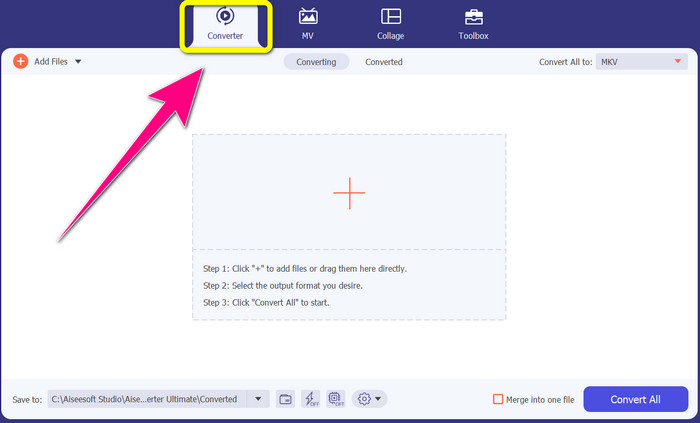
Langkah 2: Anda akan melihat empat pilihan di bahagian atas antara muka, Converter, MV, Collage dan Toolbox. Pilih panel Converter.
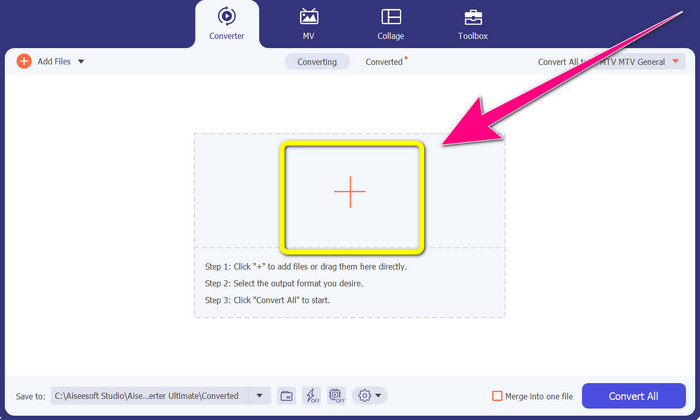
Langkah 3: Seterusnya, klik ikon + untuk menambah fail video MTV yang ingin anda tukar.
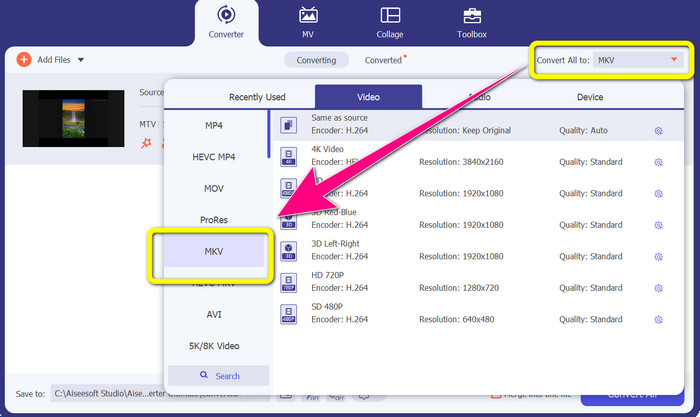
Langkah 4: Setelah anda menambah video anda, klik pilihan Convert all to. Kemudian, cari format fail MKV daripada pilihan format, dan klik padanya.
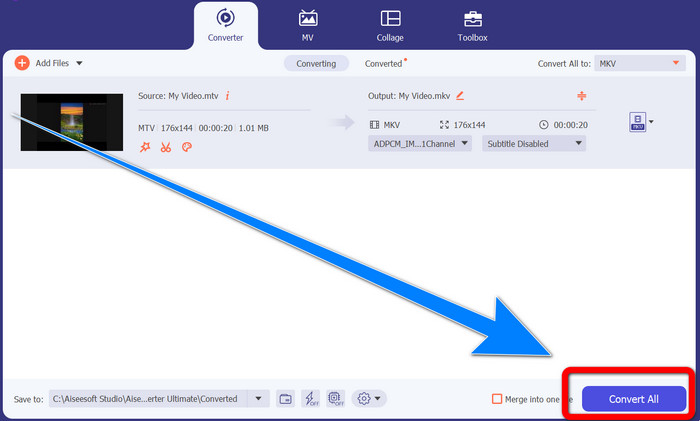
Langkah 5: Selepas memilih format fail MKV, anda boleh terus klik butang Convert All untuk menukar dan menyimpan video akhir anda.
Bahagian 3: Perisian Dalam Talian untuk Menukar MTV kepada MKV
Menggunakan Converthelper
Anda telah mempelajari cara menukar MTV kepada MKV pada Windows dan Mac anda. Kini, anda akan mempelajari prosedur untuk menukar fail secara dalam talian. Salah satu penukar berguna yang boleh anda gunakan ialah Converthelper. Alat dalam talian ini ialah alat percuma yang boleh anda gunakan untuk menukar pelbagai format fail, seperti MTV, MKV, DDAT, AVE, PS GFP, WMF dan lain-lain. Selain itu, ia hanya mempunyai beberapa langkah untuk menukar, yang sesuai untuk pemula. Dan anda boleh menukar banyak fail tanpa had menggunakan Converthelper. Namun, penukar dalam talian percuma ini perlahan dalam proses penukaran, di mana ia mengambil masa untuk menukar fail sepenuhnya. Selain itu, prestasi alat ini bergantung pada sambungan internet anda. Jadi untuk menukar fail menggunakan Converthelper, anda mesti mempunyai sambungan internet yang baik. Ikuti langkah di bawah untuk menukar MTV kepada MKV secara dalam talian.
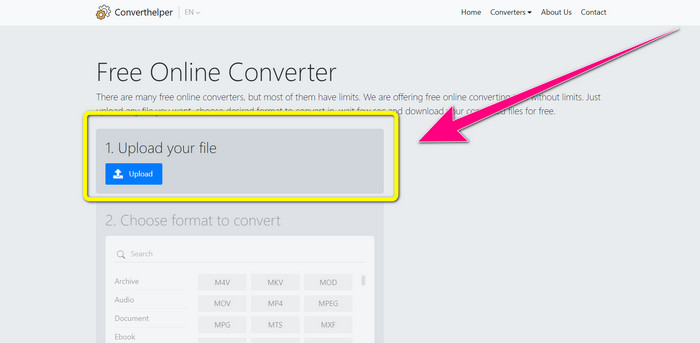
Langkah 1: Lawati laman web Converthelper pada pelayar anda. Kemudian, klik butang muat naik dan tambah video dengan fail MTV.
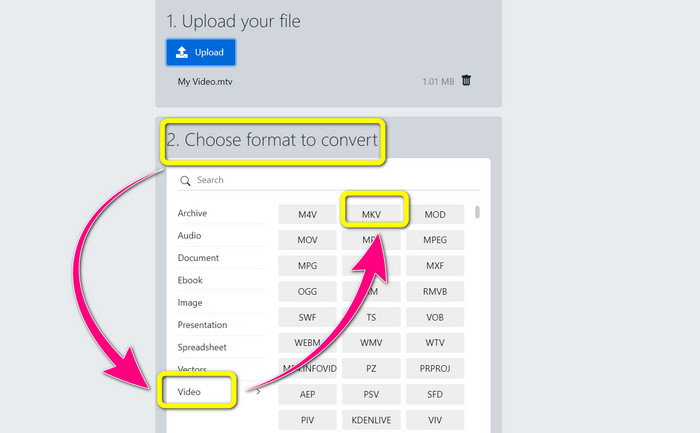
Langkah 2: Selepas memuat naik fail anda, teruskan ke nombor 2. Pilih pilihan format. Klik butang Video, cari fail MKV dan klik padanya.
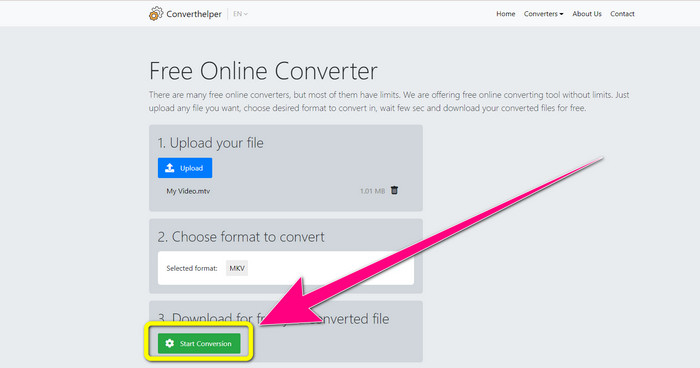
Langkah 3: Untuk langkah terakhir, klik butang Start Conversion untuk menukar fail MTV anda kepada format MKV. Tunggu proses penukaran akhir, kemudian muat turun video akhir anda dengan fail MKV.
Menggunakan Online Convert
Alat dalam talian lain yang boleh anda gunakan untuk menukar MTV kepada MKV ialah Tukar Dalam Talian. Selain daripada format MTV dan MKV, ia menyokong lebih banyak format, seperti MP4, AVI, GIF, FLAC, FLV, VOB, DIVX, MOV, WMV dan banyak lagi. Ia bukan sahaja boleh dipercayai dalam menukar fail video. Anda juga boleh menukar imej, dokumen, audio dan format lain. Alat dalam talian ini juga bagus untuk pengguna baharu kerana ia mudah digunakan dan hanya mempunyai beberapa langkah untuk menukar fail yang berbeza. Walau bagaimanapun, alat dalam talian ini mempunyai had saiz fail, iaitu maksimum 3Mb. Selain itu, seperti alat berasaskan web yang lain, anda tidak boleh menggunakannya jika anda tidak mempunyai sambungan internet. Ada kalanya perisian ini tidak berfungsi dengan baik. Untuk menukar fail MTV anda kepada format fail MKV, gunakan langkah ini di bawah.
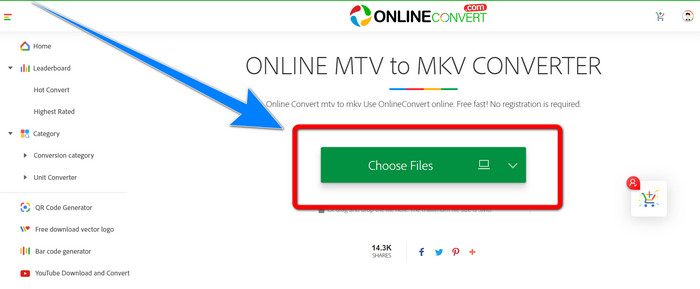
Langkah 1: Pergi ke laman web Online Convert. Klik butang Choose Files untuk mengimport video anda dengan format fail MTV.
Langkah 2: Apabila anda memuat naik video anda dengan format fail MTV, pergi ke pilihan format dan pilih format MKV.
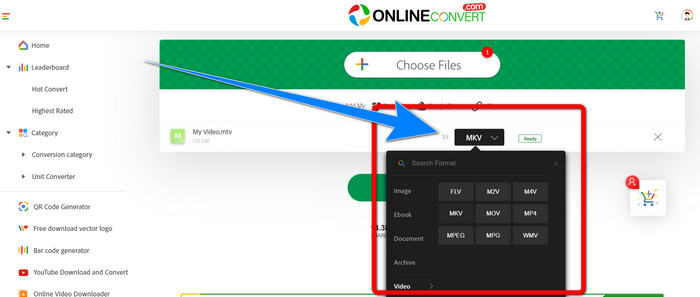
Langkah 3: Untuk langkah terakhir, klik butang Convert untuk menukar format MTV anda kepada format MKV. Kemudian, tunggu proses penukaran dan simpan video yang telah ditukar.
Bacaan Lanjut:
Prosedur Terbaik tentang Cara Menukar AMV ke MKV Secara Percuma
[Dalam Talian & Percuma] Bagaimana Saya Boleh Menukar MKV kepada MP4 pada Windows/Mac
Bahagian 4: Soalan Lazim tentang Menukar MTV kepada MKV
Adakah format MKV sama dengan MP4?
Tidak, mereka tidak. MKF mempunyai lebih banyak ciri tambahan seperti berbilang sari kata dan trek audio, jadi MKV mempunyai saiz fail yang lebih besar daripada format MP4. Selain itu, MKV mempunyai resolusi yang lebih tinggi daripada MP4 kerana ia mempunyai codec lanjutan dengan nisbah mampatan yang lebih tinggi.
Bolehkah saya juga menukar MKV kepada format lain?
Sudah tentu boleh! Anda boleh menukar MKV kepada format lain menggunakan perisian yang menyokong format fail MKV, seperti Video Converter Ultimate. Muat turun aplikasi pada Windows atau Mac anda, dan nikmati proses menukar fail anda.
Adakah format MKV hebat?
Ya betul. Ia tidak mempunyai keperluan pelesenan. Ia menyokong ciri yang sangat baik, seperti berbilang lagu dan sari kata, dan banyak lagi.
Kesimpulannya
Inilah kaedah terbaik untuk menukar MTV kepada MKV menggunakan penukar yang hebat. Jika anda ingin menukar berbilang fail dengan mudah dan tanpa kehilangan kualiti, gunakan Video Converter Ultimate.
-
 MP4 ke MKV Converter Percuma - Cara Menukar MP4 ke MKV dengan Kemudahan
 Apabila anda ingin menukar MP4 ke MKV secara percuma, anda dapat mengetahui lebih lanjut mengenai 4 kaedah yang paling berkesan untuk mengubah fail MP4 menjadi video MKV untuk senario yang berbeza.
-
 Bagaimana untuk Menukar MKV kepada DivX Dalam Talian dan Luar Talian secara Percuma
 Adakah anda sedang mencari cara terbaik untuk menukar MKV kepada format DivX secara percuma. Teruskan membaca untuk mengetahui penukar MKV kepada DivX terbaik dalam talian dan luar talian
-
 4 daripada The Best MKV to 3GP Converters untuk Windows dan Mac
 Jika anda sedang mencari penukar MKV ke 3GP yang mudah digunakan, anda bertuah! Kami menemui penukar MKV ke 3GP terbaik dan percuma yang anda mesti cuba
