


 Video Converter Ultimate
 Perakam Skrin
 Pembaikan Video
 Muat Turun Selamat
Kaedah Terpantas tentang Cara Menukar MXF kepada M4V pada Desktop dan Dalam Talian
Fail MXF ialah format piawai industri untuk audio dan video. Namun, format fail ini tidak disokong oleh Apple QuickTime Player, jadi adalah mustahil untuk memainkan fail MXF anda menggunakan program ini. Jika anda tidak dapat memainkan fail MXF pada Apple QuickTime Player, anda perlu menukarkannya kepada format fail lain, seperti M4V. Anda bernasib baik kerana kami mempunyai penyelesaian terbaik untuk anda. Artikel ini akan memberikan kaedah paling berkesan dan berguna untuk menukar MXF ke M4V menggunakan penukar yang boleh dipercayai secara luar talian dan dalam talian. Selain itu, kami akan membantu anda mendapat idea tentang cara menjadikan video anda lebih menarik hanya dengan menyuntingnya. Baca artikel ini segera dan dapatkan maklumat yang anda perlukan.

Bahagian 1: Kaedah Hebat untuk Menukar MXF kepada M4V Dalam Talian
Salah satu penukar dalam talian terbaik yang boleh anda gunakan untuk menukar MXF ke M4V ialah FVC Free Video Converter Online. Perisian dalam talian ini mampu menukar pelbagai fail video, seperti MOV, MKV, AVI, FLV, MP4, WEBM, VOB dan banyak lagi. Selain itu, anda boleh menukar banyak fail dalam satu prosedur kerana penukar ini menyokong penukaran berkelompok. Di samping itu, sebelum menukar video anda, anda boleh sunting resolusi, kadar bit dan kadar bingkai mengikut pilihan anda. Ia juga mempunyai antara muka mesra pengguna dan cara penukaran fail yang ringkas. Dengan itu, semua orang boleh mengendalikan penukar dalam talian ini, sama ada pengguna lanjutan atau bukan profesional. Tambahan pula, penukar dalam talian ini tersedia pada semua pelayar, seperti Google Chrome, Mozilla Firefox, Microsoft Edge dan lain-lain, yang menjadikannya mudah diakses oleh pengguna.
Selain itu, selain daripada menukar video, anda juga boleh menukar pelbagai format audio, termasuk AAC, MP3, M4A, M4B, FLAC dan banyak lagi. Ia juga mempunyai tetapan audio yang membolehkan anda melaraskan sampel dan kadar bitnya. Dengan ciri ini, anda boleh mengetahui bahawa FVC Free Video Converter Online boleh dipercayai.
Ciri-ciri
◆ Tukar pelbagai format video, seperti MP4, AVI, M4V, MXF, MOV, WMV, MKV, FLV dan banyak lagi.
◆ Mampu menyunting resolusi video, kadar bit dan kadar bingkai.
◆ Menawarkan proses penukaran kelompok.
◆ Tukar fail audio seperti MP3, AAC, AC3, M4B, FLAC dan banyak lagi.
◆ Boleh mengedit kadar sampel dan kadar bit audio.
Lihat langkah di bawah untuk mengetahui tentang menukar fail MXF kepada format M4V menggunakan FVC Free Video Converter Ultimate.
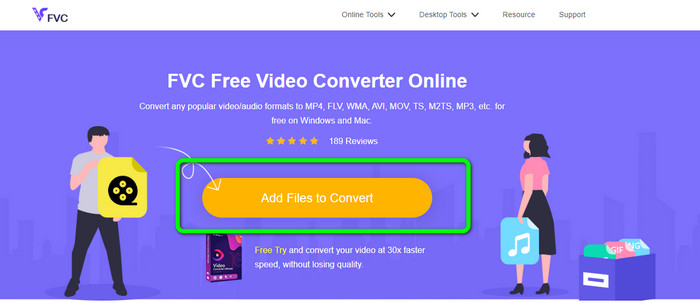
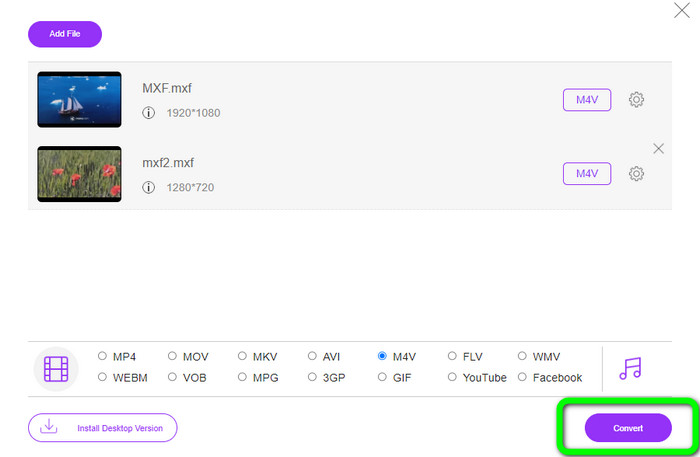
Langkah 1: Pergi ke pelayar anda dan lawati laman web FVC Free Video Converter Online. Setelah anda berada pada halaman utama, tekan Add Files to Convert untuk memuat naik fail video MXF yang ingin anda tukar.
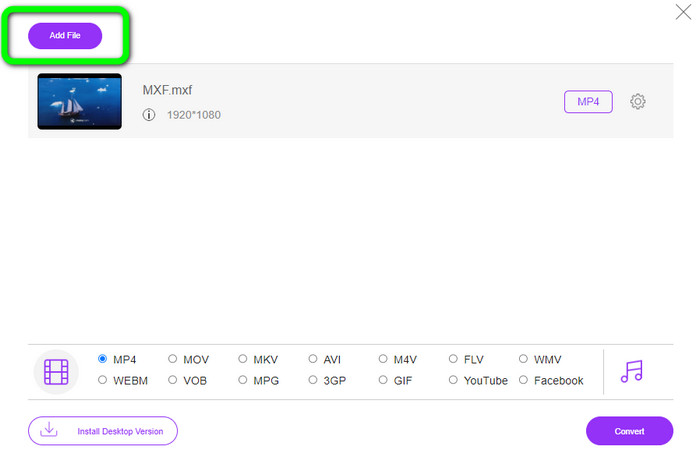
Langkah 2: Penukar ini menawarkan proses penukaran berkelompok. Jadi jika anda mahu memuat naik lebih banyak fail MXF, klik butang Add File.
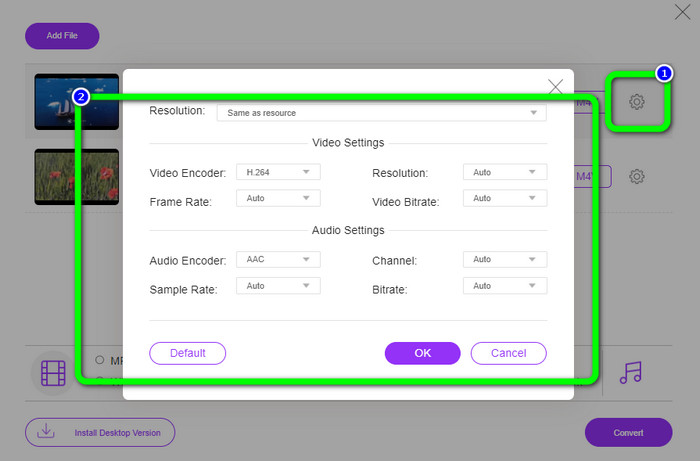
Langkah 3: Pada bahagian ini, anda boleh menyunting video anda dengan mengklik ikon Setting. Selepas mengklik ikon ini, anda boleh menyunting kadar bingkai, resolusi dan kadar bit video. Selain itu, anda boleh menukar kadar sampel dan kadar bit audio. Kemudian, klik butang OK.
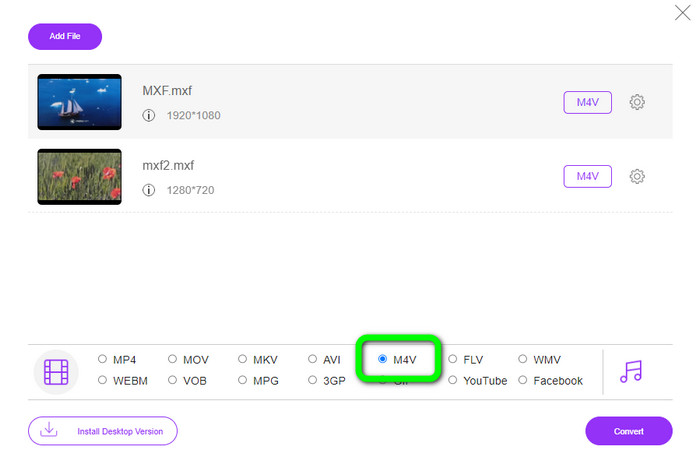
Langkah 4: Selepas menyunting video anda, anda boleh menukar format keluaran dengan mengklik format M4V daripada pilihan format di bahagian bawah antara muka.
Langkah 4: Untuk langkah terakhir, tekan butang Convert. Tunggu proses penukaran selesai dan simpan video anda di lokasi yang anda inginkan.
Bahagian 2: Cara Terpantas untuk Menukar MXF kepada M4V Tanpa Kehilangan
Jika anda mahukan alat boleh dimuat turun untuk menukar MXF ke M4V tanpa kehilangan kualiti, Video Converter Ultimate ialah pilihan terbaik. Penukar hebat ini boleh menukar pelbagai fail dengan pantas kerana ia mempunyai proses penukaran yang laju, bukan 10x, bukan 20x, tetapi 30x lebih pantas daripada kelajuan penukaran purata. Selain itu, ia mempunyai satu lagi ciri hebat yang boleh anda nikmati. Anda boleh menukar berbilang fail pada masa yang sama kerana penukar ini menawarkan proses penukaran berkelompok. Juga, selain MXF dan M4V, alat ini menyokong pelbagai format video lain, termasuk MP4, FLV, AVI, MKV, MOV, WMV, VOB dan banyak lagi. Tambahan pula, Video Converter Ultimate boleh diakses pada kedua-dua Windows dan Mac, yang amat berguna untuk pengguna Mac dan Windows.
Tambahan pula, aplikasi yang boleh dimuat turun ini mempunyai lebih banyak ciri hebat selain menukar video. Jika anda ingin mencipta Video Muzik untuk pasangan anda, keluarga, rakan, dsb., maka anda boleh menggunakan alat ini. Video Converter Ultimate menawarkan pencipta Video Muzik di mana anda boleh membuat filem yang menarik dengan muzik. Ia juga menyediakan tema percuma, seperti malam yang ceria, bergaya, ringkas, bersalji, romantis dan banyak lagi. Selain itu, jika anda mempunyai video dengan saiz fail yang besar, anda boleh memampatkannya menggunakan Pemampat Video. Dengan bantuan alat ini, anda boleh menukar saiz video anda dengan mudah.
Ciri-ciri
◆ Tukar 100+ format fail video, termasuk M4V, MXF, FLV, AVI, MP4, XVID, VOB, MOV, SWF, MKV dan banyak lagi.
◆ Tukar berbilang fail serentak.
◆ Menawarkan pembuat Video Muzik.
◆ Cipta Kolaj yang hebat.
◆ Tawarkan alatan penyuntingan video, seperti pemangkas video, pemampat, penambah, pembetulan warna, dsb.
◆ Tukar format fail imej seperti BMP, PNG, JPG dan banyak lagi.
Ikuti langkah terperinci di bawah untuk menukar MXF kepada M4V tanpa kehilangan menggunakan FVC Video Converter Ultimate.
Langkah 1: Muat turun Video Converter Ultimate pada peranti anda dengan mengklik butang Download. Terdapat dua butang muat turun di bawah. Jika anda pengguna Windows, klik versi Windows. Dan klik versi Mac jika anda pengguna Mac. Kemudian, lancarkan aplikasi tersebut.
Muat Turun PercumaUntuk Windows 7 atau lebih baharuMuat Turun Selamat
Muat Turun PercumaUntuk MacOS 10.7 atau lebih baharuMuat Turun Selamat
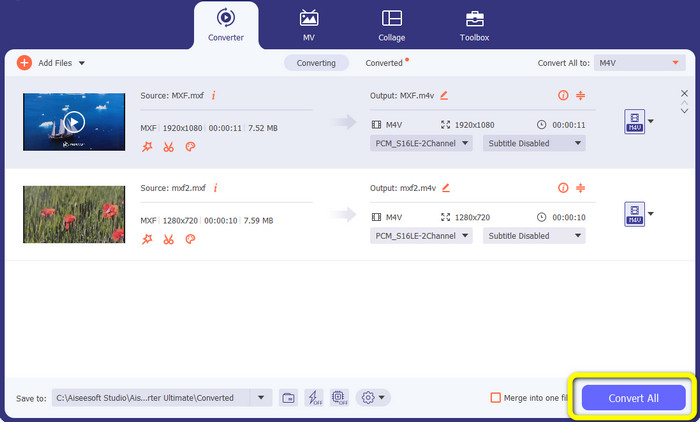
Langkah 2: Seterusnya, pilih panel Converter. Klik ikon + atau butang Add File untuk mengimport fail video MXF.
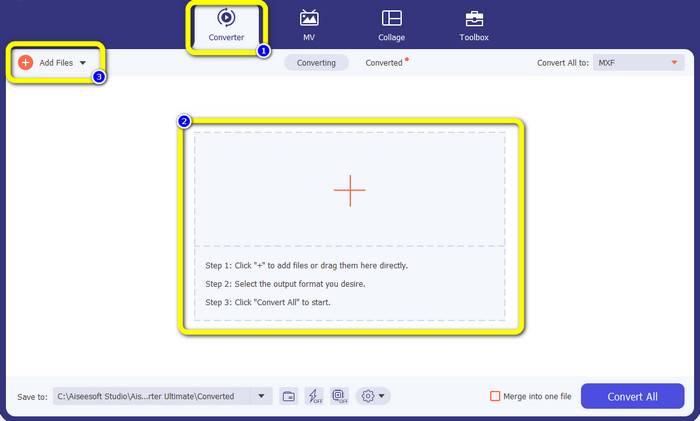
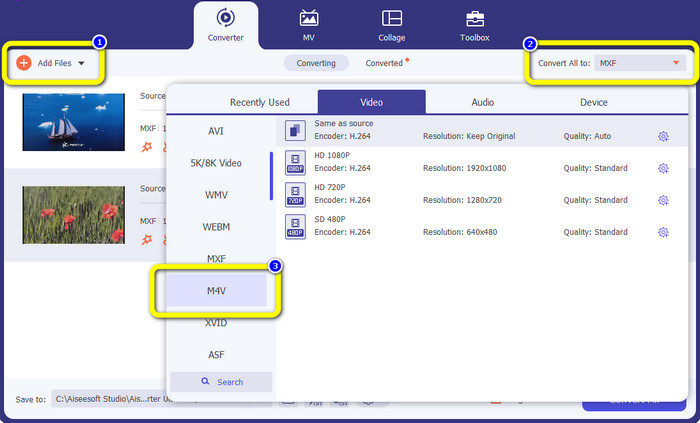
Langkah 3: Jika anda ingin menukar berbilang fail secara serentak, klik butang Add File. Kemudian, klik butang Convert All to dan pilih format fail M4V. Anda juga boleh memilih resolusi yang anda kehendaki untuk video anda.
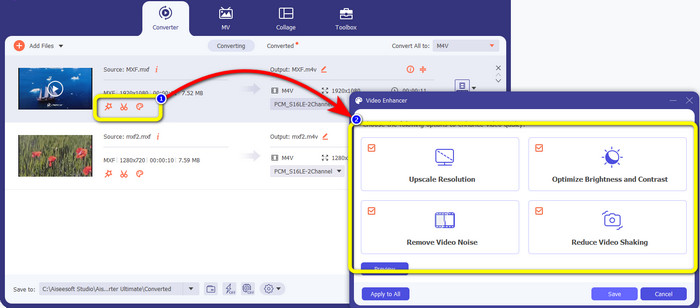
Langkah 4: Jika anda mahu menyunting video anda sebelum menukarnya, anda boleh berbuat demikian. Klik alat penyuntingan pada kotak pertama. Kemudian, pilih ikon video enhance. Selepas itu, tandakan semua kotak untuk menambah baik resolusi, mengoptimumkan kecerahan dan kontras, serta mengurangkan hingar dan gegaran video.
Langkah 5: Setelah selesai menyunting dan menukar format keluaran video anda, klik butang Convert All dan simpan video anda pada peranti anda.
Bahagian 3: Apakah MXF?
Persatuan SMPTE mencipta bekas media MXF untuk kegunaan perniagaan. MXF melaksanakan sebahagian daripada skema data Advanced Authoring Format (AAF) dan baru-baru ini muncul sebagai standard industri untuk penyuntingan video profesional bukan linear. Fail MXF boleh ditukar dengan mudah kepada mana-mana format video biasa dan dimampatkan menggunakan hampir mana-mana codec. Adalah penting untuk ambil perhatian bahawa pelaksanaan format ini oleh Sony, Panasonic dan Canon mempunyai banyak ketidakserasian, kelemahan utama bekas ini. Semakan standard 2009 menangani masalah ini.
Bahagian 4: Apakah M4V?
M4V ialah sejenis bekas video yang digunakan oleh fail iTunes untuk menyimpan kedua-dua data audio dan video. Adalah lebih baik untuk membeli fail audio atau video daripada gedung iTunes jika ia dilindungi oleh Apple FairPlay DRM daripada tontonan dan penyalinan tanpa kebenaran. Oleh kerana formatnya adalah berdasarkan struktur MPEG-4, boleh dikatakan mana-mana pemain kontemporari boleh memaparkan fail yang tidak dilindungi.
Bacaan Lanjut:
Penukar MXF ke WMV Terbaik untuk Menukar MXF ke WMV Secara Percuma
4 Penyelesaian Terhebat untuk Menukar MXF ke MKV [Selesai]
Bahagian 5: Soalan Lazim tentang Menukar MXF kepada M4V
Seberapa besar fail MXF?
MXF menyokong saiz fail sehingga 2 gigabait. Selain itu, MXF menyokong fail yang lebih panjang. Masa tangkapan fail media maksimum untuk format OMF ialah tiga jam. MXF boleh mengendalikan audio selama 12 jam pada dua saluran pada 48 kHz.
Siapa yang menggunakan fail MXF?
Beberapa iklan pengeluaran, termasuk perakam video IMX Siri SONY MSW 2000, menggunakannya. Selain itu, peralatan penyuntingan Avid menyokong varian MXF tertentu.
Bagaimanakah cara menukar MXF kepada MOV?
Anda boleh menggunakan FVC Free Video Converter Online. Muat naik fail MXF anda, pilih format MOV daripada pilihan format dan klik butang Convert. Dengan cara ini, anda boleh menukar MXF ke MOV serta-merta.
Kesimpulannya
Terdapat banyak cara untuk menukar MXF ke M4V. Tetapi jika anda mahu penukar yang terbaik dan paling berbaloi, anda boleh menggunakan aplikasi yang dinyatakan di atas: Video Converter Ultimate dan FVC Free Video Converter Online. Kedua-dua penukar ini boleh menukar fail dengan lebih pantas berbanding penukar lain, dan anda boleh menggunakannya secara percuma.
-
 Pelbagai Kaedah Cara Tukar MOV ke Format Fail M4V
 Adakah anda inginkan kaedah yang berkesan untuk menukar fail MOV kepada format M4V? Kemudian, artikel ini akan memenuhi keinginan anda. Berikut ialah penukar terbaik yang boleh anda gunakan.
-
 Teknik Cemerlang untuk Menukar GIF kepada M4V dengan serta-merta
 Tiang panduan ini memberi anda strategi paling berkesan untuk menukar GIF kepada M4V. Selain itu, kami akan memperkenalkan anda kepada dua penukar terbaik yang boleh anda cuba.
-
 2 Cara Luar Biasa Mengenai Cara Menukar M2TS kepada M4V
 Adakah anda fikir menukar fail M2TS kepada format lain adalah mungkin? Kami akan menunjukkan kepada anda cara menukar M2TS ke format fail M4V jika anda mahukan penyelesaian terbaik.
