


 Video Converter Ultimate
 Perakam Skrin
 Pembaikan Video
Dalam Kajian Terperinci Mengenai 5 Penukar Teratas untuk Menukar OGV kepada WMV
Tidak tahu langsung cara menukar OGV kepada WMV dan memainkannya pada Windows Media Player anda? Anda bernasib baik kerana pada hari ini, kami ingin memperkenalkan pelbagai alat yang boleh anda gunakan untuk menukar fail OGV anda. Mahu tahu apakah lima alat ini? Pada bahagian akhir, anda juga akan belajar cara menukar fail OGV anda kepada WMV. Jadi, sebaiknya bersedia kerana kami tidak mahu anda menunggu lebih lama, dan mari kita mulakan penerokaan kita sekarang juga.

Bahagian 1. Top 5 OGV to WMV Converter Dalam Talian dan Luar Talian
Teratas 1. FVC Video Converter Ultimate
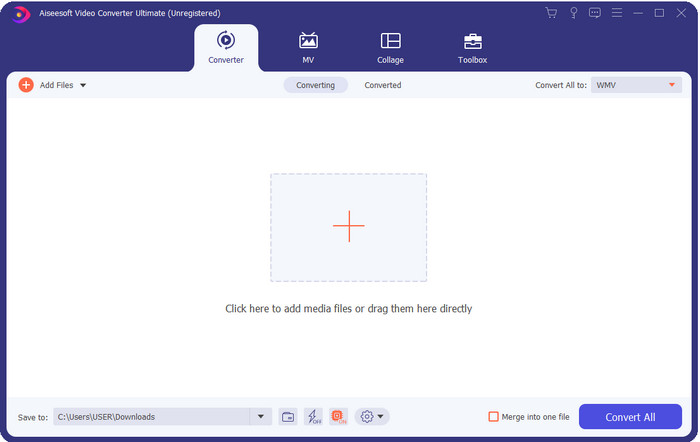
FVC Video Converter Ultimate ialah salah satu penukar OGV ke WMV terbaik yang boleh anda muat turun pada desktop. Alat ini menyediakan kelajuan penukaran yang luar biasa sehingga mengagumkan ramai penggunanya. Selain itu, penukaran bukan satu-satunya kelebihan penting alat ini. Anda boleh menggunakan ciri penyuntingan lanjutan di sini untuk menjadikan video anda lebih menonjol, menjadikannya lebih kecil, atau menggabungkannya. Secara keseluruhan, jika anda baru dalam hal menukar format, ini ialah pilihan terbaik kerana anda boleh melakukan penukaran tanpa bersusah payah dan semudah satu-dua-tiga sambil memperoleh output yang profesional pada akhir proses penukaran.
Muat Turun PercumaUntuk Windows 7 atau lebih baharuMuat Turun Selamat
Muat Turun PercumaUntuk MacOS 10.7 atau lebih baharuMuat Turun Selamat
Kelebihan
- Tukar OGV anda kepada WMV, AVI, MOV, MP4 dan 200+ format tersedia dalam masa kurang daripada seminit.
- Sut kuatnya sedang menukar dan ciri penyuntingan lanjutan yang anda perlukan.
- Penukar yang sukar dipercayai yang boleh digunakan oleh sesiapa sahaja walaupun tanpa pengalaman adalah mudah dan ringan.
- Tersedia dalam semua sistem pengendalian untuk dimuat turun pada Windows & Mac.
Keburukan
- Untuk memperoleh perisian ini, anda perlu membelinya terlebih dahulu.
- Muat turun pada pemacu komputer anda.
2 Teratas. Pemain Media VLC
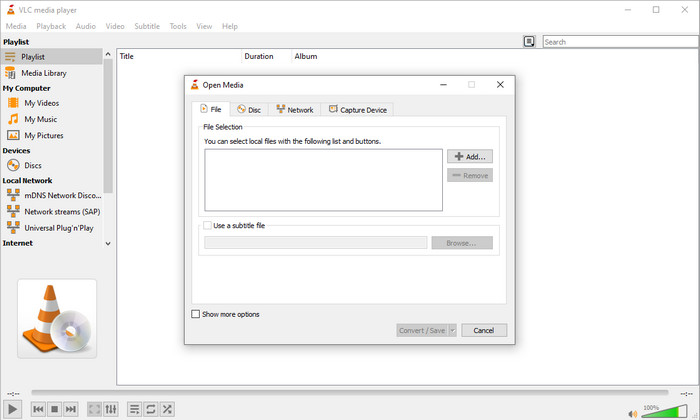
VLC Media Player ialah pemain media yang paling banyak dimuat turun dan mudah diakses pada semua peranti. Pemain video ini juga boleh menukar OGV anda kepada WMV atau versi baharu lain yang anda mahu. Walaupun pemain ini boleh menukar, ia masih kekurangan sokongan format, terutamanya apabila menukar fail anda kepada format tertentu. Namun, jika anda sudah mempunyai VLC pada desktop anda, apa kata cuba gunakan pemain video–penukar ini pada desktop anda untuk menukar format.
Kelebihan
- Percuma untuk dimuat turun, dan ia menyokong format yang berbeza untuk dimainkan dan ditukar.
- Tersedia dalam semua peranti untuk digunakan.
- Proses penukaran pantas.
Keburukan
- Ia menyokong format terhad yang boleh anda pilih.
- Bukan penukar biasa anda.
- Banyak langkah diperlukan sebelum anda boleh menukar.
Top 3. Aconvert
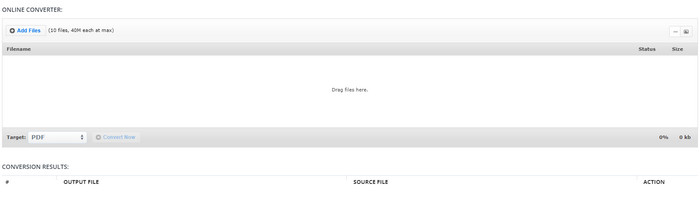
Aconvert akan membantu anda dalam tugasan menukar fail OGV. Penukar OGV ke WMV dalam talian ini menyediakan proses penukaran yang cekap supaya anda mengalami lebih sedikit kesulitan. Walau bagaimanapun, penukar ini mempunyai banyak iklan pada antara muka web yang boleh menjadi sangat mengganggu dalam pelbagai keadaan. Selain itu, alat ini mengehadkan pengalaman penukaran anda kepada hanya sepuluh kali penukaran dan saiz fail 40MB bagi setiap fail. Namun tidak perlu risau kerana alat ini percuma untuk semua pengguna internet yang mahu menukar fail secara dalam talian.
Kelebihan
- Tersedia di web untuk digunakan.
- Ia menyokong format yang diketahui yang boleh anda masukkan.
- Mesra pengguna.
Keburukan
- Format pilihan untuk output akhir mempunyai banyak kekurangan.
- Terdapat banyak iklan yang menjengkelkan di laman web.
4 Teratas. Video2Edit.com
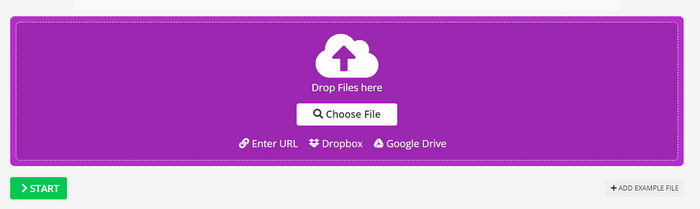
Video2Edit.com adalah seperti Aconvert, tetapi alat ini lebih baik kerana anda boleh mengubah suai video sebelum anda menukar OGV kepada WMV. Anda juga boleh menukar codec audio anda kepada tiga pilihan. Selain itu, terdapat banyak perkara yang boleh anda lakukan dengan penukar ini. Tetapi kekurangannya ialah format yang tersedia di sini adalah terhad. Ia juga mempunyai iklan, dan proses penukaran adalah perlahan.
Kelebihan
- Penukar pelbagai fungsi.
- Tersedia di semua web untuk diakses oleh sesiapa sahaja.
- Ia boleh mengubah suai codec video dan audio.
Keburukan
- Iklan pada antara muka.
- Proses penukaran mengambil masa yang lama.
5 Teratas. Penukar Video Percuma FVC Dalam Talian
FVC Free Video Converter Online menyediakan proses penukaran OGV ke WMV yang lebih baik berbanding VLC, Aconvert dan Video2Edit.com. Ini kerana alat dalam talian ini menawarkan output yang berkualiti profesional seperti FVC Video Converter Ultimate, namun tidak semua format yang disokong oleh versi ultimate disokong di sini. Tambahan pula, anda boleh melaraskan kualiti dan menetapkannya kepada definisi lebih tinggi untuk hasil yang lebih baik. Satu lagi kelebihan di sini ialah tiada iklan yang mengganggu anda semasa menukar. Jadi, anda boleh menikmati proses penukaran tanpa iklan timbul, dan anda boleh menukar tanpa had di sini, termasuk dari segi saiz fail.
Kelebihan
- Ia menyokong lebih banyak format daripada VLC, Adconvert dan Video2Edit.
- Ia boleh mengubah suai spesifikasi video dan audio anda.
- Mudah untuk mengakses penukar web pada bila-bila masa dan di mana sahaja dengan sambungan internet.
- Tiada iklan pada antara muka dan ia kelihatan lebih profesional.
Keburukan
- Jika anda tidak mempunyai internet, anda tidak boleh menggunakan penukar ini seperti dua penukar dalam talian yang lain.
- Tiada ciri penyuntingan.
Bahagian 2. Bagaimana untuk Menukar OGV kepada WMV dengan FVC Video Converter Ultimate
Jadi kini, jika anda kagum dengan perkara lain yang boleh dilakukan oleh FVC Video Converter Ultimate, anda mesti membaca ini. Untuk mendapatkan gambaran tentang cara menukar OGV ke WMV dengan alat ultimate ini, anda mesti mengikut langkah-langkah berikut.
Langkah-langkah Cara Menukar OGV kepada Format WMV dengan FVC Video Converter Ultimate:
Langkah 1. Muat turun perisian penukar pada Windows atau Mac anda, ikut arahan pemasangan, dan buka penukar tersebut.
Muat Turun PercumaUntuk Windows 7 atau lebih baharuMuat Turun Selamat
Muat Turun PercumaUntuk MacOS 10.7 atau lebih baharuMuat Turun Selamat
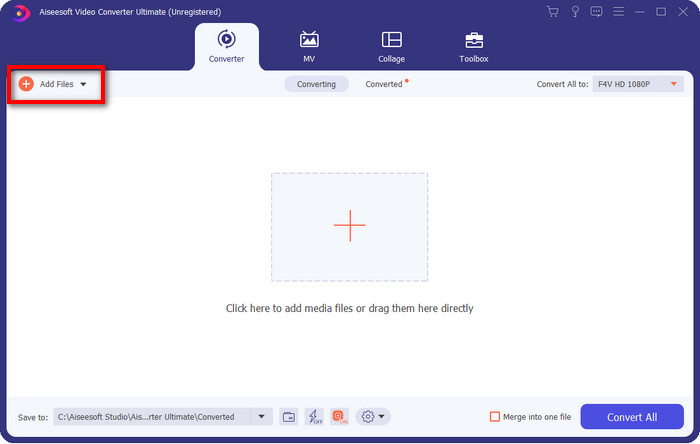
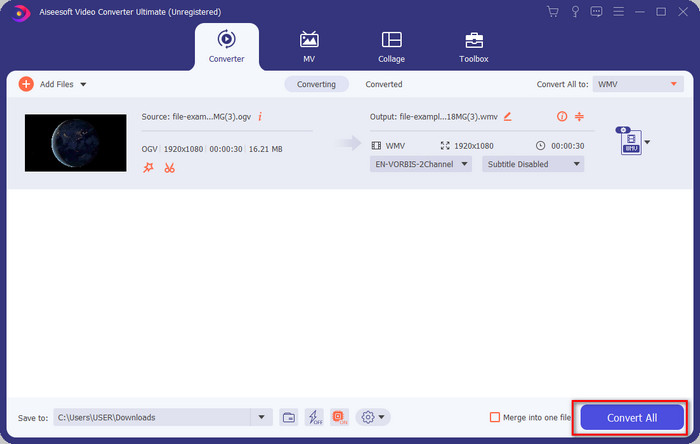
Langkah 2. Selepas membuka penukar, anda boleh memuat naik fail OGV dengan mengklik butang Add Files di bahagian kiri atas antara muka dan menekan Open.
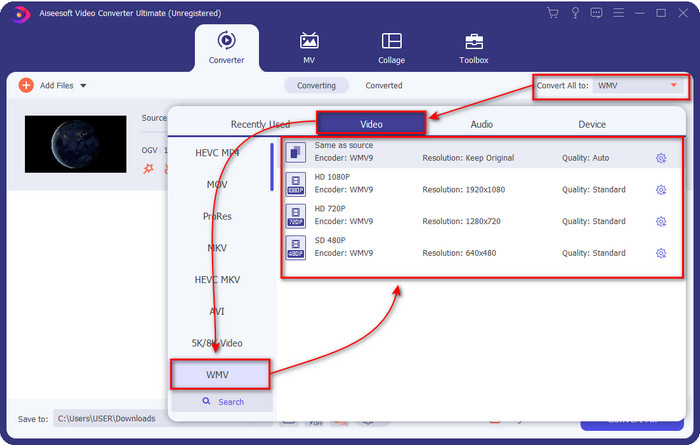
Langkah 3. Setelah anda memuat naik fail OGV, pilih format WMV yang anda mahu di bawah pilihan Convert All to.
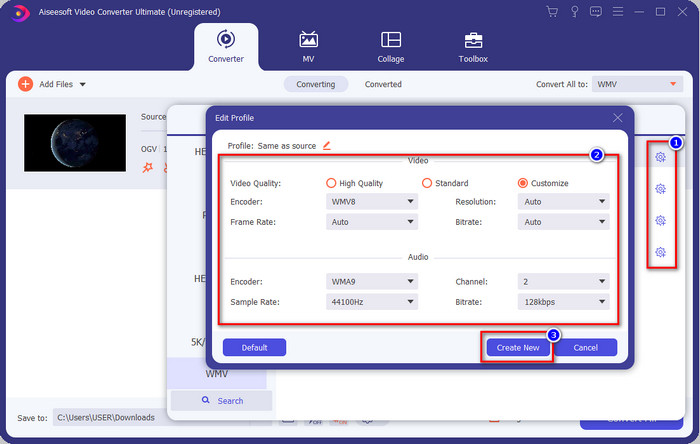
Pilihan tambahan: Mahu mengubah suai profil video itu sendiri? Klik ikon cog, laraskan pengekod, kadar bingkai, atau kadar sampel untuk video dan audio. Untuk menyimpan perubahan, klik Create New. Selepas melaraskannya, anda akan melihat ikon cog di bahagian atas format yang anda pilih.
Langkah 4. Klik Convert All untuk memulakan proses. Selepas proses penukaran, satu folder komputer akan muncul bersama fail WMV.
Bahagian 3. Carta Perbandingan
| Ciri-ciri Penukar | FVC Video Converter Ultimate | Pemain Media VLC | Bertukar | Video2Edit.com | FVC Penukar Video Percuma Dalam Talian |
| Menukar Format |  | | | | |
| Ciri Penyuntingan | |  | | | |
| Ubah suai Tetapan Video dan Audio | | | | | |
| Bergantung kepada Internet | | | | | |
| Iklan Percuma | | | | | |
Bahagian 4. Soalan Lazim tentang Penukaran OGV ke WMV
Bolehkah saya menggunakan penukar FFmpeg OGV ke WMV?
Ya, anda boleh menggunakan FFmpeg untuk menukar OGV kepada WMV, tetapi penukar ini bukanlah penukar mesra pengguna yang biasa dilihat atau digunakan. Jadi sekarang, jika anda mahu menggunakan alat ini, ikut langkah-langkah berikut. Lancarkan alat tersebut dan jalankan laluan FFmpeg.exe pada sistem anda. Buka Command Prompt dan pergi ke lokasi fail OGV yang anda mahu tukar pada CRM. Seterusnya, masukkan kod ini ffmpeg -i input.ogv -vn -ar 44100 -ac 2 -b:a 192k output.wmv, kemudian tekan Enter untuk memproses.
Adakah OGV boleh dimainkan pada Mac?
Anda tidak boleh melakukannya jika mahu memainkan fail OGV pada QuickTime kerana pengekod format tersebut tidak disokong. Tetapi ada cara untuk menjadikannya serasi di Mac, iaitu dengan menukarnya kepada MOV. Mahu tahu cara menukar fail OGV anda kepada MOV? Maka klik pautan ini.
Adakah OGV dan OGG format yang sama?
OGV dan OGG adalah bekas yang tepat, tetapi ia mempunyai perbezaan dalam kandungannya. Contohnya, fail OGG boleh menyimpan audio berkualiti tinggi tetapi tidak dengan video. Sebaliknya, OGV boleh menyimpan kandungan audio dan video berkualiti tinggi.
Kesimpulannya
Dan sekarang setelah kita mengetahui penukar OGV ke WMV yang boleh anda gunakan, tibalah masanya untuk memilih alat yang patut anda gunakan. Walaupun semua alat yang dibentangkan di sini dapat membantu anda, kami mendapati bahawa FVC Video Converter Ultimate benar-benar memberikan kecemerlangan kepada pengguna yang menggunakannya. Sukar untuk percaya apa yang mampu dilakukan oleh alat ini. Kini keputusan di tangan anda untuk memilih alat, tetapi jika anda masih belum membuat pilihan, kami mencadangkan anda menggunakan FVC Video Converter Ultimate. Mahu tahu lebih lanjut tentang alat ini sendiri? Maka anda mesti memuat turunnya dahulu dan menggunakannya tanpa sebarang had.
-
 2 Penukar Pilihan Paling Boleh Diakses untuk Menukar Fail OGV kepada AVI [2021]
 Ingin menukar fail OGV kepada AVI? Artikel ini menyediakan dua daripada penyelesaian terbaik yang boleh anda gunakan untuk menjadikan penukaran anda selamat dan pantas tanpa kehilangan kredibiliti video'
-
 Penukar OGV ke FLV yang Hebat Anda Jangan Terlepas [Terbukti]
 Jika anda tertanya-tanya cara menukar OGV kepada fail FLV dengan cepat, artikel ini akan menunjukkan kepada anda satu-satunya penukar yang anda perlukan.
-
 3 Cara Menukar Fail M2TS ke WMV secara percuma di Windows / Mac / Online
 Berikut adalah 3 cara mudah untuk menukar video M2TS ke WMV. Anda boleh menukar format video dari M2TS ke WMV secara percuma di Windows, Mac dan dalam talian dengan cepat. Penukaran kumpulan disokong.
