


 Video Converter Ultimate
 Perakam Skrin
 Pembaikan Video
 Muat Turun Selamat
3 Kaedah Mudah untuk Menukar TRP kepada MKV
Adakah anda menghadapi kesukaran dengan fail TRP kerana anda tidak dapat memainkannya pada pemain media atau program lain? Jika anda salah seorang pengguna yang mengalami masalah seperti ini, sangat disarankan anda membaca artikel ini. Anda boleh menukar fail TRP anda kepada MKV kerana kebanyakan program menyokong format MKV. Artikel ini akan menunjukkan kaedah mudah untuk menukar TRP ke MKV menggunakan Windows, Mac dan secara dalam talian. Apa tunggu lagi? Jangan buang masa dan mulakan membaca artikel ini!

Bahagian 1: Definisi TRP dan MKV
Apakah TRP?
TRP ialah fail media definisi tinggi yang dikodkan dalam format pengangkutan MPEG-2 bahagian 1. Ia sering digunakan dalam penyiaran video digital. Selain itu, ia digunakan untuk aliran audio, menyegerakkan output, dan multipleks digital video, serta mengandungi ciri hebat untuk membetulkan ralat. TRP juga mengandungi data audio AC3 dan video H.264. Ia boleh dimainkan dengan beberapa program main balik video.
Apakah MKV?
MKV, atau Matroska, ialah bekas multimedia yang mengurus pelbagai fail audio, sarikata dan video dalam satu format fail. MKV juga berbeza daripada piawaian multimedia lain seperti MP4 dan AVI kerana ia sumber terbuka dan boleh disesuaikan oleh pengguna melalui perisian pelaksanaan sumber terbuka. Akhir sekali, format fail MKV paling biasa digunakan untuk video HD dan penstriman video dalam talian.
Bahagian 2: Cara Paling Mudah untuk Menukar TRP kepada MKV Luar Talian
Menggunakan Video Converter Ultimate
Anda mesti memuat turun dan menggunakan Video Converter Ultimate untuk menukar TRP kepada MKV tanpa kehilangan. Menggunakan aplikasi ini, anda boleh menukar mana-mana format fail video yang anda mahu, termasuk TRP dan MKV. Anda boleh menukar berbilang fail video dalam satu proses kerana alat ini mempunyai fungsi penukaran kelompok. Di samping itu, ia mempunyai proses penukaran 30x lebih pantas, jadi anda tidak perlu mengambil lebih banyak masa untuk menukar fail yang berbeza. Aplikasi ini menyokong beberapa format selain TRP dan MKV, seperti video 5K/8K, ProRes, DV, ASF, M4V, MXF, MP4, MOV dan banyak lagi. Bahagian yang terbaik ialah anda boleh menggunakan aplikasi ini menggunakan Windows dan Mac anda, yang merupakan berita baik untuk semua pengguna. Selain itu, jika anda ingin menukar kelajuan video anda, anda boleh menggunakan fungsi Pengawal Kelajuan Video. Anda boleh memperlahankan video anda daripada 0.125x dan mempercepatkannya sehingga 8x lebih pantas daripada kelajuan asal. Selain itu, jika anda ingin memangkas video anda, anda boleh melakukannya. Alat ini juga menawarkan fungsi pemangkas video,
Untuk mengetahui lebih lanjut tentang perisian hebat ini, anda mesti memuat turunnya dan mencubanya sendiri.
Ciri-ciri:
◆ Tukar banyak format fail.
◆ Boleh membuat kolaj kreatif.
◆ Ia menawarkan Pencipta Video Muzik.
◆ Menyediakan Kotak Alat untuk mempertingkatkan video.
Kelebihan
- 30x lebih pantas daripada penukar perisian lain.
- Mempunyai antara muka pengguna yang mesra, yang sesuai untuk pengguna bukan profesional.
- Mempunyai ciri yang berbeza selain daripada menukar.
- Tersedia pada Windows dan Mac.
- Tukar pelbagai format fail, seperti FLV, MP4, MOV, WBM, GIF, AMV, dll.
- Boleh menukar butiran tarikh secara individu atau dalam kelompok.
Keburukan
- Beli langganan untuk menggunakan ciri yang lebih maju.
Jika anda tidak sabar-sabar untuk menukar TRP kepada MKV, ikuti langkah mudah di bawah.
Langkah 1: Dengan menggunakan Windows atau Mac anda, muat turun Video Converter Ultimate dengan mengklik butang Muat Turun di bawah. Buka aplikasi selepas memuat turun dan memasangnya.
Muat Turun PercumaUntuk Windows 7 atau lebih baharuMuat Turun Selamat
Muat Turun PercumaUntuk MacOS 10.7 atau lebih baharuMuat Turun Selamat
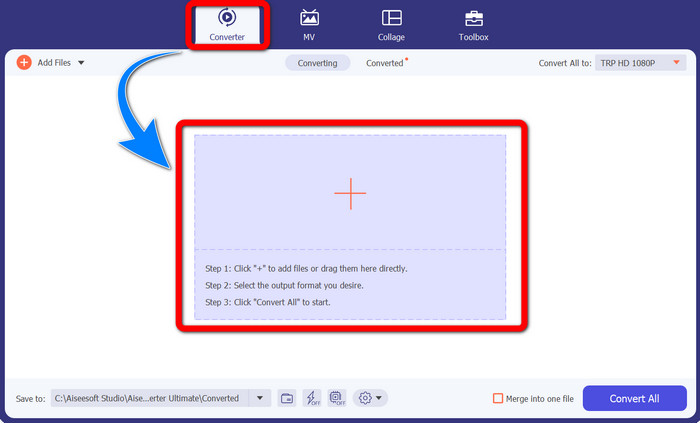
Langkah 2: Setelah anda melancarkan Video Converter Ultimate, pilih panel Converter. Kemudian, klik tanda + untuk mengimport video anda dalam format TRP.
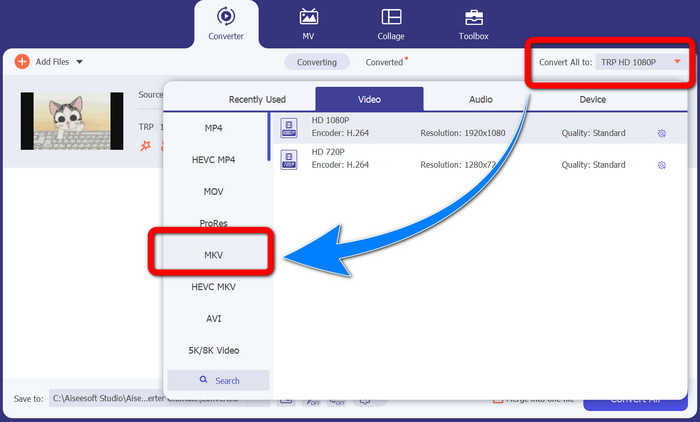
Langkah 3: Selepas anda mengimport video, klik ikon Convert all to. Cari format MKV daripada pilihan format dan klik padanya.
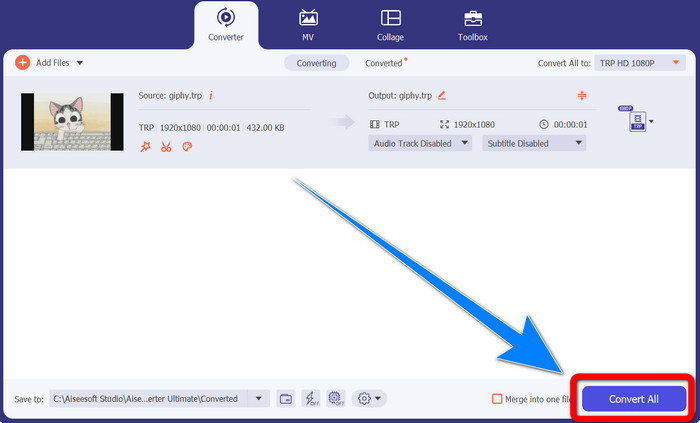
Langkah 4: Kemudian, klik butang Convert All untuk menukar TRP anda kepada format MKV.
Menggunakan Prism Video Converter
Prism ialah satu lagi aplikasi yang boleh anda muat turun pada Windows dan Mac. Aplikasi ini dapat membantu anda menukar TRP ke MKV dengan mudah. Ia juga menyokong pelbagai format fail seperti AMV, MP4, DVD, VOB, MOV, DIVX, AVI, 3GP dan banyak lagi. Namun, aplikasi ini sangat perlahan apabila dipasang pada Windows atau Mac. Proses penukaran juga mengambil masa. Selain itu, antara mukanya adalah rumit, yang boleh mengelirukan pengguna baharu, jadi anda perlu mencari tutorial atau mendapatkan bantuan daripada pengguna berpengalaman. Jika anda ingin memuat turun dan menggunakan aplikasi ini, ikut langkah ringkas di bawah.
Langkah 1: Muat turun Prism Video Converter pada Mac atau Windows anda.
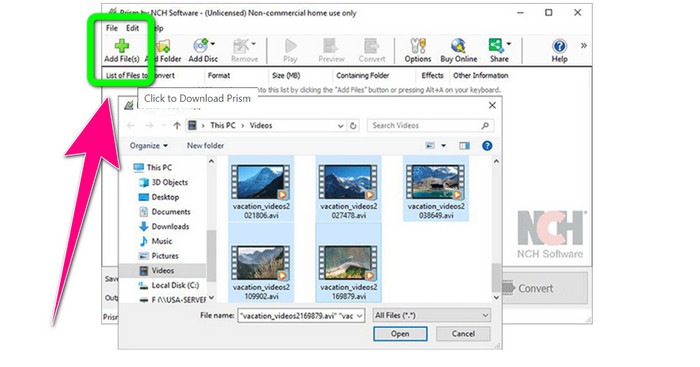
Langkah 2: Klik butang hijau Add Files dan masukkan fail TRP anda.
Langkah 3: Tetapkan format keluaran. Klik fail MKV daripada pilihan format.
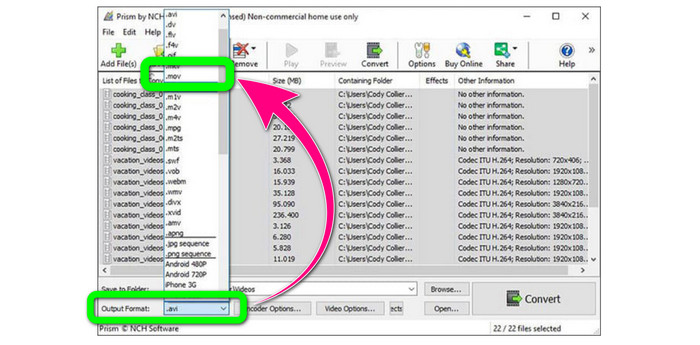
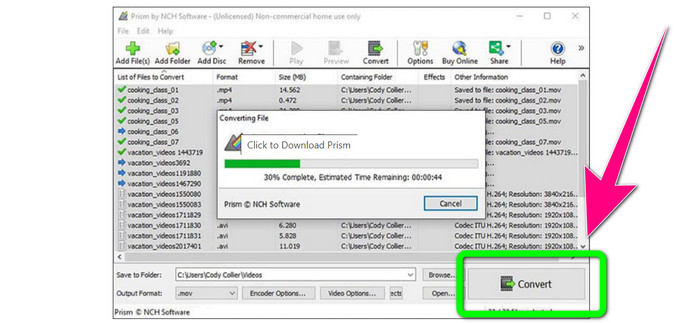
Langkah 4: Akhir sekali, pilih butang Convert untuk menukar fail TRP anda kepada format MKV.
Bahagian 3: Aplikasi Dalam Talian untuk Menukar TRP kepada MKV
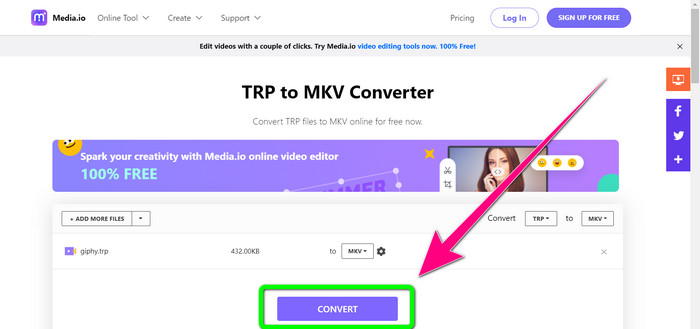
Adakah anda berminat untuk menukar TRP ke MKV secara dalam talian? Jika ya, anda boleh menggunakan Media.io. Dengan bantuan aplikasi ini, anda boleh menukar TRP ke MKV. Selain itu, ia menyokong lebih banyak format seperti MP4, AVI, WMV, MOV, FLV, DIVX, XVID, 3GP dan sebagainya. Ia juga merupakan penukar audio dan imej.
Selain itu, ia juga mampu menyunting video. Anda boleh memangkas, memangkas, cantum, gelung video dan banyak lagi. Walau bagaimanapun, apabila ia datang kepada proses penukaran ia adalah perlahan. Anda perlu menunggu sedikit lagi untuk menyelesaikan proses. Ia juga mempunyai iklan yang mengganggu yang dipaparkan pada skrin. Selain itu, ia memerlukan sambungan internet yang pantas untuk berfungsi dengan baik. Jika anda ingin menukar TRP kepada MKV menggunakan Media.io, ikuti langkah di bawah.
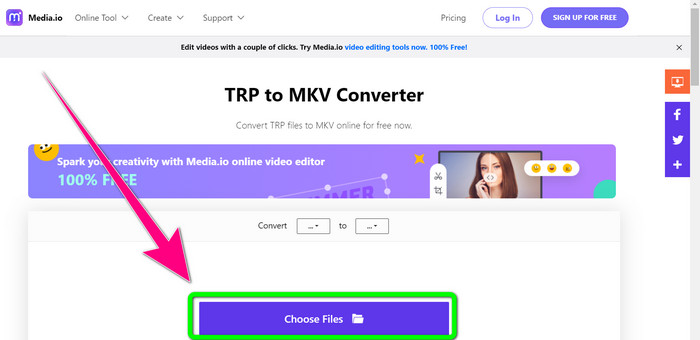
Langkah 1: Pergi ke laman web Media.io. Kemudian, klik butang Choose Files untuk menambah video anda dalam format fail TRP.
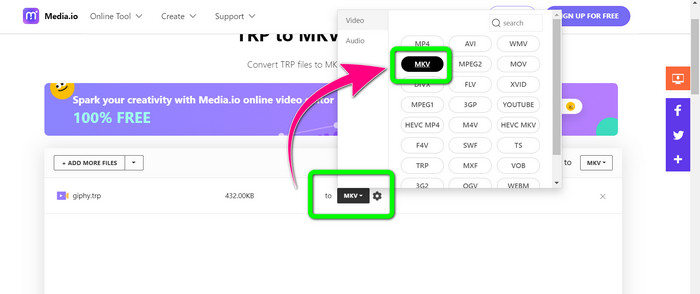
Langkah 2: Selepas menambah video anda, pergi ke pilihan format, cari fail MKV dan pilihnya.
Langkah 3: Untuk langkah terakhir, klik butang Convert. Tunggu proses penukaran selesai dan simpan video anda dalam format fail MKV.
Bacaan Lanjut
Prosedur Terbaik tentang Cara Menukar AMV ke MKV Secara Percuma
Tukar MTV ke MKV dengan Mudah Menggunakan Penukar Terbaik Ini
Bahagian 4: Soalan Lazim tentang Menukar TRP kepada MKV
Mengapa fail MKV tidak disokong pada TV saya?
Fail MKV hanyalah bekas video yang boleh dikodkan dengan banyak codec, seperti HEVC, MPEG-4, VP9, dll. TV mempunyai keserasian yang lemah dengan codec ini, itulah sebabnya anda tidak boleh memainkan MKV pada TV anda.
Adakah fail MKV berkualiti?
Format fail MKV popular dalam video berkualiti tinggi. Ia juga mempunyai saiz fail yang lebih besar. Ini bermakna MKV adalah bekas dan tidak memberi kesan kepada kualiti.
Adakah terdapat penukar pantas yang boleh saya gunakan pada komputer saya?
Sememangnya Ya! Jika anda sedang mencari penukar perisian yang pantas, maka Video Converter Ultimate ialah aplikasi terbaik. Anda boleh menukar fail anda berkali-kali lebih pantas dan lebih mudah.
Kesimpulannya
Dengan semua aplikasi dan kaedah menukar TRP ke MKV di atas, kami amat mengesyorkan menggunakan Video Converter Ultimate. Ia boleh menukar banyak fail sekaligus dengan kelajuan penukaran yang sangat pantas. Jadi, apa yang anda tunggu? Cubalah sendiri untuk mengetahui lebih banyak lagi.
-
 2 Perisian Paling Mengesankan Tersedia untuk Menukar TRP kepada MOV
 Tidak dapat menukar fail TRP kepada MOV? Kemudian ikuti panduan yang disediakan dalam artikel ini. Semasa kami memilih alat terbaik yang boleh anda gunakan untuk menukar fail TRP anda.
- 2 Perisian Paling Mengesankan Tersedia untuk Menukar TRP kepada MOV
Tidak dapat menukar fail TRP kepada MOV? Kemudian ikuti panduan yang disediakan dalam artikel ini. Semasa kami memilih alat terbaik yang boleh anda gunakan untuk menukar fail TRP anda
-
 2 Penukar Profesional untuk Menukar TRP kepada Format WMV [Panduan]
 Adakah anda salah seorang pengguna yang mempunyai masa yang rumit dengan fail TRP? Jika ya, mari teruskan membaca artikel ini untuk mengetahui cara menukar TRP kepada WMV dan mengetahui lebih lanjut
