


 Video Converter Ultimate
 Perakam Skrin
 Pembaikan Video
 Muat Turun Selamat
Prosedur Terpantas untuk Menukar VOB kepada M4V pada Windows dan Mac
DVD biasanya menggunakan format fail VOB atau Video Object. Fail ini selalunya disimpan dalam folder VIDEO_TS pada aras root DVD. Namun kini, terdapat sejumlah besar fail media di internet. Selain itu, DVD semakin kurang digunakan dan tidak lagi disokong secara meluas oleh kebanyakan peranti dan program. Jika itu masalahnya, anda memerlukan format yang disokong oleh banyak peranti dan program seperti format fail M4V. Anda akan berasa bersyukur kerana anda akan mempelajari kaedah paling berguna untuk menukar VOB kepada M4V menggunakan perisian dalam talian dan perisian yang boleh dimuat turun.

Bahagian 1: Perbezaan Antara VOB dan M4V
| VOB | M4V | |
| Nama penuh | Objek Video | Video MPEG-4 |
| Sambungan fail | .vob | .m4v |
| Penerangan | Video, audio, sari kata, menu DVD dan kandungan lain semuanya terkandung dalam satu fail menggunakan format bekas VOB. Format VOB, berdasarkan aliran sistem MPEG-2 dan boleh dimainkan pada banyak peranti media, biasanya disimpan dalam folder VIDEO TS pada akar cakera. | Apple mencipta format kontena video M4V, yang digunakan untuk mengedarkan kandungan audio dan video melalui iTunes. Kecuali untuk kemungkinan menggunakan perlindungan salinan DRM untuk melindungi pemilikan episod TV, filem dan bahan media lain daripada gedung iTunes, fail M4V adalah sama dengan fail MP4. |
| Dibangunkan oleh | Forum DVD | epal |
| Jenis MIME | video/DVD video/Mpeg | video/x-m4v |
| Codec Video | MPEG-1 MPEG-2 | H.264 |
| Codec Audio | MP2 AC-3 DTS | AAC Dolby Digital |
| Program Berkaitan | Pemain Media Klasik Pemain Media Windows Pemain Media VLC Pemain Pot Pemain GOMP | Pemain QuickTime iTunes Pemain Media Klasik Pemain K-Multimedia Pemain MP Pemain Media VLC |
Bahagian 2: Mengapa anda perlu Menukar VOB ke M4V
Sebab utama mengapa anda perlu menukar VOB kepada M4V ialah banyak aplikasi tidak menyokong fail VOB. Tidak kira apa, jika anda mempunyai video VOB pada Mac, anda boleh menghadapi masalah. Letakkannya ke dalam QuickTime untuk main semula atau iMovie/FCP untuk mengedit. Oleh itu, anda mesti menukar fail the.vob kepada format yang boleh disokong oleh Mac, seperti M4V.
Bahagian 3: Bagaimana untuk Menukar VOB kepada M4V Menggunakan Mac
Penukar terbaik yang anda boleh gunakan untuk menukar VOB kepada M4V pada Mac ialah FVC Video Converter Ultimate. Penukar ini tidak sama seperti penukar lain yang anda lihat di internet. Penukar lain hanya menawarkan proses penukaran pada kelajuan biasa. Tetapi dalam aplikasi ini, anda akan merasai lebih banyak perkara yang menarik. Video Converter Ultimate menawarkan proses penukaran berkelajuan ultra, iaitu 30x lebih pantas daripada kelajuan purata. Selain itu, jika anda mahu menukar dua atau lebih fail, aplikasi ini memang sesuai untuk anda. Ia menyokong penukaran kelompok (batch conversion), membolehkan anda memuat naik lebih banyak fail dan menukarnya dalam satu prosedur. Dengan penukaran kelompok ini, anda boleh menjimatkan lebih banyak masa. Tambahan pula, semasa menukar, anda masih boleh menyunting video anda. Anda boleh menambah baik, menyunting dan memotong video kerana terdapat lebih banyak pilihan semasa proses Converting. Di samping itu, anda juga boleh menambah baik fail video VOB anda menggunakan penukar ini.
Ciri-ciri
◆ Tukar 100+ format fail video, termasuk MP4, VOB, M4V, WMV, MKV, AVI, FLV, MTS, dsb.
◆ Menawarkan pencipta Kolaj dengan templat dan penapis yang tersedia.
◆ Mampu membuat Video Muzik dengan tema percuma. Ia boleh menggabungkan video dan imej.
◆ Menyediakan Toolbox dengan banyak alat penyuntingan, seperti penambah video, perapi, pemangkas, dsb.
◆ Tukar fail imej seperti PNG, JPG, BMP, TIFF dan banyak lagi.
◆ Cipta video 3D tersuai daripada 2D.
◆ Ia boleh memperlahankan dan mempercepatkan video daripada 0.125x hingga 8x lebih pantas.
Ikuti prosedur asas di bawah untuk menukar VOB kepada M4V pada Mac menggunakan FVC Video Converter Ultimate.
Langkah 1: Cari FVC Video Converter Ultimate pada pelayar anda. Anda juga boleh klik butang Muat Turun di bawah. Pilih versi Mac. Kemudian, lancarkan aplikasi tersebut.
Muat Turun PercumaUntuk Windows 7 atau lebih baharuMuat Turun Selamat
Muat Turun PercumaUntuk MacOS 10.7 atau lebih baharuMuat Turun Selamat
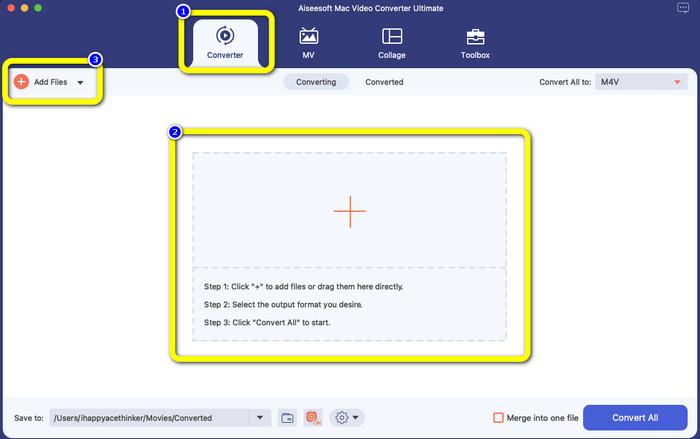
Langkah 2: Pilih panel Converter apabila antara muka muncul. Klik ikon Plus atau butang Add Files untuk menambah fail VOB anda. Anda juga boleh seret terus fail video anda ke dalam kotak.
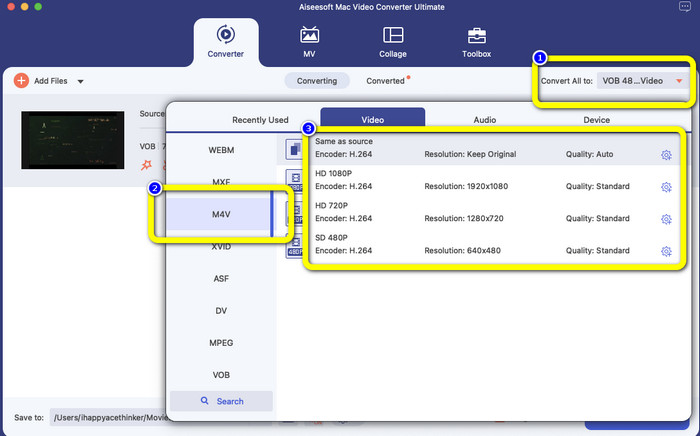
Langkah 3: Klik butang Convert All to untuk melihat pilihan format. Selepas itu, pilih format fail M4V. Anda juga boleh memilih resolusi untuk video anda daripada 480p hingga 1080p, atau kekalkan pada kualiti asal.
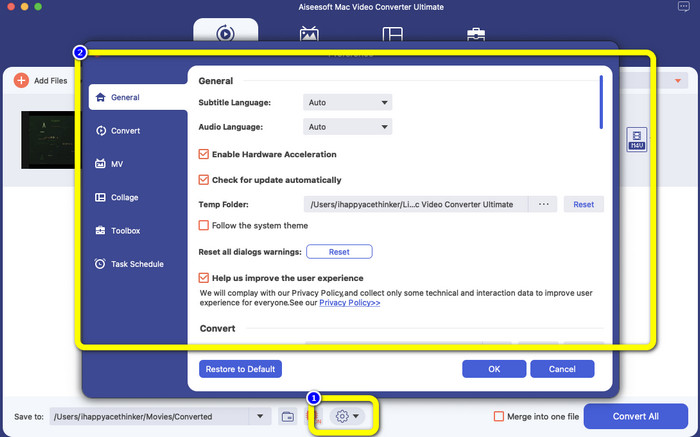
Langkah 4: Sebelum menukar, anda boleh menyunting video anda, seperti menambah sari kata atau bahasa audio dan banyak lagi, dengan mengklik ikon Preference pada bahagian bawah antara muka.
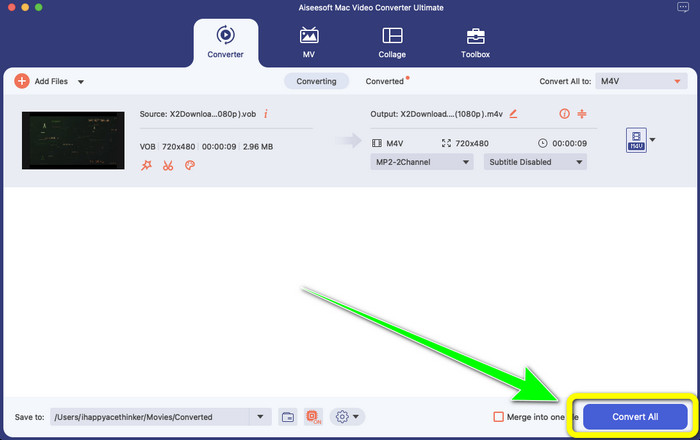
Langkah 5: Jika anda telah selesai membuat beberapa perubahan pada video VOB anda, klik butang Convert untuk menukar fail VOB anda kepada format M4V. Kemudian, simpan video anda pada Mac.
Bahagian 4: Cara Mudah untuk Menukar VOB kepada M4V Dalam Talian secara Percuma
Jika anda mahu menukar VOB kepada M4V secara percuma dalam talian, anda boleh cuba FreeFileConvert. Penukar dalam talian ini boleh menukar pelbagai jenis fail dengan mudah. Ia hanya memerlukan tiga langkah untuk menukar fail video VOB anda kepada format M4V, menjadikannya sesuai untuk pengguna bukan profesional. Selain itu, selepas 24 jam, semua fail yang telah ditukar akan dipadam daripada pelayan dan tidak lagi boleh diakses. Anda juga boleh memadam fail anda dengan menggunakan butang Delete selepas fail ditukar. Tambahan pula, FreeFileConvert bukan sahaja bagus untuk penukaran video. Ia juga membolehkan anda menukar imej, dokumen, vektor, audio, arkib, e-buku dan pembentangan, yang menjadikannya mudah untuk pengguna. Namun, alat dalam talian ini mempunyai proses penukaran yang perlahan, jadi anda perlu meluangkan lebih banyak masa. Ia juga memerlukan sambungan internet untuk beroperasi.
Langkah 1: Lawati laman web FreeFileConvert.
Langkah 2: Pilih butang Choose File untuk menambah fail video VOB anda.
Langkah 3: Klik butang Convert File to untuk melihat pilihan format dan pilih format fail M4V.
Langkah 4: Untuk langkah terakhir, pilih butang Convert. Muat turun video akhir selepas proses penukaran.
Bahagian 5: Soalan Lazim tentang Menukar VOB kepada M4V
1. Apakah format fail biasa untuk menukar fail VOB?
Memandangkan MP4 ialah sambungan fail multimedia biasa dan format bekas untuk menyimpan data video, audio dan sari kata, ia akan menjadi format video terbaik untuk menukar fail video VOB anda yang tidak disokong ke dalamnya. Banyak peranti mudah alih, termasuk produk Apple, menyokong format MP4.
2. Bagaimanakah cara saya menukar format fail VOB tanpa kehilangan kualiti?
Anda boleh menggunakan FVC Video Converter Ultimate. Alat luar talian ini boleh menukar berbilang fail tanpa mengubah kualiti video.
3. Bolehkah fail VOB dimainkan pada Android?
Tidak. Video disimpan pada DVD menggunakan format bekas (container) VOB (Video Object). Fail VOB biasanya tidak disokong oleh Android. Anda perlu menukar VOB anda kepada MP4 atau format video lain yang disokong oleh peranti Android jika anda ingin memainkannya pada telefon pintar atau tablet Android.
Kesimpulannya
Kini anda telah mengetahui perbezaan antara VOB dan M4V. Selain itu, artikel ini menunjukkan kepada anda prosedur paling mudah untuk menukar VOB kepada M4V. Jika anda mengutamakan aplikasi dengan proses penukaran yang pantas, anda boleh gunakan FVC Video Converter Ultimate. Penukar ini boleh menukar pelbagai fail 30x lebih pantas daripada penukar lain.
-
 Cara Memampatkan Fail VOB Dalam Talian & Percuma [Tiada Muat Turun]
 Adakah anda sedang mencari kaedah untuk memampatkan fail VOB? Ketahui cara terbaik untuk menjadikan saiz fail VOB lebih kecil dalam artikel ini
-
 Panduan Konkrit untuk Bergabung dengan Fail M4V di Windows dan Mac secara percuma
 Jika anda sedang mencari penyelesaian untuk menggabungkan fail video M4V menjadi satu, jangan lepaskan petikan ini. Di sini kita akan bercakap tentang dua kaedah terbaik untuk menggabungkan fail video M4V
-
 Tukar VOB kepada 3PG pada Windows dan Mac secara Percuma [Losslessly]
 Bagaimana untuk menukar VOB ke 3GP pada Windows dan Mac? Artikel ini menyediakan penyelesaian terbaik untuk anda menukar VOB kepada 3GP
