


 Video Converter Ultimate
 Perakam Skrin
 Pembaikan Video
 Muat Turun Selamat
3 Kaedah Terbaik Anda Boleh Cuba Tukar WebM kepada 3GP
WebM disokong oleh hampir semua pelayar seperti Google Chrome, Microsoft Edge, Mozilla Firefox, Opera dan lain-lain. Namun, ada kalanya anda tidak dapat memainkan fail WebM pada sesetengah peranti seperti telefon. Untuk memainkan video anda pada peranti lain, anda mesti memuat turun penukar dalam talian atau luar talian untuk menukar fail WebM anda kepada format lain. Nasib baik, artikel ini akan memperkenalkan beberapa cara yang paling mudah untuk menukar WebM kepada 3GP menggunakan beberapa perisian yang telah diuji.

Bahagian 1: Kaedah Berkesan untuk Menukar WebM kepada 3GP pada Windows dan Mac
Artikel ini sesuai untuk anda jika anda mahukan penukar WebM ke 3GP pada Windows dan Mac anda. Video Converter Ultimate ialah perisian terbaik yang boleh anda gunakan. Aplikasi ini membolehkan anda menukar banyak jenis fail seperti FLV, MKV, DIVX, XVID, MT2S, MTS, M4V, AVI, MP4 dan lebih 1000 lagi. Selain itu, anda tidak perlu risau tentang proses penukaran kerana anda boleh menukar fail 30x lebih pantas berbanding penukar lain. Anda juga boleh memuat turun aplikasi hebat ini secara percuma.
Selain itu, kaedah aplikasi ini untuk menukar fail tidak rumit kerana ia mempunyai antara muka yang mesra dan cara yang mudah, yang sesuai untuk semua pengguna. Selain daripada menukar, terdapat lebih banyak alat yang boleh anda nikmati, seperti mempertingkatkan video anda, membuat video muzik, mencipta kolaj, menukar saiz fail dan banyak lagi.
Ciri-ciri
◆ Sesuai untuk mencipta kolaj.
◆ Peribadikan dan sesuaikan GIF.
◆ Tukar kelajuan video.
◆ Mampu menukar saiz fail video
◆ Ia boleh memampatkan fail audio.
Kelebihan
- Sesuai untuk Pengguna Windows dan Mac.
- Ia mempunyai proses penukaran yang cepat.
- Ia menyokong 1000+ format, seperti MP4, M4V, DIVX, FLV, MKV, 3GP, SWF, dll.
- Mempunyai antara muka pengguna yang mesra, yang sesuai untuk pemula.
- Boleh menambah dan mengalih keluar elemen yang tidak perlu dengan mudah seperti tera air, logo, tandatangan, dsb.
Keburukan
- Bayar untuk versi pro untuk menggunakan semua ciri hebat.
Langkah 1: Muat turun Video Converter Ultimate menggunakan Windows atau Mac anda dengan mengklik butang Muat Turun di bawah. Pasang pada peranti anda dan jalankan perisian tersebut.
Muat Turun PercumaUntuk Windows 7 atau lebih baharuMuat Turun Selamat
Muat Turun PercumaUntuk MacOS 10.7 atau lebih baharuMuat Turun Selamat
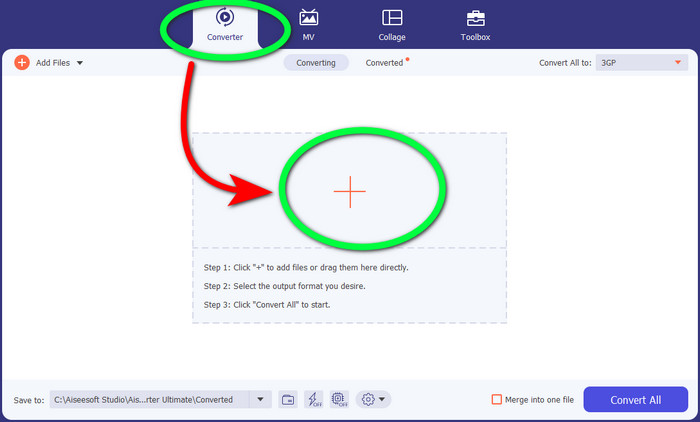
Langkah 2: Apabila anda melihat empat pilihan di bahagian atas antara muka, pilih panel Converter dan klik tanda + untuk memuat naik fail video WebM.
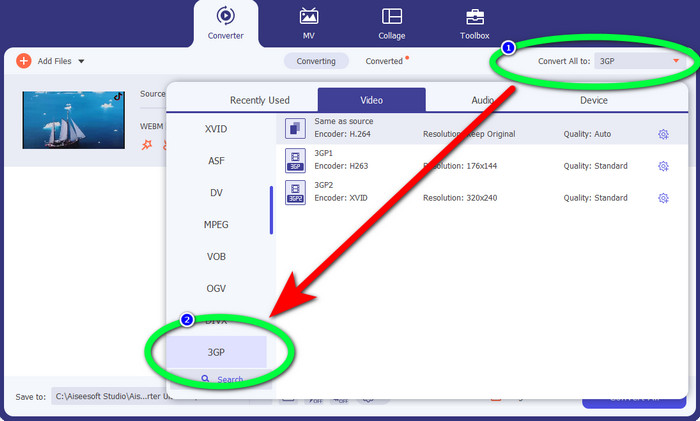
Langkah 3: Selepas memuat naik fail video WebM, klik pilihan Convert all to dan pilih fail 3GP.
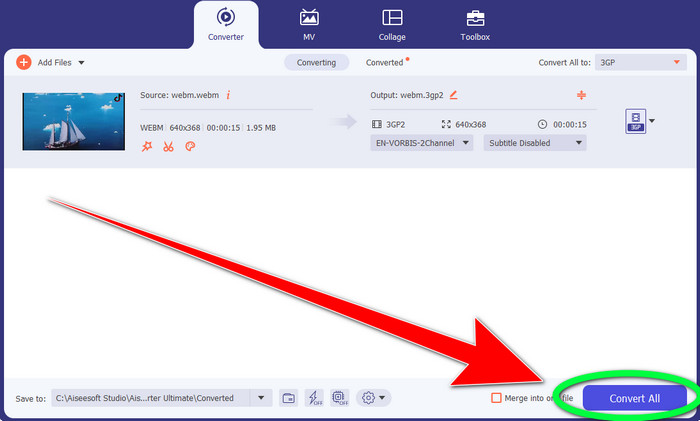
Langkah 4: Setelah anda selesai menukar format fail daripada WebM kepada 3GP, klik butang Convert.
Bahagian 2: Cara Mudah untuk Menukar WebM kepada 3GP Dalam Talian
Menggunakan FVC Free Video Converter Dalam Talian
Adakah anda mahu menggunakan penukar video percuma dalam talian? Maka, alat dalam talian yang boleh anda gunakan secara percuma ialah FVC Free Video Converter Online. Aplikasi dalam talian ini membolehkan anda menukar WebM kepada 3GP dengan mudah. Ia hanya mempunyai tiga (3) langkah asas, jadi anda tidak akan keliru ketika menukar pelbagai fail. Selain itu, penukar percuma ini boleh diakses pada Windows dan Mac. Ia juga menukar pelbagai fail seperti MP4, AVI, M4V, MKV, WMA, MP3 dan banyak lagi. Di samping itu, anda boleh menukar fail anda dengan cepat kerana ia mempunyai kelajuan penukaran yang tinggi, jadi anda tidak perlu menunggu lama untuk menukar fail lain. Jika anda berminat menukar WebM kepada 3GP menggunakan FVC Free Video Converter Online, gunakan langkah ringkas di bawah.
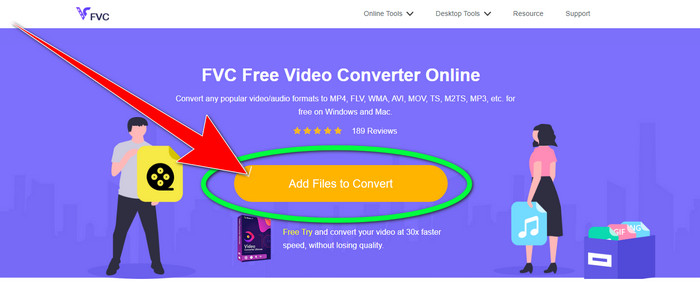
Langkah 1: Lawati FVC Free Video Converter Online. Klik butang berwarna oren di tengah untuk menambah fail video WebM anda.
Langkah 2: Seterusnya, pilih fail 3GP sebagai format pilihan anda. Anda akan melihat pilihan format di bahagian bawah antara muka.
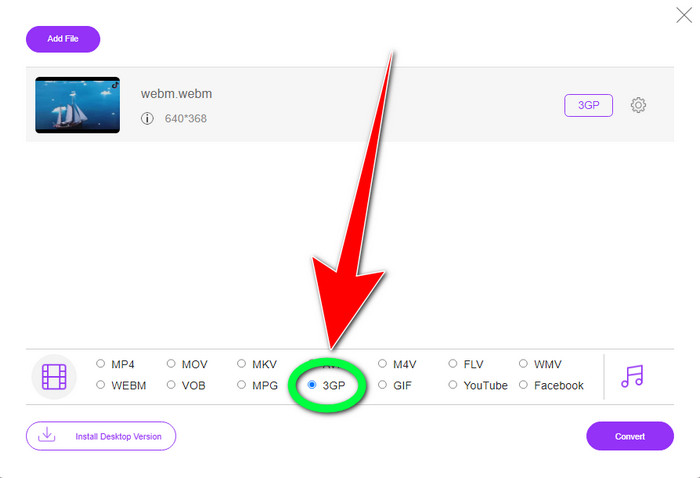
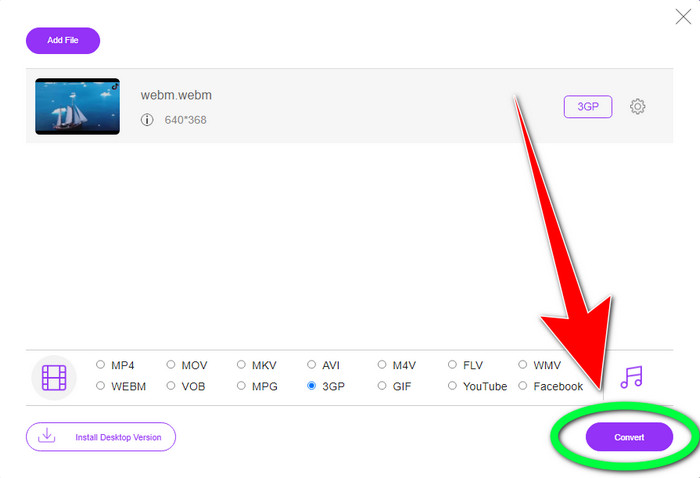
Langkah 3: Setelah anda memilih format fail 3GP, anda sudah boleh klik butang Convert untuk menyimpan video anda. Alat ini juga membolehkan anda menukar WebM kepada DIVX.
Menggunakan Convertio
Jika anda masih mencari penukar WebM ke 3GP lain dalam talian, maka Convertio ialah alat yang anda cari. Ia juga mempunyai langkah mudah untuk menukar fail anda. Selain itu, anda boleh menukar fail anda kepada 37 format fail video yang berbeza, termasuk HEVC, MPG, M4V, MKV, WMV, MP4, MOV, AVI, dll. Convertio bukan sahaja terhad kepada menukar format video. Anda juga boleh menukar audio, imej dan format dokumen yang berbeza.
Walau bagaimanapun, 100Mb adalah saiz fail maksimum aplikasi dalam talian ini untuk menggunakan versi percuma. Anda mesti mendapatkan versi berbayar untuk mempunyai saiz fail tanpa had dan menikmati lebih banyak ciri. Tetapi, membeli langganan adalah mahal. Jika anda ingin menukar fail WebM kepada 3GP menggunakan Convertio, ikut langkah di bawah.
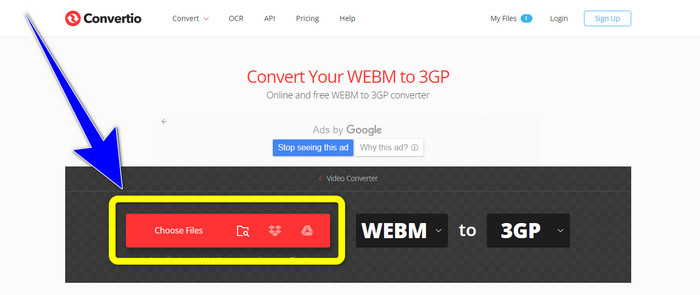
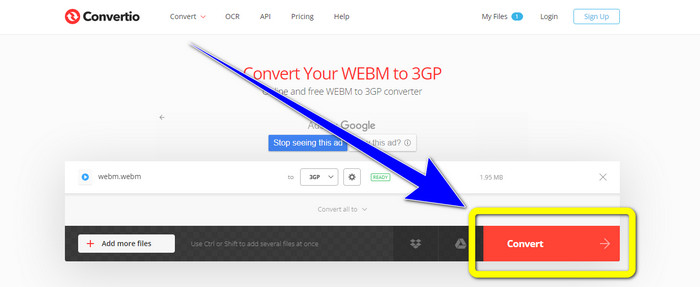
Langkah 1: Pergi ke laman web Convertio dan tekan butang Choose files untuk menambah fail video WebM anda.
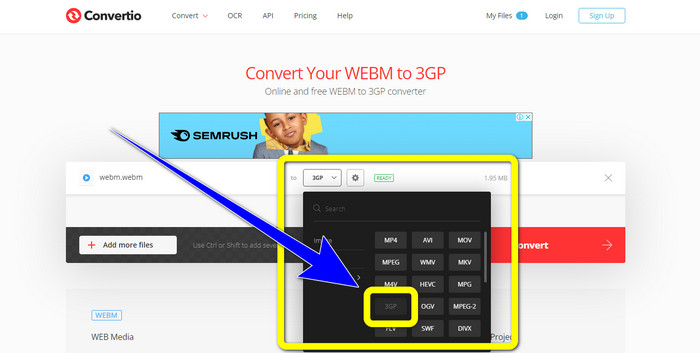
Langkah 2: Setelah anda menambah fail video WebM anda dalam Convertio, pilih pilihan format dan format fail 3GP.
Langkah 3: Untuk langkah terakhir, anda boleh klik butang Convert untuk menukar fail anda. Kemudian, simpan fail akhir anda pada komputer selepas proses penukaran. Klik di sini untuk mempelajari cara menukar MPG kepada 3GP.
Bahagian 3: Maklumat tentang WebM dan 3GP
WEBM
Dengan pemampatan video VP8 dan audio Vorbis, WebM ialah sebuah bekas media terbuka. Format WebM biasanya digunakan untuk menambah media pada laman web dan disokong oleh semua pelayar web, termasuk Opera, Mozilla Firefox dan Google Chrome. Ia menawarkan kualiti main balik video yang baik dan ciri pemampatan data yang baik. Penyematan video WebM pada halaman laman web berlaku tanpa gangguan atau ralat. Format WebM bertujuan untuk bersaing dengan piawaian h.264. Google mempunyai hak cipta bagi sambungan ini.
3GP
Untuk telefon berasaskan GSM, atau Global System for Mobile Communications, Third Generation Partnership Project mencipta bekas multimedia 3GP pada tahun 1998. Bekas ini sesuai untuk telefon mudah alih kerana ia menggunakan kurang data, jalur lebar dan storan. Ia merupakan bekas yang biasa digunakan untuk fail MMS (Multimedia Messaging Service).
Bahagian 4: Soalan Lazim tentang Menukar WebM kepada 3GP
Apakah penukar luar talian dan dalam talian terbaik yang boleh saya gunakan untuk menukar WebM kepada 3GP?
Berikut ialah aplikasi yang telah diuji dan boleh dipercayai untuk menukar WebM kepada 3GP dan pelbagai fail lain.
1. FVC Free Video Converter Online
2. Video Converter Ultimate
3. Convertio
4. HitPaw Video Converter
5. Online Convert Free
6. AnyMP4 Video Converter Ultimate
7. OnlineConvert
Adakah 3GP format video yang baik?
Apabila ia datang kepada telefon rangkaian 3G, format 3GP sangat baik kerana ia dicipta khusus untuk peranti itu. Walau bagaimanapun, dari segi penstriman pada pemain media mudah alih atau desktop, terdapat lebih banyak format yang baik seperti MP4 kerana ia boleh menyokong video resolusi lebih tinggi daripada 3GP.
Apakah resolusi 3GP?
Video 3GP mempunyai dua peleraian: Yang pertama ialah 176x144 untuk semua telefon yang menyokong format 3G. Resolusi lain ialah 320x240 untuk telefon dengan skrin lebar, PSP, pemain MP4 dan sentuhan iPad.
Kesimpulannya
Dalam artikel ini, kita boleh membuat kesimpulan bahawa terdapat banyak cara untuk menukar WebM kepada 3GP. Jika anda mahu cara terbaik untuk menukar fail video secara dalam talian, gunakan FVC Free Video Converter Online. Kemudian, jika anda mencari perisian yang boleh dimuat turun, gunakan Video Converter Ultimate. Kedua-duanya boleh dipercayai untuk menukar pelbagai format video.
-
 Penukar WebM ke FLV Pilihan Paling Teratas Percuma di Web & Desktop
 Adakah anda mempunyai masalah yang sama memainkan fail WebM pada telefon pintar anda? Kemudian luangkan masa 5 minit membaca artikel ini untuk mengetahui cara menukar WebM kepada FLV.
-
 3 Penukar WebM Terbaik kepada WMV Terbaik yang Anda Jangan Lepaskan
 Mencari cara untuk menukar fail WebM kepada fail WMV? Kami mencuba beberapa penukar terkenal di pasaran hari ini dan memilih yang terbaik dan paling mudah untuk digunakan antara mereka.
-
 Penukar WebM ke MKV Terbaik yang Anda Mesti Gunakan untuk Menukar dengan Pantas
 Adakah anda sedang mencari cara untuk menukar fail WebM kepada MKV? Artikel ini membentangkan penukar WebM ke MKV terbaik untuk anda cuba.
