


 Video Converter Ultimate
 Perakam Skrin
 Pembaikan Video
Muat turun 5 Alat Terbaik yang Tersedia untuk Membuat Video 2x Lebih Cepat dalam Beberapa Klik
Ada kalanya anda perlu mempercepatkan video, contohnya sehingga 2x video speed. Ini kerana ada bahagian yang anda mahu langkau atau anda mahu video dimainkan dengan lebih pantas untuk memendekkan durasinya. Jadi, jika anda ingin belajar cara menjadikan video anda lebih laju, teruskan membaca artikel ini. Supaya anda mendapat idea dan pengetahuan yang mencukupi tentang cara melakukannya dan mengapa kelajuan 2x patut digunakan.

Bahagian 1. Apakah video 2x?
Menonton pantas ialah tindakan menonton video yang dipercepatkan ke kelajuan main semula semula jadinya. Hanya dengan melaraskan kelajuan video yang sedang kita tonton; ia boleh membantu kita dalam pelbagai cara. Jadi, jika anda ingin tahu apakah faedah membawa video kelajuan semula jadi anda ke dalam kelajuan video 2x. Kemudian baca butiran di bawah untuk mengetahui lebih lanjut.
Kelebihan menonton video yang dipercepatkan.
◆Jika anda memainkan video pada kelajuan 2x, anda boleh menentukan dengan mudah sama ada video itu berbaloi untuk ditonton atau tidak. Ini mungkin terpakai pada video berdurasi panjang dan selalunya ia membosankan untuk menonton semuanya pada kelajuan biasa.
◆Ia membolehkan kami menjimatkan banyak masa daripada kelajuan main balik biasa. Dalam kes ini, jika anda perlu menonton 2 atau lebih video dengan panjang 15 minit adalah lebih baik untuk menontonnya 2x lebih pantas. Untuk menyerap butiran lebih cepat daripada menontonnya pada kelajuan biasa. Jadi, daripada menonton 1 video dalam masa 15 minit anda boleh menonton 2 video dalam jangka masa tersebut.
◆Kebanyakan orang yang suka menonton video yang dimainkan pada main balik pantas ialah mereka yang suka menghafal segala-galanya dalam masa seminit. Ini berfungsi paling baik untuk orang sibuk atau mereka yang tergesa-gesa.
◆Ia akan meningkatkan dan melatih fokus dan kemahiran mendengar anda dengan lebih baik jika anda memainkan video pada kelajuan 2x berbanding kelajuan biasa. Jadi sekarang, anda mempunyai idea tentang kelebihan mempercepatkan video. Kini tiba masa yang sesuai untuk meneruskan ke alatan yang akan membantu anda mempercepatkan video anda. Bahagian seterusnya akan bercakap tentang alat yang berbeza yang perlu anda gunakan.
Bahagian 2. Bagaimana Membuat Video 2x
Jika anda mahu menjadikan video 2x lebih pantas, cuba gunakan penyunting video hebat, iaitu Video Converter Ultimate. Alat ini telah banyak membantu pelanggannya menyelesaikan pelbagai masalah, terutamanya menukar format, membuat GIF, menambah baik kualiti dan banyak lagi. Jadi, menjadikan main balik video anda lebih pantas boleh dilakukan dengan mudah dengan bantuan alat ini. Selain itu, sementara anda menambah kelajuan video, anda juga boleh pratonton kelajuan 2x di bahagian bawah untuk menentukan sama ada kelajuan video tersebut sesuai untuk anda. Sekarang, mari teruskan cara menukar kelajuan main balik video anda dengan mengikuti langkah‑langkah di bawah.
Langkah-langkah Cara Mempercepatkan Video sehingga 2X Kelajuan
Langkah 1. Muat turun alat ini ke desktop anda kemudian pasangkannya selepas proses muat turun selesai.
Muat Turun PercumaUntuk Windows 7 atau lebih baharuMuat Turun Selamat
Muat Turun PercumaUntuk MacOS 10.7 atau lebih baharuMuat Turun Selamat
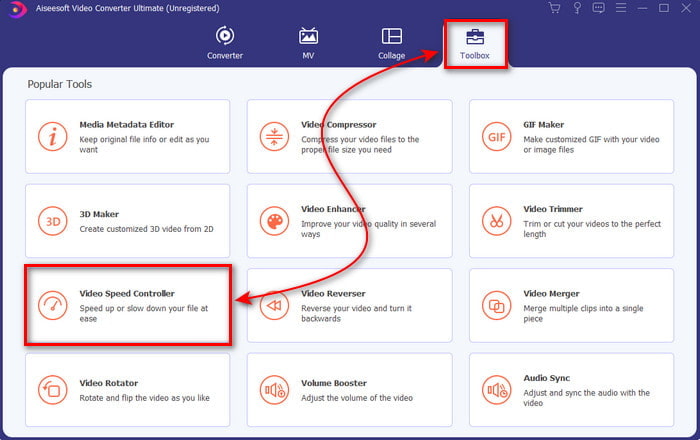
Langkah 2. Kemudian pergi ke Toolbox dan cari Video Speed Controller.
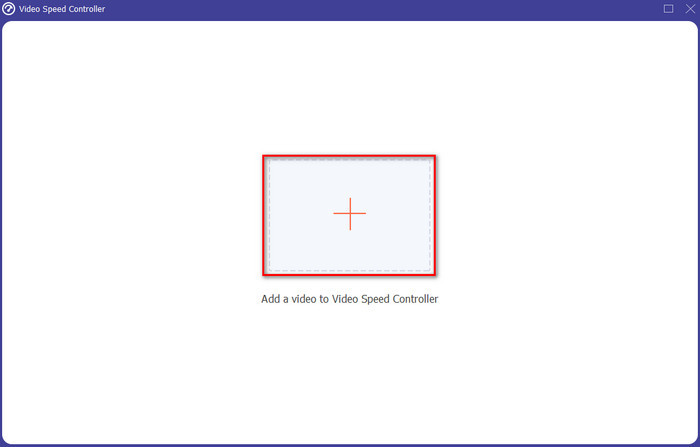
Langkah 3. Klik butang + untuk memasukkan fail yang anda mahu tonton pada kelajuan video 2x dan klik Open untuk meneruskan.
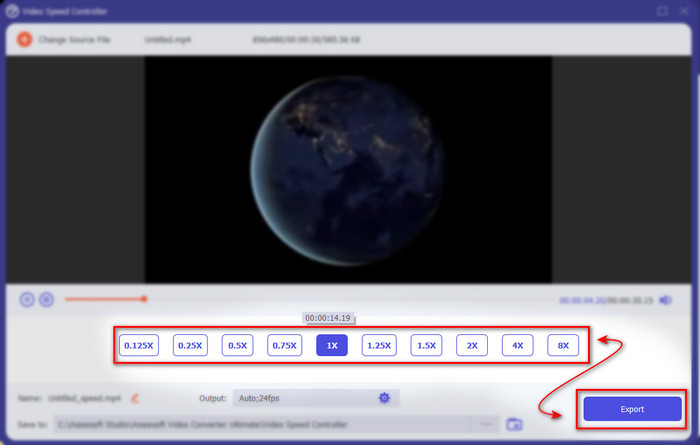
Langkah 4. Selepas memasukkan fail, pilih 2x pada senarai kelajuan video yang tersedia. Kemudian untuk menyimpan kelajuan video tersebut, klik butang Export.
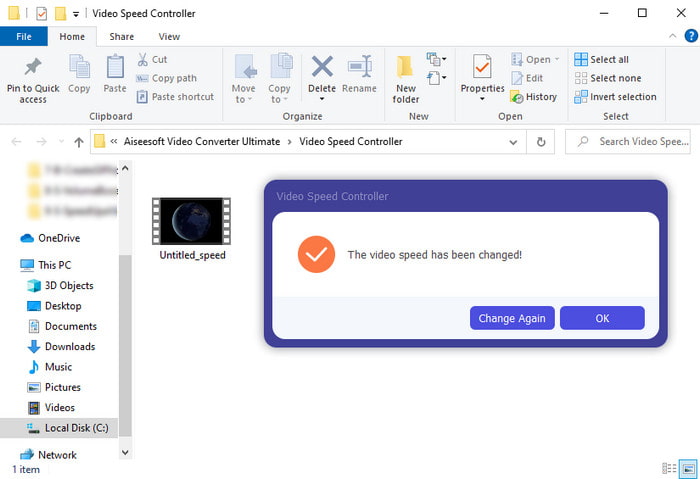
Langkah 5. Selepas fail dieksport, satu folder akan dipaparkan pada skrin anda; klik fail itu untuk menonton versi video yang telah dipercepatkan.
Bahagian 3. Cara Memainkan Video dalam Kelajuan 2x
1. Pemain Media VLC
Pemain media yang paling terkenal yang boleh anda muat turun pada PC atau Mac ialah VLC Media Player. Alat desktop ini telah digunakan oleh pengguna yang gemar menonton klip filem. Selain itu, alat ini menyokong hampir semua format yang kita kenali di web. Namun, sesetengah video dengan codec yang rumit tidak dapat dimainkan di sini seperti AVI atau MKV. Jadi, jika anda ingin tahu cara menjadikan video 2x speed dengan VLC Media Player, ikut langkah‑langkah yang disediakan di bawah.
Langkah 1. Muat turun VLC ke desktop anda kemudian buka ia.
Langkah 2. Seret dan lepaskan fail ke antara muka kemudian klik fail video yang anda masukkan tadi.
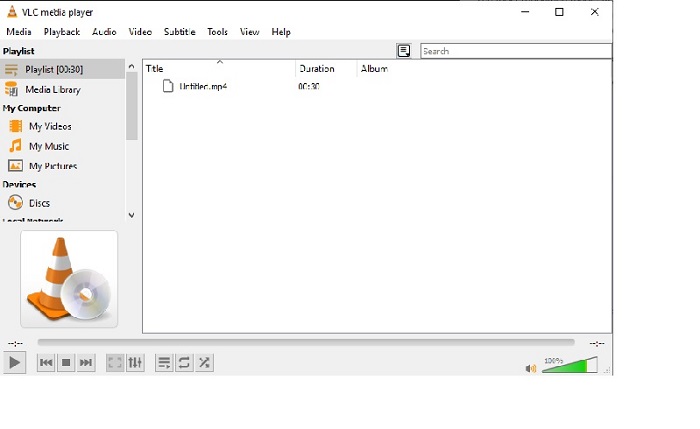
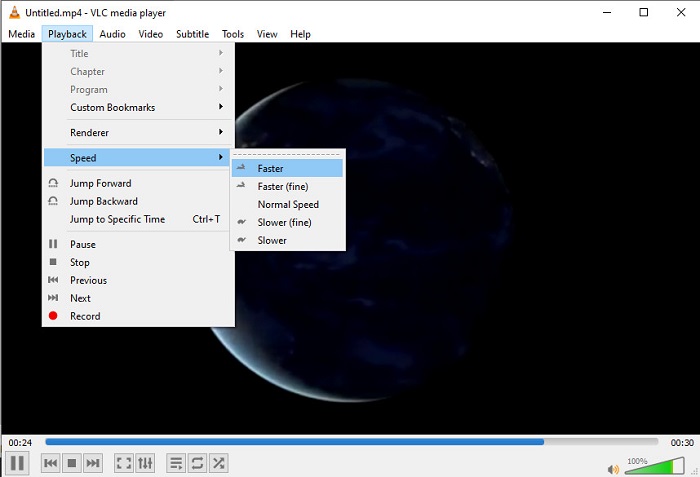
Kemudian pergi ke Playback dan klik Speed untuk menukar kelajuan asal video.
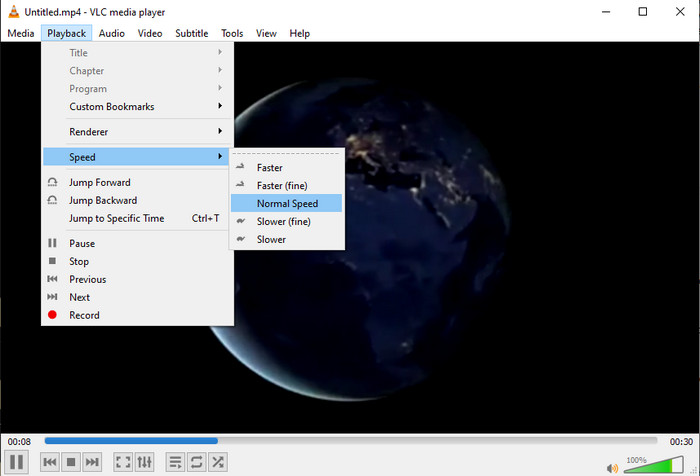
Langkah 3. Dan jika anda mahu mengembalikan kelajuan ke normal, pergi ke Playback dan klik Speed kemudian pilih kelajuan normal.
2. Pemain QuickTime
Pemain media asli Mac sedia membantu anda memainkan video pada kelajuan main balik video 2x. QuickTime Player ialah pemain media prat dipasang yang anda akan lihat pada Mac. Tidak seperti VLC, alat ini tidak perlu dimuat turun ke desktop anda. Malangnya, jika anda pengguna Windows anda tidak boleh menggunakan alat ini kerana ia tidak menyokong PC Windows. Walaupun alat ini boleh diakses pada Mac, masih banyak ciri yang ia tidak sokong seperti format tertentu, kerana kebanyakan format yang dibangunkan oleh Windows tidak boleh dimainkan di sini. Jadi kini, jika anda mempunyai Mac cuba ikut langkah‑langkah di bawah.
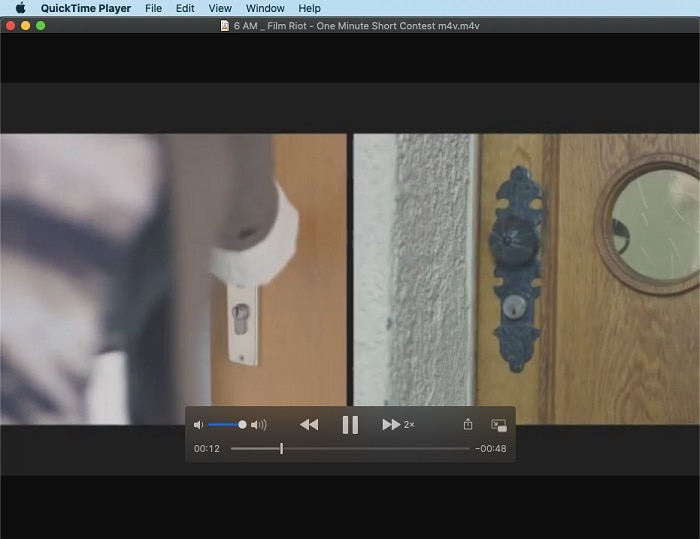
Langkah 1. Cari QuickTime dalam Finder kemudian lancarkan alat tersebut. Klik File dan Open File untuk mencari video dan buka ia.
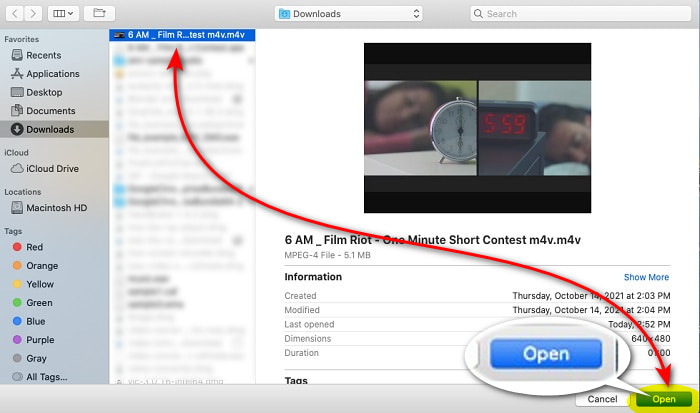
Langkah 2. Semasa video dimainkan, klik butang fast-forward untuk mempercepatkan video.
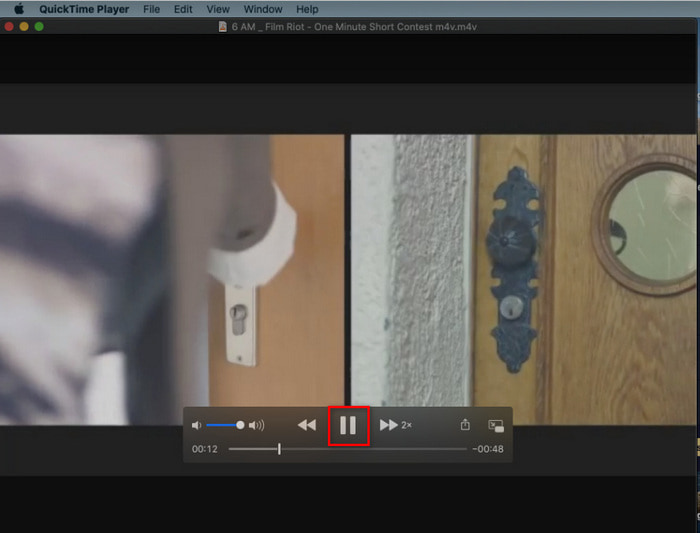
Langkah 3. Dan jika anda mahu menghentikan kelajuan yang dipercepatkan itu, klik butang pause/play.
3. Windows Media Player
Jika Mac mempunyai pemain media prat dipasang sendiri, Windows juga mempunyai pemain medianya yang tersendiri, iaitu Windows Media Player. Sama seperti QuickTime, alat ini sudah pun dipratpasang pada Windows dan sedia digunakan untuk menonton dan menjadikan video 2x lebih pantas daripada kelajuan biasa. Namun, kami menganggap fungsi percepatannya yang paling teruk kerana ia menghilangkan visual dan melompat dari satu saat ke saat yang lain dan bukannya memainkan video dengan laju. Tetapi jika itu tidak menjadi masalah kepada anda, ikut langkah‑langkah di bawah tentang cara mempercepatkannya.
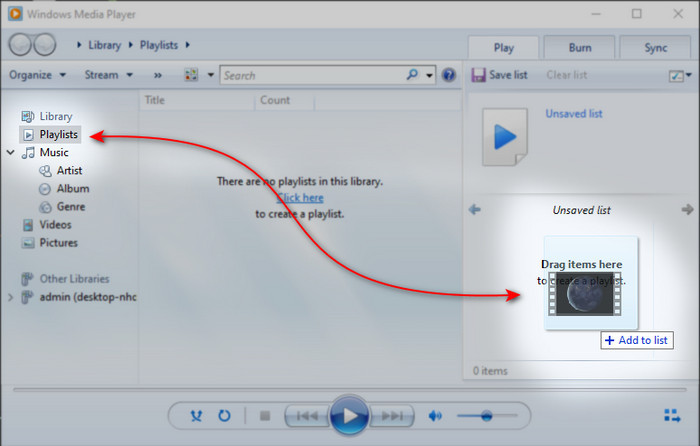
Langkah 1. Lancarkan alat ini pada desktop Windows anda.
Langkah 2. Klik Playlist kemudian drag and drop fail video ke kotak kecil di bahagian kanan.
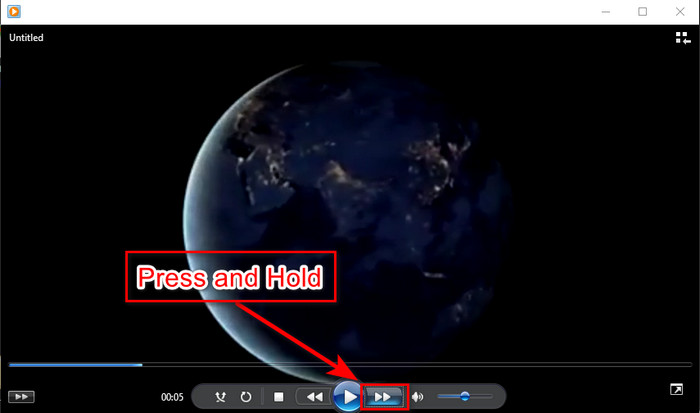
Langkah 3. Video akan dimainkan secara automatik, untuk mempercepatkan klik dan tahan butang fast-forward dan lepaskan untuk berhenti.
Bahagian 4. Soalan Lazim tentang 2x Video
Mana yang lebih baik: gerakan perlahan atau mempercepatkan?
Sebenarnya, ia bergantung pada situasi yang sepatutnya anda gunakan. Walaupun kedua-dua pelarasan yang akan anda lakukan akan membantu anda. Jadi, jika anda sedang menonton tutorial atau anda ingin mendedahkan helah ahli silap mata, gunakan gerakan perlahan. Walau bagaimanapun, jika anda tergesa-gesa dan perlu menonton banyak klip video maka adalah satu kemestian untuk menontonnya untuk mempercepatkan main semula.
Bolehkah saya merakam ke dalam main balik gerakan yang sangat pantas?
Ya, anda boleh menggunakan selang masa untuk membuat video berdurasi satu jam menjadi seminit atau saat. Tetapi tidak seperti mempercepatkan, selang masa adalah lebih cepat daripada kelajuan 2x, 4x, 8x biasa.
Apakah kelemahan menonton video pada kelajuan 2x?
Walaupun menonton video pada kelajuan seperti ini boleh banyak membantu anda, terdapat banyak keburukan bermain yang kelajuan boleh berlaku kepada anda. Sebagai contoh, jika memainkan video ke dalam ini menjadi tabiat anda maka kelajuan biasa video akan menjadi lebih perlahan.
Kesimpulannya
Sekarang setelah anda mengetahui pelbagai alat yang boleh digunakan untuk menonton video pada kelajuan 2x, inilah masanya untuk memilih yang mana satu anda lebih gemari. Kami berharap artikel ini membantu anda memilih yang lebih baik. Sama ada anda mahu menggunakan pemain media untuk melaraskan kelajuan atau menggunakan penyunting seperti Video Converter Ultimate. Walau apa pun penyelesaian yang anda pilih, semuanya berfungsi dengan baik untuk digunakan oleh anda sebagai pengguna.
-
 4 Pemain VOB Terbaik untuk Mobiles Android untuk Penggunaan Berbeza
 Apabila anda memuat turun video VOB dan ingin menontonnya di Android, anda boleh memilih yang paling sesuai dari 4 pemain VOB teratas berikut dalam artikel ini.
-
 5 Alternatif Pemain Media Windows Terbaik untuk Android Mobiles
 Oleh kerana anda tidak dapat memuat turun Windows Media Player untuk Android, anda harus membaca artikel ini dan mengetahui tentang 5 alternatif terbaik untuk Windows Media Player.
-
 5 Pemain Video Terbaik Terbaik untuk iPhone yang Anda Jangan Terlepas pada 2025
 Untuk memainkan video dalam semua format dan mempunyai pengalaman menonton yang lebih baik di iPhone anda, anda harus membaca artikel ini dan mengetahui tentang 5 pemain video terbaik untuk iPhone 12/11 / X / 8/7/6.
