


 Video Converter Ultimate
 Perakam Skrin
 Pembaikan Video
Cara Menambah Sarikata pada Video yang Anda Simpan ke dalam Desktop Anda
Subtitles are the best way to translate dialogues of other countries into your native language to a text. This is created for those who don't understand the dialogues of the actor or actresses. Also, they improve the overall engagement of the audience to the film, series, and movies as well. But in some cases, the video you download has no subtitles or has a separate file for it. So, the best way to add subtitles to videos is presented in this article. So, keep on reading this write-up as we provide steps on how to insert your subtitles and what are the different tools you can use.

Bahagian 1. 4 Alat Terbaik yang Boleh Anda Gunakan untuk Menambah Sarikata pada Video Anda
1. Video Converter Ultimate (Windows & Mac)
Did you know that you can add subtitles to Video Converter Ultimate? This phenomenal converter has a lot of different features that keep us amaze every time. The overall performance of this software is phenomenal in the line of converting files, editing, making, adding and more. But for now, we will now be going to explain how to add subtitles to a video on a perfect sequence of text. In addition, this tool supports all of the subtitle formats you can use to add it to your video. So, without any more delays, let's proceed on how to add the subtitles by following this step provided only for you below.
5 Easy Steps on How to Add Subtitles on your Video with the Video Converter Ultimate
Step 1. Download the software into your Windows or Mac drive. Next, install it and do the quick set-up then click finish.
Muat Turun PercumaUntuk Windows 7 atau lebih baharuMuat Turun Selamat
Muat Turun PercumaUntuk MacOS 10.7 atau lebih baharuMuat Turun Selamat
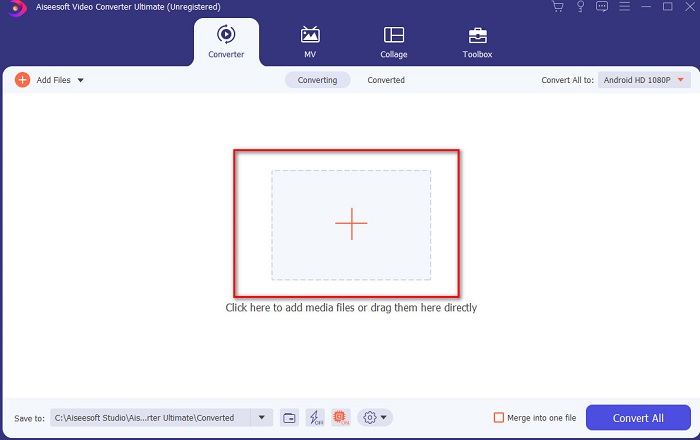
Step 2. Launch the tool, and click the plus button at the middle of the interface. Then locate the video on the folder and click Open.
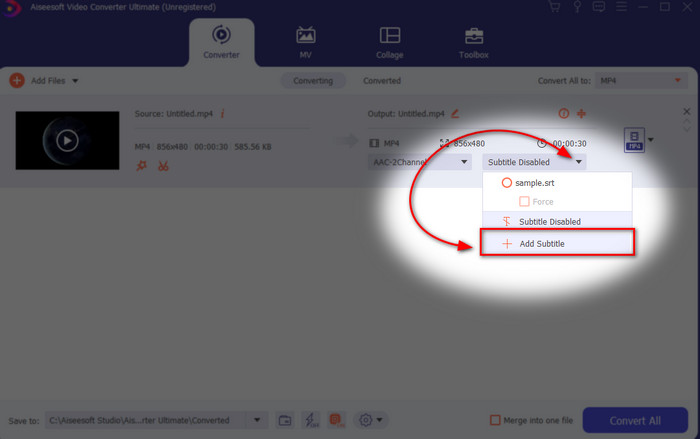
Step 3. On the interface, click the drop-down button for Subtitle and click Add Subtitle. Select the subtitle file on the file folder and click open.
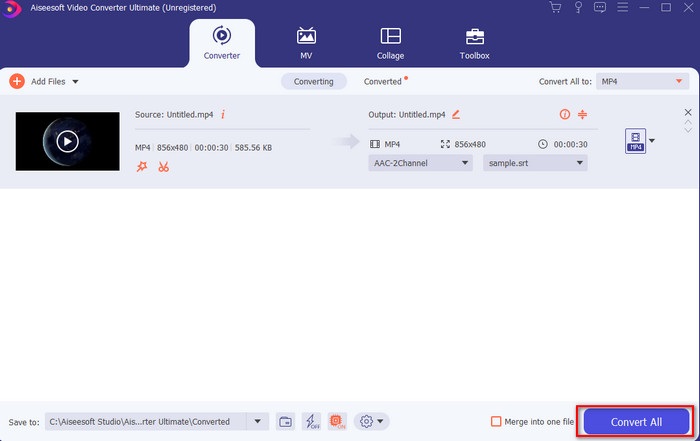
Step 4. After you add the subtitle you can now export it by clicking the Convert All.
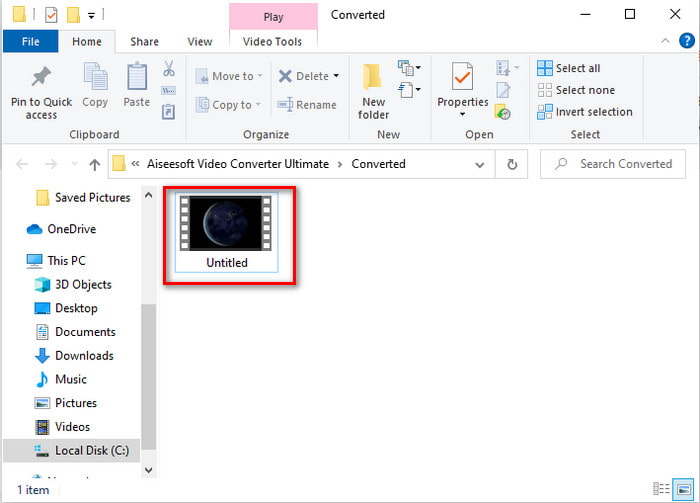
Step 5. The file explorer will pop up next to your screen with the video file that has a subtitle on it. Hit the file to watch and read the subtitle without delays.
Berkaitan:
How to Cut and Merge Songs Online
2. iMovie (Mac & iPhone)
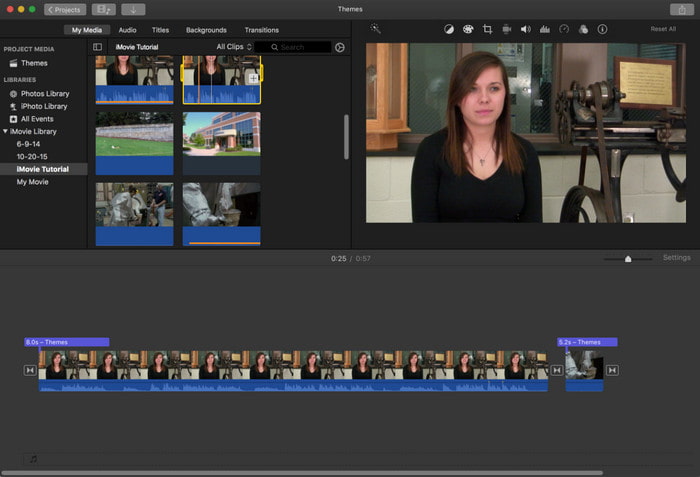
One of the best tools Apple can offer to their users, so adding subtitles to a video on iMovie is easy and free. This default tool is the best in editing and more on Mac, so adding subtitles here is easy as it is. But you can't use SRT subtitle format and add it to your video because this format is not supported by the iMovie. However, the overall performance of this Mac default editor is great to be used by anyone who is on a tight budget. Also, this tool offers a premium version that supports a lot of editing features you can use.
3. Adobe Premiere Pro (Windows & Mac)
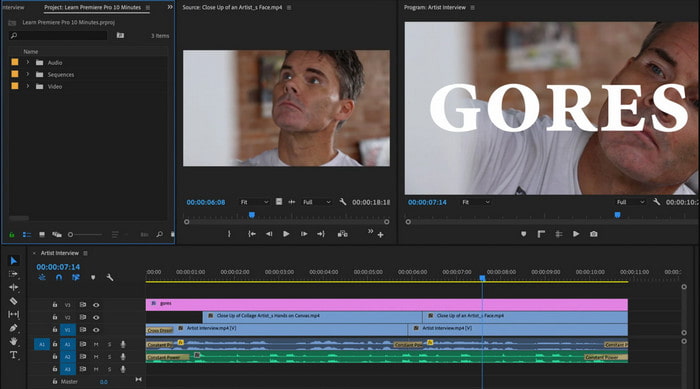
Adobe Premiere Pro offers the best editing features used by professionals in the editing industry. Also, this tool can add SRT subtitle format unlike on iMovie you can't. Moreover, this tool supports almost all of the subtitle formats you can use. Although the tool seems flawless, the price of it is enormous and if you just want to add subtitles to video on Adobe Premiere Pro this is an okay choice but not the best. Especially if you are on a tight budget and don't want to spend a lot. Also, if you are a beginner this is not the best choice because you will need a lot of time to study it first.
4. Clideo (Dalam Talian)
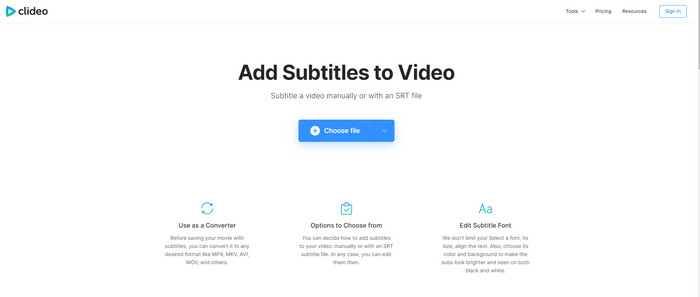
Clideo supports editing features you can use for free if you have an internet connection. This tool can be used in all devices as long as you have a browser. Although the tool is flexible the subtitle format it supports is only .srt. So, if your subtitle is not in the format of SRT then you must manually do it here which is a bit of a hassle for you. Also, the process of adding the video here will depend on your internet. With that being said, if you have a slow internet then expect a lot of time waiting than adding subtitles to video online.
Bahagian 2. Soalan Lazim tentang Menambah Sarikata pada Video
Apakah jenis format sari kata yang berbeza?
Di web, terdapat banyak format sari kata yang berbeza tetapi format yang paling biasa digunakan yang sudah anda temui ialah format sari kata SRT, WEBVTT dan SBV. Kerana ini adalah format terbaik dan fleksibel yang boleh anda gunakan dengan mudah tetapi terdapat SSA, TTML, DFXB, TXT dan banyak lagi. Walaupun ia berfungsi hebat, format sari kata pertama yang disebut adalah yang terbaik yang boleh anda gunakan.
Apakah perbezaan utama Kapsyen dan Sarikata?
Walaupun mereka menggunakan format yang sama masih terdapat perbezaan utama antara kapsyen dan sari kata. Pertama, sari kata disertakan dalam video untuk menterjemah bahasa pertuturan pelakon atau pelakon ke dalam bahasa penonton. Ini paling biasa digunakan kepada mereka yang boleh mendengar audio tetapi tidak dapat memahami apa yang mereka perkatakan. Manakala kapsyen dibuat untuk menerangkan perkara yang berlaku dan melalui teks seperti kesan bunyi. Ini dibuat untuk mereka yang boleh menonton video tetapi tidak dapat mendengar audio dengan jelas atau pekak.
Alih suara lwn. Sub; Mana satu lebih baik?
Sesetengah penonton lain lebih suka Dub daripada subs manakala yang lain sebaliknya. Walaupun ia adalah cara yang berkesan untuk menterjemahkan medium dengan lebih baik kepada khalayak. Alih suara dan subs mempunyai banyak perbezaan, contohnya sari kata diterjemahkan versi audio dan bertukar kepada teks pada video. Manakala alih suara digunakan oleh penonton yang sukar membaca. Jadi, daripada membaca konteks, mereka menggunakan alih suara untuk memfokuskan lebih baik pada perkara yang mereka tonton. Jadi, ia sentiasa bergantung kepada anda yang anda suka gunakan, jika anda boleh membaca sambil menonton subs adalah yang terbaik tetapi jika anda ingin mempunyai fokus laser pada video itu sendiri maka gunakan dub..
Kesimpulannya
Finally, we now understand and learn how to add subtitle files to your video permanently. As we make your searching easier and present different solutions for you to use. Still, it is undeniable that the Video Converter Ultimate is the best choice on the list. Because it supports all of the subtitle formats for you to use. So, instead of a huge amount of money to the other tool that has the same function or even better than the other tool. Then why don't you acquire it first and try it for yourself? To know what we are talking about.
-
 Tutorial - 4 Cara Percuma untuk Menggabungkan Video di iPhone menjadi Yang Baru
 Baca dan dapatkan 4 cara mudah untuk menggabungkan video di iPhone. Semua model iPhone dan versi iOS disokong. Anda boleh menggabungkan 2 dan lebih banyak video di iPhone menjadi video baru dengan cepat.
-
 Cara Memampatkan Fail M4V ke Saiz Yang Lebih Kecil (Percuma & Dalam Talian)
 Sekiranya anda mencari cara mudah untuk mengurangkan ukuran fail M4V anda, anda harus datang dan membaca artikel ini. Di sini kami akan berkongsi cara termudah untuk memampatkan fail M4V dengan anda.
-
 Kompres WebM - Cara Memampatkan Fail WebM Secara Dalam Talian
 Bagaimana memampatkan fail WebM dalam talian? Apakah cara terpantas untuk memampatkan fail besar? Catatan ini memberitahu 2 cara percuma untuk memampatkan WebM.
