


 Video Converter Ultimate
 Perakam Skrin
 Pembaikan Video
 Muat Turun Selamat
Tutorial Cara Mengedit Metadata MKV pada Desktop dengan Cara Paling Mudah
MKV ialah sambungan yang sangat popular untuk format bekas multimedia Matroska. Apakah yang menjadikan MKV lebih popular berbanding format lain? Ramai pengguna menyangka bahawa MKV ialah pemampatan video yang digunakan pada audio dan video, sedangkan sebenarnya bukan. Format ini menjadi popular kerana fleksibilitinya dalam menyesuaikan codec untuk audio, video dan sari kata sambil menyimpannya dalam satu fail. Dengan ciri ini, format tersebut menjadi ‘future-proof’, yang bermaksud format fail ini tidak akan lapuk, termasuk juga metadata yang disimpan di dalamnya. Jadi, jika anda mahu menambah, mengalih keluar atau mengedit metadata pada fail MKV anda, anda mesti terus membaca artikel ini dan pelajari cara mengedit metadata MKV dengan lebih pantas.

Bahagian 1. Cara Mengedit Metadata Fail MKV dengan 3 Perisian Terbaik pada Desktop
FVC Video Converter Ultimate – Editor Tag MKV Paling Berkuasa pada Windows dan Mac
FVC Video Converter Ultimate ialah penyunting metadata MKV terbaik yang boleh anda muat turun pada kedua-dua sistem operasi untuk menyiapkan kerja seperti seorang profesional. Perisian ‘ultimate’ ini boleh mengendalikan fail MKV dengan mudah dan membukanya untuk menukar metadata jika anda mahu mengubahnya. Dengan sokongan format video dan audio yang luas, memuat naik sebarang format media seperti MKV tidak lagi menjadi satu masalah. Semasa menggunakan perisian ini, anda akan mengalami proses pembelajaran yang mudah untuk memahami keseluruhan idea cara menggunakannya. Adakah anda mahu menggunakan alat ini tetapi tiada tutorial yang boleh anda harapkan? Nasib baik, maklumat yang kami sediakan di bawah akan membantu anda menyelesaikan tugas seperti seorang profesional; baca perincian di bawah untuk mengetahui cara menukar tajuk fail MKV dalam masa kurang daripada seminit.
Langkah 1. Mula-mula, klik butang muat turun untuk memuat turun perisian ke desktop anda serta pilih versi perisian yang sepadan dengan sistem yang anda gunakan. Kemudian, pasang pada desktop dan lancarkannya untuk menambah metadata pada fail MKV anda.
Muat Turun PercumaUntuk Windows 7 atau lebih baharuMuat Turun Selamat
Muat Turun PercumaUntuk MacOS 10.7 atau lebih baharuMuat Turun Selamat
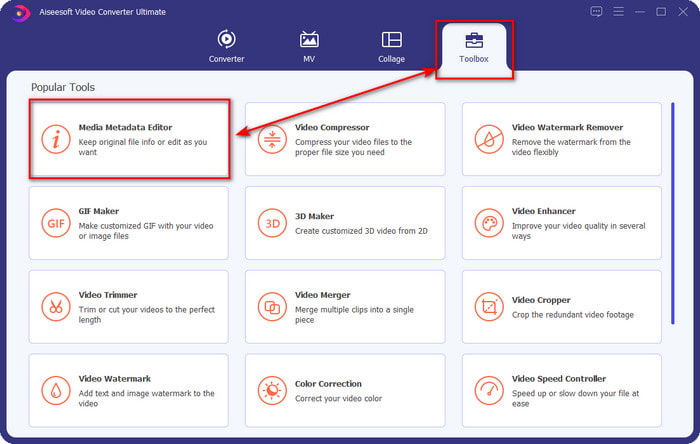
Langkah 2. Setelah anda melancarkan alat tersebut, pergi ke bahagian Toolbox dan cari Media Metadata Editor pada senarai set di bawah.
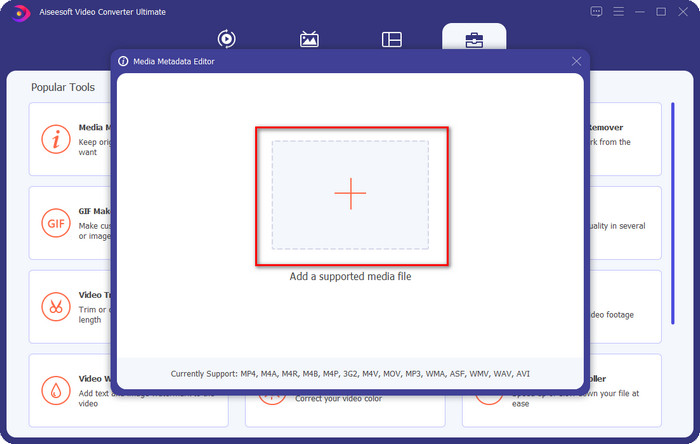
Langkah 3. Untuk menambah fail MKV, klik butang + yang akan dipaparkan pada skrin anda, cari fail .mkv dalam folder dan klik Open untuk meneruskan ke langkah seterusnya.
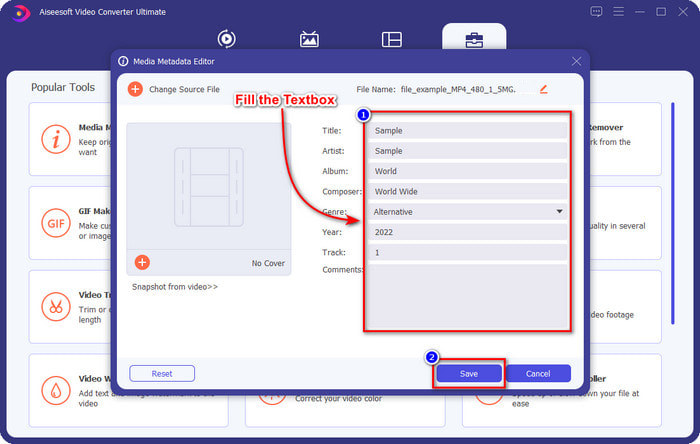
Langkah 4. Pada bahagian ini, anda kini boleh menambah metadata yang anda perlukan pada MKV anda, isikan mengikut kehendak anda, dan klik Save jika semuanya telah siap dan anda sedia untuk menerapkannya. Dengan itu, anda telah menambah tag pada fail MKV anda untuk memudahkan pengecaman kandungan fail tersebut.
Pemain Media VLC – Editor Metadata MKV Percuma
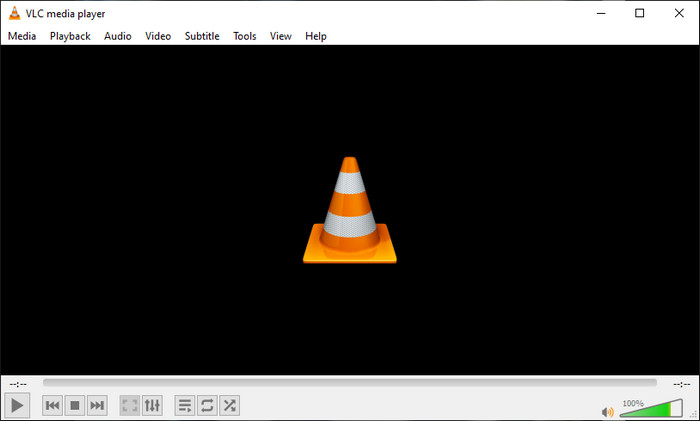
VLC Media Player boleh memainkan dan mengedit tag MKV anda dengan mudah. Alat ini sumber terbuka, jadi anda tidak perlu risau untuk memuat turunnya ke desktop kerana anda boleh menggunakan keseluruhan fungsi alat ini secara percuma, tetapi anda boleh menderma jika mahu. Walaupun alat ini tidak sebaik penyunting metadata lain dalam senarai ini, ia masih dianggap sebagai alat yang boleh diharap untuk digunakan pada peranti anda. Selain itu, anda bebas menambah maklumat asas pada fail MKV anda, sama ada nama pengarang, tajuk, artis, album dan sebagainya. Ikuti langkah berikut dan pelajari cara mengedit metadata MKV menggunakan pemain media ini sebagai penyunting metadata.
Langkah 1. Muat turun dan kemudian buka VLC pada desktop anda.
Langkah 2. Pergi ke Tools dan klik Media Information. Jika anda mahu cara yang lebih mudah, anda boleh menggunakan kekunci pintas dengan menekan CTRL + I. Apa sahaja cara yang anda pilih, fungsinya tetap sama.
Langkah 3. Taip maklumat yang anda perlukan dan klik Close untuk menyimpan metadata secara automatik.
GUI MKVToolNix – Editor Tag MKV khusus
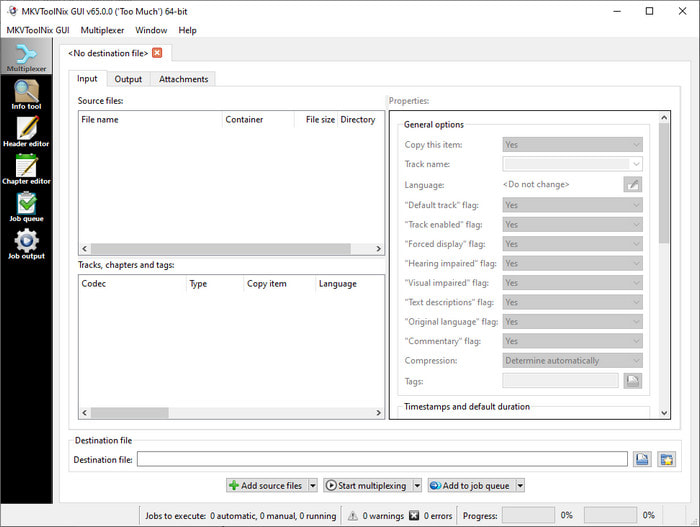
MKVToolNix GUI ialah penyelesaian khusus untuk fail MKV; walaupun anda boleh memuat naik format lain, perisian akan menukarkan formatnya kepada MKV. Alat ini dikenali sebagai penyelesaian sehenti berkaitan MKV kerana ia menyokong set alat, yang bermaksud anda boleh mendapatkan fungsi lain selain penyuntingan metadata. Dengan GUI yang ringkas, tidak banyak yang perlu dipelajari tentang cara menggunakannya; secara asasnya, anda boleh menguasai cara menggunakannya dalam beberapa minit. Walaupun alat ini ringkas, sesetengah pengguna yang sudah biasa menggunakan penyunting metadata yang lebih mantap membandingkan GUI-nya dengan yang lain dan mengatakan bahawa alat ini tidak cukup intuitif bagi mereka. Walau apa pun yang dikatakan, tidak dinafikan lagi bahawa alat ini masih boleh membantu kita mempelajari cara menukar tajuk fail MKV.
Langkah 1. Muat turun perisian ke desktop anda, bukanya, klik Add Source File dan cari fail MKV dalam folder.
Langkah 2. Tekan Output dan tukar metadata di sini.
Langkah 3. Jika anda telah melakukan semua ini, anda kini boleh menyimpannya dengan mengklik Start Multiplexing.
Bahagian 2. Soalan Lazim tentang Editor Metadata MKV
Bolehkah saya menukar VOB kepada MKV?
Anda boleh menukar VOB ke MKV dengan mudah dengan mengklik pautan ini, dan satu tab baharu akan dibuka yang akan terus membantu anda menukar VOB ke MKV. Jika anda mahukan lebih banyak maklumat tentang VOB dan MKV, inilah artikel yang sesuai untuk anda.
Mengapakah fail MKV saya mempunyai saiz fail yang lebih besar?
Sebab utama fail MKV anda besar ialah format ini bukan sahaja mengandungi video dan audio. Ia juga mengandungi pelbagai elemen seperti sari kata, metadata, kadar bit berubah-ubah, dan banyak lagi. Jadi apakah yang perlu anda lakukan jika anda mahu memampatkan fail MKV supaya menjadi lebih kecil tanpa merosakkan kualiti? Tidak banyak pemampat video yang benar-benar boleh dipercayai, dan kerana itu, kami telah membuat beberapa kajian untuk membantu anda memampatkan MKV tanpa menurunkan kualiti dengan mudah.
Apakah kelemahan format MKV?
Walaupun format fail diketahui, sesetengah pemain media dan editor masih boleh mengendalikan format kerana isu codec dan elemen. Selain itu, format ini mempunyai saiz yang besar, dan tidak semua perisian menyokong memuat naik saiz fail yang besar kerana mengimport dan mengeksportnya akan memakan banyak masa. Saiz fail juga akan meningkat kerana ia adalah sebahagian daripada fail, sama seperti format lain yang telah anda tambahkan metadata. Walaupun ia mempunyai kelemahannya, ia masih berdaya saing mengenai penyimpanan fail media dan memastikannya selamat untuk tujuan masa hadapan.
Kesimpulannya
Bukankah ia menakjubkan? Apakah yang boleh ditawarkan oleh ketiga-tiga perisian desktop ini kepada anda? Yang satu lagi ialah pemain media, manakala yang satu lagi ialah editor khusus untuk MKV, tetapi alat manakah yang patut anda gunakan? Jika anda mahukan yang terbaik, kami dengan senang hati membawakan alat muktamad kepada anda. Mempelajari cara mengedit metadata MKV dengan FVC Video Converter Ultimate menjadi mudah dan berkesan. Jadi, apa tunggu lagi? Sediakan alat itu dalam jangkauan anda dan gunakannya untuk membetulkan metadata pada fail MKV anda seperti profesional dengan beberapa klik sahaja.
-
 2 Cara Terbaik untuk Mengedit Metadata OGG yang Perlu Anda Cuba secara Percuma
 Perlu mengedit metadata OGG? Nah, anda boleh mengendalikan penyuntingan tag dengan mudah dengan menggunakan perisian yang betul. Jika anda tidak membaca artikel ini adalah satu kemestian.
-
 Gambaran Keseluruhan Mutlak tentang Editor Metadata Pentaho [Dikemas kini 2022]
 Tidak menemui artikel yang boleh dipercayai tentang Pentaho Metadata Editor? Nasib baik, kami menyemak sendiri alat tersebut untuk memberikan fakta yang anda akan ketahui tentang alat tersebut.
-
 Petua & Trik tentang Editor Metadata VLC yang Mesti Anda Ketahui pada 2022
 Adakah anda mahu menggunakan VLC sebagai editor metadata? Dalam kes ini, anda boleh membaca artikel ini kerana kami menyediakan ulasan yang tidak berat sebelah terhadap editor metadata VLC.
