


 Video Converter Ultimate
 Perakam Skrin
 Pembaikan Video
 Muat Turun Selamat
Cara Mengurangkan Saiz Fail SWF Dalam Talian Tanpa Pemain Flash
SWF adalah format fail Adobe Flash yang digunakan untuk streaming melalui Internet. Sama ada anda memuat turun fail SWF atau ingin memuat naik video SWF dalam talian, saiz fail SWF yang besar menarik garis keras.
Tetapi kelebihannya ialah anda boleh memampatkan fail SWF untuk menyelesaikan masalah ini.

Pada mulanya, pemain SWF rasmi, Adobe Flash Player, dapat memampatkan fail SWF dengan mengubah kadar bit dan resolusi, tetapi ia tidak lagi disokong setelah 31 Disember 2020.
Jangan risau, anda mempunyai pilihan!
Catatan ini berkongsi satu pemampat fail SWF dalam talian percuma untuk membantu anda mengurangkan saiz video SWF menjadi lebih kecil dengan mudah pada PC dan Mac.
Bahagian 1. Pemampat Fail SWF Dalam Talian Terbaik
Alat yang baik adalah perkara penting. Untuk memampatkan fail SWF, pemampat fail SWF adalah alatnya.
Pemampat Video Dalam Talian Percuma ialah alat percuma untuk mengurangkan saiz fail SWF secara dalam talian. Tanpa pendaftaran, anda boleh melengkapkan proses pemampatan fail SWF dengan beberapa klik mudah. Ia boleh memampatkan sepanduk Flash, tayangan slaid, animasi, permainan, filem dan sebagainya, untuk menjadikan fail SWF lebih kecil dengan mudah. Selain itu, pemampat SWF dalam talian ini boleh:
- 1. Kurangkan saiz fail SWF hingga 95% dengan kehilangan kualiti yang kurang atau sifar.
- 2. Memampatkan lebih daripada 300 format video seperti SWF, MP4, MOV, AVI, WebM, MKV, dll.
- 3. Bebas memampatkan dan menukar format video tanpa tanda air.
- 4. Sokong resolusi 1080p HD, 720p HD, dan video lain.

Kami di sini untuk membimbing anda bagaimana memampatkan fail SWF di bahagian seterusnya.
Bahagian 2. Cara Memampatkan SWF Dalam Talian (100% Percuma)
Proses memampatkan fail SWF secara dalam talian dapat dilakukan dalam beberapa langkah mudah.
Langkah 1. Tambah fail SWF
Buka pemampat fail SWF dalam talian percuma ini melalui pelayar anda pada komputer Windows atau Mac. Klik butang Add Files to Compress, dan anda akan digesa untuk memuat turun serta memasang pelancar pemampat.
Selepas pemasangan yang berjaya, tetingkap sumber terbuka akan muncul, dan anda harus mencari fail SWF di komputer anda dan menambahkannya ke alat ini.

Langkah 2. Pilih kadar dan saiz pemampatan
Di sebelah Size, anda boleh melihat saiz fail SWF semasa. Klik ikon anak panah ke bawah atau ke atas untuk melaraskan saiz fail SWF keluaran. Sebagai alternatif, anda boleh menggerakkan peluncur di sebelah kanan untuk mengurangkan saiz fail dengan menentukan kadar pemampatannya.
Di sebelah Format, anda boleh memilih format lain seperti MP4, MOV, MKV, AVI, FLV dan lain-lain untuk menukar SWF kepada format lain.
Pilihan keluaran dengan Resolution yang lebih rendah juga akan membantu menjadikan saiz fail SWF lebih kecil.
Walaupun anda memampatkan fail SWF ke ukuran yang lebih kecil, bitrate fail ini akan menjadi lebih rendah sesuai dengan layar paparan.
Langkah 3. Mampatkan SWF
Klik Compress untuk memilih lokasi destinasi bagi menyimpan fail SWF yang telah dimampatkan dan mula mengurangkan saiz fail SWF.
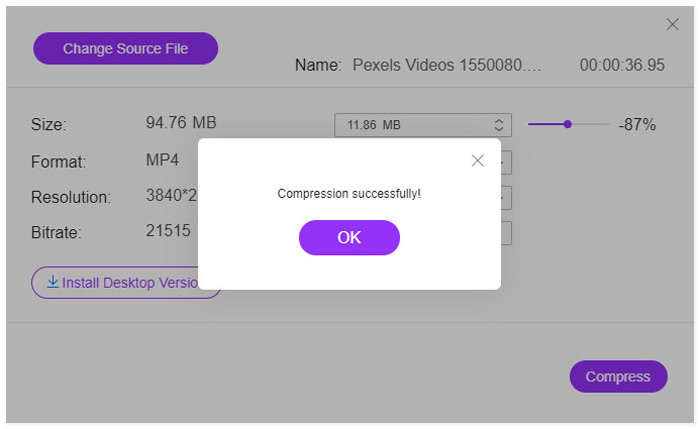
Setelah proses pemampatan selesai, anda akan melihat tetingkap pop timbul. Kemudian anda dapat mencari fail yang dimampatkan dengan menavigasi lokasi yang anda tetapkan.
Untuk penjelasan: Pemampat SWF dalam talian percuma ini akan menukar fail SWF kepada format lain selepas pemampatan. Jika anda mahu memampatkan fail SWF sambil mengekalkan format asal atau memampatkan video 4K, anda disyorkan memuat turun versi desktop pemampat SWF, Video Converter Ultimate.
Muat Turun PercumaUntuk Windows 7 atau lebih baharuMuat Turun Selamat
Muat Turun PercumaUntuk MacOS 10.7 atau lebih baharuMuat Turun Selamat
Bahagian 3. Soalan Lazim Mengurangkan Saiz Fail SWF menjadi Lebih Kecil
Program apa yang akan membuka fail SWF?
Pada asalnya, fail SWF boleh dibuka melalui pemain rasminya pada pelayar, Adobe Flash Player. Namun, Adobe Flash Player telah dihentikan mulai Januari 2021. Pemain SWF lain seperti VLC, Windows Media Player dan lebih banyak perisian pemain SWF boleh membuka fail SWF.
Adakah SWF dimampatkan?
SWF menggunakan pemampatan tanpa kerugian untuk menjaga kualiti gambar, dan itu berarti video yang disimpan dalam fail SWF tidak dikompresi, dan ukuran file besar.
Mengapa Adobe Flash dimatikan?
Piawaian terbuka seperti HTML5, WebGL, dan WebAss Assembly terus matang selama bertahun-tahun dan berfungsi sebagai alternatif yang sesuai untuk kandungan Flash. Juga, vendor penyemak imbas utama mengintegrasikan piawaian terbuka ini ke dalam penyemak imbas mereka dan menghentikan kebanyakan pemalam lain (seperti Pemain Flash). Oleh itu, Adobe memutuskan untuk mematikan Adobe Flash Player.
Kesimpulannya
Fail SWF adalah tanpa hilang data (lossless) dan mengambil lebih banyak ruang. Sama ada anda mahu menjimatkan lebih banyak ruang pada komputer untuk muat turun SWF, atau memuat naik fail SWF ke dalam talian dengan jayanya, memampatkan fail SWF menjadi isu biasa. Catatan ini menunjukkan tutorial untuk mengurangkan saiz fail SWF secara percuma dengan pemampat SWF dalam talian dalam 3 langkah. Tiada tera air atau pendaftaran diperlukan dan anda boleh melengkapkan proses pemampatan dengan cepat.
Sekarang giliran anda.
Adakah anda memahami kaedah mengurangkan saiz video SWF?
Atau adakah anda mempunyai cadangan lain untuk menyelesaikan pemampatan SWF?
Beritahu saya dengan meninggalkan komen anda di bawah.
-
 Cara Memampatkan Video MP4 ke Saiz Lebih Kecil
 Video MP4 terlalu besar untuk dimuat naik? Ingin mengurangkan saiz video? Berikut adalah 3 kaedah yang cekap untuk memampatkan fail MP4 ke saiz yang lebih kecil tanpa had.
-
 2 Cara Memampatkan Video untuk YouTube
 Video YouTube besar dan lambat dimuat naik? Cukup tekan saiz fail video menjadi lebih kecil untuk YouTube dengan 2 cara dalam talian dan di komputer.
-
 Cara Percuma Memampatkan Video untuk Facebook dari GB ke MB
 Sekiranya anda dilarang memuat naik video besar di Facebook, jangan risau. Cukup tekan ukuran video besar dari GB hingga MB dengan pemampat video percuma.
