


 Video Converter Ultimate
 Perakam Skrin
 Pembaikan Video
2 Kaedah Memampatkan Video untuk Instagram Dalam Talian dan di Desktop
Bagaimana memampatkan video untuk Instagram? Adakah anda putus asa ketika mengetahui bahawa video yang anda kerjakan berjam-jam tidak dapat dimuat naik ke Instagram kerana ukurannya yang besar? Jangan panik. Anda baru sahaja sampai di tempat yang betul. Artikel ini akan memberi anda 2 cara termudah untuk memampatkan video untuk memuat naik Instagram.

Bahagian 1: Mengapa Saya Perlu Memampatkan Video untuk Instagram
Seperti yang disebutkan di atas, lebih banyak fail video tidak dapat diunggah ke Instagram. Anda perlu memampatkan video Instagram ke fail MP4 di bawah 20MB. Kadar bingkai video mestilah 30 bingkai sesaat, dengan kadar bit 3500KBPS. Ukuran video biasanya lebar 1080 piksel. Resolusi 4: 5 disyorkan. Lebih-lebih lagi, video anda mestilah melebihi 3 saat dan di bawah 60 saat.
Bahagian 2: Cara Memampatkan Fail Video untuk Instagram Dalam Talian
FVC Free Video Compressor ialah alat dalam talian pintar untuk memampatkan video dalam pelbagai format. Anda tidak perlu memuat turun program ini. Keseluruhan proses pemampatan diselesaikan pada halaman web. Dengannya, anda boleh mengecilkan video anda kepada sebarang saiz yang anda mahu.
Ciri Utama:
- 1. Memampatkan pelbagai video besar seperti MKV, FLV, WMV, AVI, TS, MOV, dll.
- 2. Antara muka yang mudah digunakan untuk pemula untuk menyesuaikan tetapan
- 3. Bekerja pada kelajuan 30x lebih cepat dan jangan tinggalkan tanda air pada output
- 4. Kendalikan video 4K Ultra HD tanpa kehilangan kualiti
Berikut adalah langkah-langkah untuk memampatkan fail video untuk Instagram dalam talian dengan alat ini:
Langkah 1: Muatkan FVC Free Video Compressor dalam pelayar anda.
Klik butang Add Files to Compress di bahagian tengah. Untuk penggunaan kali pertama alat ini, anda perlu memuat turun fail bernama fvc-launcher dan menjalankannya sebelum meneruskan. Selepas itu, klik butang Add Files to Compress sekali lagi. Kemudian anda boleh memilih fail video yang anda mahu mampatkan untuk Instagram.

Langkah 2: Sesuaikan tetapan video yang anda mahu mampatkan untuk Instagram
Saiz: Anda boleh melaras bar peratusan dengan menyeretnya. Untuk memampatkan video bagi Instagram, pastikan saiz keluaran ialah di bawah 20 MB. Perubahan pada saiz keluaran akan menjejaskan Bitrate keluaran pada masa yang sama.
Format: Pada masa ini, anda boleh menukar video kepada 12 format termasuk MP4, MKV, AVI, FLV dan lain-lain. Untuk memampatkan video bagi Instagram, cuma pilih format MP4.
Resolusi: Anda dibenarkan menurunkan resolusi kepada tahap yang lebih rendah seperti 320*240, 480*360 dan sebagainya. Atau anda boleh mengekalkan resolusi asal dan memampatkan video untuk Instagram hanya dengan mengurangkan bitrate.

Langkah 3: Mula memampatkan dan tunggu alat ini menyiapkan tugas.
Klik butang Compress berwarna ungu dan pilih destinasi di mana anda mahu menyimpan video keluaran. Jangan tutup pelayar atau halaman web semasa video sedang diproses. Jika tidak, anda perlu memampatkan video untuk Instagram dari awal sekali lagi. Kelajuan proses sangat bergantung pada perkakasan anda.
Bahagian 3: Cara Memampatkan Fail Video untuk Instagram di Desktop
Selain saiz, panjang video anda hendaklah 3 hingga 60 saat. Namun, fungsi alat dalam talian ini agak ringkas kerana ia berfungsi pada halaman web. Anda tidak disokong untuk memotong (trim) video dengan alat dalam talian ini. Alat apa yang boleh anda gunakan jika anda mahu bukan sahaja memampatkan tetapi juga menyunting video? Aiseesoft Video Converter Ultimate mungkin pilihan terbaik anda.
Ciri Utama:
- 1. Sesuai dengan lebih daripada 1,000 format, termasuk WMA, MP4, AVI, MOV, WMV, MP3, FLAC, dll.
- 2. Teknologi percepatan perkakasan yang maju memastikan kelajuan yang belum pernah terjadi sebelumnya
- 3. Potong dan gabungkan klip video dengan pelangi penapis dan kesan asas.
- 4. Alat Pembuat 3D membolehkan anda menikmati video 3D yang luar biasa dalam gelas 3D anda
- 5. Buat video skrin split hampir profesional
- 6. Empat cara terpadu untuk meningkatkan video anda
Muat Turun PercumaUntuk Windows 7 atau lebih baharuMuat Turun Selamat
Muat Turun PercumaUntuk MacOS 10.7 atau lebih baharuMuat Turun Selamat
Langkah-langkah untuk memampatkan video untuk Instagram dengan Video Converter Ultimate:
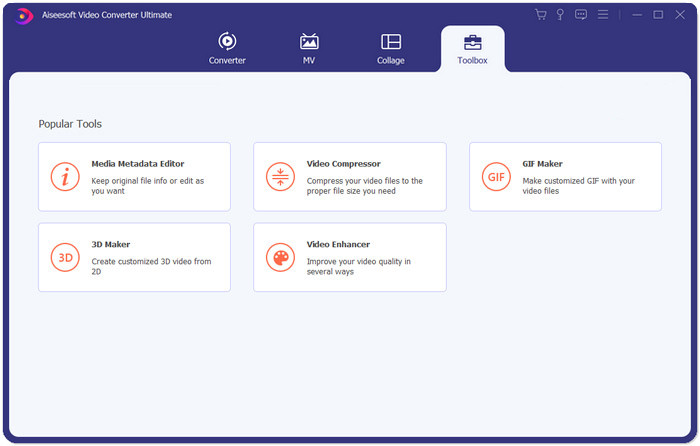
Langkah 1: Muat turun, pasang dan lancarkan Aiseesoft Video Converter Ultimate. Tukar ke tab Toolbox dan klik butang “+” untuk menambah video yang anda mahu mampatkan untuk Instagram.
Langkah 2: Selepas menambah video, anda akan berada pada antara muka Video Compressor. Seret bar saiz untuk melaras saiz fail keluaran dan pilih resolusi serta format keluaran yang anda inginkan.
Nota: Anda hanya boleh menukar bitrate secara tidak langsung dengan mencuba pelbagai gabungan resolusi dan saiz keluaran.
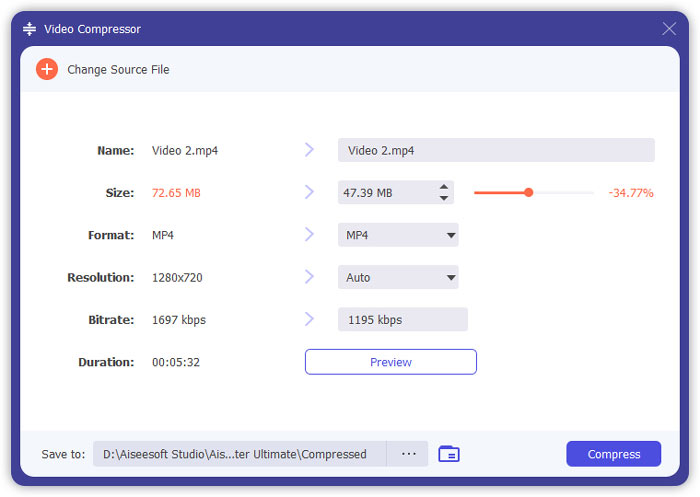
Langkah 3: Klik butang Compress di bahagian bawah kanan untuk mula memampatkan video untuk Instagram.
Bacaan Lanjutan:
Cara Memampatkan Video Secara Dalam Talian untuk WhatsApp (100MB/500MB/1GB…)
Cara Memampatkan Video untuk E-mel dan Menjadikannya Kurang daripada 25MB
Bahagian 4: Soalan Lazim Memuat naik Video ke Instagram
Apakah syarat muat naik video Instagram?
Format: MP4
Codec: H.264
Bitrate: di bawah 3500 kbps
Kadar bingkai: kurang daripada 30 bingkai sesaat.
Apakah nisbah aspek terbaik untuk video Instagram?
Nisbah aspek terbaik ialah 9:16 yang juga merupakan nisbah standard bagi kebanyakan telefon pintar.
Format audio apa yang harus digunakan oleh video saya untuk memuat naik Instagram?
Audio AAC.
Kesimpulannya
Dari artikel ini, anda mempunyai dua alat berguna untuk memampatkan video anda untuk Instagram. Mereka adalah FVC Free Video Compressor dan Video Converter Ultimate. Apabila anda memampatkan video untuk Instagram, jangan lupa untuk memastikan video anda berdurasi 3 hingga 60 saat dan di bawah 20 MB.
-
 Cara Terbaik untuk Mengurangkan Saiz Video Vimeo untuk Muat Naik
 Dalam catatan ini, kami akan menunjukkan kepada anda cara memampatkan fail video anda untuk memuat naik fail di Vimeo, bersama dengan panduan yang mungkin anda perlukan untuk pemampatan video dan audio.
-
 Cara Mengurangkan Ukuran Fail Video untuk YouTube dalam 2 Cara
 Video YouTube besar dan lambat dimuat naik? Cukup tekan saiz fail video menjadi lebih kecil untuk YouTube dengan 2 cara dalam talian dan di komputer.
-
 Cara Memampatkan Video untuk Facebook Percuma & Dalam Talian
 Sekiranya anda dilarang memuat naik video besar di Facebook, jangan risau. Cukup tekan ukuran video besar dari GB hingga MB dengan pemampat video percuma.
