


 Video Converter Ultimate
 Perakam Skrin
 Pembaikan Video
 Muat Turun Selamat
Pemampatan VOB: Cara Mengurangkan Ukuran Fail VOB Secara Dalam Talian secara Percuma
Fail VOB ialah fail data filem daripada cakera DVD, yang biasanya disimpan dalam folder VIDEO_TS di root DVD. Namun, fail VOB selalunya agak besar dan jika anda perlu menyimpannya ke peranti storan yang kecil atau menghantarnya melalui e-mel, anda perlu mengecilkan saiz VOB tersebut. Jadi jika anda ingin memampatkan fail VOB atau memampatkan fail VOB kepada format MP4, teruskan membaca untuk mengetahui penyelesaian terbaik.

Bahagian 1. Cara termudah untuk Memampatkan dan Menukar Fail VOB ke MP4 Dalam Talian
Jika anda tidak mahu memuat turun aplikasi pada komputer sendiri, terdapat banyak laman web yang membolehkan anda memuat naik fail video VOB dan memampatkannya untuk anda. Sesetengah perkhidmatan ini memerlukan pendaftaran, dan ada yang akan meletakkan tera air pada video anda. Di sini kami ingin mengesyorkan Free Video Compressor yang benar-benar percuma dan tidak memerlukan apa-apa selain fail video. Anda hanya perlu memuat naik video anda, laraskan beberapa pilihan, dan semuanya siap. Selain memampatkan video VOB, anda juga boleh menggunakannya untuk memampatkan MP4, AVI, WMV, MOV dan banyak lagi format fail video yang jarang digunakan.
Langkah 1. Masuk ke laman pemampat video dalam talian
Pautan di bawah akan membawa anda ke tempat yang betul:
Pergi ke laman web pemampat video dalam talian
Langkah 2. Muat naik fail anda
Cari dan klik butang Add Files to Compress. Kali pertama anda menggunakan alat ini, anda perlu memasang pelancar (launcher)nya. Kemudian, pilih fail VOB anda dari komputer dan tekan Open untuk memuat naiknya.

Langkah 3. Laraskan pilihan pemampatan
Untuk menjadikan fail anda lebih kecil, anda dapat mengubah ukuran video anda, mengubah resolusi, menyesuaikan bitrate, atau menukar ke format video lain, dll. Sebagai contoh, anda boleh memampatkan dan menukar fail VOB ke format MP4 untuk mengurangkan ukuran fail.

Langkah 4. Kemudian, klik butang Compress untuk memulakan proses. Apabila pemampatan fail selesai, alat tersebut akan menyimpannya ke komputer anda secara automatik.

Selain itu, anda boleh menggunakan alat dalam talian ini untuk menyelesaikan masalah pemampatan video yang lain. Cukup periksa artikel berikut:
Cara Memampatkan Fail Video AVCHD Secara Percuma
Cara Memampatkan Video Dalam Talian untuk WhatsApp
Bahagian 2. Dua Lagi Pemampat Video Dalam Talian untuk Membuat Fail VOB Anda Lebih Kecil
Penjepit klip
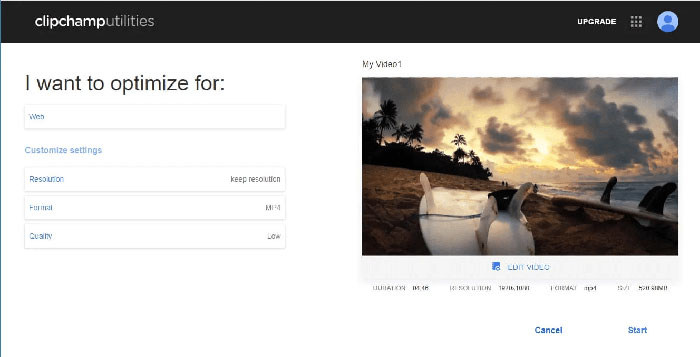
Clipchamp adalah alat penyuntingan video berasaskan web yang membolehkan anda menukar, mengedit, dan memampatkan fail video anda. Ini membolehkan anda memilih format (MP4, MOV atau AVI), ukuran fail video, dan banyak lagi sebelum memampatkan fail VOB anda. Setelah pemampatan selesai, anda boleh memuat turun fail ke komputer anda atau hanya berkongsi dengan orang lain. Perhatikan bahawa versi percuma Clipchamp akan memberi tanda air pada video yang anda kompres pada bingkai awal dan akhir. Sekiranya anda ingin menghilangkan tanda air, anda perlu membeli perkhidmatan tersebut.
Video
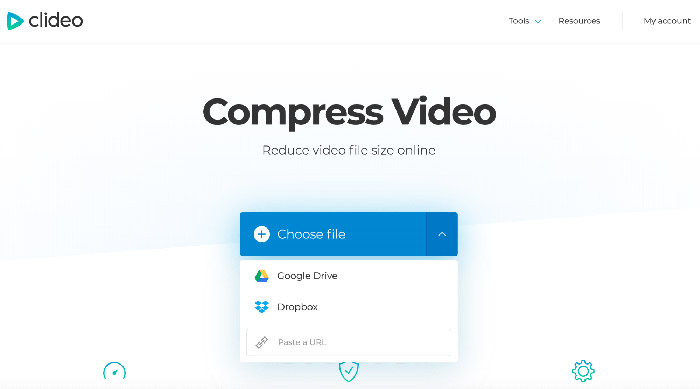
Clideo adalah satu lagi aplikasi penyuntingan video dalam talian yang membolehkan anda mengurangkan saiz video dengan mudah. Anda boleh memuat naik fail VOB dari komputer, Google Drive, Dropbox atau melalui URL, dan kemudian Clideo akan mengkonfigurasi semua parameter pemampatan secara automatik. Walau bagaimanapun, ia percuma untuk fail sehingga 500 MB. Sekiranya fail anda lebih besar, anda perlu menaik taraf ke Clideo Pro dengan bayaran bulanan $6.
Bahagian 3. Soalan Lazim Pemampatan VOB
Bagaimana memampatkan fail VOB pada Mac?
Alat dalam talian yang disebutkan di atas berfungsi pada mana-mana sistem operasi, jadi anda boleh menggunakan salah satunya untuk menjadikan fail VOB anda lebih kecil pada Mac anda.
Bagaimana saya memampatkan video VOB untuk e-mel?
Terdapat pelbagai penyelesaian yang berkesan untuk penukaran video bagi e-mel, dan anda boleh membaca Cara Memampatkan Video untuk E-mel untuk mengetahui lebih lanjut.
Bagaimana cara menukar VOB ke MP4 tanpa kehilangan kualiti?
Anda boleh mencuba penukar VOB ke MP4 dalam talian seperti Free Online Video Converter, yang membolehkan pengguna menukar sebarang fail daripada VOB ke MP4 dengan cepat tanpa menjejaskan kualiti. Ia juga boleh dengan mudah menukar MP4 ke VOB.
Kesimpulannya
Ini adalah pilihan utama kami untuk pemampatan fail VOB. Kami harap anda dapat memperoleh ukuran fail VOB anda yang berpuas hati dengan menggunakan salah satu platform di atas. Platform mana yang anda suka dan mengapa? Jangan ragu untuk berkongsi pandangan anda di bahagian komen di bawah.
-
 Cara Memampatkan Fail MOV pada Windows, Mac, iPhone dan Android
 Artikel ini menunjukkan cara memampatkan video QuickTime MOV pada telefon atau komputer anda secara terperinci. Sekiranya video MOV anda terlalu besar untuk dihantar, dikongsi atau disimpan, anda boleh mendapatkan 4 penyelesaian yang boleh dilaksanakan di sini.
-
 Memampatkan Fail AVI untuk Mendapatkan Ukuran Fail Lebih Kecil tanpa Kehilangan Kualiti
 Baca dan dapatkan 3 cara percuma untuk memampatkan fail AVI di komputer anda. Anda boleh mengurangkan saiz fail video AVI anda tanpa kehilangan kualiti. Saiz video AVI anda sekecil yang anda bayangkan.
-
 Pemampatan GIF - Cara Memampatkan GIF Animasi ke dalam Ukuran Fail Kecil
 Inilah 2 cara mudah untuk memampatkan GIF di komputer atau telefon bimbit anda. Anda boleh menggunakan FVC Free Online Video Compressor dan Photoshop mengurangkan saiz fail GIF dalam pelbagai aspek.
