


 Video Converter Ultimate
 Perakam Skrin
 Pembaikan Video
[Terbukti] Cara Mengedit Sifat Fail WAV pada Windows 10/11 & Mac Dengan Mudah
If you want to store audio bitstream on PC, then without a doubt, WAV is the standard audio format you must use. As an imitation of RIFF, WAV files have their metadata on INFO chunks. Although it can store more than audio, sometimes the data that is on WAV files are inaccurate. So, if the data on your WAV files are wrong, you must use this guide to know how to edit the properties of WAV files on Windows 10/11 and Mac with easy-to-follow detailed steps.

Bahagian 1. Cara Mengedit Sifat fail WAV dengan Alat Terbaik pada Windows
Editor Metadata Terbaik pada Windows & Mac - FVC Video Converter Ultimate
Mempelajari cara mengedit sifat fail WAV pada Windows 10/11 dan Mac bukanlah masalah besar dengan bantuan editor metadata terbaik yang boleh anda muat turun pada platform tersebut. FVC Video Converter Ultimate mempersembahkan penukar terbaik dan salah satu editor metadata terkemuka yang boleh anda gunakan dan muat turun pada desktop anda. Tidak seperti alat lain di pasaran dan senarai ini, alat ini membentangkan editor tag yang berkuasa pada 1000+ fail media, termasuk WAV.
Di samping itu, walaupun anda pernah atau belum berpengalaman mengedit tag metadata; anda boleh memikirkan semuanya dengan cepat dengan menggunakan penukar muktamad. Tiada kerja yang rumit boleh diatasi dengan cepat dengan alat ini, menjadikan perisian itu unik dan berkuasa. Ingin tahu cara menggunakan alat tersebut? Anda boleh mengikuti panduan yang kami tambahkan di bawah dan salin langkah-langkah untuk menyelesaikan tugas dengan jayanya.
Step 1. Please click the download button presented below click the appropriate download button. Then, install and set up the tool next and launch it.
Muat Turun PercumaUntuk Windows 7 atau lebih baharuMuat Turun Selamat
Muat Turun PercumaUntuk MacOS 10.7 atau lebih baharuMuat Turun Selamat
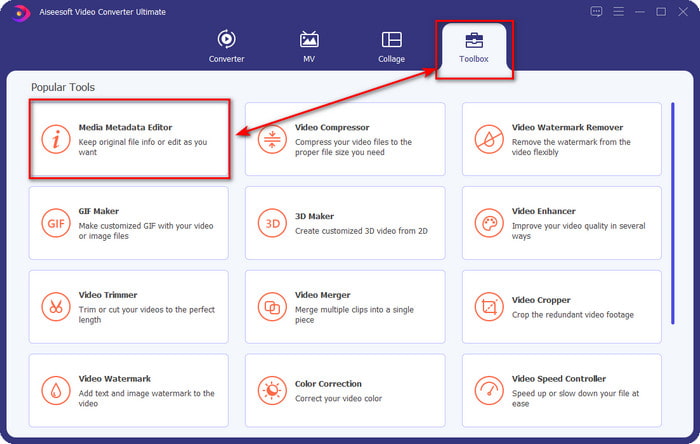
Step 2. Once you've opened the software, you must go now to the Toolbox section, and there the Media Metadata Editor under the setlist below.
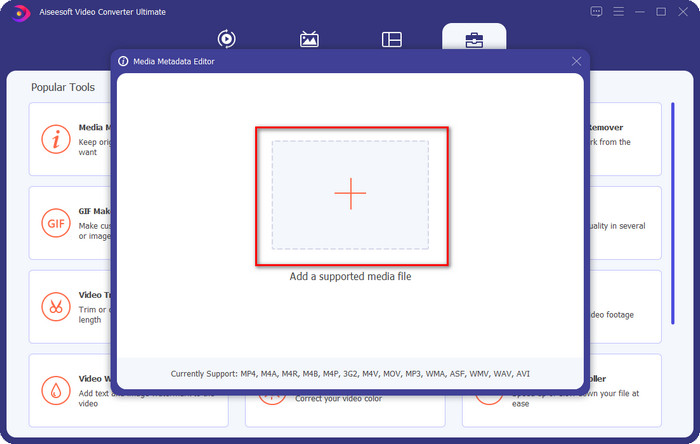
Step 3. Add the file by clicking the + button presented on your screen, find the WAV file you want to add metadata to your computer folder, then press Open.
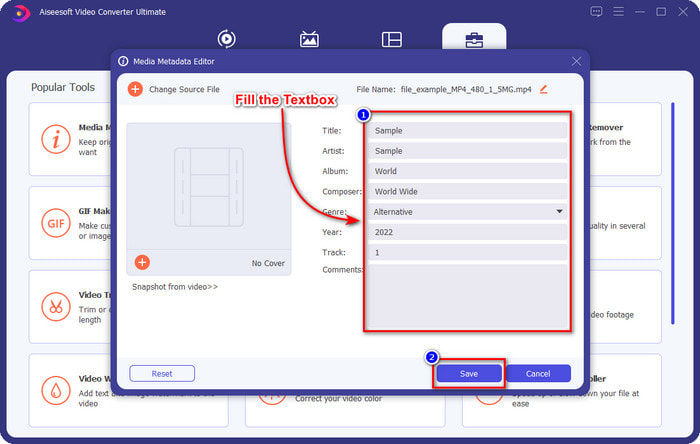
Step 4. Edit or delete the information on the textbox; if you successfully fill them all, you can click Save to apply the changes. And by that, you've learned how to edit tags onWAV files with the help of the ultimate tool.
Keberanian
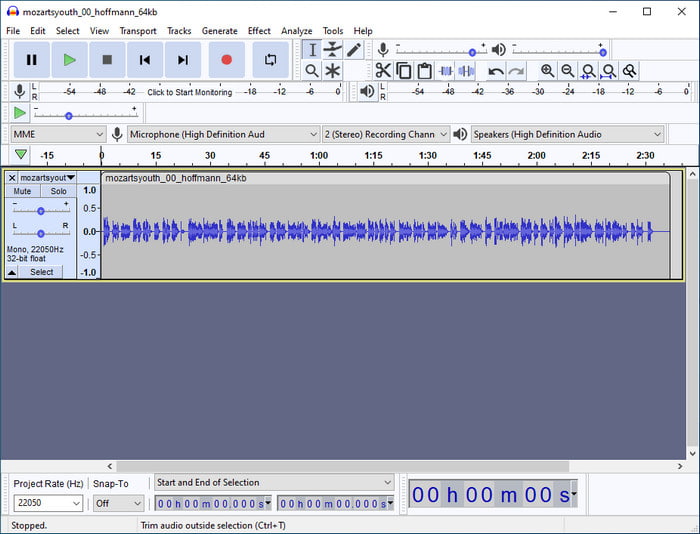
One of the best software you can use to enhance your audio is Audacity. This Windows software presents a powerful enhancer and editor that you would love to use for free. Although it can improve your audio file, it can also change the tags on your audio file if you need it. You can follow the guide below if you want to know how to edit properties of WAV files using the tool.
Step 1. Download the Audacity on Windows, then open it.
Step 2. Then drag and drop the WAV file you want, click Edit, and under it click Metadata.
Step 3. Tap each square under Value to edit the tags of your WAV file, then click OK to apply, click File, and Save Project.
Bahagian 2. Cara Mengedit Sifat fail WAV dengan Perisian Teratas pada Mac
Music Tag Pro
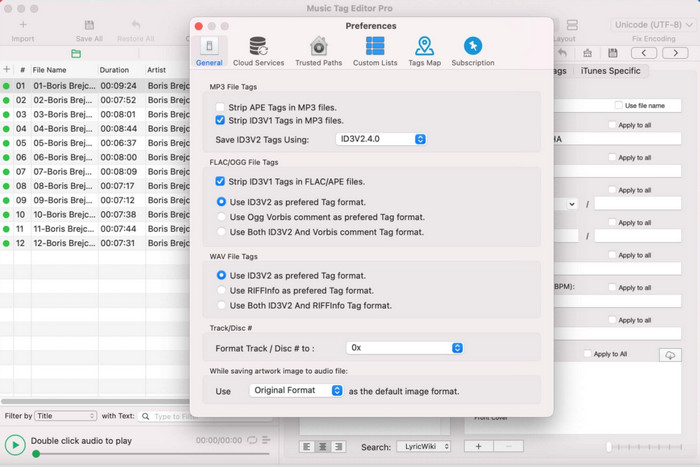
Music Tag Pro is a software you can download on your Mac to edit the audio and video file metadata. It can also bulk edit metadata tags to change the file's metadata efficiently. With the overall performance of the tag editor on Mac, many users enjoy using it and leave a lot of good comments on the Appstore if you take a look. However, the information on your media file is limited, but it is still doable with the tool. If you want to use it, the tutorial will teach you how to edit properties of WAV files on Mac.
Step 1. Search the tool on the Appstore, then download it.
Step 2. Click the Import button to add the WAV files.
Step 3. Click the WAV files, edit the tags on each column, and click Save All if you've done editing the WAV file.
Editor Tag untuk Mac
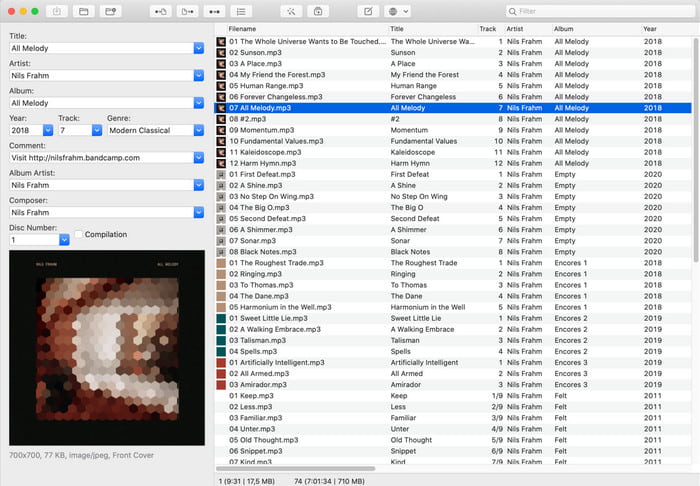
Tag Editor for Mac is a helpful software to add tags to your audio files, such as WAV. With this software, you can easily add the metadata on any audio file without degrading them, like what the ultimate tool can do. Also, this is not only applauded by the users for its tag editing provides and the fast customer service it offers to its customers who need help. If you need a step-by-step tutorial on how to edit properties of WAV files using it, read below.
Step 1. Open your Appstore and download there the Tag Editor; after that, open it.
Step 2. Click the + button above to add the WAV files, and they will automatically be placed on the list below.
Step 3. Click Edit to change the metadata, then to save the changes, click Save.
Bahagian 3. Soalan Lazim tentang Mengedit Sifat pada Fail WAV
Mengapakah kualiti audio WAV berkurangan selepas mengedit metadata?
Sesetengah alatan mungkin mengurangkan kualiti audio fail WAV anda; ramai pengguna mengadu tentang masalah ini walaupun mereka tidak mengedit kualitinya. Jadi, jika anda tidak pasti tentang perisian yang anda gunakan, adalah lebih baik untuk membaca ulasan yang boleh dipercayai untuk menentukan sama ada ia akan kehilangan kualiti audio sebaik sahaja anda mengeksportnya.
Bolehkah saya melihat metadata WAV saya?
Absolutely, yes, you can. Click this link if you don't know how to view your media file's metadata using Windows, Mac, and online services.
Adakah metadata diperlukan pada WAV?
Definitely, yes. Metadata is vital on each media file you have, whether audio or video. So, adding metadata on your WAV file can help you, and the library arranges each WAV file according to the author's name, title, time, date, location, and many more. If you aren't convinced of adding metadata to your WAV file, we suggest reading this article to know more about metadata.
Kesimpulannya
With the help of this article, we now have enough knowledge on how to edit properties of WAV files on Windows 10/11 and Mac. If you are a user of both systems, you can use them for free, but some are paid. Even though whatever you choose, we believe that editing the metadata is easy. But if you want to have a low-cost metadata editor on your side that can edit the WAV tags effortlessly, then you must pick the ultimate tool. The FVC Video Converter Ultimate is the budget-friendly professional metadata editor you can use on both Windows and Mac. You can check out the fantastic features this tool offers if you download it, so click the download button and use it.
-
 Cara Mengedit & Membetulkan Metadata MP4 dengan Cara yang Sangat Bijak
 Adakah anda ingin tahu cara membetulkan metadata MP4? Dalam kes itu, baca keseluruhan kandungan artikel ini untuk mengetahui helah tentang cara membetulkan tag MP4 dengan mudah.
-
 4 Kaedah Terbaik untuk Membetulkan & Mengedit Metadata MP3 pada Windows dan Mac
 Ingin tahu rahsia mengedit metadata MP3 dengan mudah? Blog ini akan mengajar anda teknik yang berbeza dengan alatan berbeza yang anda akses dengan mudah.
-
 2 Cara Terbaik untuk Mengedit Metadata OGG yang Perlu Anda Cuba secara Percuma
 Perlu mengedit metadata OGG? Nah, anda boleh mengendalikan penyuntingan tag dengan mudah dengan menggunakan perisian yang betul. Jika anda tidak membaca artikel ini adalah satu kemestian.
