


 Video Converter Ultimate
 Perakam Skrin
 Pembaikan Video
Semak tentang Kepentingan Editor Tag ID3 pada 2022
Lagu yang anda muat turun di laman web muzik sememangnya mempunyai metadata atau dikenali sebagai tag ID3. Biasanya, semua maklumat yang anda perlukan tentang lagu itu terdapat dalam maklumat tag. Dalam sesetengah keadaan, fail muzik tidak disertakan dengan tag atau mengandungi maklumat yang salah. Dalam situasi sebegini, anda perlu menggunakan perisian yang boleh membantu anda mengendalikan tugas ini dengan mudah. Dalam keadaan ini, kami dengan sukacitanya memperkenalkan kepada anda penyunting tag ID3 terbaik yang boleh anda muat turun pada Windows, Mac, iOS dan Android untuk mengedit tag pada lagu anda.

Bahagian 1. Apa Itu Tag ID3
Tag ID3 adalah penting bagi setiap pengguna yang mahu mengetahui maklumat terperinci tentang sesuatu lagu. Contoh terbaik tag yang boleh anda lihat tanpa membuka paparan tag sebenar ialah nama artis dan tajuk lagu. Walaupun kita tidak menambahkannya secara manual ke dalam fail audio, maklumat itu tetap terbenam untuk membantu kita mengetahui sama ada kita memainkan muzik yang betul atau tidak.
Namun begitu, jika anda tidak mempunyai teg pada lagu atau podcast anda, maka terdapat kemungkinan bahawa fail tersebut akan digempur di seluruh pustaka atau folder di mana ia disimpan. Menambah teg pada fail anda boleh membantu anda menentukan fail dan menyusunnya supaya kelihatan teratur. Jika fail anda tidak mempunyai satu, maka anda mesti menambah data. Pastikan bola bergolek untuk membantu anda mencari editor tag ID3 yang patut anda gunakan yang sesuai dengan keperluan anda.
Tetapi sebelum kita mula, sila sediakan metadata yang ingin anda tambahkan pada fail audio anda; ini termasuk tajuk, pengarang, bab, halaman, ulasan, lirik, dan sebagainya. Selepas membaca ini, anda akan terkejut dengan ulasan kami tentang editor teg teratas yang boleh anda gunakan pada semua peranti.
Bahagian 2. Editor Tag ID3 Terbaik pada Windows/Mac untuk Menukar Metadata dengan Mudah
FVC Video Converter Ultimate – Editor Tag ID3 Terbaik
Salah satu pengetahuan asas yang anda perlu tahu ketika memilih penyunting tag ID3 pada Mac atau Windows ialah ia perlu tepat, mesra pengguna dan mudah diakses; semua ini boleh ditemui pada FVC Video Converter Ultimate. Ia dikenali sebagai penyunting metadata kelas pertama yang mudah dikendalikan walaupun pengguna tidak tahu cara melaraskannya dengan betul. Tidak seperti penyunting tag lain, anda tidak perlu melakukan banyak perkara rumit untuk menambah atau membetulkan tag audio atau video anda. Jadi, jika anda baru dalam bidang mengedit atau membetulkan tag ID3, tanpa ragu-ragu inilah perisian sehenti untuk anda.
Tambahan pula, kami tidak memanggilnya sebagai editor sehenti tanpa sebab; mungkin anda fikir kenapa. Jika kami meneroka lebih lanjut tentang alat tersebut, anda akan melihat bahawa anda boleh melakukan pengeditan video awal dan asas di sini untuk menjadikan video anda kelihatan cemerlang dengan menambahkan kesan dan penapis. Masih terdapat terlalu banyak ciri yang tidak disebut yang boleh anda dedahkan jika anda memuat turun alat tersebut. Tetapi hari ini, kami akan menumpukan pada menggunakan perisian penyuntingan tag ID3 ini untuk membantu anda mengedit dan membetulkan teg lagu anda dengan cepat.
Langkah 1. Mula-mula, muat turun perisian pada sistem pengendalian pilihan anda; terdapat dua pilihan yang tersedia iaitu Windows dan Mac. Seterusnya, pasang ia dengan betul, ikut proses set up, kemudian buka alat tersebut setelah anda selesai semuanya.
Muat Turun PercumaUntuk Windows 7 atau lebih baharuMuat Turun Selamat
Muat Turun PercumaUntuk MacOS 10.7 atau lebih baharuMuat Turun Selamat
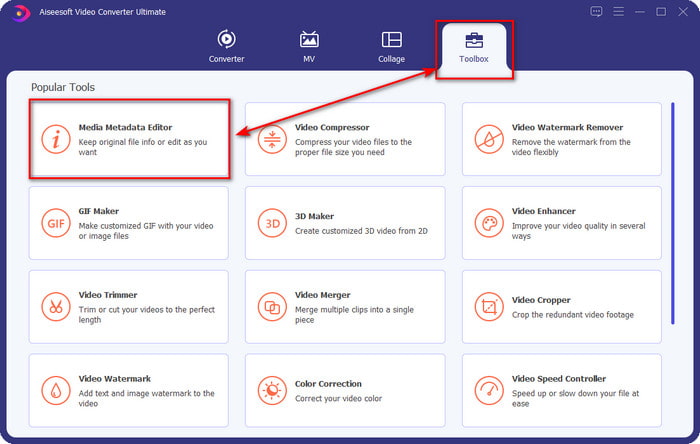
Langkah 2. Setelah anda membuka alat itu, teruskan ke bahagian Toolbox dan buka Media Metadata Editor dengan mengkliknya.
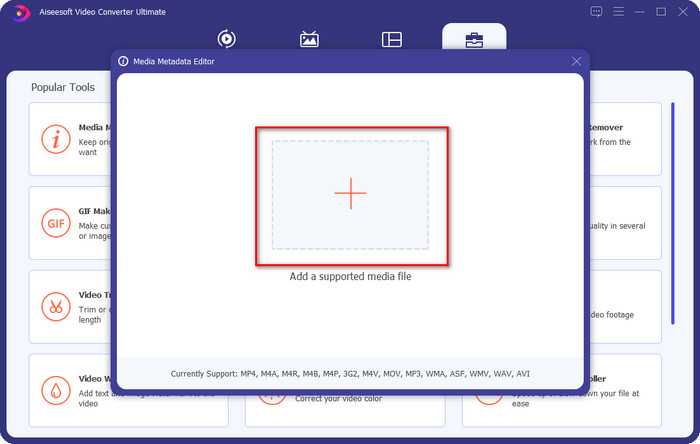
Langkah 3. Tekan ikon + pada tetingkap baharu yang akan dipaparkan pada skrin anda, pilih fail audio yang anda mahu ubah tag ID3-nya, tekan Open untuk memuat naiknya.
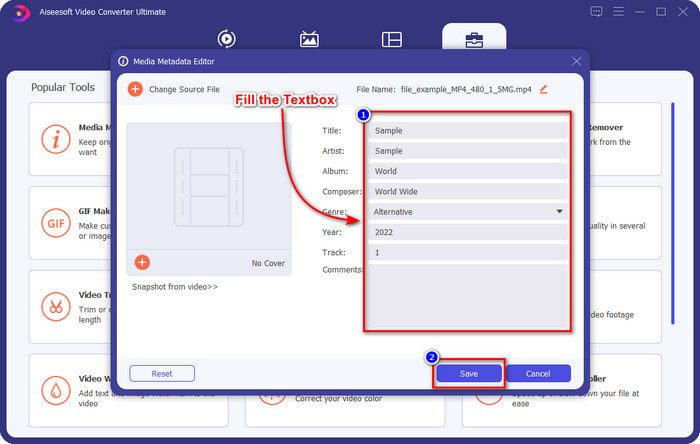
Langkah 4. Kini anda boleh menaip maklumat yang anda ingin tambah pada fail audio anda dan klik Save apabila anda selesai pada setiap kotak teks. Semudah itu, anda telah berjaya menambah tag pada fail audio dengan bantuan perisian ini.
Kelebihan
- Ia menyokong menukar MP3, WMA, WAV dan 1000+ metadata dengan mudah.
- Penukaran ultra pantas dan pecutan perkakasan disokong untuk proses kelajuan kilat.
- Ciri penyuntingan video utama sehingga lanjutan tersedia pada Kotak Alat.
- Ia adalah pilihan pertama berjuta-juta pengguna di seluruh dunia untuk melaksanakan tugas ini.
Keburukan
- Membeli alat itu diperlukan untuk mempunyai semua ciri penyuntingan mewah.
- Tidak tersedia pada Android dan iOS.
Pemain Media VLC
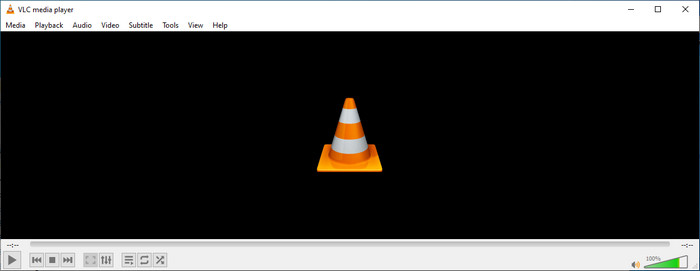
VLC Media Player ialah pemain media bertaraf tinggi yang boleh anda muat turun pada Windows dan Mac. Alat ini boleh membantu anda memainkan video tanpa memuat turun sebarang codec pada sistem anda, tetapi anda juga boleh menggunakannya untuk mengedit tag ID3 fail audio anda. Walaupun alat ini bukan penyunting metadata khusus, ia masih boleh membetulkan tag yang salah. Jadi, jika anda mempunyai alat ini, anda boleh melaraskan metadata lagu anda dengan mudah, tetapi jangan jangkakan terlalu tinggi terhadap alat ini kerana ia tidak sebaik penyunting tag ID3 kelas pertama pada desktop.
Kelebihan
- Pemain media dan editor metadata yang boleh anda gunakan pada mana-mana peranti.
- Ia menyokong format media purata untuk menukar tag.
- GUI adalah jelas dan ringkas.
Keburukan
- Ia bukan editor metadata pro.
- Menyokong fungsi terhad mengenai penyuntingan tag.
Bahagian 3. Editor Teg ID3 3 Teratas pada Peranti Mudah Alih iOS/Android
Editor Tag Muzik Bintang
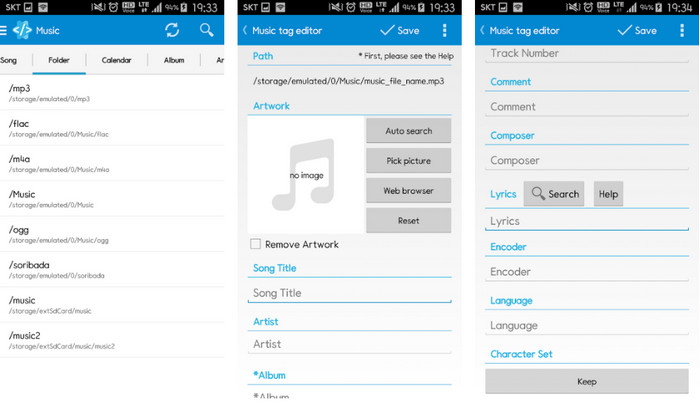
Star Music Tag Editor ialah salah satu penyunting tag ID3 yang paling banyak digunakan pada Android. Apl ini boleh memaparkan pelbagai maklumat tentang muzik anda, dan anda boleh mengubahnya jika perlu. Antara mukanya (GUI) sangat ringkas, jadi anda boleh belajar cara menggunakannya dengan mudah walaupun anda tidak biasa menggunakan alat untuk mengedit tag. Walaupun apl ini bagus, ia masih mempunyai beberapa kekurangan dalam menambah metadata, khususnya pada kulit album. Walaupun masalah mungkin berlaku, ia tetap merupakan penyunting tag yang boleh diharap untuk anda muat turun pada telefon Android anda.
Kelebihan
- Percuma untuk memuat turun editor metadata pada Android.
- GUI ringkas dan mudah difahami.
- Tambahkan tag pada fail audio dengan mudah.
Keburukan
- Ia mempunyai masalah menambah penutup imej pada fail audio.
- Kadangkala pepijat masih berlaku.
Pemain Muzik Awan untuk Awan
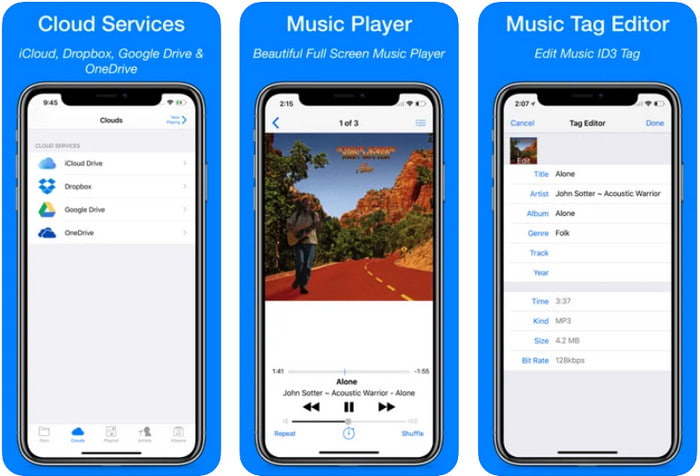
Clouds Music Player for Clouds ialah apl serba guna yang boleh anda muat turun pada peranti iOS anda. Ia boleh mengedit tag ID3 pada iPhone, memainkan muzik dan mencipta nada dering daripada muzik tersebut. Dengan ciri-cirinya, antara mukanya ringkas dan mudah, dan anda boleh mengakses perkhidmatan awan anda melalui apl ini. Walaupun dengan antara muka yang mesra pengguna, sesetengah maklumat yang boleh anda tambah sebagai metadata pada fail audio anda adalah tidak mencukupi, yang bermakna hanya tag asas sahaja yang tersedia untuk diedit. Namun begitu, ia tetap sangat baik untuk dimuat turun jika anda pengguna iOS.
Kelebihan
- Tersedia pada mana-mana peranti iOS untuk dimuat turun.
- Editor muzik pelbagai fungsi dan editor tag.
- Editor metadata intuitif pada iOS.
Keburukan
- Ia tidak menyokong penambahan lebih banyak metadata.
- Menukar pepijat dan isu metadata berlaku tetapi tidak selalunya.
Dash- Apl Infotainment
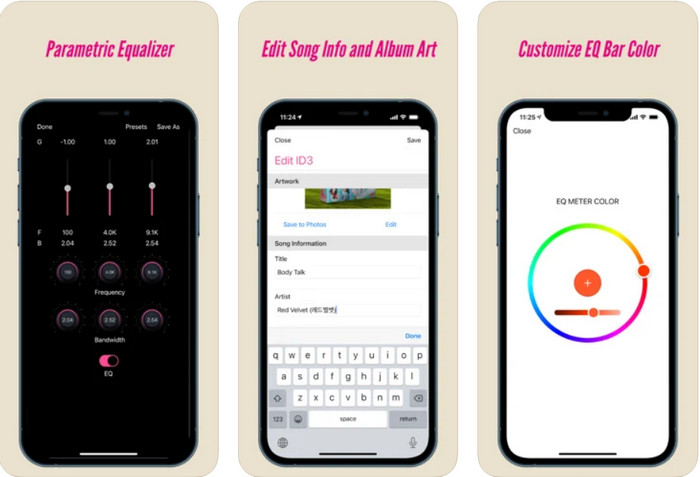
Dash- Infotainment App ialah satu lagi alat yang boleh anda muat turun dan gunakan untuk mengedit tag ID3 pada iPhone apabila anda memerlukannya. Tidak banyak yang perlu anda pelajari sebelum menggunakan apl ini kerana antara mukanya yang ringkas dan tersusun. Anda boleh menggunakan alat ini untuk menukar parameter FLAC dan ALAC anda dengan mudah melalui equalizer yang mudah digunakan. Selain itu, anda boleh melihat kelajuan (tempo) dan kompas (meter/masa) lagu yang anda muat naik di sini. Sama seperti penyunting tag iPhone pertama tadi, anda hanya boleh menambah tajuk, artis dan kulit album di sini, tetapi ingat bahawa format anda mesti FLAC atau ALAC sahaja; jika bukan dalam format ini, maka anda tidak boleh memuat naiknya.
Kelebihan
- Keluk pembelajaran tidaklah terlalu kaku.
- Penyamaan audio yang banyak tersedia.
- GUI tidak banyak, dan tidak kurang.
Keburukan
- Ia hanya menyokong format FLAC dan ALAC.
- Tiada apa-apa yang boleh ditawarkan dalam hal mengedit metadata.
Bahagian 4. Soalan Lazim tentang ID3 Tag Editor
Apakah editor tag ID3 baris arahan terbaik yang boleh saya gunakan?
Jika anda mencari penyunting tag ID3 berasaskan command-line, anda mesti tahu bahawa FFmpeg ialah penyunting command-line. Dengan alat ini, anda boleh menukar format, memusing (rotate), memotong, memangkas dan mengedit tag metadata anda. Jika anda mahu mengetahui lebih lanjut tentang FFmpeg, anda boleh membaca cara menggunakannya dengan mengklik pautan untuk mengedit metadata FFmpeg dengan mudah.
Apakah jenis metadata yang lain?
Terdapat enam jenis metadata: deskriptif, pentadbiran, rujukan atau penerangan, statistik, perundangan dan metadata struktur. Jika anda mahu mengetahui lebih lanjut tentang jenis-jenis ini dan maklumatnya, anda boleh klik pautan ini dan baca lanjut mengenainya.
Adakah mungkin untuk melihat teg tanpa apl?
Ya, sebagai ganti memuat turun perisian, anda boleh menggunakan alat dalam talian untuk melihat tag fail anda. Klik pautan ini untuk melihat metadata pada desktop anda secara dalam talian, tetapi kami juga akan memperkenalkan beberapa alat yang mungkin anda suka untuk dimuat turun.
Kesimpulannya
Dengan maklumat yang kami senaraikan di atas, anda boleh mengedit teg ID3 menggunakan editor yang kami bentangkan di atas, tidak kira peranti yang anda gunakan sekarang. Selain itu, apl dan perisian ini sesuai untuk pengguna yang perlu mengedit metadata mereka. Walaupun alat itu membuka peluang yang sangat baik kepada pengguna untuk mengedit metadata, masih tidak syak lagi bahawa alat muktamad membentangkan cara yang berkesan untuk mengedit teg ID3 pada mana-mana fail muzik. Jika anda ingin mempunyai editor tag ID3 terbaik pada Windows dan Mac, anda boleh memuat turunnya secara langsung dengan mengklik butang muat turun yang dibentangkan di atas, kemudian nikmati kehebatannya.
-
 2 Cara Terbaik untuk Mengedit Metadata OGG yang Perlu Anda Cuba secara Percuma
 Perlu mengedit metadata OGG? Nah, anda boleh mengendalikan penyuntingan tag dengan mudah dengan menggunakan perisian yang betul. Jika anda tidak membaca artikel ini adalah satu kemestian.
-
 Gambaran Keseluruhan Mutlak tentang Editor Metadata Pentaho [Dikemas kini 2022]
 Tidak menemui artikel yang boleh dipercayai tentang Pentaho Metadata Editor? Nasib baik, kami menyemak sendiri alat tersebut untuk memberikan fakta yang anda akan ketahui tentang alat tersebut.
-
 Petua & Trik tentang Editor Metadata VLC yang Mesti Anda Ketahui pada 2022
 Adakah anda mahu menggunakan VLC sebagai editor metadata? Dalam kes ini, anda boleh membaca artikel ini kerana kami menyediakan ulasan yang tidak berat sebelah terhadap editor metadata VLC.
