


 Video Converter Ultimate
 Perakam Skrin
 Pembaikan Video
[Semakan Lengkap] 5 Pemotong MP3 Terkini Tersedia pada Windows/Mac/Dalam Talian
We often wish to cut the audio we listen to and set it as a ringtone, highlighting the vital part or trim the unnecessary detail of the sound. Although there are sets of cutters you can use on all platforms still some aren't trustworthy. So today, we will present to you the cutters we found on the market where you can trust because we try all of these tools ourselves to ensure that it is malware-free and reliable. Before we pick them out, we follow a strictly high standard for the audience who needs a dependable cutter. To make your browsing on the internet at full tilt, we presented below the five MP3 cutters we found ready to take the task of cutting any audio format.

Bahagian 1. 2 Perisian Pemotong MP3 Luar Talian Windows & Mac
1. Video Converter Ultimate – Pemotong MP3 Terbaik [Sangat Disyorkan]
The best audio MP3 cutter in this list is the Video Converter Ultimate, which lets users cut any audio effortlessly. With the help of this ultimate tool, you can trim the sound to remove the unwanted audio, even merge multiple cut audio files into a single file and boost the audio if you feel that the sound is a bit low. Furthermore, this software provides an ultra-fast process while taking care of the original quality of the sounds.
Tidak seperti mana-mana pemotong, alat ini menyokong spektrum format yang luas, bukan sahaja MP3 tetapi juga FLAC, M4R, M4A, OGG, MKA, WAV, WMA dan banyak lagi, dan sememangnya fail audio anda disokong di sini untuk dipotong. Mungkin anda tidak tahu cara memotong fail audio anda dan menggunakannya untuk keperluan anda sekarang. Hari ini adalah hari bertuah anda kerana kami akan mengajar anda cara menggunakan pemotong MP3 dan pembuat nada dering secara percuma dengan mengikuti tutorial di bawah.
Step 1. Download the audio cutter on your desktop by clicking the download button below. Pick whether you are using a Windows or Mac, install the software promptly, and launch it. Remember, you will need to be familiarized with the tool's interface to be easy for you to follow the following steps.
Muat Turun PercumaUntuk Windows 7 atau lebih baharuMuat Turun Selamat
Muat Turun PercumaUntuk MacOS 10.7 atau lebih baharuMuat Turun Selamat
Step 2. Drag the audio file you want to cut on the interface, or you can click Add Files and locate the audio on the computer folder that will show. Hit Open to proceed to the next step.
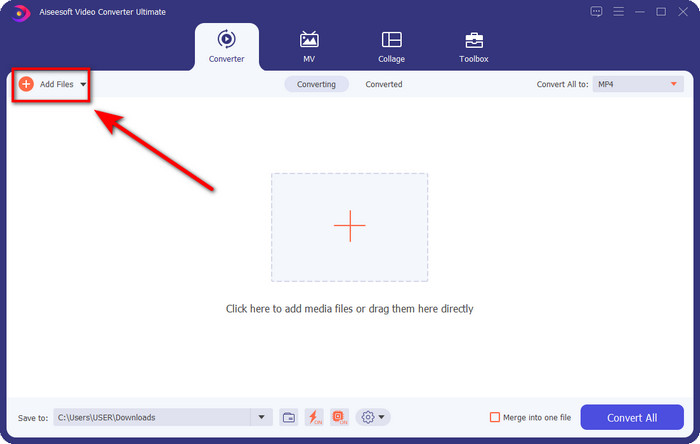
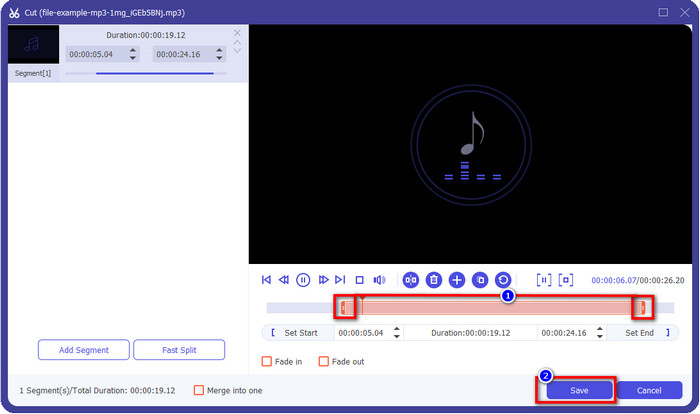
Step 3. After inserting the audio file, it is now time to click the scissor-like button. Drag the play in and out to your desired length of the audio you want. Remember that the highlighted audio in the middle of play in and out is the only audio kept. Then press Save to cut the audio.
Optional. Need to boost your audio? If that is the case, click the wand button, adjust the volume slider by dragging it up, and press OK to save.
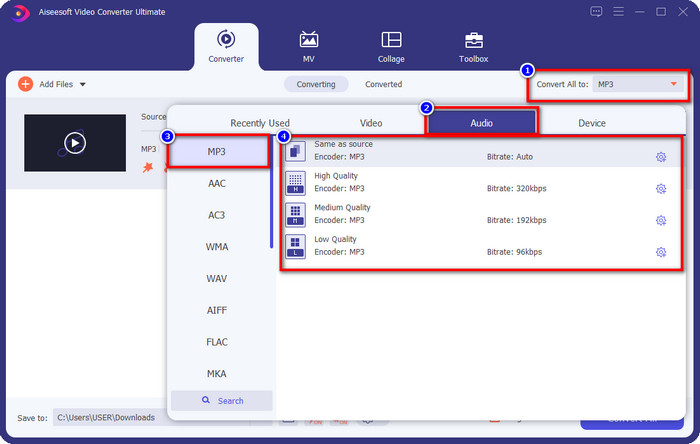
Step 4. Go to Convert All to, Audio and set the format to MP3. Although you aren’t converting, make sure that the name under Convert All to is MP3 or not another format to avoid changing the format to another format.
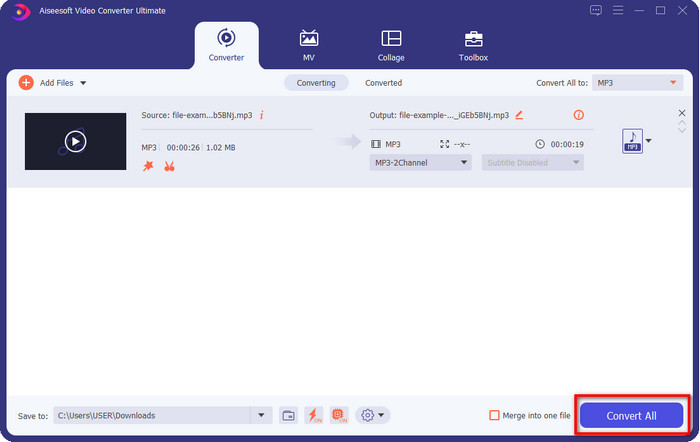
Step 5. By clicking Convert All, saving the audio cut will begin. You now have the audio cut with the best free MP3 cutter as easy as that.
Kelebihan
- Ia boleh memotong audio anda sepantas mungkin dan memprosesnya dalam masa kurang dari satu saat.
- Ciri lanjutan tersedia untuk meningkatkan kuasa volum.
- Ia menyokong semua sistem pengendalian seperti Windows atau Mac.
- Gabungkan berbilang fail audio boleh dilakukan dengan penggabungan audio alat ini.
Keburukan
- Membeli alat itu diperlukan.
2. Keberanian
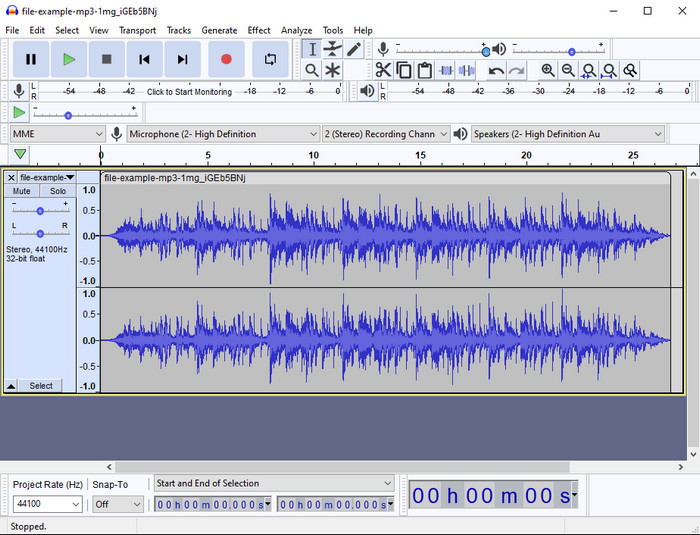
Audacity has provided pro editing features for your audio thru the years. This app is free to download and offers users do a multiple-track mixing. It is known to be used by podcasters to edit and record podcasts easily. However, some of its features are hard to understand, especially if you are not fond of using specialized software like this one.
Walaupun anda masih boleh belajar cara menggunakannya, ia akan mengambil masa untuk menggunakan potensi penuh pemangkas audio MP3 ini, dan untuk memotong audio, wajar untuk mengatakan bahawa ia memotong serta-merta dan mudah jika anda memerlukannya.
Kelebihan
- Percuma untuk dimuat turun dalam semua program seperti Windows dan Mac.
- Editor audio lanjutan dan profesional tersedia untuk menjadikan audio anda berbunyi hebat.
- Ia adalah yang terbaik untuk merakam podcast dan banyak lagi.
Keburukan
- Banyak pesaing menyediakan UI yang mesra pengguna.
- Bukan pilihan terbaik untuk pemula untuk hasil segera pemotongan dan tujuan penyuntingan lain.
- Sesetengah laporan menunjukkan bahawa data anda dikumpul jika anda menggunakan alat ini, tetapi belum ada bukti kukuh lagi.
Bahagian 2. 3 Pemotong MP3 Dalam Talian yang Boleh Diakses di Web
1. mp3cut.net
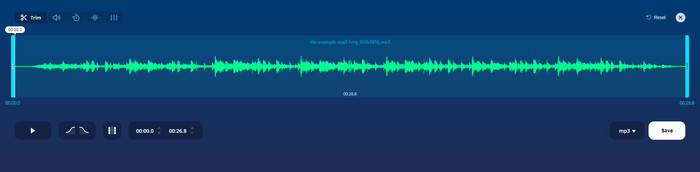
Anda mungkin menggunakan mp3cut.net jika anda memerlukan pemotong MP3 dalam talian untuk kerja itu. Selepas memuat naik fail dalam pemotong dalam talian ini, anda kini boleh mengalih keluar bunyi yang anda ingin lukis pada fail audio anda. Selain itu, alat ini juga mempunyai beberapa ciri penyuntingan kecil untuk menukar kelajuan dan nada audio jika anda perlu.
Walaupun ia mempunyai kebolehan jenis ini, alat ini selalunya ranap dan tidak dapat memainkan audio untuk mendengar jika anda memotongnya dengan betul. Jadi, untuk menggunakannya semula, anda perlu memuat semula penyemak imbas anda dan ulangi pelarasan yang anda lakukan sekali lagi.
Kelebihan
- Mesra pengguna dan boleh diakses melalui internet.
- Pada asasnya, ciri untuk membantu anda memotong audio.
- Ciri penyuntingan asas tersedia.
Keburukan
- Ia mempunyai iklan pada antara muka web.
- Kadangkala ia ranap dan perlu dimuat semula semula untuk menggunakannya.
2. audiotrimmer.com
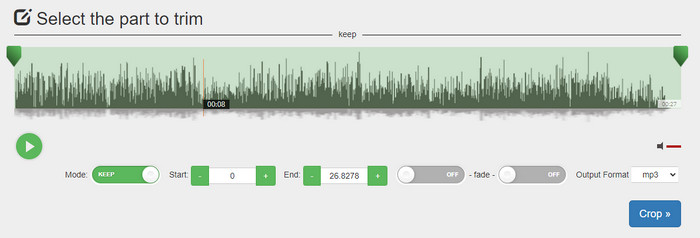
Another free mp3 cutter online is audiotrimmer.com. This tool provides easy-to-understand and straightforward trimming features; all of the function of this tool is on point. With it, you can choose whether you want to keep the audio or remove the audio. Also, it has a fade-in and out effect like the other trimmer mentioned here. However, when we did try to use the fade-in and out the effect, it didn't work; there were no added effects to our audio. But if you want to do easy cutting, this is a must-try web tool.
Kelebihan
- Percuma dan tersedia dalam semua pelayar untuk diakses.
- Mudah digunakan untuk memangkas audio.
- Ia mempunyai kesan fade-in dan out.
Keburukan
- Fade-in dan out tidak berfungsi dengan baik.
- Terdapat banyak iklan yang menjengkelkan jika anda mengaksesnya. Jadi, berhati-hati untuk tidak mengkliknya.
3. Clideo

One of the best online MP3 cutters and joiners you can use is the Clideo. Most users enjoy and prefer using this tool because of its editing capabilities. Moreover, you can also add fade in and out on your audio file if you need it. But after exporting it and listening to it, there is no fade in and out added to our audio file. We encounter one slight problem with this tool: uploading and downloading the file. Unlike the first-mentioned tool, uploading audio on its cutter takes time, and there are times that we failed to upload the audio file here because of unknown reasons.
Walaupun kami menghadapi beberapa masalah, ia masih merupakan pemotong terbaik dalam talian, dan ia juga selamat untuk digunakan.
Kelebihan
- Pemotong dalam talian terbaik dalam talian.
- Antara muka pengguna profesional.
- Mudah untuk digunakan.
Keburukan
- Proses memuat naik dan memuat turun akan mengambil terlalu banyak masa anda.
- Pudar masuk dan keluar berfungsi tetapi tidak baik.
Bahagian 3. Soalan Lazim tentang Pemotong MP3
Apakah pemangkas MP3 terbaik pada Mac?
FVC Video Converter Ultimate is available on Mac as well. So, if you need to trim your audio on Mac, you better download the ultimate tool to handle your audio file appropriately. The ultimate tool presents not only best for cutting your audio, but you can also enhance the audio by boosting it. Moreover, if you need help in converting, merging, syncing the audio, etc. ultimate tool is to the rescue. If you need to know more about the ultimate tool, you better read the details presented above.
Adakah pemangkasan audio mengurangkan saiznya?
Saiz fail audio mengecil selepas anda memangkasnya. Semasa kami membandingkan fail audio asal dengan fail potong, kami melihat beberapa perubahan dalam ketinggian. Jadi, ini bermakna semakin pendek fail audio, semakin kecil saiznya, tetapi jika fail audio anda mempunyai sangat panjang, maka jangkakan saiznya juga penting.
Bolehkah saya menggunakan Audacity untuk menggabungkan berbilang audio?
Yes, you can, Audacity supports merging multiple-audio tracks into one file. However, it is hard, especially if you don't have a relevant tutorial to follow. So, if you need to merge audio via Audacity, you can click this link and learn from it.
Kesimpulannya
The MP3 cutters presented here already pass the standards we set to provide only the best trimmer for you. This article shows how important to choose the right and suitable cutter based on your needs. Even though the trimmers here do the same function, the FVC Video Converter Ultimate provides a much more efficient cutting audio. According to our research, the ultimate tool surpasses all the standards we set. So, if you want to have a top cutter on your hand, this is the best choice among the rest cutters available on the market. Too good to not believe? Well, you better download the tool and test it out yourself.
-
 Cara Memotong dan Menggabungkan Lagu Dalam Talian - 4 Cara Terbaik yang Anda Perlu Tahu
 Apabila anda ingin memotong dan menggabungkan lagu secara dalam talian untuk membuat muzik, anda dapat mengetahui lebih lanjut mengenai 4 alat dalam talian terbaik untuk memotong lagu dan menggabungkan fail dari artikel tersebut.
-
 Cari Perapi MP4 Terbaik dengan Prosedur dan Maklumat
 Adakah anda ingin belajar cara memotong video seperti vlogger yang anda tonton? Kemudian teruskan membaca siaran ini untuk mengetahui pemangkas MP4 yang boleh anda gunakan.
-
 Muat Turun Pemain MP3 – 10 Pemain Muzik MP3 Percuma Terbaik 2025
 Apakah pemain muzik MP3 terbaik? Bagaimana saya meletakkan muzik pada pemain MP3? Bagaimana membuat muat turun pemain muzik MP3? Catatan ini memberi anda ulasan terperinci mengenai 10 pemain MP3 percuma terbaik untuk Windows PC dan Mac.
