


 Video Converter Ultimate
 Perakam Skrin
 Pembaikan Video
 Muat Turun Selamat
Alih Keluar Tera Air Animotica pada Video dengan Cara Yang Mudah
Animotica ialah penyunting video Windows yang popular dan digemari ramai kerana ia menghasilkan output yang menakjubkan setiap kali anda menggunakannya. Dengan antara muka dan fungsinya yang mesra pengguna, walaupun anda masih amatur dalam penyuntingan video, anda tetap boleh menghasilkan video yang hebat seperti hasil kerja golongan profesional. Tidak hairanlah nama alat ini tersenarai antara penyunting video terbaik yang boleh anda gunakan pada Windows. Walaupun kualitinya baik, ramai pengguna masih menghadapi masalah ketika menggunakannya, dan tera air yang tertinggal pada video menjadi kebimbangan utama. Daripada risau, apa kata anda baca artikel ini untuk mengalih keluar tera air Animotica? Adakah kami sudah menarik perhatian anda? Jika ya, teruskan membaca butiran di bawah untuk mengetahui cara melakukannya dengan berkesan.

Bahagian 1. Cara Membuang Tera Air daripada Video Animotica Menggunakan 3 Cara Yang Mesti Anda Tahu
FVC Video Converter Ultimate [Penyingkiran Tera Air Video Paling Disyorkan]
FVC Video Converter Ultimate memberikan hasil terbaik untuk menyingkirkan tera air pada video anda. Walaupun anda tidak begitu mahir seperti penyunting video lain, anda masih boleh mendapat hasil yang hebat setelah biasa menggunakannya—tidak perlu risau kerana anda boleh menjadi pengguna mahir alat ini dalam masa yang singkat. Prestasinya sukar ditandingi berbanding penanggal tera air lain yang boleh anda muat turun atau gunakan di internet. Jadi, jika anda ingin melihat cara membuang tera air daripada video Animotica menggunakan alat ini, anda boleh ikut tutorial yang kami sertakan di bawah.
Langkah 1. Mula-mula, muat turun perisian ini ke desktop anda, dan pilih versi yang sesuai dengan sistem operasi anda. Kemudian, ikut proses pemasangan, dan buka alat tersebut untuk meneruskan.
Muat Turun PercumaUntuk Windows 7 atau lebih baharuMuat Turun Selamat
Muat Turun PercumaUntuk MacOS 10.7 atau lebih baharuMuat Turun Selamat
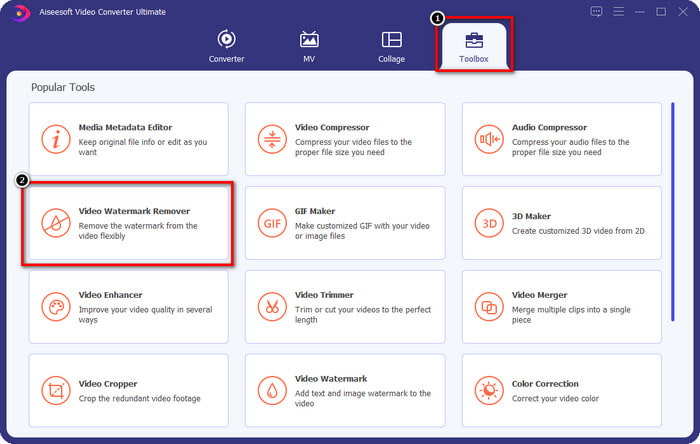
Langkah 2. Setelah anda membuka aplikasi, pergi ke Toolbox dan buka Video Watermark Remover. Terdapat lebih banyak ciri dan fungsi yang boleh anda gunakan di bawah Toolbox; anda boleh menelitinya kemudian jika mahu.
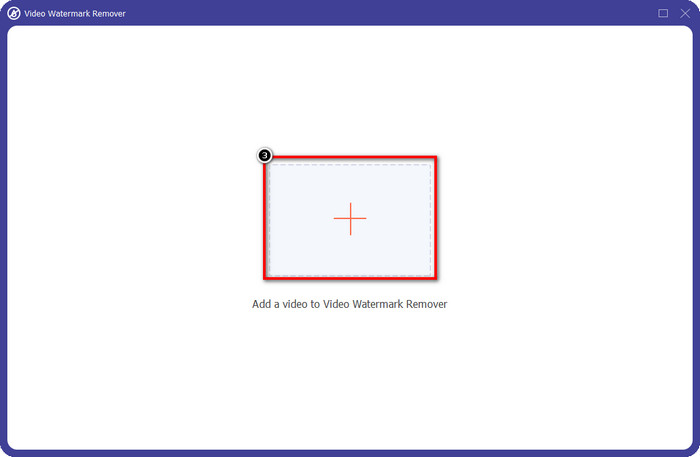
Langkah 3. Klik ikon + untuk memuat naik video yang anda edit pada Animotica. Cari fail video yang anda eksport dengan tera air dalam folder yang dipaparkan pada skrin, kemudian klik Open untuk memuat naiknya.
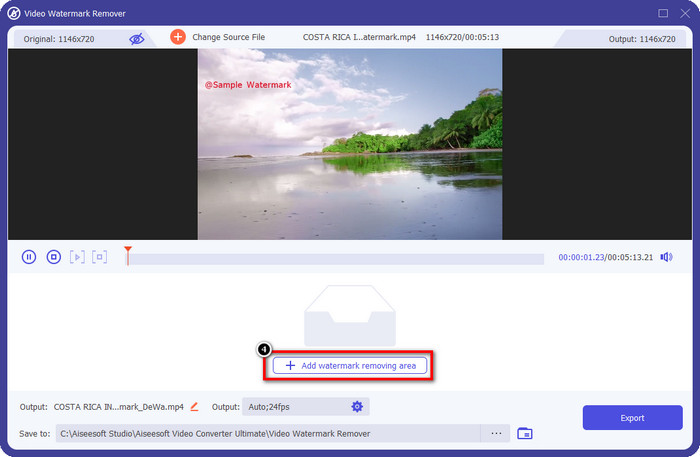
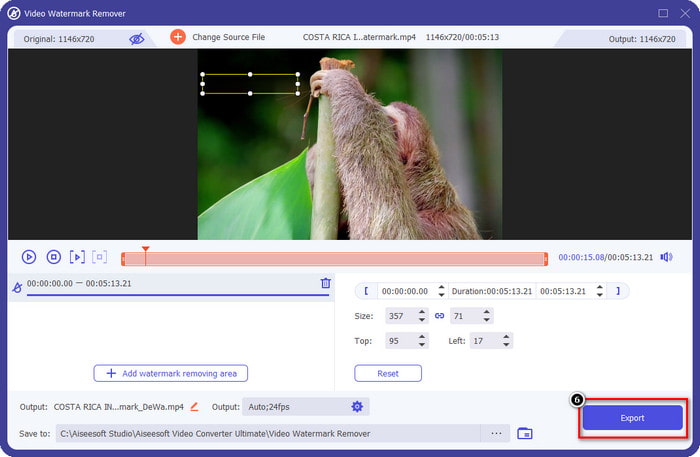
Langkah 4. Pada tetingkap yang muncul, klik Add Watermark Removing Area untuk membuka satu lagi tetingkap di mana anda akan menjejak tera air tersebut.
Langkah 5. Di sini, letakkan bentuk segi empat tepat pada tera air untuk menutupnya, dan pastikan keseluruhan tera air diliputi. Anda boleh melaraskan saiz kotak pilihan jika terlalu kecil atau terlalu besar pada tera air itu.
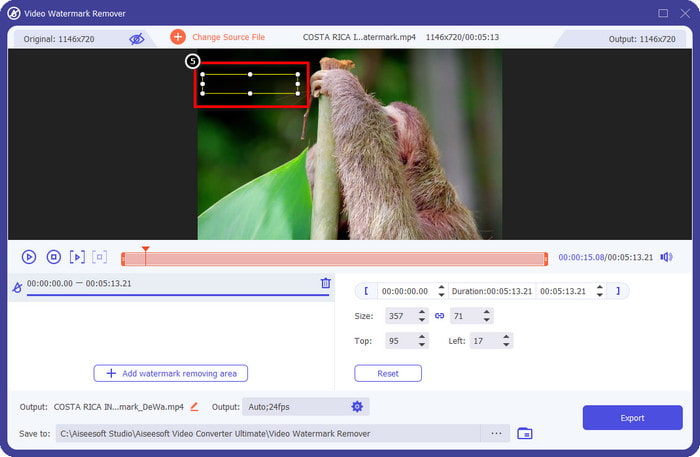
Langkah 6. Kini anda boleh menyimpan video Animotica tanpa tera air dengan mengklik butang Export di bahagian bawah kanan antara muka.
Berkaitan:
Pembuang Tera Air Video UkeySoft
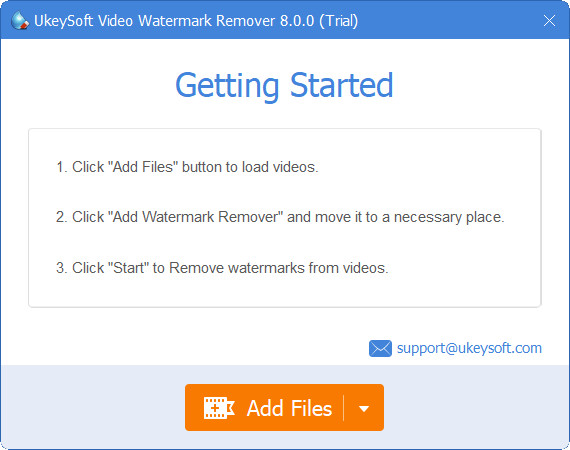
Anda boleh memuat turun secara percuma UkeySoft Video Watermark Remover untuk membuang tera air pada video anda. Alat ini tersedia pada Windows, bermakna jika anda pengguna Windows, anda boleh memuat turunnya secara percuma dan memanfaatkan kelebihannya untuk mengalih keluar tera air. Seperti penanggal tera air yang lain, alat ini memberikan hasil terbaik dan tidak menurunkan kualiti video yang diimport apabila ia dieksport.
Walau bagaimanapun, jika anda menggunakan versi alat ini yang boleh diakses, beberapa pengehadan boleh menghalang anda, seperti anda tidak boleh memuat naik video di sini selama lebih daripada satu minit secara percuma. Berikut ialah panduan lengkap untuk mengalih keluar tera air Animotica secara percuma.
Langkah 1. Untuk memuat turun perisian ke desktop anda, pergi ke laman web rasminya dan klik butang muat turun untuk memasangnya pada Windows anda.
Langkah 2. Buka penanggal tera air, kemudian klik Add Files untuk memuat naik video yang mempunyai tera air.
Langkah 3. Klik Add Watermark Remover dan letakkan kotak pilihan pada tera air. Kemudian klik ikon check untuk mula mengalih keluar tera air pada video anda.
Langkah 4. Untuk menyimpan perubahan yang telah anda buat dan mendapatkan Animotica tanpa tera air, klik Next.
Penyingkiran Tera Air Apowesoft Dalam Talian
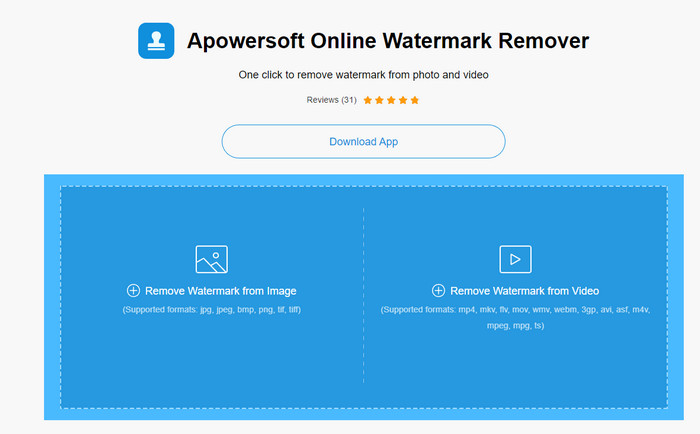
Apowersoft Watermark Remover Online ialah penanggal tera air khusus yang boleh anda akses dalam talian jika anda tidak mahu memuat turun perisian penanggal tera air pada peranti anda. Memandangkan ia boleh diakses melalui web, keserasian alat ini jauh lebih meluas pada pelbagai sistem operasi. Walaupun alat ini berasaskan web, prestasinya tetap setanding dengan penanggal tera air lain yang boleh anda gunakan atau muat turun pada komputer anda. Seperti alat hebat yang lain, ia juga mempunyai kelemahan, seperti format video yang disokong terhad, kebergantungan pada internet, dan sebagainya.
Tetapi jika alat ini menarik perhatian anda, di bawah ialah tutorial tentang mengalih keluar tera air Animotica dalam video anda dengan cepat menggunakan alat dalam talian.
Langkah 1. Untuk mengakses penanggal tera air dalam talian ini, anda boleh mencari alat tersebut pada pelayar web anda, kemudian bukanya.
Langkah 2. Tekan Remove Watermark From Video, kemudian pilih fail video yang mempunyai tera air. Tunggu proses memuat naik kerana ia mungkin mengambil masa yang lama, terutamanya jika sambungan internet anda perlahan.
Langkah 3. Selepas memuat naik fail video, letakkan bentuk segi empat tepat pada tera air untuk menutup tera air pada video.
Langkah 4. Setelah tera air sasaran dipilih, klik Erase untuk membuang tera air di dalam kawasan segi empat tepat tersebut.
Bahagian 2. Soalan Lazim tentang Cara Membuang Tera Air Animotica
Berapakah harga Animotica Light?
Harga Animotica Light ialah $6.99. Harganya masih bergantung pada Wilayah Kedai Microsoft. Ia termasuk beberapa ciri kecil yang boleh anda gunakan yang tidak disertakan dalam versi percuma, seperti jumlah output HD, tiada tera air, semua peralihan, kadar bingkai tanpa had dan lain-lain.
Adakah pilihan terbaik untuk menggunakan Animotica Pro?
Untuk $15.99, alat ini adalah pilihan yang baik untuk pemula yang ingin melakukan penyuntingan asas yang menyediakan ciri dan fungsi luar biasa yang boleh anda nikmati. Dengan versi pro, anda boleh mengeksport video sehingga kualiti 2160 (4k) dengan 60 FPS, ciri penyuntingan penuh dan banyak lagi.
Mengapa tera air Animotica menjadi kabur?
Kebanyakan alatan mengaburkan tera air pada video anda untuk menjadikannya tidak kelihatan. Walau bagaimanapun, jika anda melihatnya lebih lama, anda akan melihat bahawa ia meninggalkan sisa yang boleh memburukkan visual. Jadi, gunakan pengalih keluar tera air yang tidak mengaburkan tera air sebaik sahaja anda mengeksport, seperti yang dihasilkan oleh FVC Video Converter Ultimate.
Kesimpulannya
Sesungguhnya semua alat yang kami sebutkan dalam artikel ini mempunyai kekuatan dan kelemahan yang berbeza dalam mengalih keluar tera air Animotica. Sebelum kami menamatkan artikel ini, alat manakah yang akan anda gunakan sebagai penghilang tera air anda? Katakan anda masih belum memutuskan apa yang hendak digunakan. Dalam kes itu, kami mencadangkan anda memilih penanggal tera air muktamad kerana ia adalah alat yang paling mujarab untuk mengalih keluar tera air pada mana-mana video dan melakukan berbilang tugas pada satu muat turun. Kami harap kami menjawab pertanyaan anda dengan artikel ini. Tutorial di atas akan membantu anda mengalih keluar tera air pada video anda supaya anda boleh menikmati menonton video berkualiti tinggi tanpa tera air.
-
 Ketahui Cara Membuang Tera Air Movavi secara Percuma [Mesti Ada!]
 Mengeksport video atau imej pada Movavi akan meninggalkan tera air, tetapi adakah mungkin untuk mengalih keluarnya? Untuk mengajar cara membuang tera air secara percuma baca ini.
-
 3 Cara Mudah untuk Mengalih Keluar Tera Air Fiverr pada Windows dan Mac
 Anda berada di halaman yang betul jika anda mencari aplikasi yang boleh mengalih keluar tera air Fiverr. Baca siaran ini untuk mengetahui cara anda boleh mengalih keluar tera air Fiverr dengan mudah.
-
 Cara Menghilangkan Tera Air Lomotif Menggunakan Alat Hebat ini
 Adakah anda ingin mengetahui cara membuang tera air Lomotif daripada video anda? Baca artikel ini untuk mengetahui kaedah paling cemerlang untuk mengalih keluarnya dalam talian dan luar talian.
