


 Video Converter Ultimate
 Perakam Skrin
 Pembaikan Video
 Muat Turun Selamat
Cara Mengeluarkan Tera Air Boleh Digigit daripada Video Anda Dengan Mudah
Jika anda sedang mencari cara yang hebat dan paling mudah untuk mengalih keluar tera air Biteable daripada video anda, anda tidak perlu menyusahkan diri lagi. Secara jujur, menonton video yang mempunyai tera air adalah menjengkelkan dan mengecewakan. Anda tidak dapat menikmati video yang sedang anda tonton. Selain itu, tera air ini mengganggu para penonton. Difahamkan, tera air adalah untuk keselamatan pemilik video. Namun, meletakkan tera air yang besar bukanlah sesuatu yang baik. Ia hanya memberikan maklum balas negatif kepada orang yang gemar menonton video kegemaran mereka. Salah satu contohnya ialah tera air Biteable. Tera air Biteable ini datang daripada aplikasi Biteable, di mana tera air akan dilampirkan secara automatik selepas menghasilkan atau menyimpan video. Nasib baik, anda boleh menggunakan aplikasi untuk mengalih keluar tera air ini daripada video anda. Anda boleh menonton video kegemaran anda tanpa rasa jengkel dan kecewa. Jika anda ingin mengetahui aplikasi terbaik dan paling dipercayai yang patut anda gunakan untuk mengalih keluar tera air ini, teruskan membaca artikel ini.

Bahagian 1: Cara Terbaik untuk Mengalih Keluar Tera Air Boleh Digigit daripada Video
Video Converter Ultimate ialah aplikasi paling hebat yang boleh anda gunakan untuk mengalih keluar tera air Biteable daripada video anda. Selain itu, perisian yang cemerlang ini mampu menghapuskan objek lain yang tidak berkaitan dan mengganggu, seperti logo, teks, tandatangan dan sebagainya. Proses penyingkiran dan penyimpanan juga sangat pantas, jadi anda tidak perlu mengambil masa yang lama. Tambahan pula, Video Converter Ultimate menyediakan dua kaedah mudah untuk mengalih keluar tera air daripada video anda, iaitu pemangkas video (video cropper) dan penghapus tera air video (video watermark remover). Ia juga mempunyai lebih banyak alat penyuntingan yang boleh anda gunakan, seperti pengawal kelajuan video, penukar video, pemampat video, pembetulan warna, pembina kolaj, pembuat GIF, pemangkas video, penukar imej dan banyak lagi. Bahagian terbaik alat ini ialah anda boleh menggunakannya dengan mudah kerana ia mempunyai antara muka yang ringkas dan sesuai untuk pemula. Ia juga menyokong pelbagai format fail seperti MP4, MOV, FLV, MKV, OGV, DIVX dan lain-lain. Akhir sekali, Video Converter Ultimate boleh diakses pada Windows dan Mac, yang sangat memudahkan pengguna. Jika anda ingin mengalih keluar tera air daripada video, ikut langkah mudah di bawah.
Menggunakan alat Pembuang Tera Air Video
Langkah 1: Pergi ke laman web Video Converter Ultimate dan muat turun aplikasi tersebut. Kemudian teruskan dengan prosedur pemasangan. Selepas pemasangan selesai, lancarkan aplikasi.
Muat Turun PercumaUntuk Windows 7 atau lebih baharuMuat Turun Selamat
Muat Turun PercumaUntuk MacOS 10.7 atau lebih baharuMuat Turun Selamat
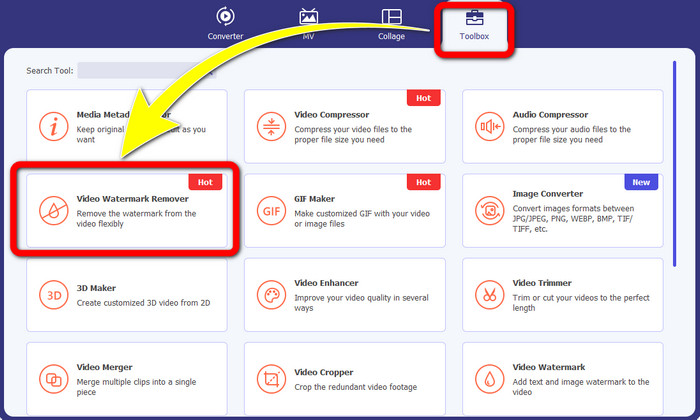
Langkah 2: Selepas membuka Video Converter Ultimate, klik butang Toolbox > Video Watermark Remover. Kemudian, satu antara muka lain akan muncul pada skrin.
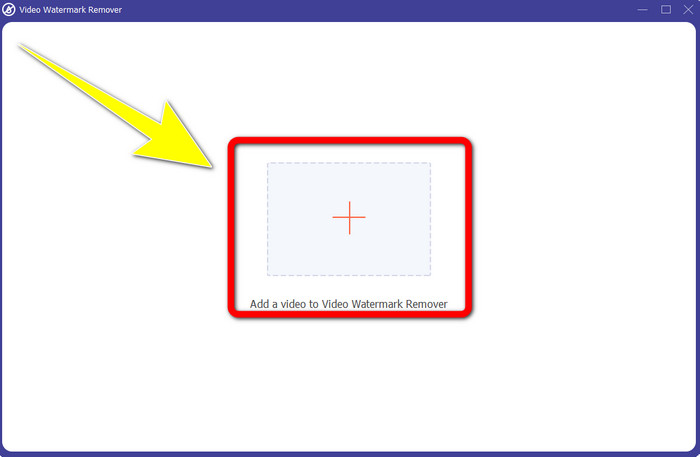
Langkah 3: Apabila antara muka baharu telah muncul pada skrin anda, klik butang tanda Tambah (Plus) untuk menambah video anda yang mempunyai tera air Biteable.
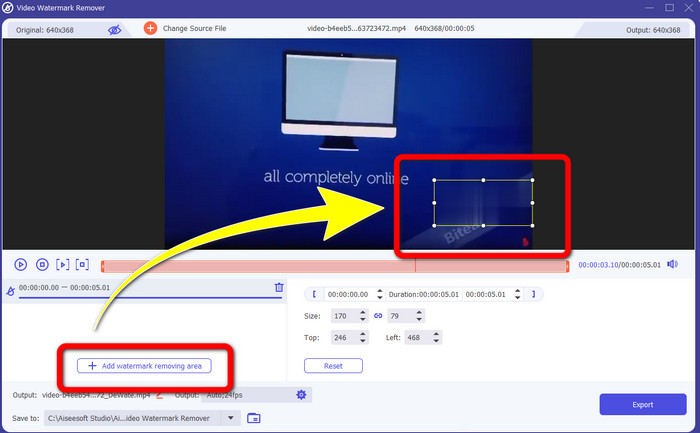
Langkah 4: Selepas anda menambah video anda, klik Add Watermark Removing Area. Kemudian kotak mini akan muncul pada video anda. Seret kotak tersebut untuk menutup tera air.
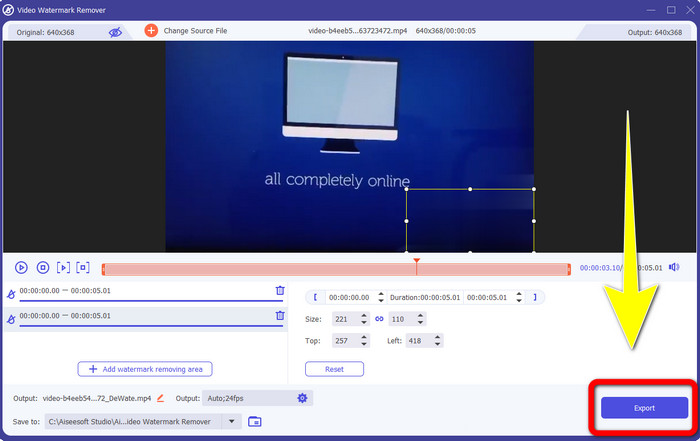
Langkah 5: Jika anda telah mengalih keluar tera air Biteable daripada video anda, klik butang Export untuk menyimpan hasil akhir anda.
Menggunakan alat Pemotong Video
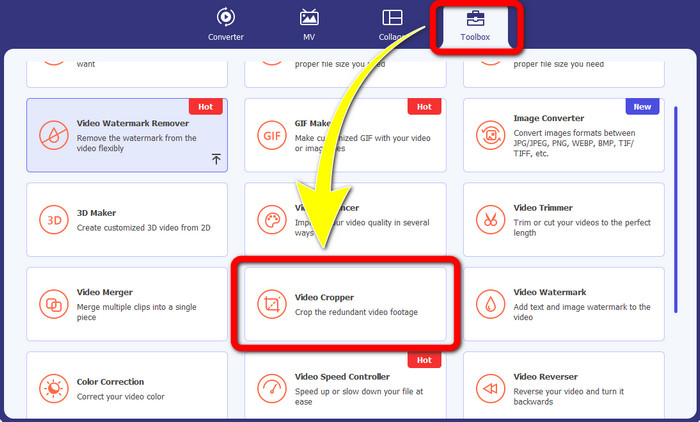
Langkah 1: Lancarkan Video Converter Ultimate. Klik butang Toolbox > Video Cropper.
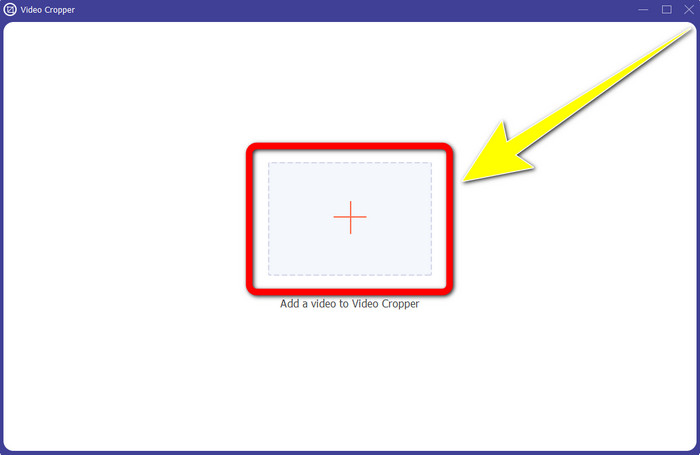
Langkah 2: Selepas mengklik Video Cropper, satu antara muka baharu akan dipaparkan pada skrin anda. Klik ikon Plus dan tambah video anda yang mempunyai tera air Biteable.
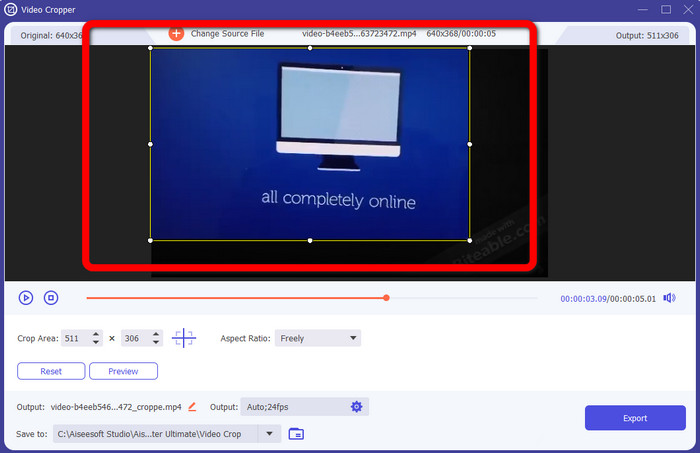
Langkah 3: Setelah anda menambah video anda, anda kini boleh Crop video tersebut untuk mengalih keluar tera air.
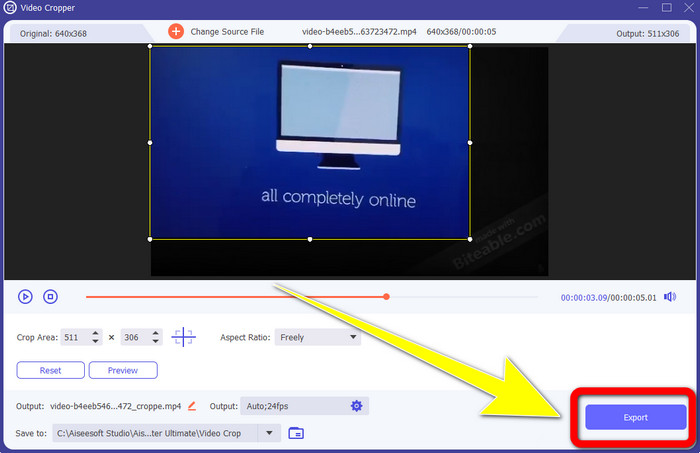
Langkah 4: Jika anda sudah selesai memangkas video anda, klik butang Export dan simpan video anda tanpa tera air Biteable.
Bahagian 2: Cara Membuang Tera Air Boleh Digigit daripada Video Dalam Talian
1. Menggunakan BeeCut
Jika anda ingin membuang tera air yang boleh digigit secara percuma dalam talian, BeeCut ialah aplikasi dalam talian terbaik yang boleh anda gunakan. Ia mampu mengalih keluar tera air daripada video anda. Ia adalah alat dalam talian mudah yang boleh anda gunakan, yang sesuai untuk pemula. Anda boleh mengalih keluar tera air boleh digigit daripada empat video dalam beberapa langkah sahaja.
Selain itu, BeeCut mempunyai banyak alat penyuntingan, seperti memangkas, memotong, membelah dan menggabungkan video. Di samping itu, jika anda ingin membuat video, anda boleh menambah sari kata pada video anda di bawah, yang memudahkan penonton. Walau bagaimanapun, ia adalah lambat dalam memuat naik fail dan proses menyimpan menggunakan alat ini. Selain itu, anda tidak boleh menggunakan alat ini jika anda tidak mempunyai sambungan internet. Jika anda ingin mengalih keluar tera air boleh digigit daripada video anda menggunakan alat dalam talian ini, ikut beberapa langkah di bawah.
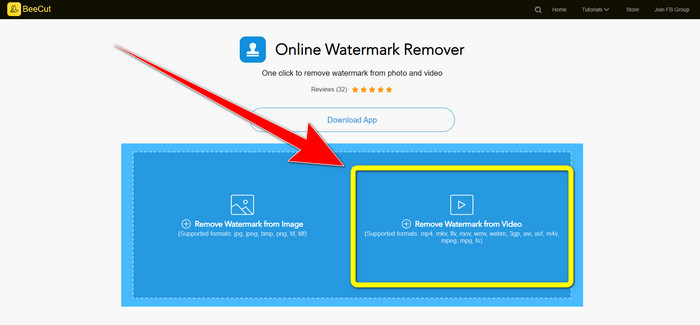
Langkah 1: Lawati laman web BeeCut. Kemudian klik butang Remove Watermark from Video dan tambah video anda yang mempunyai tera air Biteable.
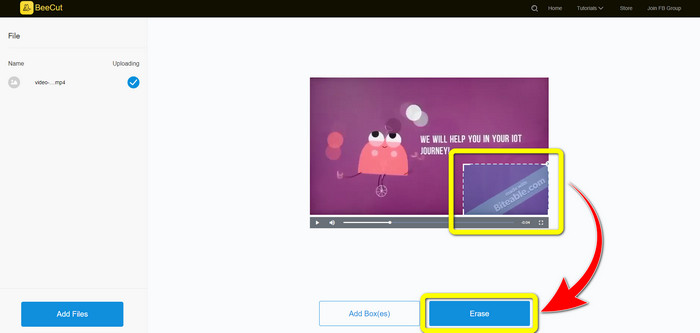
Langkah 2: Selepas menambah fail anda, satu kotak kecil akan muncul pada video anda. Seret dan tutup tera air Biteable tersebut. Kemudian, apabila anda selesai menutup tera air, klik butang Erase.
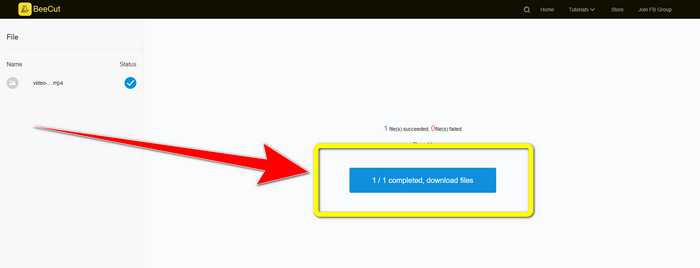
Langkah 3: Setelah anda mengklik butang Erase, tunggu proses penyingkiran selesai. Kemudian anda boleh memuat turun fail tersebut dan menikmati tontonan tanpa tera air Biteable pada video anda.
2. Menggunakan Blur Video Dalam Talian
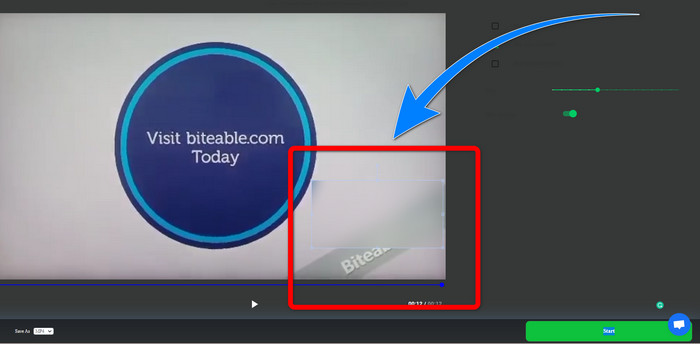
Jika anda masih mencari aplikasi lain yang boleh anda gunakan untuk mengalih keluar tera air yang boleh digigit daripada video anda dalam talian, Blur Video Online ialah alat yang hebat untuk anda. Dan Blur Video Online tersedia untuk hampir semua peranti dan penyemak imbas, seperti Google Chrome, Opera, IE, Mozilla Firefox dan banyak lagi. Walau bagaimanapun, aplikasi yang bergantung kepada web ini terlalu lambat dalam mengimport fail video, dan proses mengalih keluar tera air memakan masa. Ia juga merupakan alat yang bergantung kepada internet, yang bermaksud ia hanya beroperasi jika anda mempunyai sambungan internet. Ikuti langkah mudah di bawah untuk mengalih keluar/kaburkan tera air Boleh Digigit daripada video anda.
Langkah 1: Pergi ke laman web Blur Video Online. Kemudian, klik butang Click to Add File dan tambah video anda yang mempunyai tera air.
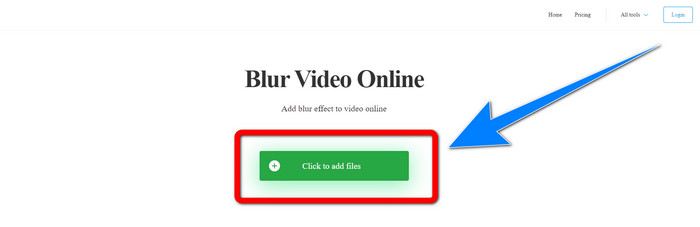
Langkah 2: Jika anda telah memasukkan video anda, satu kotak akan muncul pada video anda. Seret kotak itu untuk menutup tera air dan simpan hasil akhir anda.
Berkaitan dengan:
Cara Terbaik Mengalih Keluar Tera Air daripada Camtasia 9 pada Windows anda
Cara Mengalih Keluar Banner Tera Air daripada AVS Video Editor dengan Cepat
Bahagian 3: Soalan Lazim tentang Mengalih Keluar Tera Air Boleh Digigit daripada Video
Bolehkah saya mengalih keluar setem tarikh menggunakan Video Converter Ultimate?
Ya awak boleh! Video Converter Ultimate boleh membantu anda dalam menghapuskan objek yang mengganggu daripada video anda, seperti cop tarikh, tera air, teks, dsb.
Adakah ia memakan masa untuk mengalih keluar tera air daripada video saya?
Ia bergantung pada aplikasi yang anda gunakan. Sesetengah aplikasi boleh mengalih keluar tera air daripada video anda serta-merta, dan sesetengah aplikasi mengambil masa untuk mengalih keluar tera air.
Adakah terdapat pengalih keluar tera air yang boleh saya gunakan tanpa kehilangan kualiti video saya?
Ya, ada! Anda boleh menggunakan Video Converter Ultimate. Ia bukan sahaja bagus untuk mengalih keluar tera air dan menyunting video. Aplikasi ini membolehkan anda menghapuskan tera air daripada video anda tanpa kehilangan kualiti.
Kesimpulannya
Mengalih keluar tera air daripada video anda amat baik, terutamanya jika anda ingin menonton video kegemaran tanpa objek yang tidak diperlukan. Artikel ini telah memberikan anda aplikasi praktikal yang boleh digunakan untuk mengalih keluar tera air Biteable daripada video anda. Akhir sekali, menggunakan Video Converter Ultimate adalah pilihan terbaik jika anda sedang mencari aplikasi yang paling hebat dan mengagumkan untuk mengalih keluar tera air daripada video anda.
-
 Cara Menghilangkan Tera Air Powtoon Menggunakan 4 Kaedah Berkesan
 Baca artikel ini untuk mengetahui cara mengalih keluar tera air Powtoon menggunakan alat terbaik yang kami sertakan di sini dan tutorial.
-
 Ulasan Apowersoft Watermark Remover – Ciri, Kebaikan & Keburukan serta Harga
 Apowersoft Watermark Remover ialah salah satu tera air terbaik yang dialih keluar yang menyokong dalam talian dan luar talian, klik ini untuk mengetahui lebih lanjut!
-
 3 daripada Pembuang Tera Air Shutterstock Terkini Yang Anda Perlukan
 Tidak suka tera air Shutterstock yang dilampirkan pada video yang dieksport? Anda boleh menggunakan penanggal tera air Shutterstock untuk memadamkannya dengan berkesan.
