


 Video Converter Ultimate
 Perakam Skrin
 Pembaikan Video
 Muat Turun Selamat
Cara Lengkap untuk Mengalih Keluar Tera Air Penapis Picsart pada Video Anda Dengan Berkesan
Pada masa kini, adalah satu ‘senjata’ yang sangat diperlukan untuk mempunyai perisian penyuntingan media visual yang boleh anda harapkan di desktop seperti Picsart. Dengannya, anda boleh melaras beberapa pilihan untuk menjadikan imej biasa anda seperti fotografi yang tiada tandingan! Anda boleh menarik lebih ramai pelanggan atau audiens dengan imej yang menarik perhatian yang anda cipta. Namun, ada masalah apabila menggunakan Picsart, iaitu tera air yang ditambah selepas dieksport. Tera air ini agak menjengkelkan dan boleh mengganggu paparan visual jika tidak dibuang. Jadi, jika anda mahukan perisian dan juga tutorial tentang cara membuang tera air penapis Picsart, anda perlu teruskan membaca artikel ini dan pelajari lebih lanjut!

Bahagian 1. Cara Membuang Tera Air Penapis Picsart Menggunakan Perisian Percuma pada Desktop
FVC Video Converter Ultimate - Pembuang Tera Air Nombor Satu pada Windows & Mac
Mari mula memperkenalkan perisian dengan pilihan nombor satu kami yang boleh membantu dan mengajar anda cara membuang tera air Picsart. FVC Video Converter Ultimate ialah senjata penting dalam ‘arsenal’ anda; anda akan memerlukannya untuk membuang tera air pada video dengan mudah sambil mengekalkan hasil yang profesional. Disebabkan prestasi dan cirinya yang tiada tandingan, ramai pengguna telah mencubanya dan alat ini tidak mengecewakan mereka. Jika anda memerlukan bantuan untuk membuang tera air pada video anda, maka anda boleh cuba menyalin langkah yang kami sediakan di bawah dan ikutinya.
Langkah 1. Anda boleh memuat turun perisian ultimate pada peranti anda dengan mengklik butang muat turun yang sesuai di bawah. Selepas itu, anda mesti memasang perisian pada komputer anda dan klik Start Now untuk membukanya.
Muat Turun PercumaUntuk Windows 7 atau lebih baharuMuat Turun Selamat
Muat Turun PercumaUntuk MacOS 10.7 atau lebih baharuMuat Turun Selamat
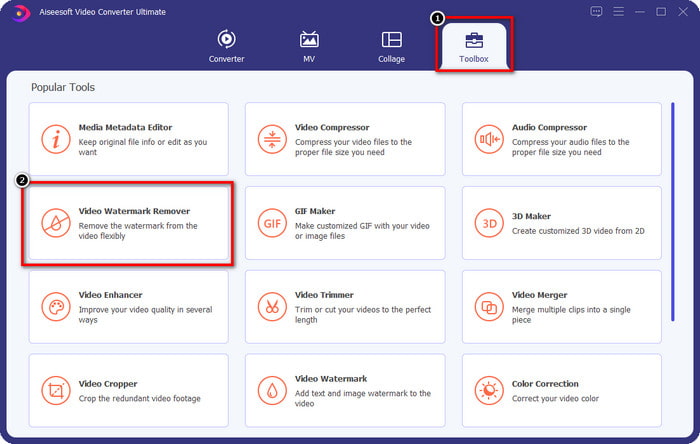
Langkah 2. Dalam bahagian Toolbox, anda akan melihat ciri lain yang boleh anda gunakan yang dapat membantu memberikan sentuhan yang mengagumkan pada video anda. Tetapi untuk hari ini, klik Video Watermark Remover.
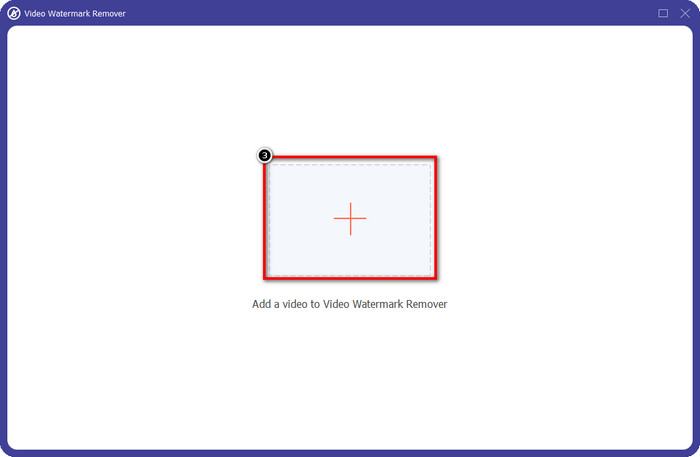
Langkah 3. Muat naik video yang anda sunting dalam Picsart dengan mengklik ikon +. Cari fail dalam folder yang akan muncul pada skrin anda, kemudian klik Open.
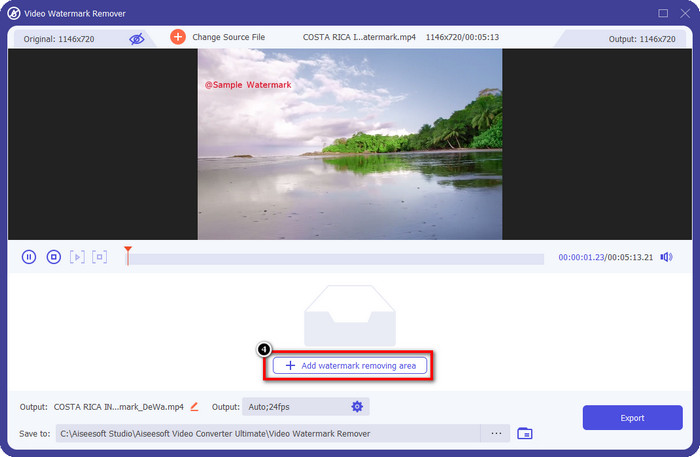
Langkah 4. Tekan Add Watermark Removing Area untuk membuang tera air yang terbenam pada video yang anda muat naik.
Langkah 5. Tahan dan letakkan kotak pemilihan pada tera air dan tutupkannya. Anda boleh membesarkan atau mengecilkan kotak mengikut keutamaan anda.
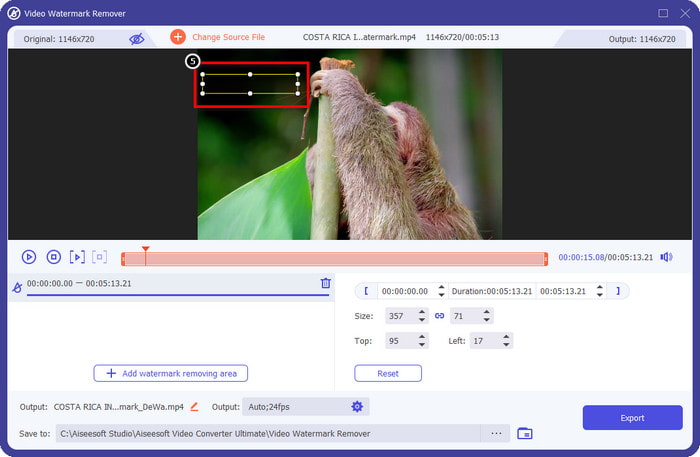
Langkah 6. Setelah anda selesai menutup tera air dengan kotak pemilihan, klik Export untuk menyimpan hasil akhir pada pemacu setempat anda.
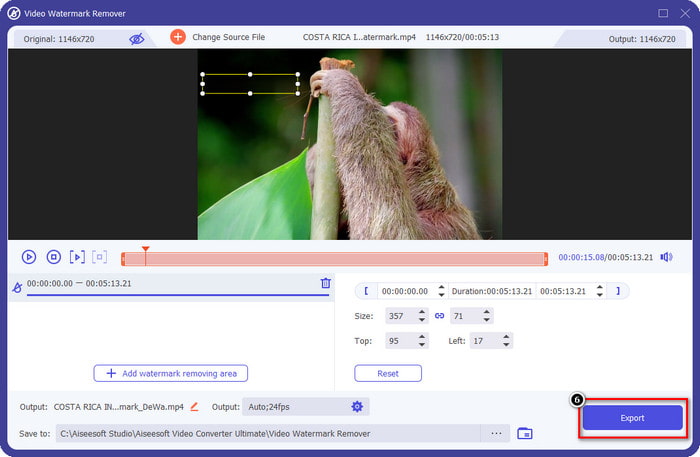
Foto pada Windows- Cover Watermark dengan Reka Bentuk 3D
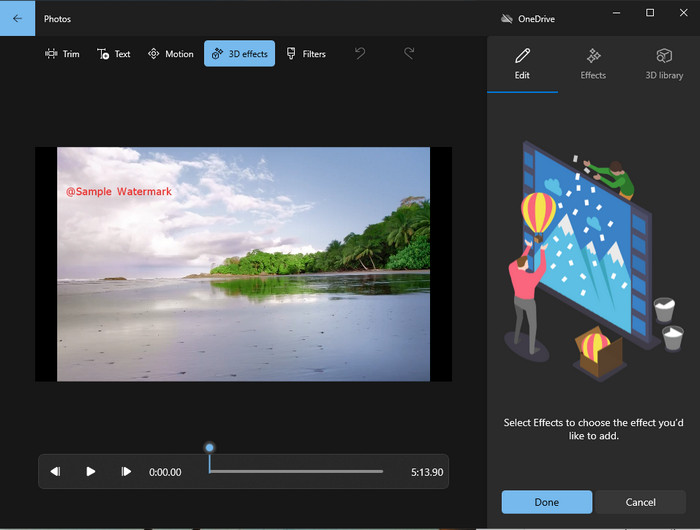
Jika memuat turun perisian bukan keutamaan anda dan anda ialah pengguna Windows, anda patut cuba menggunakan Photos untuk menyunting tera air dalam video anda. Mempelajari cara membuang tera air Picsart dengan alat ini akan menjadi lebih pantas kerana anda tidak perlu melalui fasa memuat turun aplikasi. Alat ini tidak membuang tera air pada video, tetapi anda boleh menutup tera air tersebut dengan reka bentuk 3D. Walau bagaimanapun, prestasi penonton dan penyunting media visual lalai ini adalah baik. Masih ragu-ragu? Maka anda boleh cuba membaca langkah di bawah dan ikutinya jika anda mahu.
Langkah 1. Klik butang Windows pada bar tugas dan cari nama Photos untuk membukanya.
Langkah 2. Selepas membuka penyunting terbina dalam, anda mesti klik tanda + untuk memuat naik video yang anda mahu sunting di sini.
Langkah 3. Pergi ke 3D Effects, klik 3D Library, dan cari reka bentuk yang anda mahu gunakan untuk menutup tera air. Letakkan reka bentuk yang anda pilih pada bahagian yang mempunyai tera air.
Langkah 4. Tekan Finish Video untuk menyimpan hasil akhir pada pemacu setempat Windows anda.
PickFrom Blur Video Dalam Talian
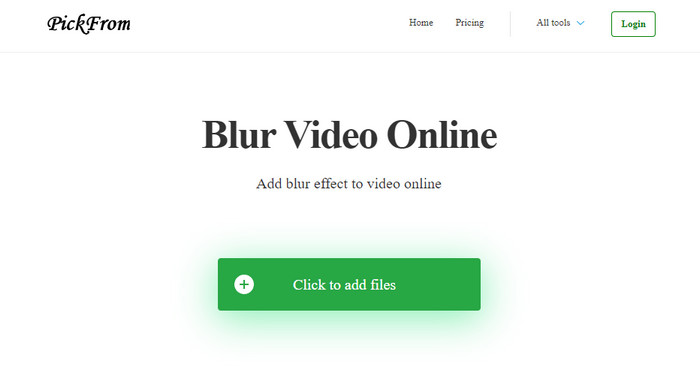
PickFrom Blur Video Online boleh membantu anda membuang tera air PicsArt pada video yang anda ada di web. Alat ini tidak begitu dikenali ramai, tetapi hari ini kami akan memperkenalkannya. Kami menyertakan perisian ini kerana kecekapannya dalam membuang tera air pada video yang anda muat naik. Antara mukanya (GUI) ringkas dan mudah; anda tidak akan keliru apabila hendak menggunakan perisian ini. Jadi, jika anda mahu membuang tera air, mari ikuti proses di bawah.
Langkah 1. Buka pelayar web anda, cari namanya, dan klik hasil pertama untuk membuka penanggal tera air dalam talian.
Langkah 2. Klik Click to Add File supaya anda boleh memuat naik video di sini.
Langkah 3. Tanda pada Blur Part of the Video, kemudian letakkan kotak pemilihan pada tera air.
Langkah 4. Tekan Start untuk memuat turun video tanpa tera air.
Bahagian 2. Cara Membuang Tera Air Picsart dengan Membeli Versi Premium
Anda mesti membeli perisian jika anda tidak mahu menghadapi masalah dengan mengalih keluar tera air emas Picsart. Ia akan dikenakan bayaran sejumlah tertentu kerana anda perlu membayarnya sebelum anda boleh menggunakannya dan kemudian mengeksport video tanpa sebarang tera air terbenam. Jadi, jika anda mahukan tutorial langkah demi langkah untuk membeli Picsart, anda mesti mengikuti tutorial seterusnya yang kami tambahkan.
Langkah 1. Buka laman web rasmi Picsart dan log masuk ke akaun anda di sini. Jika anda tidak mempunyai akaun, anda mesti menciptanya dengan mendaftar di sini.
Langkah 2. Pada laman utama, klik Pricing dan lihat harga bagi setiap produk yang tersedia.
Langkah 3. Pilih pelan yang anda mahu, bulanan atau tahunan, kemudian klik Go to Payment.
Langkah 4. Tambah maklumat bil dengan mengisi butiran yang diperlukan, kemudian klik Purchase Now.
Berkaitan:
Buang Tera Air daripada Gambar Graduasi
Bahagian 3. Soalan Lazim tentang Cara Membuang Tera Air Picsart
Bolehkah saya membeli Picsart Gold secara kekal?
Ia tidak menyokong asas atau pelan pembayaran sekali, jadi jika anda ingin menggunakan Picsart Gold, anda perlu menggunakan pelan bulanan atau tahunan. Semak harga untuk setiap pelan dengan pergi ke tapak web rasminya.
Bolehkah saya membuat langganan tersuai pada Picsart?
Ya, anda boleh membuat langganan untuk pasukan di Picsart. Anda boleh menetapkan bilangan orang yang akan menggunakan apl itu.
Di manakah saya boleh mengakses Picsart?
Anda boleh memuat turun Picsart pada Windows, Android dan iOS. Malangnya, apl itu tidak mempunyai versi Mac sekarang tetapi jangan sedih kerana anda boleh menggunakan perisian penyuntingan media lain yang tersedia pada sistem anda.
Kesimpulannya
Tutorial yang kami ajar sebelum ini memberi anda idea untuk mengalih keluar tera air menggunakan PicsArt dan penanggal tera air terbaik yang boleh anda gunakan. Anda kini boleh menikmati video yang anda sunting pada Picsart tanpa mengganggu tera air produk yang ditambahkan pada output akhir. Jadi, jika anda masih tidak yakin dengan alatan yang kami sediakan, anda mesti mencubanya terlebih dahulu, terutamanya FVC Video Converter Ultimate. Klik butang muat turun dan pasangkannya pada Windows & Mac anda secara percuma, kemudian nikmati ciri dan fungsi yang disediakannya yang boleh anda manfaatkan.
-
 Cara Mengeluarkan Tera Air Pond5 Menggunakan Alat Terbaik
 Ketahui cara membuang tera air Pond5 dengan mengikuti langkah mudah di bawah. Anda boleh mengalih keluar tera air Pond5 pada imej anda dengan mudah menggunakan alat yang mengagumkan ini.
-
 2 Cara Berkuasa tentang Cara Menghapus Tera Air Dxtory
 Ketahui Cara Menghapus Tera Air Dxtory dengan mengikuti dua kaedah terbaik. Jika anda sedang mencari alat yang paling sesuai untuk mengalih keluar tera air Dxtory, baca di sini.
-
 Penghilang Tera Air Arnold Maya Yang Tidak Boleh Anda Terlepaskan
 Banyak penanggal tera air boleh mengalih keluar tera air Arnold Maya. Tetapi jika anda ingin tahu apakah penanggal tera air Arnold Maya yang terbaik, baca halaman ini.
