


 Video Converter Ultimate
 Perakam Skrin
 Pembaikan Video
 Muat Turun Selamat
Cara Mengalih Keluar Tera Air daripada Video yang Dieksport Renderforest Akhirnya
Renderforest ialah pakatan penuh templat animasi yang sangat baik untuk intro, outros, tajuk, iklan, atau sebagainya. Anda boleh bermula dari awal atau menggunakan templat yang tersedia di sini. Walaupun anda bukan pakar dalam penyuntingan video, anda masih boleh mengatasinya dengan menggunakan platform web ini. Disebabkan penggunaan dan kelebihan optimumnya, ramai pengguna memilih platform ini untuk mencipta reka bentuk yang berkualiti tinggi, cekap, serasi dan boleh dipercayai jika anda menggunakan langganan.
Jadi, anda boleh memuat turun video yang anda sunting di sini secara percuma jika anda mendaftar, tetapi dengan tera air. Tera air ini menimbulkan masalah untuk ramai antara kita yang sudah mengeksport video di sini dan juga bagi mereka yang tidak mampu melanggan yuran alat ini. Di bahagian bawah, kami akan menyenaraikan tutorial tentang cara membuang tera air daripada Renderforest menggunakan alat‑alat paling berguna yang kami kumpulkan semasa siasatan kami. Kami boleh kongsikannya dengan anda jika anda terus membaca bahagian seterusnya dalam artikel ini.

Bahagian 1. 3 Cara Berkesan tentang Cara Membuang Tera Air daripada Video Renderforest
FVC Video Converter Ultimate
FVC Video Converter Ultimate ialah penanggal tera air video yang hebat dan boleh membimbing anda tentang cara membuang tera air Renderforest. Anda boleh bergantung pada alat ini untuk membuang tera air dalam video anda tanpa kesulitan. Jika kita membandingkan alat hebat ini dengan yang lain, alat ini mempunyai kuasa untuk menghapuskan tera air dalam video anda dengan sokongan teknologi AI. Walau bagaimanapun, ia adalah alat terbaik untuk membuang tera air dalam video anda dalam apa jua format yang anda muat naik. Apa yang menjadikan alat ini sangat baik? Anda tidak perlu mahir teknologi untuk menggunakannya; dengan panduan ringkas dan langkah‑langkah di bawah, anda boleh membuang tera air yang Renderforest letakkan pada video tersebut.
Langkah 1. Sila muat turun perisian pada desktop anda dengan mengklik butang muat turun yang sesuai. Klik fail muat turun, pasang, dan pilih Start Now untuk melancarkan perisian serta‑merta.
Muat Turun PercumaUntuk Windows 7 atau lebih baharuMuat Turun Selamat
Muat Turun PercumaUntuk MacOS 10.7 atau lebih baharuMuat Turun Selamat
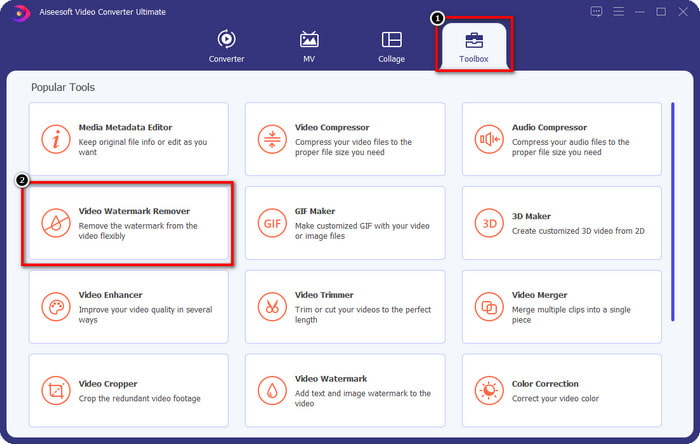
Langkah 2. Selepas melancarkan perisian, buka Toolbox, kemudian klik Video Watermark Remover di bawahnya.
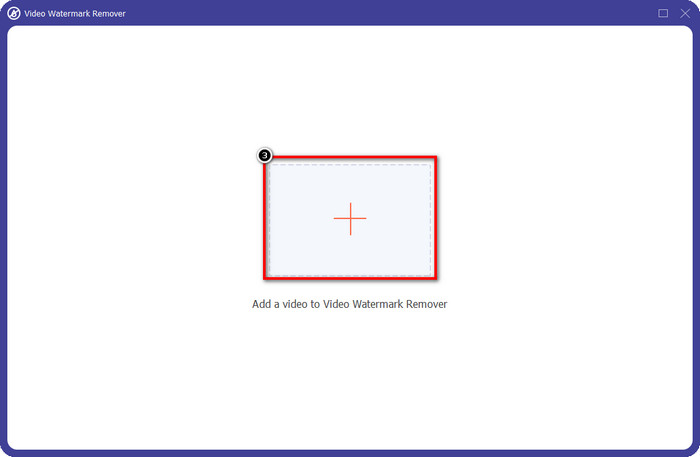
Langkah 3. Klik ikon + pada skrin anda untuk memuat naik video Renderforest yang anda eksport dengan tera air.
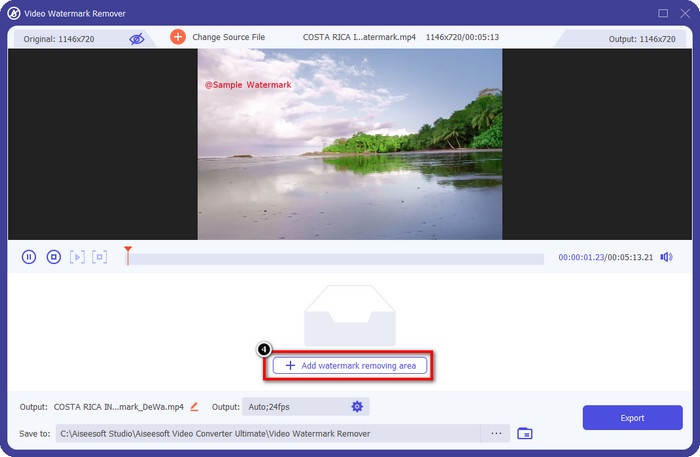
Langkah 4. Tekan Add Removing Watermark Area untuk mula membuang tera air Renderforest.
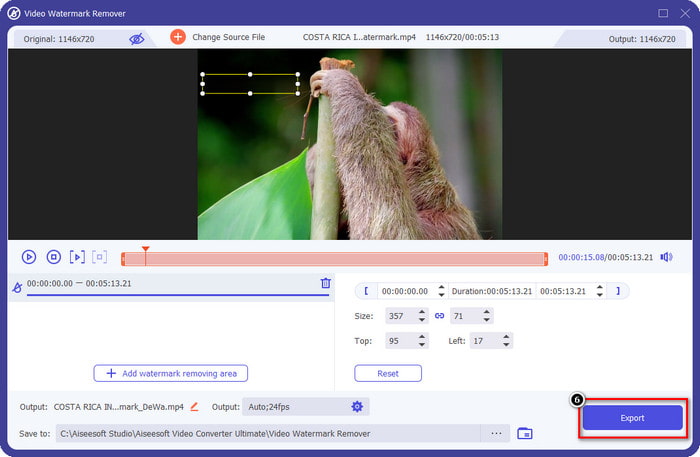
Langkah 5. Pada tetingkap baharu di skrin anda, seret kotak pilihan dan sesuaikan sehingga menutupi tera air tersebut. Anda boleh melaras kotak pilihan itu dengan bebas jika perlu.
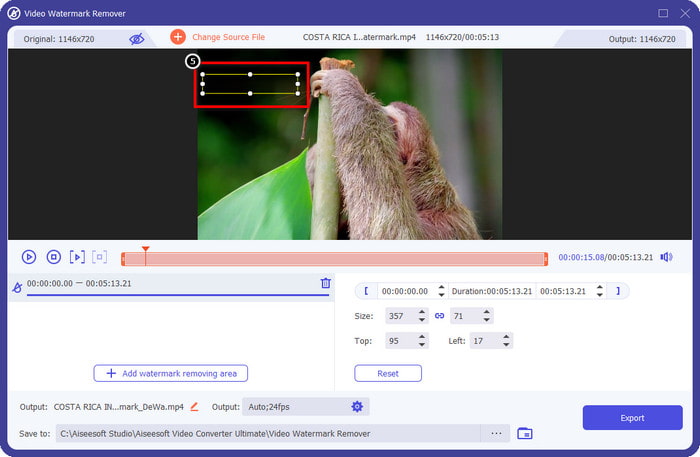
Langkah 6. Setelah kotak pilihan mengesan tera air dalam video anda, klik Export untuk mula membuang dan menyimpan video tanpa tera air. Ia akan memproses video dengan pantas, dan kini anda boleh menggunakan video tersebut tanpa tera air yang mengganggu.
Berkaitan:
Buang Logo Sekarang
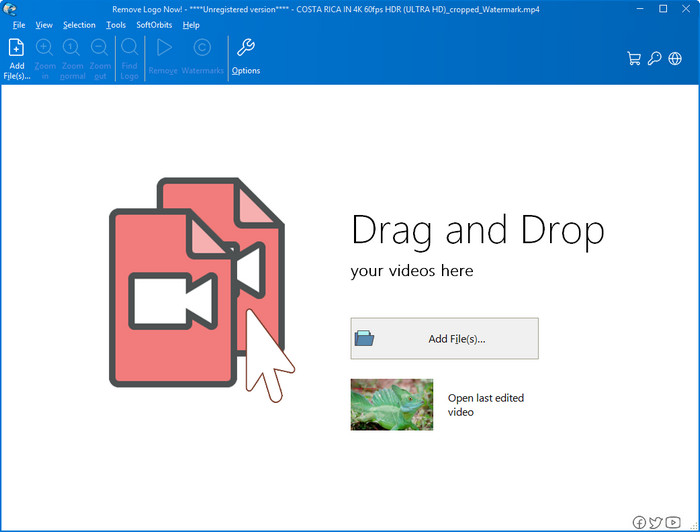
Seterusnya dalam senarai kami, Remove Logo Now membina reputasi yang sangat baik dalam membuang tera air yang disalut (overlaid) pada Windows. Dengan alat ini, anda tidak memerlukan kepakaran untuk tahu cara membuang tera air Renderforest pada PC. Selepas membuang tera air, akan ada sedikit kesan tinggalan di tempat asal tera air jika anda perhatikan dengan teliti. Tetapi jika anda tidak menelitinya, anda hampir tidak akan perasan tera air atau kesan tinggalan pada video yang dieksport. Tutorial di bawah akan mengajar anda cara membuang tera air dalam video anda pada peranti Windows.
Langkah 1. Muat turun dan pasang Remove Logo Now pada desktop anda, kemudian ikut proses pemasangan.
Langkah 2. Lancarkan perisian, kemudian klik Add Files untuk memuat naik video di sini. Anda juga boleh seret dan lepas video ke sini untuk pemuatan fail yang lebih cekap.
Langkah 3. Pilih alat yang anda ingin gunakan untuk menandakan tera air. Selepas memilih satu, sorot tera air tersebut dan klik Remove.
Langkah 4. Klik Start untuk memulakan proses pembuangan tera air yang disediakan oleh alat ini.
Pembuang Tera Air Video Dalam Talian

Tidak suka memuat turun perisian pada desktop tetapi masih mahu tahu cara membuang tera air Renderforest? Maka cubalah gunakan Video Watermark Remover Online. Anda boleh menggunakan penanggal tera air automatik sepenuhnya ini untuk menghapuskan tera air dalam video anda secara percuma tanpa memuat turun apa‑apa ke desktop anda. Sama seperti alat yang disebutkan di sini, walaupun anda seorang pemula dalam penyuntingan video atau pembuangan tera air, anda boleh mahir menggunakan alat ini dalam beberapa minit. Anda boleh ikut tutorial di bawah untuk mengetahui cara menggunakannya.
Langkah 1. Buka penanggal tera air dalam talian dengan mencarinya melalui pelayar web kegemaran anda.
Langkah 2. Klik ikon awan muat naik pada laman utama untuk memasukkan video yang anda eksport daripada Renderforest.
Langkah 3. Tunggu proses muat naik selesai kerana ia akan membuang tera air dalam video anda secara automatik, kemudian klik Download untuk mendapatkan video tanpa tera air.
Bahagian 2. Soalan Lazim tentang Cara Membuang Tera Air Renderforst
Berapakah yuran langganan untuk Renderforest?
Renderforest menyokong tiga jenis harga berbeza yang boleh anda manfaatkan; $ 14.99 untuk Lite, $24.99 untuk Pro dan $29.99 untuk Perniagaan setiap bulan. Harga ini memang mempunyai tujuan yang berbeza antara satu sama lain; anda boleh pergi ke tapak web utamanya untuk melihat apakah senarai yang tersedia pada langganan yang ingin anda manfaatkan.
Adakah mungkin untuk mengalih keluar tera air daripada Renderforest Video tanpa alat?
Ya, anda boleh mengalih keluar tera air dalam Renderforest anda tanpa menggunakan alat, dan cara itu adalah dengan membeli yuran bulanan atau tahunan pada perisian. Supaya apabila anda mengeksport fail video, tiada tera air ditambahkan padanya.
Manakah rancangan terbaik untuk Renderforest; Bulanan atau Tahunan?
Langganan bulanan adalah pilihan yang baik jika anda ingin menggunakan alat ini beberapa kali, tetapi jika anda memutuskan untuk menggunakan perisian untuk jangka masa yang lama, adalah lebih baik untuk menggunakan pelan Tahunan kerana ia akan menelan kos anda kurang daripada pembaharuan setiap bulan. Tetapi sebelum anda memanfaatkannya, anda boleh menggunakan Renderforest secara percuma dengan melog akaun anda di sini, kemudian cuba gunakan templat lain yang disediakannya secara percuma.
Kesimpulannya
Sesungguhnya artikel ini memberikan bukti kukuh untuk mengalih keluar tera air Renderforest secara percuma menggunakan tiga penanggal tera air yang paling berguna yang boleh anda gunakan. Jika anda seorang pengguna Windows dan ingin mengalih keluar tera air pada desktop anda, anda mesti cuba menggunakan Buang Logo Sekarang. Tetapi jika anda tidak suka memuat turun perisian, anda mesti cuba menggunakan Video Watermark Remover Online kerana anda boleh menggunakan alat ini untuk membuang tera air dengan berkesan.
Tetapi jika anda seorang pengguna Windows atau Mac yang mahukan penanggal tera air yang berkesan, maka tanpa ragu-ragu, penanggal tera air terbaik yang boleh anda gunakan ialah FVC Video Converter Ultimate. Ia adalah penanggal tera air muktamad yang boleh anda gunakan untuk mengalih keluar tera air yang mengganggu video Renderforest anda dengan cekap dan profesional.
-
 2 Cara untuk Mengalih Keluar Tera Air VSDC pada Windows & Mac dengan Pantas
 Adakah anda sedang mencari cara untuk mengalih keluar tera air VSDC pada video anda? Dengan artikel ini, kami menyediakan alat yang boleh anda gunakan untuk menghilangkan tera air.
-
 Keluarkan Tera Air Animoto pada Video dengan Mudah dan Berkesan
 Bagaimana untuk membuang tera air Animoto pada video? Teruskan membaca artikel ini kerana kami menyediakan tutorial lengkap tentang cara melakukannya.
-
 Cara Membuang Tera Air daripada Video Menggunakan Final Cut Pro [Panduan Lengkap]
 Ada masalah dengan tera air pada video? Tidak berkata lagi, kerana kami menyediakan tutorial tentang cara membuang tera air daripada video menggunakan Final Cut Pro.
