


 Video Converter Ultimate
 Perakam Skrin
 Pembaikan Video
 Muat Turun Selamat
Kaedah Terbaik tentang Cara Mengalih Keluar Logo VideoScribe daripada Video
Adakah anda ingin belajar cara untuk menanggalkan logo VideoScribe daripada video anda? Ada kalanya anda akan menemui logo pada video. Anda tidak dapat mengelakkannya, terutamanya apabila pemilik video mahu melindungi video mereka dan mempromosikan jenama mereka. Anda juga boleh menemui logo jika menggunakan versi percuma sesuatu aplikasi. Contoh terbaik ialah aplikasi VideoScribe. Jika anda menggunakan versi percuma aplikasi ini, video anda akan mempunyai logo VideoScribe kecuali anda membelinya. Namun, sebelum itu, anda boleh menggunakan aplikasi percuma lain untuk menanggalkan logo daripada video anda. Anda mesti membaca artikel ini untuk mengetahui cara menanggalkan logo tanpa perlu membeli apa-apa.

Bahagian 1: Cara Mengalih Keluar Logo VideScribe daripada Video Luar Talian
Jika anda mahu menanggalkan logo VideoScribe daripada video anda secara luar talian, anda boleh menggunakan Video Converter Ultimate. Aplikasi ini boleh membantu anda menanggalkan logo VideoScribe daripada video anda dengan mudah dan pantas. Anda juga boleh menggunakan perisian ini untuk menyunting video tanpa kehilangan kualiti. Selain itu, ia mempunyai antara muka GUI yang ringkas dan menawarkan output berkualiti tinggi. Video Converter Ultimate boleh digunakan pada Mac dan Windows. Walaupun mempunyai banyak fungsi, ia tetap sesuai untuk pengguna baharu. Aplikasi ini menyokong pelbagai format fail seperti FLV, MOV, MP4, MTS, DivX, XviD dan banyak lagi. Di samping itu, aplikasi ini mempunyai banyak alat penyuntingan yang boleh anda gunakan untuk menambah baik video anda, seperti menambah baik, memotong (trimming), memangkas (cropping), membetulkan warna, memusing (rotating) video dan banyak lagi. Video Converter Ultimate juga boleh memberikan dua cara untuk menanggalkan logo VideoScribe daripada video anda.
Menggunakan Penanggal Tera Air Video
Langkah 1: Klik butang muat turun di bawah untuk memuat turun Video Converter Ultimate pada Windows atau Mac anda. Selepas itu, pasang perisian pada peranti anda dan jalankan aplikasi.
Muat Turun PercumaUntuk Windows 7 atau lebih baharuMuat Turun Selamat
Muat Turun PercumaUntuk MacOS 10.7 atau lebih baharuMuat Turun Selamat
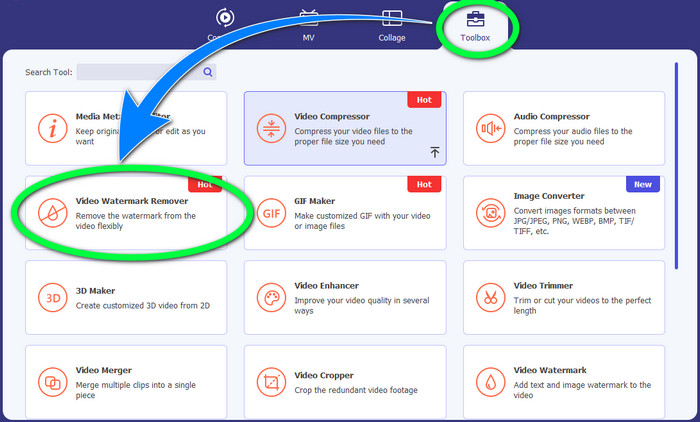
Langkah 2: Selepas itu, pergi ke panel Toolbox dan klik butang Video Watermark Remover. Antara muka baharu akan muncul pada skrin anda.
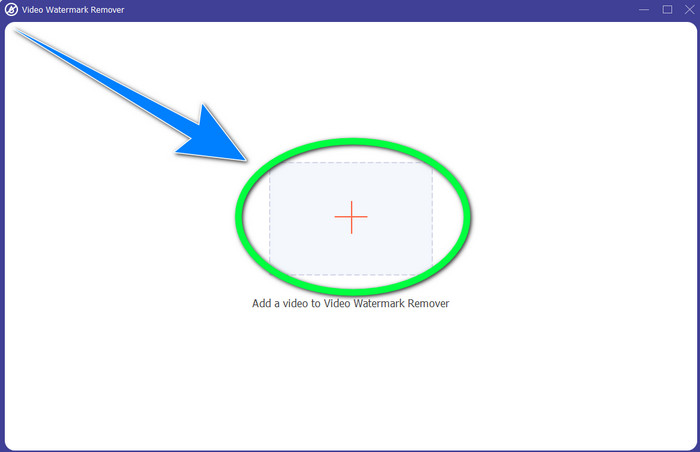
Langkah 3: Klik butang + untuk mengimport fail video dengan logo VideoScribe yang ingin anda tanggalkan.
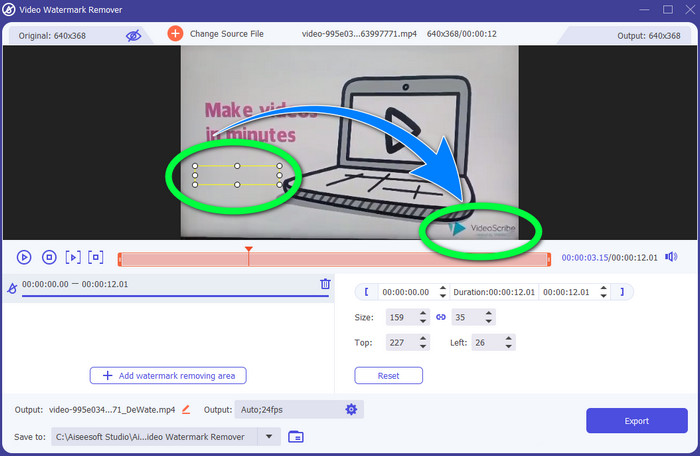
Langkah 4: Setelah selesai mengimport video, klik Add Watermark Removing Area dan letakkan kotak pilihan mini pada logo tersebut. Anda boleh melaras saiz kotak tersebut.
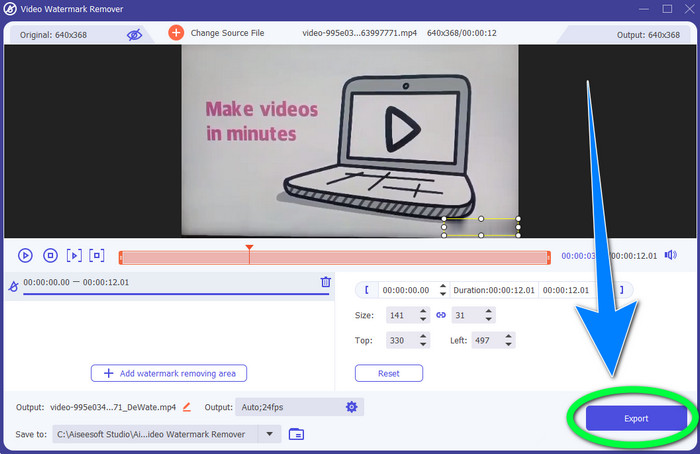
Langkah 5: Untuk langkah terakhir, anda boleh klik butang Export supaya anda boleh menyimpan video tanpa logo tersebut.
Menggunakan Fungsi Pemotong Video
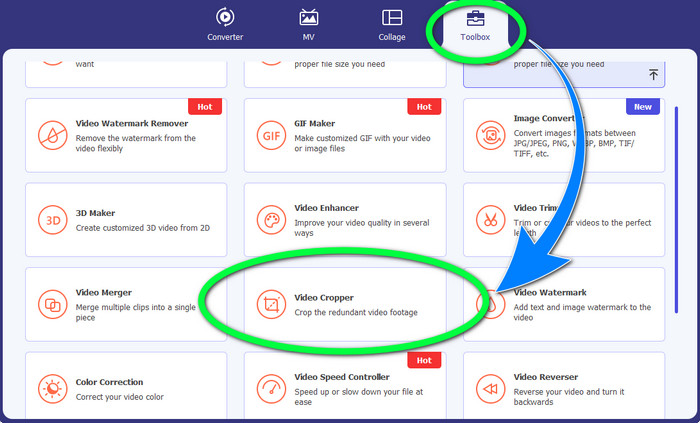
Langkah 1: Alat pemangkasan ialah satu lagi cara untuk menanggalkan logo VideoScribe. Di bawah Toolbox, klik butang Video Cropper.
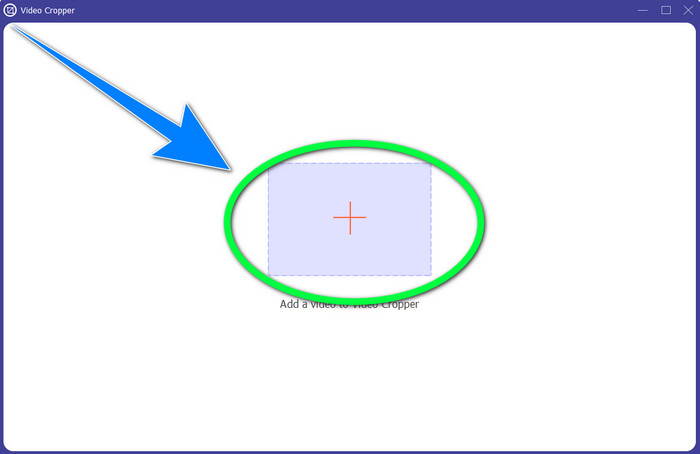
Langkah 2: Antara muka baharu akan muncul pada skrin anda. Pilih butang tanda + dan masukkan video anda yang mempunyai logo VideoScribe.
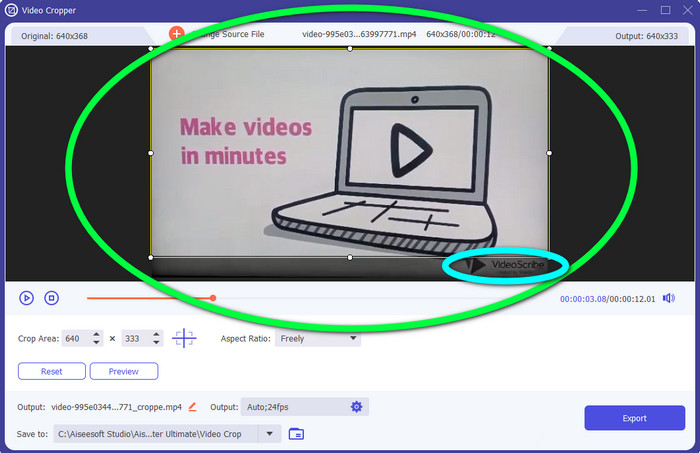
Langkah 3: Alat pemangkasan membolehkan anda memangkas bahagian tepi video anda. Jika logo berada di bahagian tepi video anda, anda boleh memotongnya untuk menanggalkan logo tersebut.
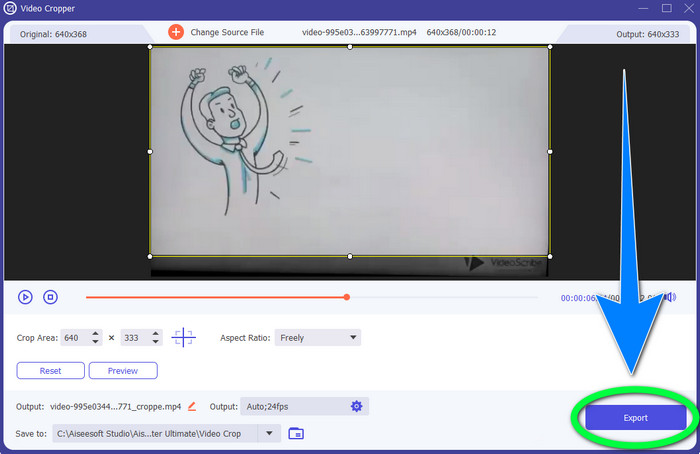
Langkah 4: Seterusnya, jika anda rasa anda telah menanggalkan logo VideoScribe, anda boleh memilih butang Export dan menyimpan video akhir anda pada peranti.
Bahagian 2: Cara Membuang Logo VideoScribe daripada Video Dalam Talian
Menggunakan BeeCut-Online Watermark Remover
Adakah anda mahu menanggalkan logo VideoScribe daripada video anda secara dalam talian? BeeCut-Online Watermark Remover ialah salah satu alat dalam talian yang hebat dan berguna yang boleh anda gunakan. Alat dalam talian ini boleh membantu anda menanggalkan objek yang mengganggu daripada video anda, seperti logo, tera air, teks, cap tarikh dan banyak lagi. Justeru, anda boleh menanggalkan logo VideoScribe daripada video anda dengan mudah kerana antara mukanya yang ringkas. Selain itu, BeeCut-Online Watermark Remover menyokong pelbagai format fail seperti FLV, MOV, MP4, WebM, ASF, AVI, 3GP, MPG dan banyak lagi. Tambahan pula, anda juga boleh menanggalkan unsur yang mengganggu daripada imej dengan alat ini. Malangnya, aplikasi ini bergantung kepada internet, yang bermaksud anda tidak boleh menggunakannya jika anda tidak mempunyai capaian atau sambungan internet. Dari segi proses penyingkiran, kadangkala ia memakan masa, bergantung pada kelajuan sambungan internet anda, sama ada pantas atau perlahan. Kami menyediakan langkah-langkah di bawah untuk anda ikuti secara teratur.
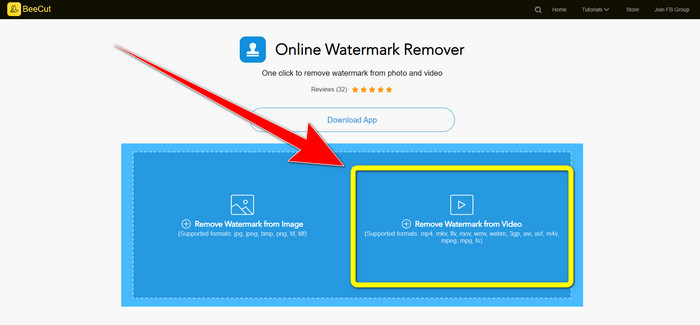
Langkah 1: Pergi ke laman web BeeCut-Online Watermark Remover. Klik butang Remove Watermark from Video dan lampirkan video anda yang mempunyai logo VideoScribe.
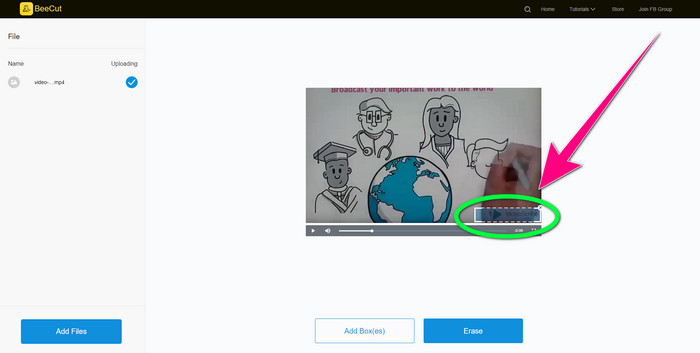
Langkah 2: Selepas menambah video anda, gunakan kotak kecil yang anda lihat pada video dan seret untuk menutupi logo tersebut.
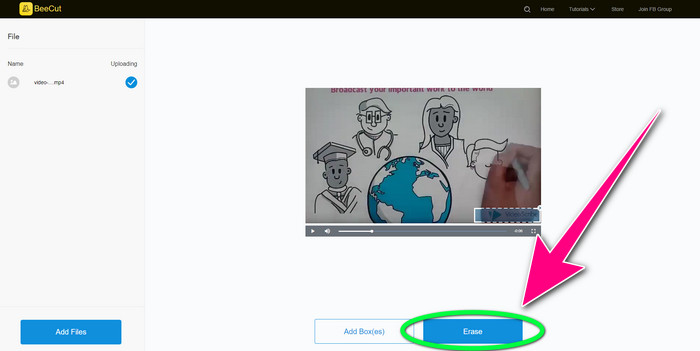
Langkah 3: Setelah anda selesai menutupi logo menggunakan kotak kecil itu, pilih butang Erase untuk menyimpan dan memuat turun video anda tanpa logo VideoScribe.
Menggunakan Pembuang Tera Air Video Dalam Talian
Video Watermark Remover Online ialah satu lagi alat dalam talian yang boleh anda gunakan untuk menanggalkan logo VideoScribe daripada video anda. Ia mempunyai antara muka yang ringkas dan sesuai untuk pengguna baharu. Selain itu, anda boleh menanggalkan logo daripada video tanpa kehilangan kualiti, yang merupakan satu kelebihan. Namun, alat dalam talian ini mempunyai ciri yang terhad dalam versi percuma. Anda hanya boleh menanggalkan logo daripada 5 video dan tidak boleh mengeksportnya ke format fail lain. Dan oleh sebab ia merupakan aplikasi dalam talian, anda tidak boleh menggunakannya tanpa sambungan internet. Selain itu, kadangkala alat ini tidak berfungsi dengan baik. Jika anda mahu belajar cara menanggalkan logo daripada video anda, ikut langkah mudah di bawah.
Langkah 1: Pergi ke laman web Video Watermark Remover Online. Klik butang Click or Drag Videos Here untuk memasukkan video anda yang mempunyai logo VideoScribe.

Langkah 2: Klik butang Remove Watermark dan tunggu proses penyingkiran selesai. Kemudian, anda boleh menyimpan video anda.
Bahagian 3: Soalan Lazim tentang Mengalih Keluar Logo VideoScribe daripada Video
Bolehkah saya mempercayai alatan dalam talian untuk mengalih keluar logo daripada video saya?
Ya awak boleh. Alat dalam talian selamat dan boleh melindungi fail video anda. Sesetengah alatan boleh memadamkan fail anda secara automatik selepas proses, jadi anda tidak perlu risau. Walau bagaimanapun, tidak semua alat dalam talian adalah sama, jadi anda masih perlu mencari ulasan untuk mengetahui sama ada anda boleh mempercayai alat tertentu.
Bagaimanakah anda menyingkirkan logo daripada video?
Jika anda ingin membuang logo, muat turun Video Converter Ultimate pada komputer atau Mac anda. Anda boleh menggunakan penghilang tera air video atau alat pemangkas video. Kedua-dua cara ini boleh membantu anda menyingkirkan logo daripada video anda.
Bolehkah saya mengalih keluar logo VideoScribe tanpa langganan?
Ya sudah tentu! Anda boleh mengalih keluar logo VideoScribe menggunakan Video Converter Ultimate. Anda tidak perlu membeli aplikasi ini untuk mengalih keluar logo kerana ia adalah percuma.
Kesimpulannya
Artikel ini telah memberikan anda maklumat tentang menanggalkan logo VideoScribe daripada video menggunakan alat boleh muat turun dan alat dalam talian. Namun, jika anda mahu menanggalkan logo daripada video anda dengan cepat dan mudah, anda boleh menggunakan Video Converter Ultimate.
-
 3 daripada Pembuang Tera Air Shutterstock Terkini Yang Anda Perlukan
 Tidak suka tera air Shutterstock yang dilampirkan pada video yang dieksport? Anda boleh menggunakan penanggal tera air Shutterstock untuk memadamkannya dengan berkesan.
-
 Cara Menghilangkan Tera Air Powtoon Menggunakan 4 Kaedah Berkesan
 Baca artikel ini untuk mengetahui cara mengalih keluar tera air Powtoon menggunakan alat terbaik yang kami sertakan di sini dan tutorial.
-
 Ulasan Apowersoft Watermark Remover – Ciri, Kebaikan & Keburukan serta Harga
 Apowersoft Watermark Remover ialah salah satu tera air terbaik yang dialih keluar yang menyokong dalam talian dan luar talian, klik ini untuk mengetahui lebih lanjut!
