


 Video Converter Ultimate
 Perakam Skrin
 Pembaikan Video
 Muat Turun Selamat
Prosedur Mudah untuk Mengeluarkan Tera Air Daripada Video MP4
Adakah anda menghadapi masalah seperti langsung tidak tahu bagaimana untuk membuang tera air daripada video MP4 anda menggunakan peranti seperti Mac dan Windows? Jika ya, artikel ini mempunyai penyelesaian terbaik untuk anda. Jika anda termasuk dalam golongan yang gemar menonton filem, klip, dan sebagainya, mungkin anda juga boleh memahami betapa mengganggu dan menjengkelkannya menonton video kegemaran dengan tera air atau sebarang objek tidak diperlukan yang kelihatan pada video MP4 anda. Selain itu, anda juga tidak dapat melihat keseluruhan bahagian skrin kerana tera air tersebut menutupinya. Dan bahagian paling mengecewakan ialah sesetengah video mempunyai tera air yang sangat besar sehingga anda langsung tidak dapat menikmati menonton video kegemaran anda.
Syukurlah, sudah ada aplikasi perisian yang hebat dan luar biasa dengan penanggal tera air video yang boleh anda gunakan untuk menghapuskan objek yang tidak diperlukan pada video anda, seperti tera air, logo, teks, gambar dan banyak lagi. Anda boleh memadam atau mengalih keluar objek ini dengan cepat dan menikmati menonton atau memainkan video anda dengan aplikasi ini. Dengan aplikasi ini, anda tidak akan kecewa atau jengkel lagi. Kemudian, jika anda tertarik dengan topik ini, anda mesti membaca artikel ini untuk memberi anda maklumat yang mencukupi, terutamanya untuk membuang tera air pada video MP4 anda dengan mudah.

Bahagian 1: Cara Terbaik untuk Mengalih Keluar Tera Air daripada Video MP4
Jika anda sedang mencari aplikasi paling hebat dan menakjubkan untuk membuang tera air daripada video MP4, Video Converter Ultimate ialah alat yang terbaik. Aplikasi ini mampu menghapuskan objek yang mengganggu dalam video anda, seperti tera air, logo, teks, atau gambar. Selain itu, anda tidak perlu menunggu lama semasa proses menyimpan kerana anda boleh menyimpan video anda dengan cepat selepas membuang tera air.
Selain itu, Video Converter Ultimate mempunyai banyak alat penyuntingan yang boleh anda gunakan, seperti penambah video, mengalih keluar tera air, menambah tera air, pengawal kelajuan video, pembuat GIF, pembuat kolaj, perakam video dan audio, pemampat video/audio, menukar pelbagai fail format, seperti MP4, FLV, MOV, TRP, MTS, M2TS, MKV, AAC, MP3 dan banyak lagi. Di samping itu, bahagian yang terbaik ialah anda tidak perlu membeli atau membeli aplikasi ini lagi. Anda boleh mengendalikan ini secara percuma. Selain itu, aplikasi ini sangat mudah dan mudah digunakan. Jika anda ingin mengalih keluar tera air pada video MP4 anda, Video Converter Ultimate boleh menawarkan anda dua cara. Baca secara berterusan untuk mengetahui dua cara menghapuskan tera air pada video anda.
1. Menggunakan Penanggal Tera Air Video
Langkah 1: Layari laman web Video Converter Ultimate. Muat turun aplikasi tersebut secara percuma. Kemudian, teruskan dengan proses pemasangan.
Muat Turun PercumaUntuk Windows 7 atau lebih baharuMuat Turun Selamat
Muat Turun PercumaUntuk MacOS 10.7 atau lebih baharuMuat Turun Selamat
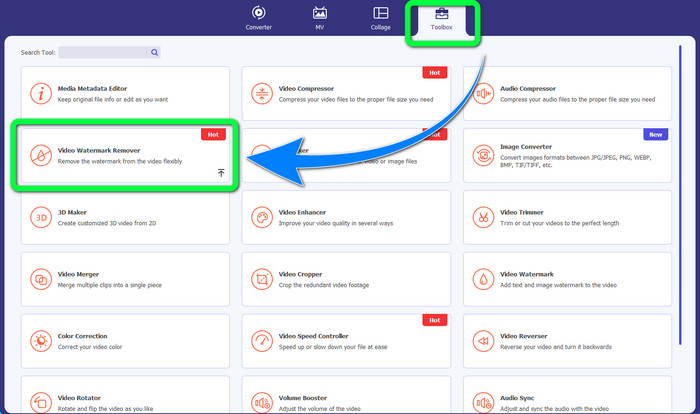
Langkah 2: Lancarkan aplikasi. Pilih Toolbox > Video Watermark Remover.
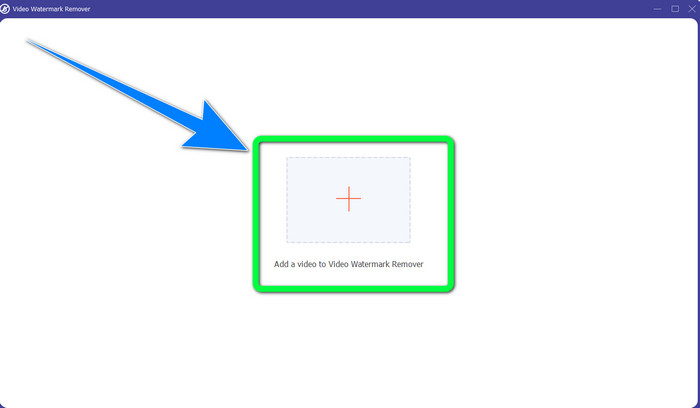
Langkah 3: Satu antara muka lain akan muncul. Klik butang tanda Tambah dan tambah video MP4 anda yang mempunyai tera air.
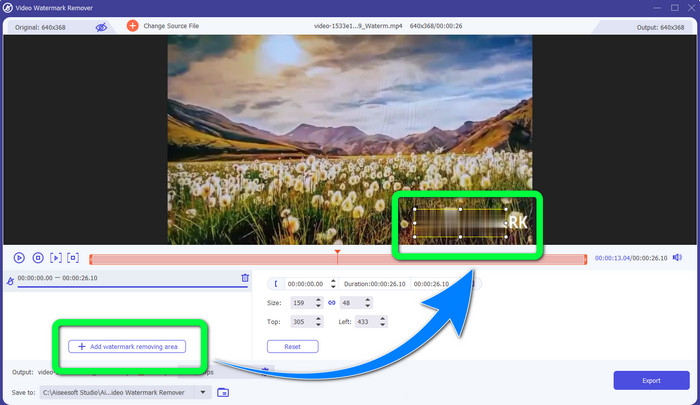
Langkah 4: Klik butang Add Watermark Removing Area. Kemudian, satu kotak kecil akan muncul pada video anda, seret kotak ini dan gunakan untuk menutup tera air pada video anda.
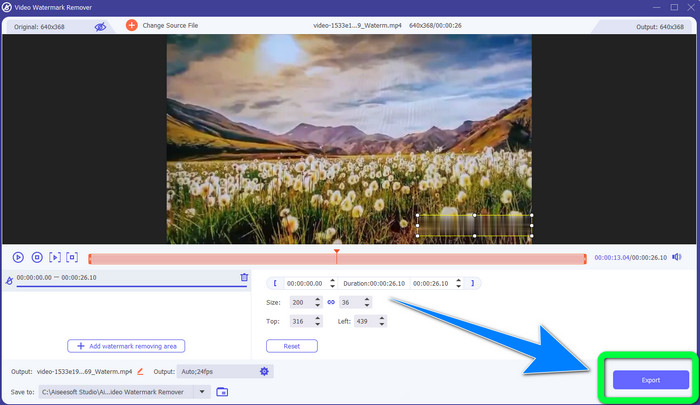
Langkah 5: Apabila anda sudah selesai membuang tera air, klik butang Export untuk menyimpan video anda. Kini, anda boleh menikmati menonton filem kegemaran tanpa tera air.
2. Menggunakan Pemotong Video
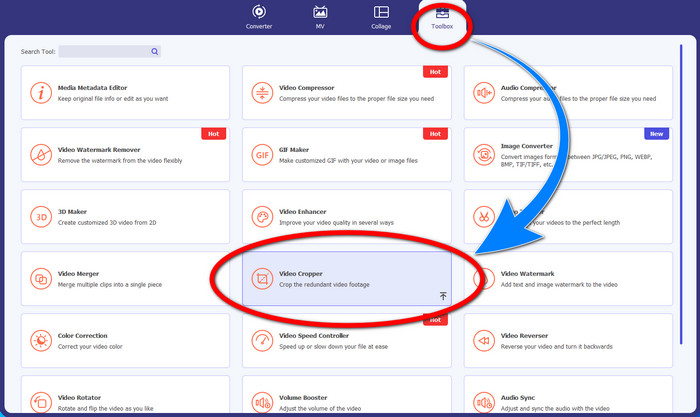
Langkah 1: Lancarkan Video Converter Ultimate. Kemudian, klik Toolbox > Video Cropper.
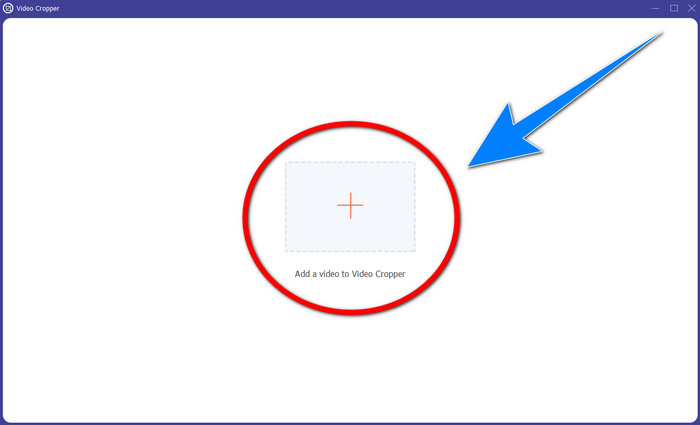
Langkah 2: Satu antara muka lain akan muncul selepas mengklik Video Cropper. Klik simbol Tambah untuk menambah video MP4 anda yang mempunyai tera air.
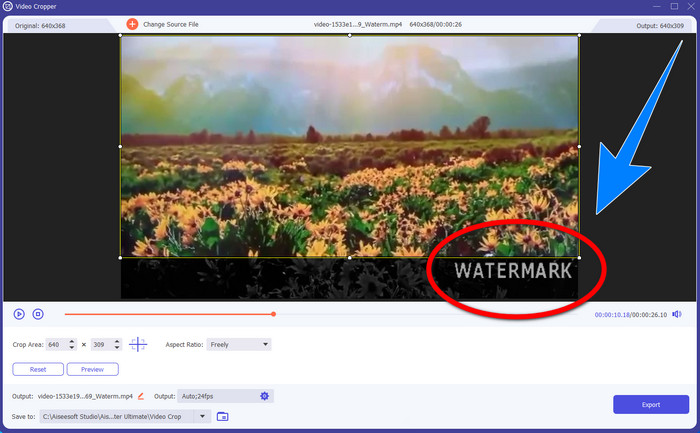
Langkah 3: Setelah anda menambahkan video anda, anda boleh memangkas video MP4 anda dan menghapuskan tera air.
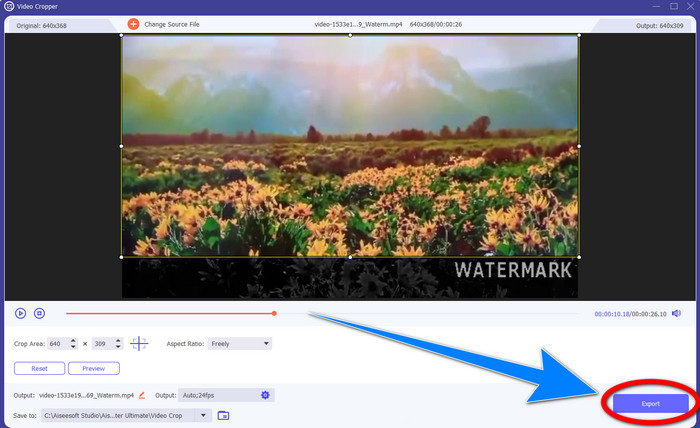
Langkah 4: Jika anda sudah selesai memotong bahagian video untuk membuang tera air, klik butang Export untuk menyimpan video anda. Dengan cara ini, anda boleh menonton video tanpa tera air.
Bahagian 2: Buang Tera Air daripada Video MP4 Dalam Talian
Adakah anda sedang mencari aplikasi hebat yang boleh anda gunakan untuk membuang tera air daripada video MP4 anda dalam talian secara percuma? Jika ya, HitPaw Online Watermark Remover ialah aplikasi yang boleh anda harapkan. Selain itu, anda boleh menggunakan aplikasi ini tanpa perlu membeli apa-apa kerana ia 100% percuma. Di samping itu, anda boleh membuang tera air, logo, dan tandatangan tanpa sebarang had, dan ia tiada iklan. Aplikasi ini juga mudah dan ringkas untuk digunakan. Anda boleh membuang tera air pada video anda hanya dengan tiga langkah, yang sangat sesuai untuk pemula.
HitPaw Online Watermark Remover boleh diakses oleh mana-mana peranti, seperti Windows, Mac, iPhone dan Android. Aplikasi ini juga selamat, dan ia memastikan bahawa anda seorang sahaja yang boleh melihat dan mengedit video anda. Walau bagaimanapun, jika anda mengalih keluar tera air pada video anda, kawasan itu akan menjadi kabur dan kadangkala mengganggu. Juga, proses penjimatan adalah perlahan. Jika anda ingin mengalih keluar tera air pada video MP4 anda dalam talian, ikut langkah mudah di bawah.
Langkah 1: Pergi ke laman web HitPaw Online Watermark Remover. Klik Remove Watermark Now, kemudian pilih Choose File untuk menambah video MP4 anda yang mempunyai tera air.
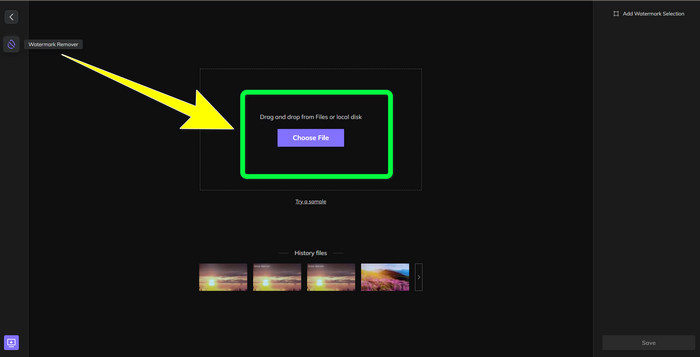
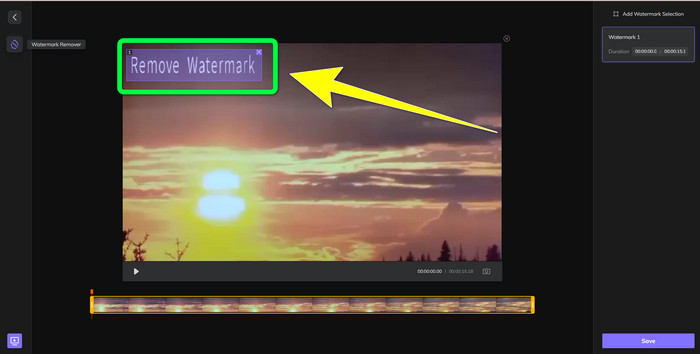
Langkah 2: Selepas menambah video anda, akan ada bentuk segi empat tepat pada video anda. Seret bentuk ini untuk menutup dan membuang tera air anda.
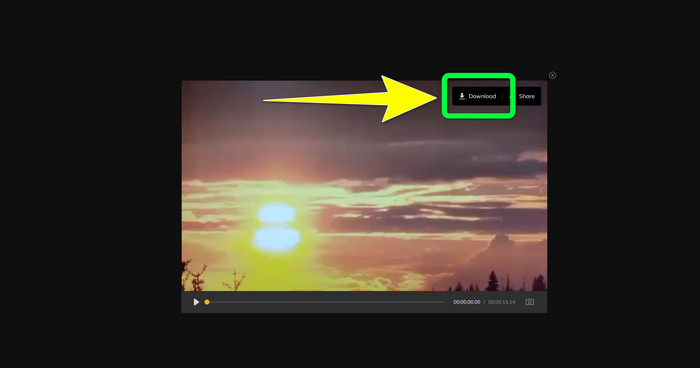
Langkah 3: Selepas membuang tera air pada video anda, klik butang Save. Tunggu proses penyimpanan selesai, kemudian klik butang Download untuk menyimpannya ke dalam peranti anda.
Bahagian 3: Soalan Lazim tentang Mengalih Keluar Tera Air daripada MP4
Adakah mungkin juga untuk menghapuskan tandatangan pada video saya?
Ya, ia boleh dilakukan. Video Converter Ultimate juga mampu membuang tandatangan pada video anda. Sebarang objek tidak diperlukan yang mengganggu video anda boleh dibuang dengan mudah menggunakan aplikasi ini.
Adakah ia memakan masa untuk mengalih keluar tera air daripada video MP4?
Ia bergantung pada aplikasi yang anda gunakan. Jika anda ingin mengalih keluar tera air pada video MP4 anda, gunakan Video Converter Ultimate. Ia boleh mengeluarkan tera air dengan serta-merta.
Apakah penanggal tera air video terbaik yang boleh saya gunakan?
Jika anda sedang mencari aplikasi yang boleh dipercayai untuk membuang tera air pada video anda, Video Converter Ultimate ialah perisian cemerlang yang boleh anda gunakan. Anda boleh membuang tera air dan menyimpan video anda tanpa menjejaskan kualitinya.
Bolehkah saya menggunakan alat pemangkasan pada HitPaw Online Watermark Remover untuk menghapuskan tera air?
Sudah Tentu Ya! Anda juga boleh menggunakan alat pemangkasan aplikasi ini jika anda ingin mengalih keluar tera air pada video anda, terutamanya jika tera air berada di sudut atau tepi video anda.
Selain daripada mengalih keluar tera air, adakah mungkin untuk menambah tera air menggunakan Video Converter Ultimate pada video saya?
Sememangnya Ya! Video Converter Ultimate bukan sahaja terhad kepada mengalih keluar tera air pada video anda. Aplikasi ini juga boleh menambah tera air pada video anda, terutamanya jika anda ingin meletakkan beberapa teks, logo, tandatangan, dsb.
Kesimpulannya
Seperti yang dinyatakan di atas, anda boleh dengan mudah membuang tera air daripada video MP4 anda menggunakan Video Converter Ultimate. Selain itu, artikel ini turut menunjukkan beberapa perisian yang boleh anda gunakan untuk membuang objek tidak diperlukan daripada video MP4 secara dalam talian.
-
 Cara Mengalih Keluar Tera Air Filmora pada Video atau Projek Anda secara Percuma
 Bagaimana untuk membuang tera air Filmora? Soalan ini tersebar di seluruh web, dan di sini kami menyenaraikan pendekatan berbeza yang boleh anda gunakan!
-
 Helah Terpantas untuk Mengalih Keluar Tera Air Stok Adobe Daripada Video [Tutorial]
 Adakah anda menghadapi masalah dengan tera air Adobe Stock? Baca ini dan ketahui cara mengalih keluar tera air Adobe Stock daripada video.
-
 5 Cara untuk Mengalih Keluar Tera Air daripada Video Secara Profesional
 Perlu mengalih keluar tera air daripada video untuk menjadikannya kelihatan profesional? Nah, baca artikel ini sambil kami menambah tutorial tentang cara melakukannya!
