


 Video Converter Ultimate
 Perakam Skrin
 Pembaikan Video
 Muat Turun Selamat
Cara Mengeluarkan Tera Air daripada Graf Asal dengan Berkesan pada Graf
Anda mungkin perlu menggunakan Origin Graph untuk mencipta templat bagi data matematik atau saintifik yang terlalu rumit untuk diterangkan dengan kata-kata. Perisian ini telah membantu pelajar, penyelidik, profesor, golongan korporat, dan sesiapa sahaja yang perlu menghasilkan graf mereka sendiri. Dengan set templat yang boleh anda pilih, anda boleh menghasilkan graf yang menarik dan mampu memikat perhatian penonton. Masalah yang mungkin anda hadapi jika menggunakan versi percumanya ialah teks tera air akan ditambah pada output akhir. Adakah anda menghadapi kesukaran menangani tera air itu? Jangan risau lagi! Kerana kami sedia membantu anda. Di sini, kami akan membentangkan beberapa petua berguna tentang cara menghapuskan tera air daripada Origin Graph dan menggunakannya dalam pembentangan Word atau PowerPoint anda.

Bahagian 1. Cara Membuang Tera Air daripada Graf Asal dengan Pembuang Tera Air Imej Dalam Talian
FVC Free Watermark Remover Online ialah penyingkir tera air teks bertaraf tinggi yang boleh anda gunakan untuk menghapuskan tera air Origin Graph. Alat ini sangat cekap dalam membuang sebarang objek pada imej anda supaya kelihatan lebih profesional selepas tera air dibuang. Dengan alat ini, kami dapat memastikan ia adalah penyingkir tera air yang berdedikasi yang boleh anda gunakan dan harapkan apabila berdepan masalah seperti ini. Tertanya-tanya sama ada alat ini mudah digunakan? Jangan risau lagi! Kerana langkah-langkah di bawah ialah panduan yang boleh anda ikuti untuk menyingkirkan tera air teks pada imej yang ditambah oleh Origin Graph.
Langkah 1. Anda boleh klik pautan ini untuk membuka penyingkir tera air imej dalam talian; ia akan terus membuka tab baharu di mana anda boleh mengakses alat tersebut.
Langkah 2. Tekan Upload Image untuk menambah foto yang mempunyai tera air di sini, cari fail foto dalam folder, dan klik Open untuk memuat naiknya dengan berjaya.
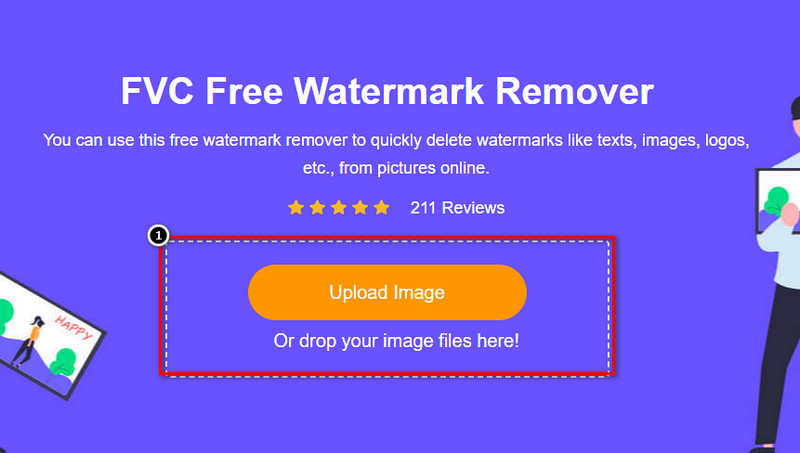
Langkah 3. Anda boleh menggunakan tiga alat untuk menyerlahkan tera air; walaupun fungsinya berbeza, keberkesanannya adalah sama. Pilih satu alat, kemudian serlahkan kawasan pada imej yang mempunyai tera air.
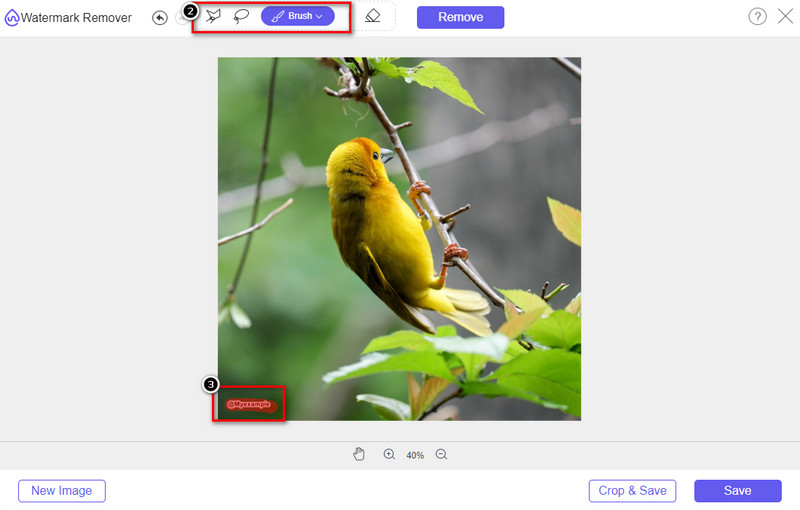
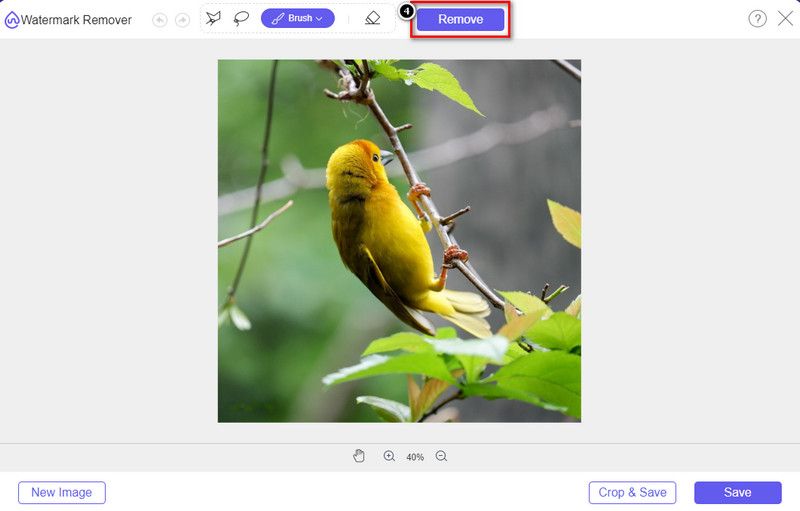
Langkah 4. Pastikan anda mengklik ikon Remove selepas menyerlahkan tera air dengan alat tadi. Langkah ini penting supaya apabila anda mengeksport imej, anda akan mendapat imej tanpa tera air.
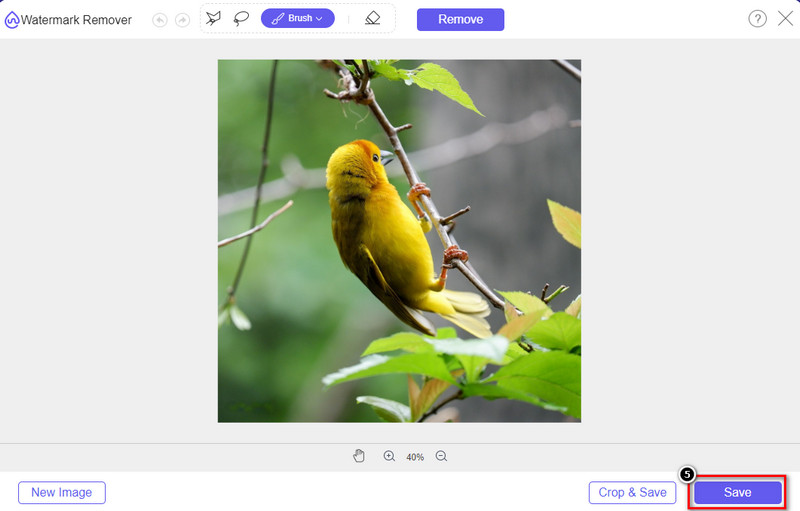
Langkah 5. Untuk memulakan proses eksport, anda kini boleh klik butang Save. Tunggu proses selesai, dan anda kini boleh menyemak imej yang sudah tidak lagi memaparkan tera air Origin Graph pada kawasan tersebut.
Kelebihan
- Penghapus tera air imej berasaskan web percuma yang boleh anda akses.
- Ia berfungsi dengan cekap untuk mengalih keluar tera air dengan sokongan AI-Technology.
- Ia menyokong pelbagai jenis format imej yang mungkin anda ada pada pemacu tempatan anda.
- Tiada tera air ditambahkan pada imej yang dieksport.
Keburukan
- Memerlukan sambungan internet untuk berfungsi.
- Fokusnya adalah untuk mengalih keluar tera air dan tiada yang lain.
Bahagian 2. Cara Menyalin Graf dari Origin ke Word atau PowerPoint tanpa Tera Air
Dalam bahagian artikel ini, kami akan memberikan anda prosedur yang perlu anda ketahui untuk menambah graf yang telah anda buat pada Graf Asal tanpa tera air. Ikutinya dengan sewajarnya untuk menambah graf yang berjaya anda buat pada Microsoft Word dan PowerPoint tanpa tera air.
Anda perlu mengosongkan sekurang-kurangnya 1.9GB kerana saiz failnya yang besar. Dalam fail 1.9GB, anda boleh mendapatkan bantuan yang anda perlukan, tetapi jika anda tidak mahu bantuan, anda boleh memuat turun versi 652 MB melalui .zip atau .exe.
Langkah-langkah Cara Membuat Graf pada Graf Asal tanpa Tera Air:
Langkah 1. Mula-mula, muat turun Origin Graph pada sistem operasi anda dengan pergi ke laman web rasminya. Buka alat itu untuk mula mencipta graf yang anda inginkan.
Langkah 2. Selepas melancarkan perisian, tambah nilai pada jadual yang anda perlukan. Anda boleh menambah lebih banyak pemboleh ubah dan bilangan graf di sini.
Tambahan: Anda boleh klik Plot untuk melihat graf lain yang boleh anda gunakan, seperti Basic 2D, Bar, Statistical, dan banyak lagi.
Langkah 3. Klik File, kemudian tekan Save untuk mengeksport graf yang telah anda cipta di sini.
Langkah 4. Anda boleh mengikuti langkah yang kami sertakan dalam Bahagian 1 dan ikuti tutorial tentang cara menghapuskan tera air daripada Origin Graph dengan bantuan FVC Free Watermark Remover Online.
Cara Menggunakan Graf pada Word tanpa Tera Air:
Langkah 1. Buka aplikasi Word pada desktop anda, kemudian klik Blank Page. Jika anda sudah mencipta dokumen Word, buka fail tersebut.
Langkah 2. Pergi ke bahagian Insert, kemudian klik Pictures. Cari fail graf dalam pemacu setempat anda, klik sekali, kemudian tekan Open untuk memuat naiknya ke dalam Word.
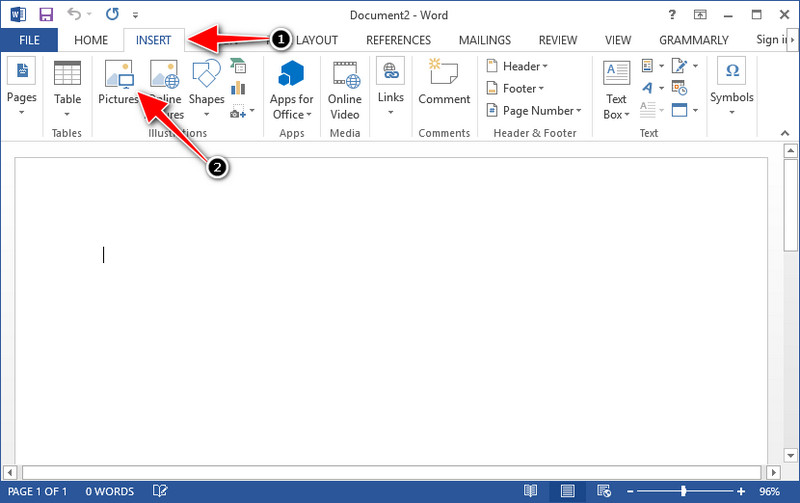
Langkah 3. Ia akan dimuatkan secara automatik pada dokumen Word yang anda buka atau cipta; anda kini boleh meletakkan graf itu dengan menekan dan menyeretnya dalam Word.
Cara Menggunakan Graf pada Powerpoint tanpa Tera Air:
Langkah 1. Lancarkan PowerPoint pada komputer anda dan klik Blank Presentation. Anda juga boleh menyemak pembentangan terkini yang anda cipta di bahagian kiri. Jika ada fail yang perlu anda tambah graf, klik untuk membukanya.
Langkah 2. Tekan Insert dan klik Picture untuk memasukkan imej graf yang anda cipta pada Origin Graph.
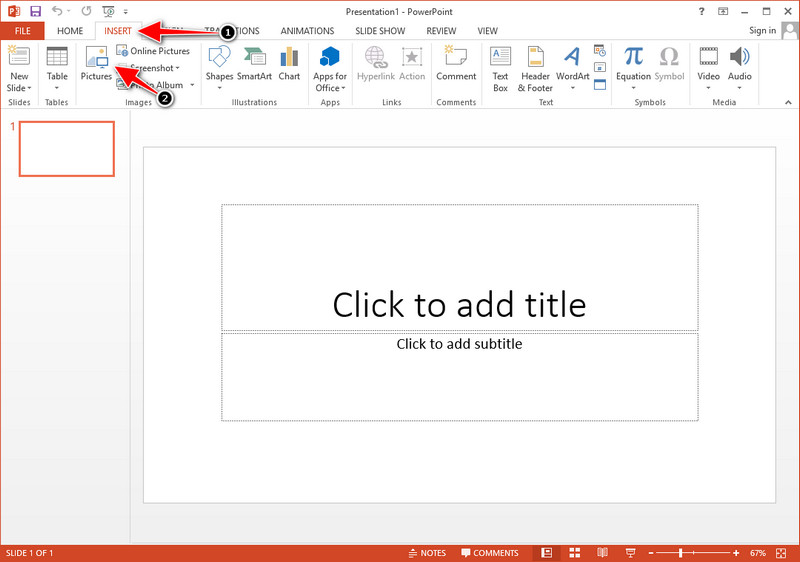
Langkah 3. Laraskan imej graf dan letakkan pada slaid.
Bacaan Lanjut:
Cara Menghapuskan Tera Air B612 daripada Imej Anda
Cara Menghapuskan Tera Air WOW Slider secara Percuma
Bahagian 3. Soalan Lazim tentang Cara Membuang Tera Air daripada Graf Asal
Berapa harga Origin Pro?
Bagi pengguna individu, anda boleh mendapatkan versi premium Graf Asal untuk $435 bermula. Anda boleh melawat kedai rasminya di Origin Lab.
Di manakah saya boleh memuat turun secara rasmi Graf Asal?
Lawati Makmal Asal untuk memuat turun Graf Asal. Sebelum anda boleh memuat turun perisian pada desktop anda, ia akan bertanya soalan. Selepas itu, terdapat dua pilihan untuk memuat turun fail, jika anda ingin memuat turunnya dengan bantuan atau tidak, dalam bentuk .exe atau zip.
Adakah Excel dan Origin sama?
Excel dan Origin mempunyai GUI seperti hamparan untuk menyusun data, mengira dan menentukan label. Walau bagaimanapun, Excel memfokuskan pada mengandungi banyak lajur dan baris yang boleh anda gunakan. Tetapi dengan Origin, ia adalah untuk mengatur atribut yang menggunakan formula lajur dan bukannya formula sel seperti yang disokong oleh Excel.
Kesimpulannya
Memandangkan anda telah mempelajari cara mengalih keluar tera air daripada Graf Asal, tiba masanya anda untuk menggunakan graf yang telah anda buat dan mempersembahkannya secara profesional. Jika tujuan anda adalah untuk menggunakannya pada Word atau Powerpoint, anda boleh membaca Bahagian 2 untuk mengetahui cara melakukannya. Mengalih keluar tera air dengan alat ini adalah yang paling dikehendaki oleh sesiapa sahaja yang ingin mengalih keluar tera air pada imej. Masalahnya diselesaikan dengan alat ini. Jika artikel ini membantu anda, sila tinggalkan 5 bintang di bawah.
-
 Cara Mengalih Keluar Tera Air dengan Pixlr dalam Langkah Terperinci [Berkesan]
 Ingin tahu cara membuang tera air dengan Pixlr? Jika ya, teruskan membaca di bawah untuk mengetahui cara melakukannya dan alternatif yang boleh anda gunakan.
-
 Alih Keluar Tera Air Animotica pada Video yang Dieksport dengan 3 Cara Terbukti
 Pernahkah anda terfikir sama ada mungkin untuk mengalih keluar tera air Animotica pada video yang anda eksport? Artikel ini menyediakan cara-cara.
-
 Cara Percuma untuk Mengalih Keluar Tera Air VideoShop pada Video [Dengan Mudah]
 Untuk mengalih keluar tera air VideoShop, peranti anda memerlukan penanggal tera air. Untuk mengetahui apakah ini, baca artikel ini.
