


 Video Converter Ultimate
 Perakam Skrin
 Pembaikan Video
 Muat Turun Selamat
Cara Menghilangkan Tera Air Video Viva pada Video Dengan Mudah & Berkesan
Viva Video ialah apl pengeditan video dan pembuatan video yang boleh anda muat turun pada peranti mudah alih anda untuk mencipta video cemerlang yang anda tidak boleh capai dengan editor video yang lain. Dengan ini, anda boleh menggunakan versi percuma atau penyuntingan video premium untuk kelebihan anda. Oleh itu, pengguna menghadapi masalah menggunakan versi percuma kerana ia meninggalkan tera air, dan ciri penyuntingan lain tidak sama dengan versi pro. Tera air yang dibenamkan dalam video boleh menghalang visual, dan mengalih keluarnya adalah lebih baik.
Walau bagaimanapun, anda boleh menggunakan beberapa alat untuk membuang tera air yang boleh anda temui di PlayStore dan App Store, tetapi yang manakah terbaik? Teruskan membaca artikel ini kerana kami menyediakan alat yang boleh anda gunakan untuk membuang tera air dengan panduan cara membuang tera air Viva Video pada video anda.

Bahagian 1. Cara Menghilangkan Tera Air Video Viva Menggunakan Aplikasi Penanggal Tera Air Terbaik
Pemadam Video - Alih Keluar Tera Air/Logo daripada Video [Android]
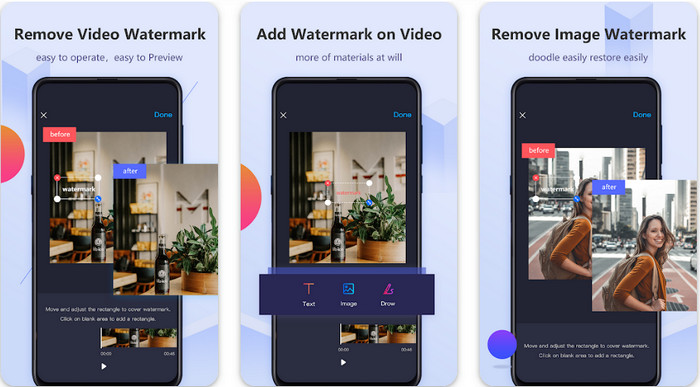
Video Eraser - Remove Watermark/Logo from Video ialah penanggal tera air yang berkuasa yang boleh anda muat turun pada peranti Android untuk membuang tera air yang terbenam dalam video anda. Apl ini boleh membantu membuang apa-apa jenis tera air dalam video anda, seperti logo, teks, cop, dan sebagainya. Anda juga boleh memanfaatkannya jika anda mahu menambah tera air peribadi, memotong bingkai (crop), memotong durasi (trim), mengundur (reverse), memampat dan menukar kelajuan video. Walaupun fungsinya banyak, anda boleh memuat turun alat ini secara percuma. Jadi, untuk membuang tera air Viva Video pada Android anda, anda boleh ikut langkah di bawah.
Langkah 1. Mula-mula, muat turun apl pada Android anda dengan pergi ke PlayStore, kemudian klik Muat Turun.
Langkah 2. Buka penanggal tera air, klik Remove Watermark from Video, benarkan alat mengakses video anda, kemudian muat naik video yang mempunyai tera air.
Langkah 3. Letakkan bentuk segi empat pada tera air untuk menutupnya.
Langkah 4. Tekan Done untuk menyimpan video tanpa tera air padanya.
Berkaitan:
Pemadam Video - Retouch Removal [iOS]
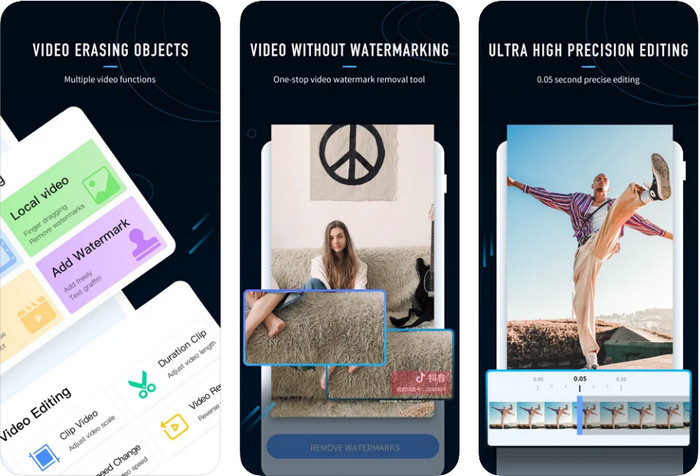
Untuk iOS, anda boleh memuat turun di App Store apl Video Eraser- Retouch Removal. Ia adalah antara penanggal tera air Viva Video yang boleh anda muat turun secara percuma dan membolehkan anda menyingkirkan tanda pada video anda dengan berkesan. Sama seperti penanggal tera air Android yang kami perkenalkan di sini, ia juga menyokong ciri penyuntingan lain yang boleh anda gunakan, seperti menaik taraf resolusi video, menambah tera air, memotong, trim, memampat dan memusing (flip) video. Semua ini ada di sini. Walaupun ia mempunyai ciri yang serupa dengan apl Android, fungsi terperincinya adalah berbeza, dan sebelum anda boleh menggunakan alat ini untuk membuang tera air, anda perlu membelinya. Anda boleh ikut langkah di bawah untuk mempelajari cara membuang tera air daripada video Viva Video yang anda eksport; sila ikut langkah yang dinyatakan di bawah.
Langkah 1. Muat turun apl di App Store anda, kemudian buka selepas proses muat turun selesai.
Langkah 2. Selepas membuka perisian, klik Local Video/GIF untuk memuat naik video yang mempunyai tera air. Pastikan anda membenarkan apl mengakses Foto anda.
Langkah 3. Ketik bahagian video anda yang mempunyai tera air; kemudian satu bentuk segi empat akan muncul pada skrin anda.
Langkah 4. Ketik Eliminate Watermark untuk mengeksport video dan menyimpannya tanpa gangguan tera air.
Bahagian 2. Bagaimana untuk Mengalih Keluar Tera Air Video Viva pada Windows & Mac [Perisian Ultimate]
Sebagai pengguna Windows dan Mac, anda memerlukan perisian berkesan untuk membuang tera air pada video anda dengan cekap tanpa meninggalkan sebarang kesan. FVC Video Converter Ultimate boleh mengajar anda cara membuang tera air Viva Video secara percuma dengan hasil akhir yang profesional. Sama seperti apl penanggal tera air yang boleh anda muat turun pada Android dan iOS, alat ini juga menyokong lebih banyak ciri dan fungsi yang boleh anda manfaatkan. Alat ini menawarkan lebih banyak lagi berbanding dua apl penanggal tera air yang kami sebutkan tadi.
Apa yang membuatkan alat ini mengagumkan? Ciri mengalih keluar yang disokong oleh alat ini adalah lebih baik daripada pengalih keluar tera air lain yang boleh anda gunakan pada video anda. Jadi, jika anda menggunakan ini, anda boleh menonton video tanpa tera air selepas mengalih keluarnya di sini. Perlukan tutorial tentang cara menggunakan ini? Butiran seterusnya akan membolehkan anda mengetahui cara menggunakan alat ini semudah 1-2-3.
Langkah 1. Untuk memuat turun perisian ultimate ini, anda boleh klik butang muat turun di bawah, kemudian pasang perisian pada peranti anda. Ikuti tetapan WinRAR, kemudian klik Start Now.
Muat Turun PercumaUntuk Windows 7 atau lebih baharuMuat Turun Selamat
Muat Turun PercumaUntuk MacOS 10.7 atau lebih baharuMuat Turun Selamat
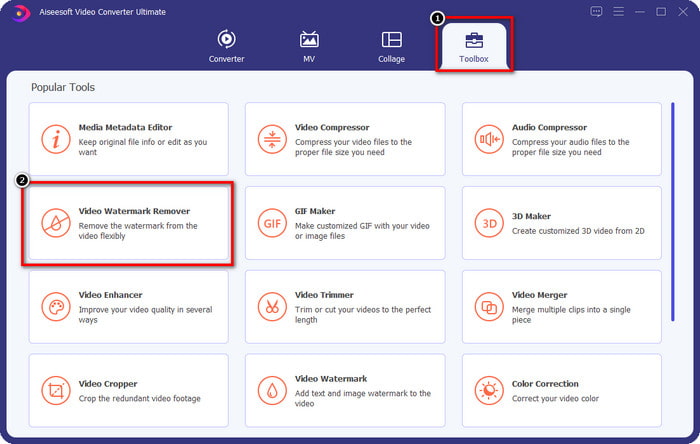
Langkah 2. Pergi ke Toolbox, kemudian klik Video Watermark Remover untuk mula menggunakan fungsi penanggal tera air yang berkesan ini.
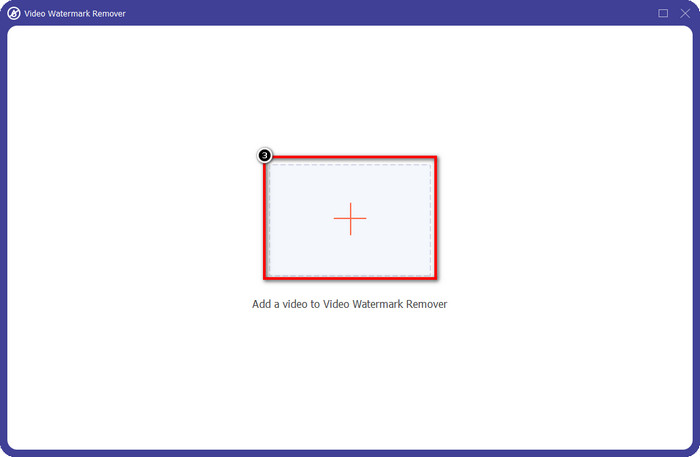
Langkah 3. Anda boleh memuat naik video Viva Video yang mempunyai tera air dan disimpan pada desktop anda dengan mengklik ikon +. Cari fail video dalam folder yang akan dipaparkan pada skrin anda dan klik Open untuk memuat naiknya dengan berjaya.
Langkah 4. Klik Add Watermark Removing Area untuk mula menggunakan fungsi penanggal tera airnya.
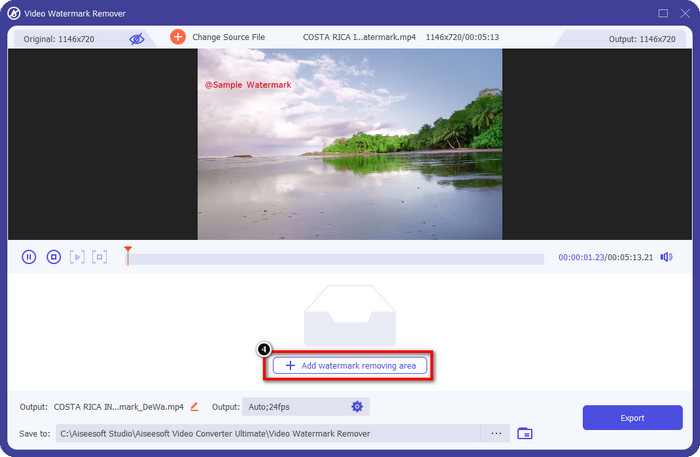
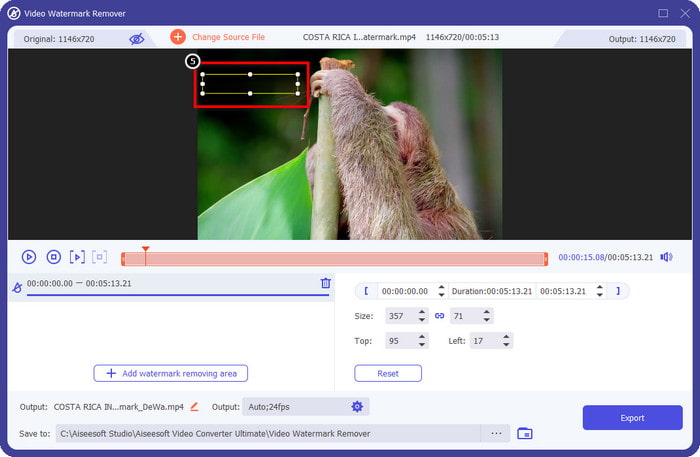
Langkah 5. Seret dan letak bentuk segi empat pada tera air dalam video anda, dan tutup keseluruhannya. Adalah penting untuk menutupnya sepenuhnya kerana jika tidak, akan tertinggal kesan tera air, dan anda boleh mengubah saiz bentuk mengikut keperluan anda.
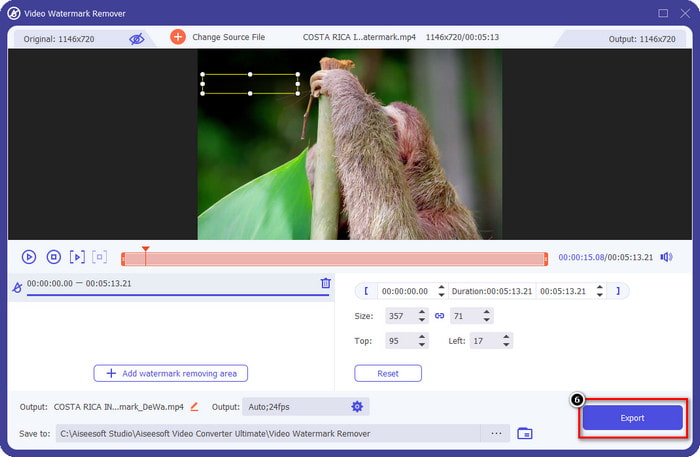
Langkah 6. Selepas itu, klik Export untuk menyimpan video tanpa tera air. Mudah, bukan? Itulah tujuan alat ultimate ini dicipta, mudah tetapi berkesan untuk semua tugas.
Bahagian 3. Soalan Lazim tentang Cara Menghapus Tera Air Video Viva
Bolehkah saya memuat turun Video Viva tanpa tera air?
Ya, anda boleh membeli versi pro alat ini supaya apabila anda mengeksport video yang anda edit di sini tidak akan meninggalkan tera air pada video. Selain itu, selepas anda membeli versi pro alat ini, anda akan menggunakan ciri premium lain yang ada pada alat ini yang tidak tersedia secara percuma.
Adakah Viva Video mempunyai versi desktop?
Anda hanya boleh memuat turun versi Viva Video pada Android dan iOS. Jadi, jika anda ingin memuat turun versi desktop, anda tidak akan menemui apa-apa, tetapi anda boleh mencari alternatif terbaik untuk penyuntingan video seperti yang ditawarkan oleh Viva Video.
Adakah Viva Video mempunyai perisian pengintip?
Pada 2017, laporan tentang aplikasi ini kemudiannya mengesahkan bahawa ia mempunyai perisian hasad. Jadi, orang yang memuat turun perisian ini memadamkan aplikasi ini secara paksa pada peranti mereka untuk mengelakkan akibat selanjutnya.
Kesimpulannya
Dengan pengalih keluar tera air Viva Video artikel ini, anda boleh menghapuskan tera air yang Viva Video benamkan pada video yang dieksport. Anda boleh cuba menggunakan apl yang dinyatakan di atas dan ikut arahan yang kami sertakan tentang cara mengalih keluar tera air. Tetapi bagi pengguna Windows dan Mac dengan tera air Viva Video, adalah lebih baik menggunakan perisian muktamad untuk membuang tera air dengan cepat dan berkesan serta mempunyai hasil yang profesional. Apa tunggu lagi Klik butang muat turun untuk mengeluarkan tera air muktamad pada peranti anda sekarang, dan gunakannya dengan mengikut langkah di atas.
-
 Cara Menghilangkan Tera Air Lomotif Menggunakan Alat Hebat ini
 Adakah anda ingin mengetahui cara membuang tera air Lomotif daripada video anda? Baca artikel ini untuk mengetahui kaedah paling cemerlang untuk mengalih keluarnya dalam talian dan luar talian.
-
 Cara Mengalih Keluar Pelancong daripada Foto Menggunakan Penanggal Tera Air
 Bagaimana untuk mengalih keluar pelancong daripada foto? Jika anda ingin mengetahui cara mengalih keluar perkara yang tidak diingini daripada foto anda, alatan ini akan membantu anda. Baca artikel ini untuk mengetahui lebih lanjut.
-
 Pembuang Tera Air 123rf – Semakan Teliti Alat Terbaik
 Jika anda ingin mengetahui apakah penanggal tera air 123rf yang paling cemerlang, baca artikel ini dengan teliti. Artikel ini menyediakan ulasan mendalam tentang alatan.
