


 Video Converter Ultimate
 Perakam Skrin
 Pembaikan Video
Pemahaman Mendalam Mengenai 5 Editor Video Slow Motion yang Tersedia
Adakah anda gemar menonton sukan pukulan berkelajuan tinggi seperti perlumbaan, tinju, besbol, bola tampar dan banyak lagi? Semua sukan yang disebutkan memerlukan kamera berkelajuan tinggi hanya untuk membuat analisis pergerakan. Jika anda benar‑benar mahu menganalisis setiap pergerakan setiap atlet, cuba baca tentang pembuat video gerak perlahan terbaik yang boleh anda gunakan. Selain itu, dengan bantuan alat di bawah, anda tidak memerlukan sebarang peralatan tambahan selain komputer meja, internet atau telefon anda. Sambil kita teruskan, baca penerangan alat dengan teliti dan pilih yang paling sesuai untuk anda gunakan.

Bahagian 1. 3 Pembuat Video Slow-Motion Terbaik untuk Windows PC, Mac dan Dalam Talian
1. Video Converter Ultimate
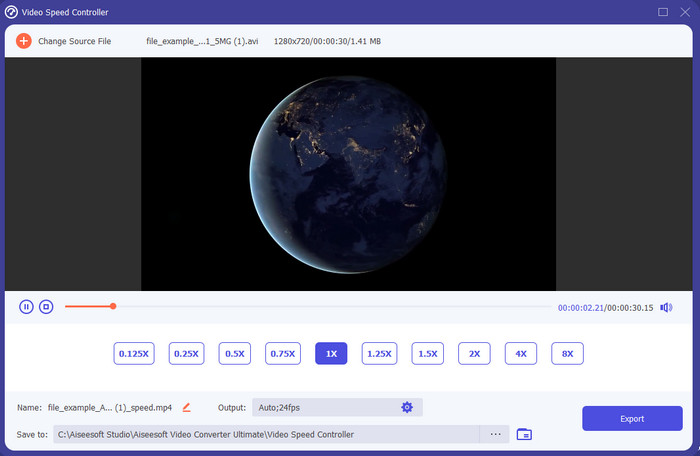
Adakah anda mahu tahu yang mana antara penyunting video gerak perlahan paling baik digunakan untuk menjadikan main balik anda dalam gerak perlahan? Maka cubalah gunakan Video Converter Ultimate kerana alat ini bukan sahaja yang terbaik, malah luar biasa. Alat ini sudah pun mempunyai banyak fungsi lanjutan yang pasti anda ingin gunakan walaupun anda bukan penyunting profesional. Walaupun anda seorang profesional, perisian ini tetap pilihan terbaik tanpa mengira tahap kemahiran suntingan anda. Selain itu, anda boleh menambah kesan gerak perlahan pada video anda dengan pantas tanpa perlu membaca manual atau menonton video cara menggunakannya. Ini kerana alat ini memberikan arahan yang jauh lebih ringkas berbanding alat di bawah. Walaupun alat ini perlu dibayar sebelum anda boleh mengaksesnya, harganya masih tidak terlalu tinggi. Jika anda ingin tahu lebih lanjut tentang alat ini, baca ciri‑ciri utamanya di bawah.
Ciri-ciri Utama Video Converter Ultimate:
◆ Aplikasi pembuat video gerak perlahan lanjutan dengan arahan asas.
◆ Antara muka alat yang mesra pengguna.
◆ Laraskan kelajuan video dengan mudah pada Pengawal Kelajuan Video.
◆ Menyokong lebih daripada 200+ format video dan audio.
◆ Ia boleh dimuat turun dan diakses pada sistem pengendalian PC dan Mac.
Muat Turun PercumaUntuk Windows 7 atau lebih baharuMuat Turun Selamat
Muat Turun PercumaUntuk MacOS 10.7 atau lebih baharuMuat Turun Selamat
2. Unit Masa Kontinum Boris
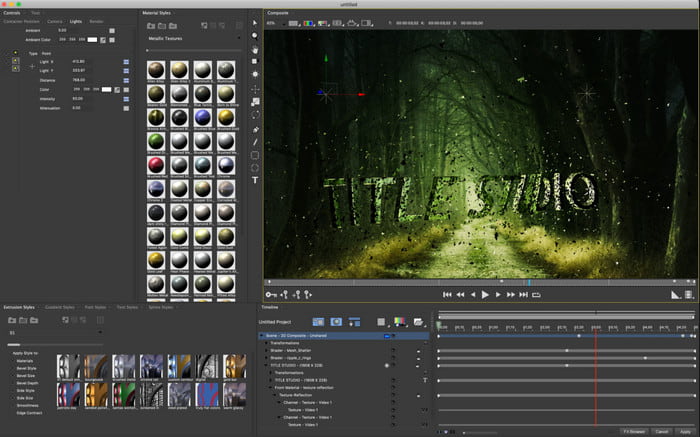
Boris Continuum Time Unit ialah pilihan terbaik jika anda mahukan aplikasi pembuat video gerak perlahan yang tahan lasak. Tiada alat lain yang boleh melakukan apa yang disediakan oleh alat ini untuk menghasilkan output bertaraf profesional. Selain itu, alat ini mempunyai fungsi suntingan terperinci terbaik yang pasti anda ingin cuba. Walaupun alat ini lebih hebat daripada alat lain, harganya memang sangat mahal. Juga, jika anda ingin cuba menggunakan alat ini, anda mesti mempunyai unit sistem desktop gred tinggi kerana anda tidak akan dapat menggunakannya pada desktop versi lama.
Kelebihan
- Alat terbaik untuk digunakan untuk melakukan penyuntingan berat.
- Ia serasi dengan semua platform.
- Antara muka alat kelihatan lebih seperti alat pro.
Keburukan
- Perisian ini adalah yang paling mahal dalam penulisan ini.
- Memerlukan unit sistem gred tinggi.
- Bukan pilihan terbaik untuk pemula yang tidak mempunyai latar belakang dalam penyuntingan.
3. VEED.IO
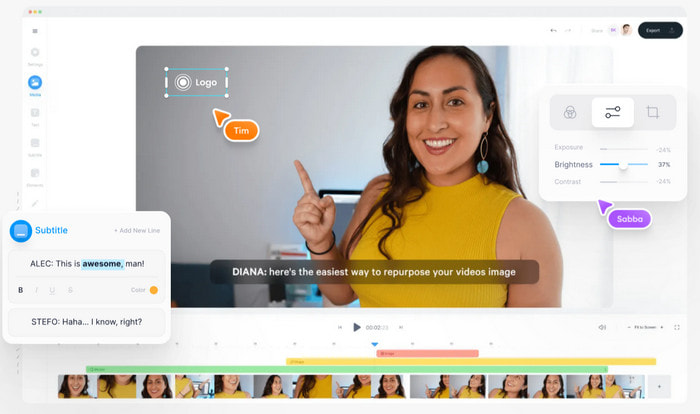
Jadi, jika anda tidak mahu berbelanja walau sedikit pun dan mempunyai sambungan internet, cuba akses VEED.IO. Ini ialah perisian terbaik untuk membuat video gerak perlahan dalam talian kerana ia ringkas dan mudah diakses. Antara muka keseluruhan alat ini sangat kemas dengan arahan yang jelas, jadi sangat memudahkan semua orang. Namun begitu, anda hanya boleh memuat naik fail kurang daripada 50 MB dan jika anda mahu memuat naik saiz fail yang lebih besar, alat ini akan meminta anda menaik taraf. Selain itu, jika anda tidak membeli versi berbayar, jangkakan output akhir mempunyai tanda air.
Kelebihan
- Boleh diakses dengan mudah oleh sesiapa sahaja yang mempunyai sambungan internet.
- Tiada iklan yang menjengkelkan di tapak web.
- Mudah ditangani oleh pemula dalam penyuntingan.
Keburukan
- Ciri alat adalah sangat terhad pada versi percuma alat.
- bergantung kepada internet. Jadi, jika internet anda perlahan maka jangkakan kelajuan muat naik, memuat turun dan mengedit. Selain itu, anda tidak boleh mengakses alat ini jika anda tidak mempunyai sambungan internet.
Bahagian 2. 2 Apl Video Gerak Perlahan Terbaik pada Android dan iOS
1 SloPro
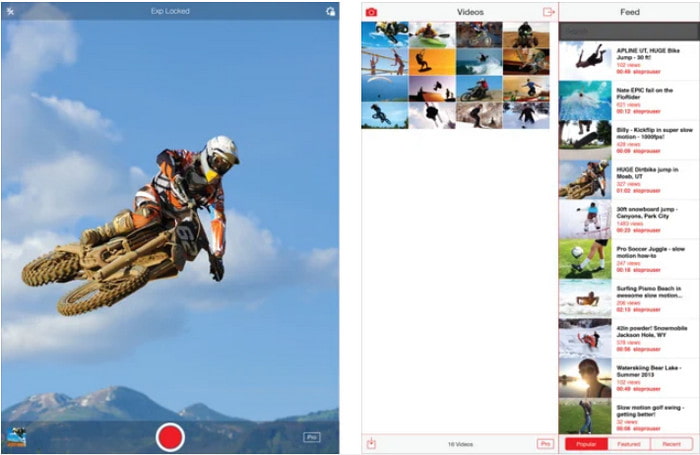
SloPro ialah aplikasi video gerak perlahan terbaik yang boleh anda muat turun secara percuma di iOS. Aplikasi ini boleh memainkan semula video dalam gerak perlahan sehingga 500 hingga 1000 fps. Selain itu, anda boleh memanipulasi video daripada main balik laju ke gerak perlahan atau sebaliknya. Walaupun alat ini mungkin pilihan yang baik, masih terdapat banyak kekurangan pada aplikasi ini. Sebagai contoh, video output akan disimpan dalam galeri aplikasi dan bukannya dalam camera roll. Juga, jika anda cuba menggunakan 1000 fps, video menjadi terganggu menurut pengguna yang sudah mencubanya. Walau bagaimanapun, alat ini masih hebat kerana ia percuma untuk digunakan dan proses memperlahankan video boleh dilakukan dengan mudah di sini.
Kelebihan
- Main balik gerakan perlahan terbaik yang boleh anda gunakan pada iOS secara percuma.
- Ia sudah menerima penarafan yang adil dan 3.3 bintang.
- Mudah dan senang digunakan.
Keburukan
- Output akhir tidak disimpan secara langsung dalam galeri.
- Semua video yang disimpan pada galeri SloPro adalah rawak dan tidak dikategorikan dengan betul.
- Jika anda menggunakan 1000 fps maka jangkakan output video buggy.
2. Pembuat Video Gerak Perlahan
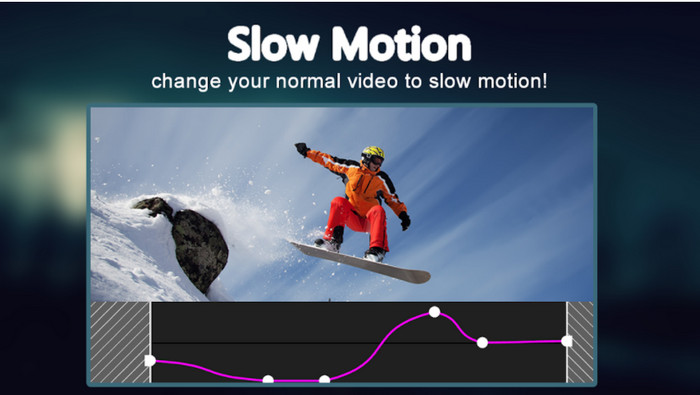
Salah satu pembuat video gerak perlahan terbaik yang boleh anda muat turun secara percuma pada telefon Android anda ialah Slow Motion Video Maker. Dengan bantuan aplikasi ini, anda boleh melakukan main balik video secara cepat (fast forward) dan gerak perlahan dengan mudah. Namun, aplikasi ini mempunyai banyak iklan menjengkelkan yang muncul tanpa dijangka. Selain itu, main balik gerak perlahan yang boleh anda tetapkan hanyalah pada kadar 0.5 sahaja. Tetapi secara keseluruhan, ia tetap bagus untuk digunakan bagi memperlahankan video di Android, cuma iklan sangat menjejaskan aplikasi ini.
Kelebihan
- Apl ini percuma untuk dimuat turun di gedung Play.
- Ia bagus untuk digunakan untuk memperlahankan video dengan lancar.
- Aplikasi ini mudah diurus.
Keburukan
- Ia mempunyai banyak iklan menjengkelkan yang muncul entah dari mana.
- Memuat turun video mungkin mengambil banyak masa kerana ia tidak mempunyai pemprosesan yang pantas.
Bahagian 3. Soalan Lazim tentang Slow Motion Video Maker
Apakah peranan FPS?
Ia digunakan untuk mengira siri bingkai berturut-turut yang ditunjukkan pada panel paparan anda. Ini paling biasa dilihat dalam setiap tangkapan gerakan seperti dalam permainan video, kamera, filem, malah mata kita boleh melihat 30 hingga 60 fps.
Apakah kadar FPS terbaik pada gerakan perlahan?
FPS ideal yang boleh anda gunakan untuk menonton video dalam main balik gerakan perlahan ialah antara 120 atau 240 fps. Jadi, jika anda ingin mempunyai main balik gerakan perlahan yang lebih terperinci maka buat FPS lebih tinggi.
Bagaimana untuk memainkan video dalam main balik gerakan pantas?
Untuk mendapat idea tentang cara memainkan video dalam gerak pantas, cuba klik pautan ini. Ketahui apakah 5 alat terbaik yang boleh anda gunakan untuk memecutkan video.
Kesimpulannya
Kesimpulannya, semua alat yang dibentangkan di sini ialah pembuat gerak perlahan terbaik yang boleh anda cari di web. Selain itu, artikel ini telah membantu anda dan memudahkan pencarian anda lebih daripada sebelumnya. Namun, ada satu alat khusus yang mungkin anda mahu gunakan untuk menjadikan video anda lebih baik dengan bantuan Video Converter Ultimate. Semua fungsi lanjutan yang boleh anda gunakan di sini memang hebat dan pada masa yang sama mudah digunakan. Tambahan pula, jika anda masih belum yakin, cuba muat turun alat ini dahulu dan cubalah sendiri.
-
 Aplikasi Android Terbaik untuk Memainkan Fail MOV di Telefon Bimbit Anda
 Mengalami kesukaran kerana rakaman MOV anda tidak dapat dimainkan dalam android anda? Jadi, dalam kes ini anda sedang mencari apakah pemain MOV terbaik untuk android.
-
 5 Pemain AVI Berkuasa untuk Menonton dan Memainkan Fail AVI [Web & Desktop]
 Ketahui pemain AVI yang boleh anda gunakan untuk bermain dan menonton fail .avi. Teruskan membaca di bawah dan pilih pemain media yang lebih baik daripada yang lain.
-
 Cara Berkesan mengenai Cara MKV fail di Xbox One S 2021
 Temui cara yang boleh membantu anda memainkan fail MKV pada Xbox One S anda menggunakan beberapa penukar terbaik.
